Property Settings
Module: Settings | Platform: Web
Property Settings controls the data model for every core entity in Appello — which fields appear
on forms, how detail pages are laid out, what default values are set, and how file folders are
structured. It is one entity-scoped screen (DataModelSettingsTabs and a handful of per-model
variants) reused across 17 different data models, so this page documents the panels once and then
shows which panels each model actually gets.
Navigation
Sidebar → Settings → Property Settings
Overview
At the top of the page, a searchable dropdown switches between the data models. Each model keeps its own independent configuration; picking a different model swaps the whole panel set below the dropdown.
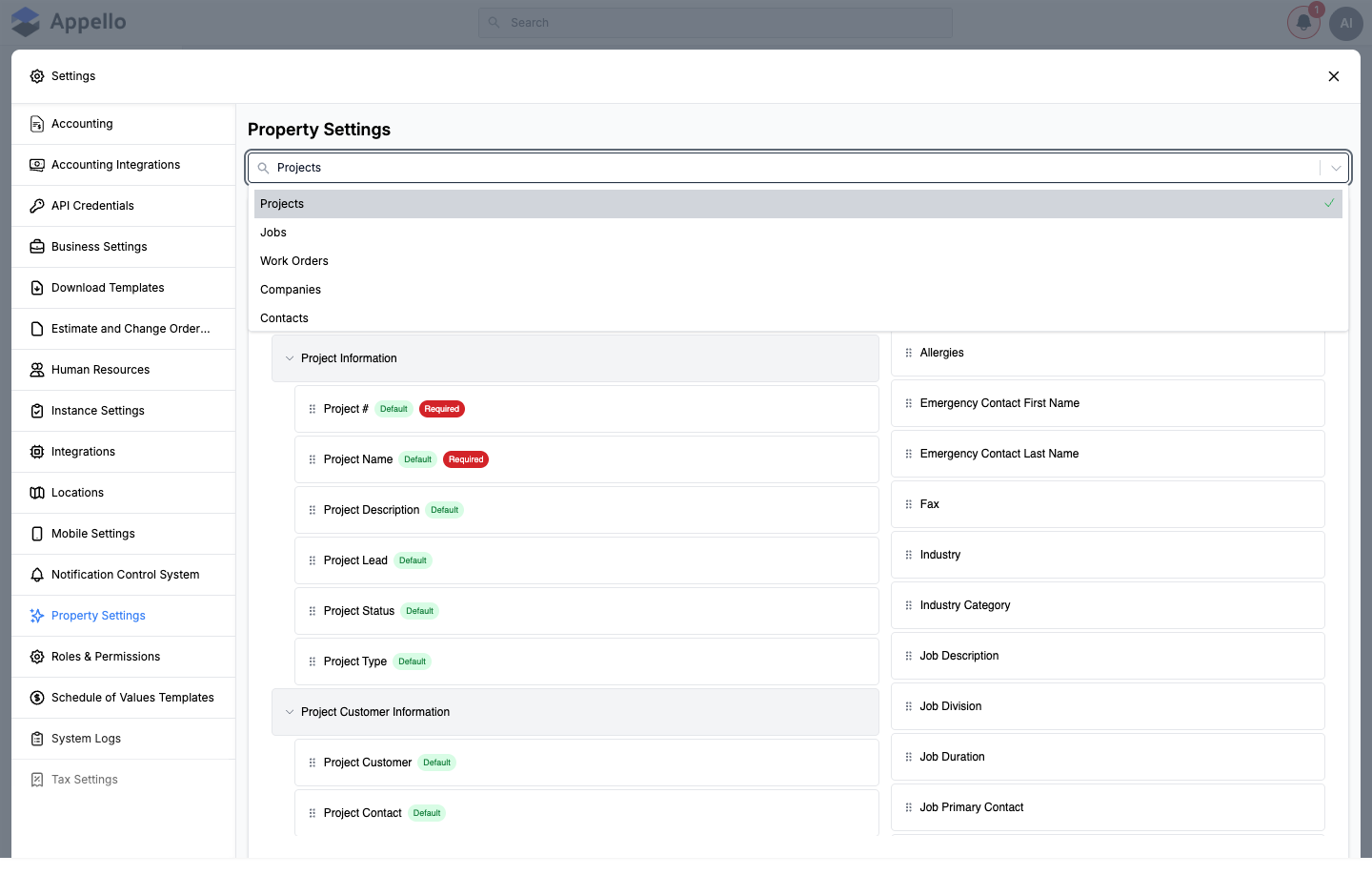
Which entities appear in the dropdown, and which of their panels are editable, depends on your role's permissions (see Permissions below). The dropdown on the demo instance used for this page listed 14 models; RFI Management, Materials, and Inventory Locations exist in the product but did not appear for the demo role, because that role lacked the View permission for Request For Information, Materials, and Inventory respectively.
The generic panels
Most models share the same panel-building blocks. This section documents each panel once, thoroughly. The per-model table below says which of these panels a given model actually shows.
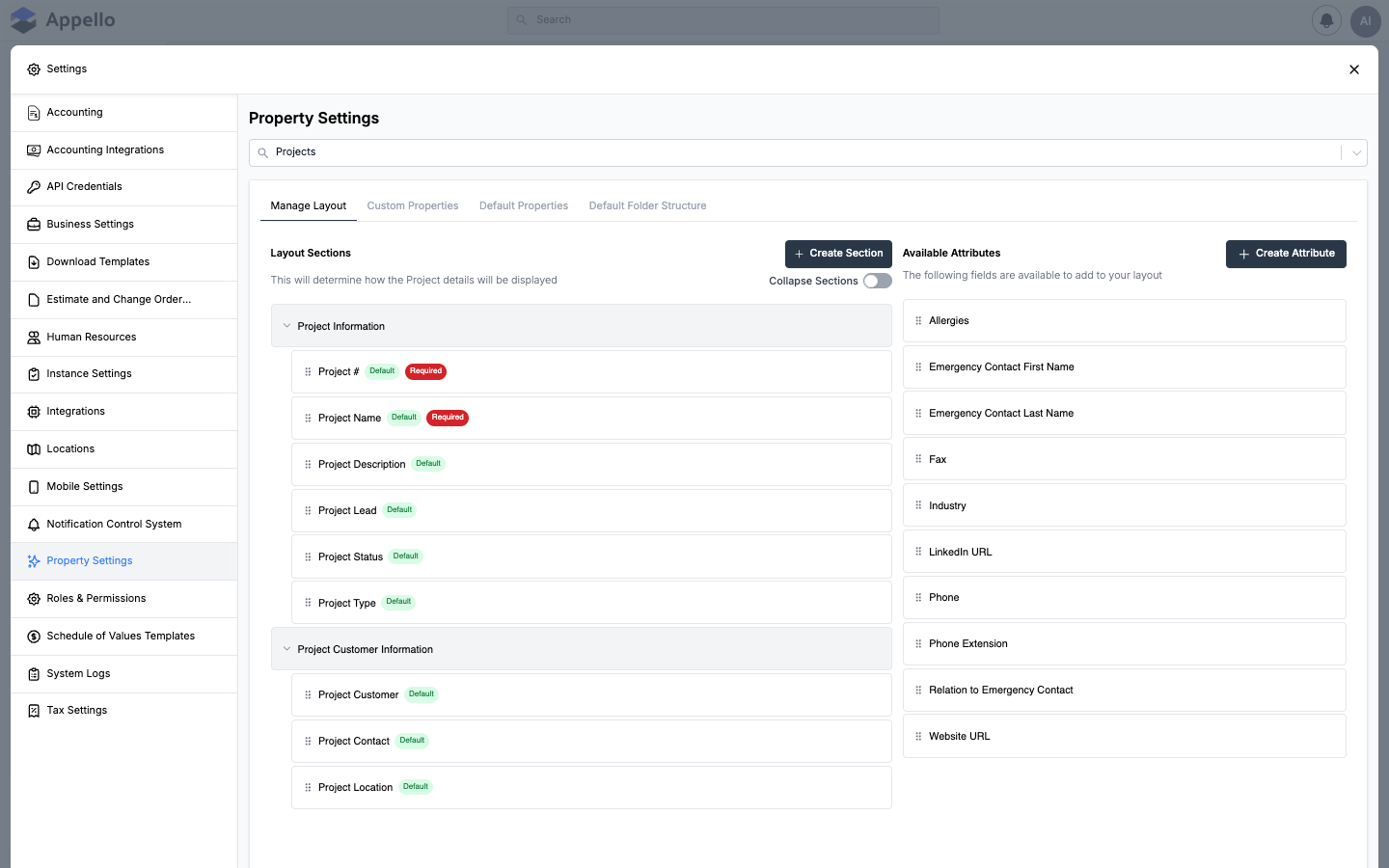
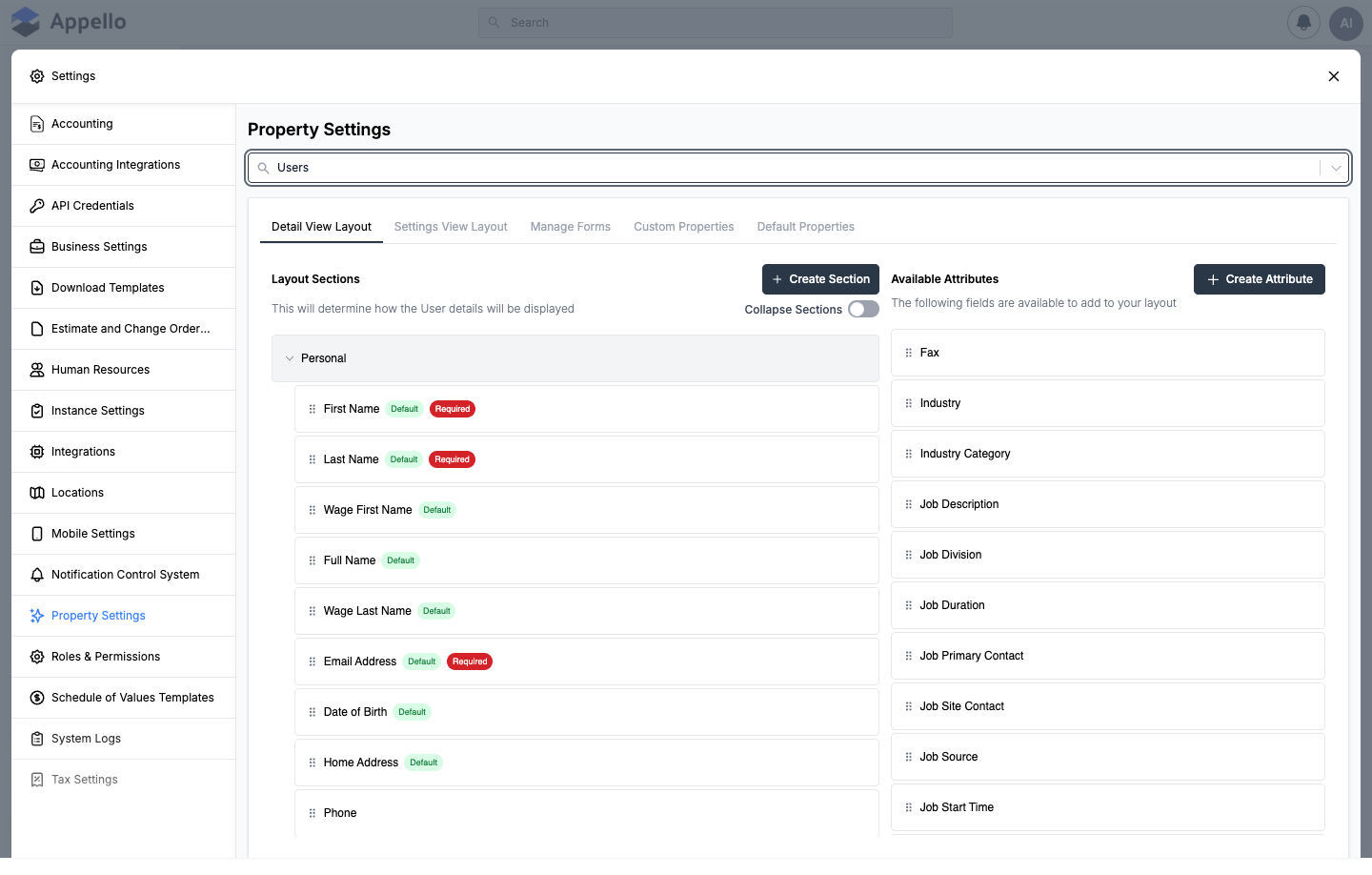
Manage Layout / Detail View Layout / Settings View Layout
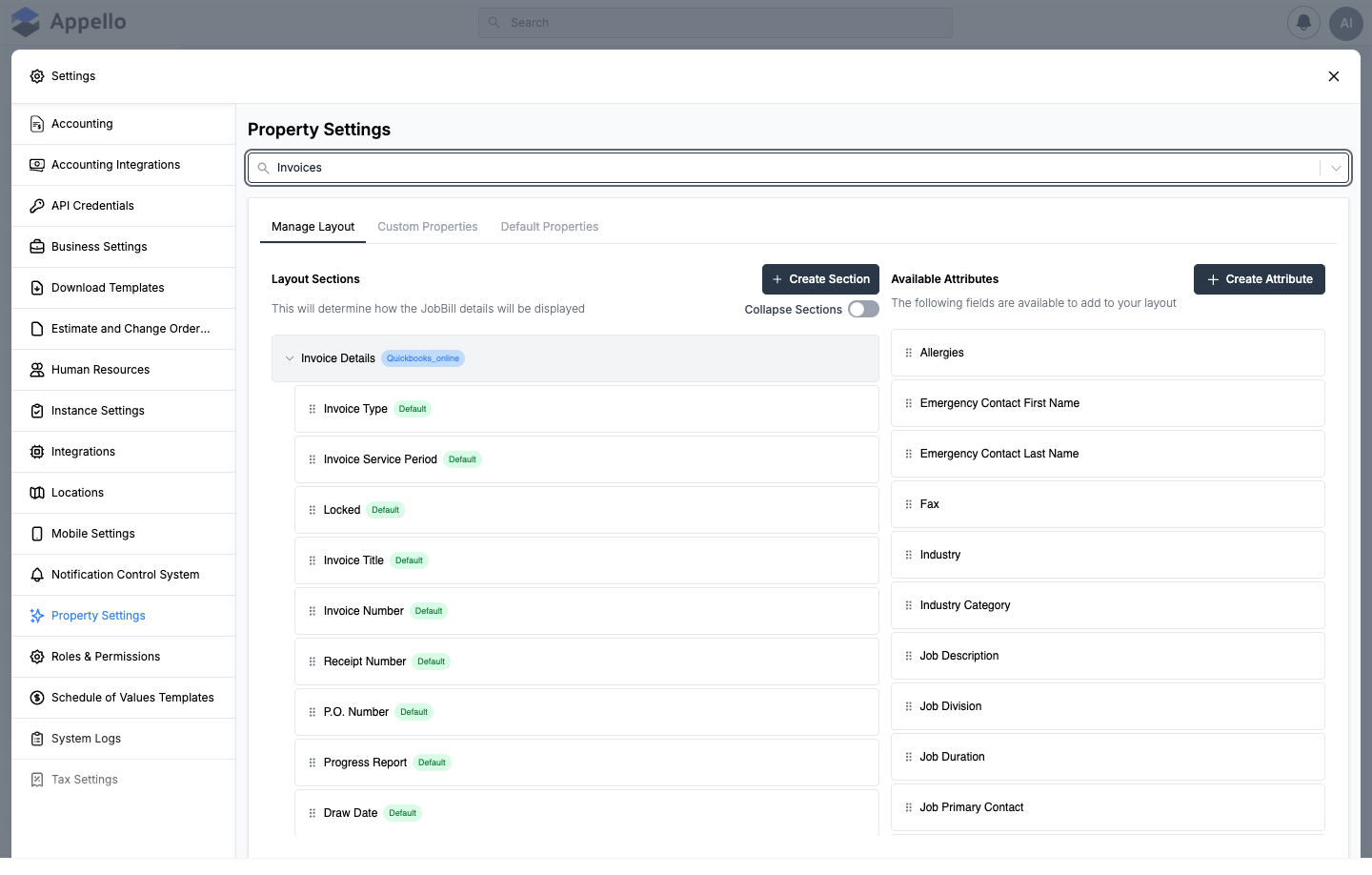
A drag-and-drop layout builder (DocumentSectionLayoutBuilder). Older models (Projects, Estimate/
Change Order, Invoices, Documents) show one copy of this panel labeled Manage Layout, scoped to
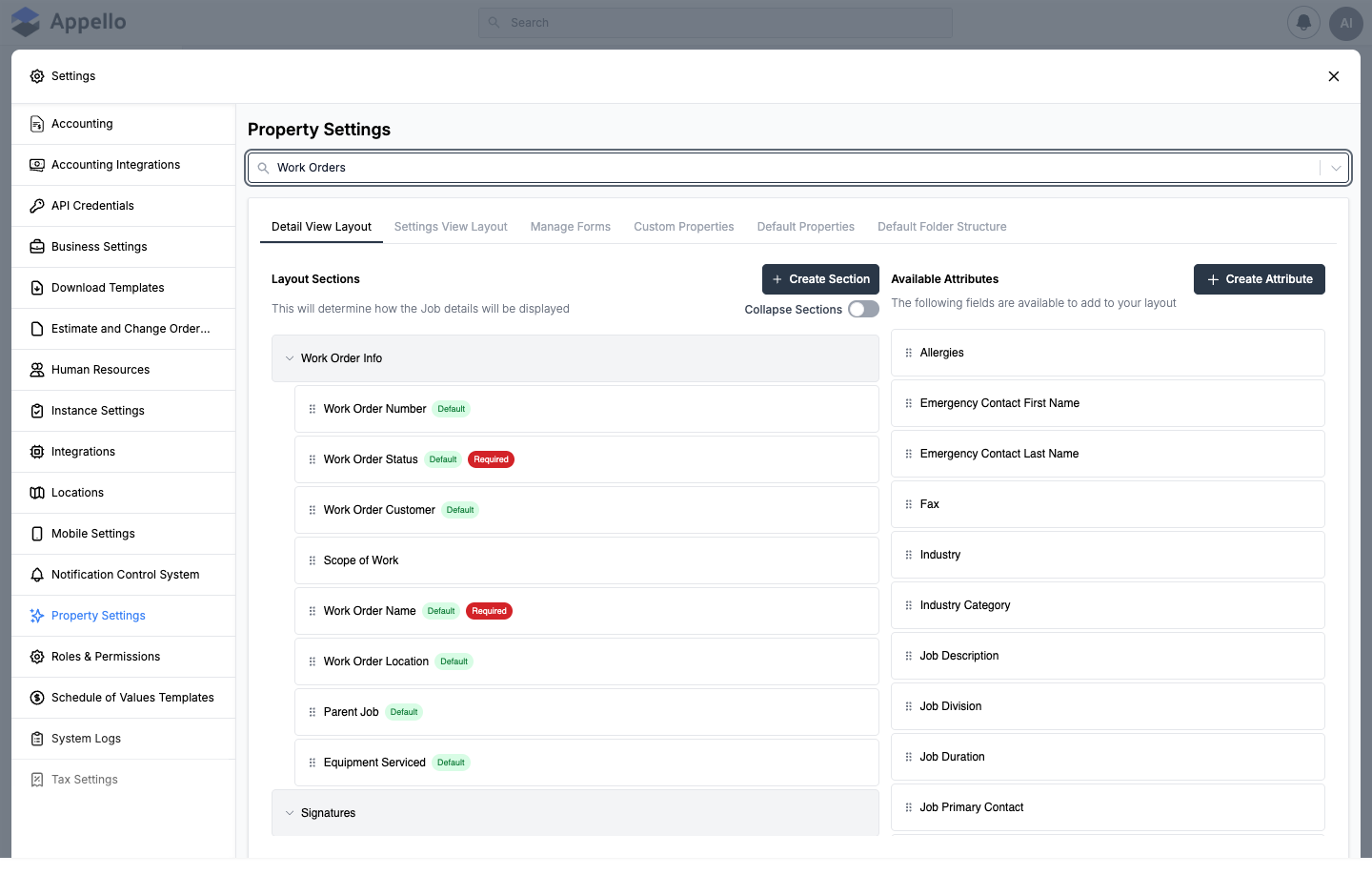
the record's detail page. Newer models (Jobs, Work Orders, Companies, Contacts, Departments, Users,
RFI Management, Inventory Locations) show it twice — Detail View Layout (the record's detail
page) and Settings View Layout (the record's settings/edit view) — as two independently
configured layouts.
| Control | Effect |
|---|---|
| Layout Sections (left panel) | The sections that make up the record's layout (e.g. "Project Information"). Drag a field in from Available Attributes to add it, drag between sections to move it, drag within a section to reorder it. |
| Available Attributes (right panel) | Fields — default and custom — not yet placed on this layout. Dragging one into a section is how it gets assigned to this model; a custom property does nothing on its own until it is dragged in here. |
| Create Section | Adds a new collapsible section to the layout. |
| Create Attribute | Opens the Add Custom Property panel without leaving the layout builder. |
| Collapse Sections toggle | Sets whether sections default to collapsed or expanded when the record's page loads. |
| Default badge on a field | The field is included on the layout automatically for every record. |
| Required badge on a field | The field must be filled in before the record can be saved. Tagging a field Required here makes it required everywhere the layout is used — use Manage Forms instead to require it on only one form. |
Custom Properties
The Custom Properties list (DocumentAttribute in code) is shared across the whole
instance — it is the same list of fields no matter which model is selected in the dropdown.
Creating a custom property here does not, by itself, put it on any model's detail page; drag it
into a section on that model's layout builder afterward. The Used In column shows how many
layouts currently reference a property, and the table filters to Active by default (switch to
All or Archived to see hidden or removed properties).
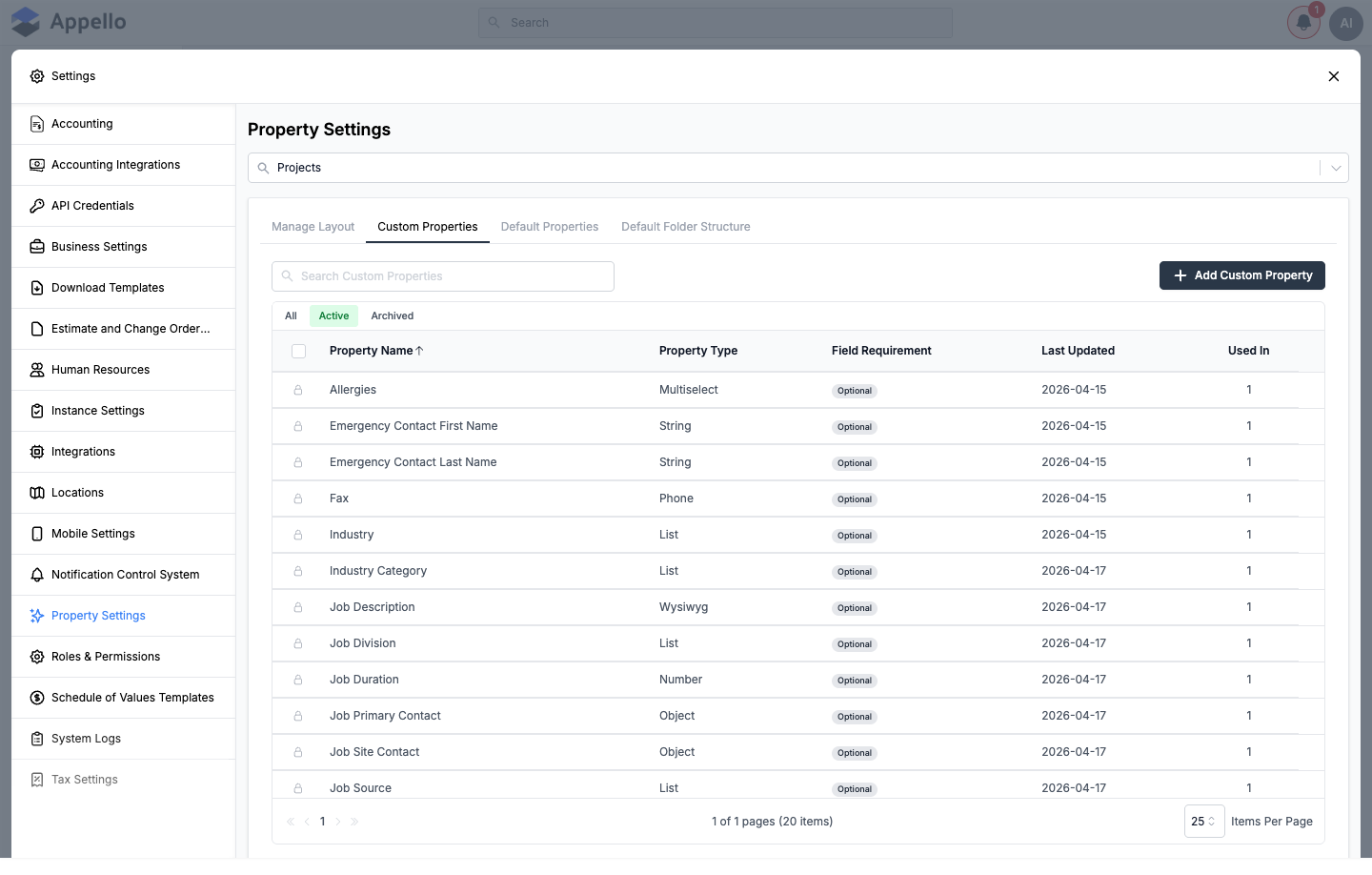
To add one, click Add Custom Property and fill in the panel:
| Field | Required | Type | Effect |
|---|---|---|---|
| Custom Property Name | Yes | Text | The field's label everywhere it's used. |
| Required Field | No | Select (Yes/No, default No) | Forces the field to be filled in before a record can be saved, on every layout it's added to. |
| Placeholder | No | Text | Placeholder text shown inside an empty field. |
| Helper Text | No | Textarea | Short instructional text shown under the field. |
| Object Property Type | Yes | Select, default String | The data type — see table below. |
| Linkable Object | Yes, only when Object Property Type is Object or Objects | Select | Which record type this property points to: Equipment, User, Contact, Company, Job, or Project. |
| Equipment Category / User Group | No, only when Linkable Object is Equipment or User | Combobox | Narrows the picker to one equipment category or user group instead of all records of that type. |
| Sort | Yes, only when Object Property Type is List | Select (Custom / Alphabetic Ascending) | Order the list's values are shown in on the field. |
| List values table | At least one row for a List/Multiselect type | Repeatable rows | Add, rename, reorder (drag when Sort = Custom), or delete the dropdown's options. A value already in use on a record can't be deleted. |
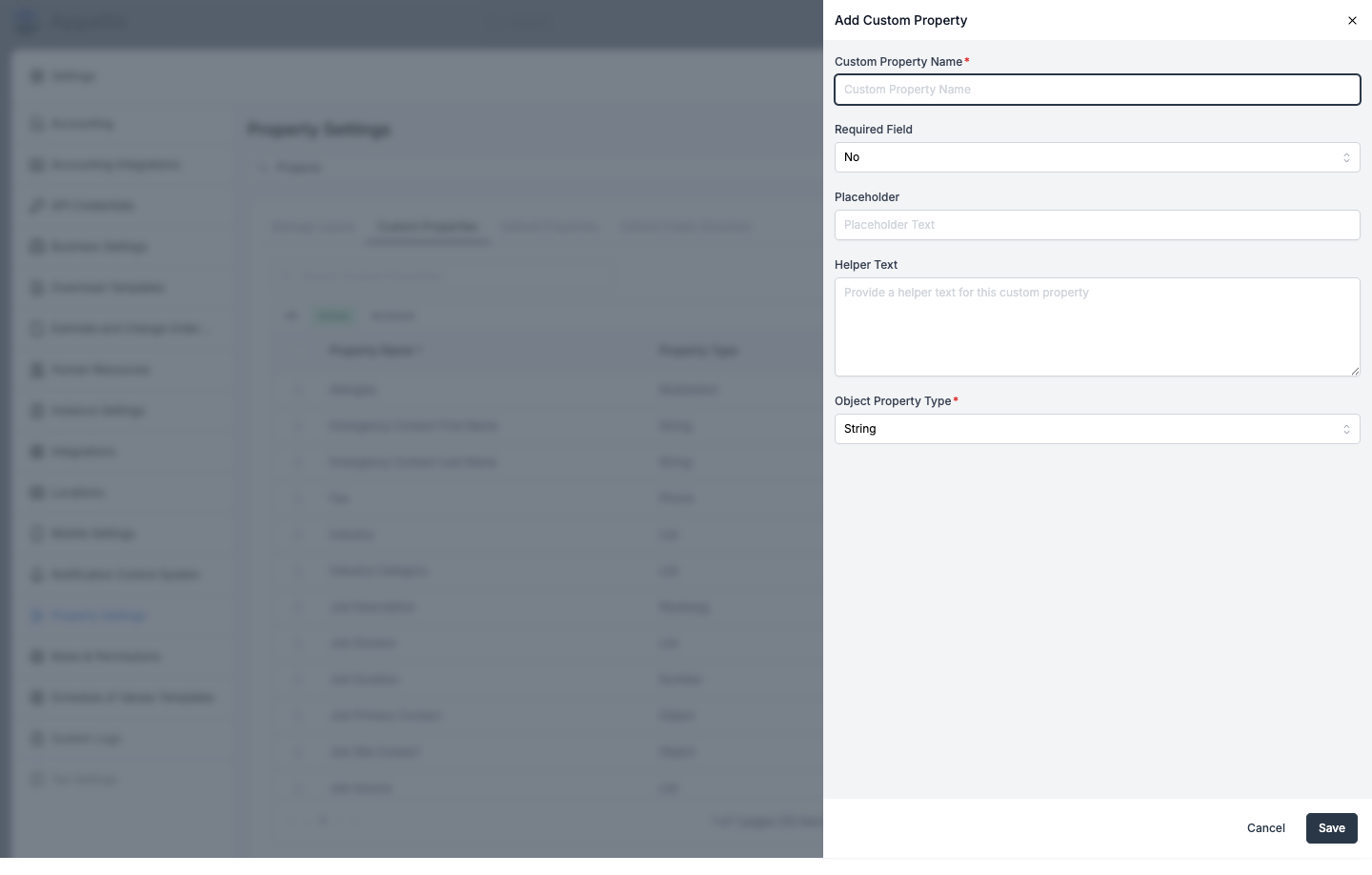
Object Property Type options:
| Type | Stores |
|---|---|
| String | A single line of text. |
| Paragraph | Multi-line plain text. |
| Wysiwyg | Rich (formatted) text. |
| Number, Percent, Dollar, Year | Numeric values, formatted for their purpose. |
| Boolean | A yes/no toggle. |
| Date, Time | A date or a time value. |
| Email, Phone, URL | Text validated to look like that format. |
| Color | A color picker. |
| Image, Document | A file attachment. |
| List, Multiselect | A dropdown (single- or multi-select) built from custom list values you add on the same panel. |
| Object, Objects | A reference to one (or many) other Appello records — reveals the Linkable Object field. |
Assigning the property to a model, and its position on that model's layout, is not part of this create form — that only happens afterward, in the model's own Manage Layout / Detail View Layout builder, by dragging the new attribute out of Available Attributes.
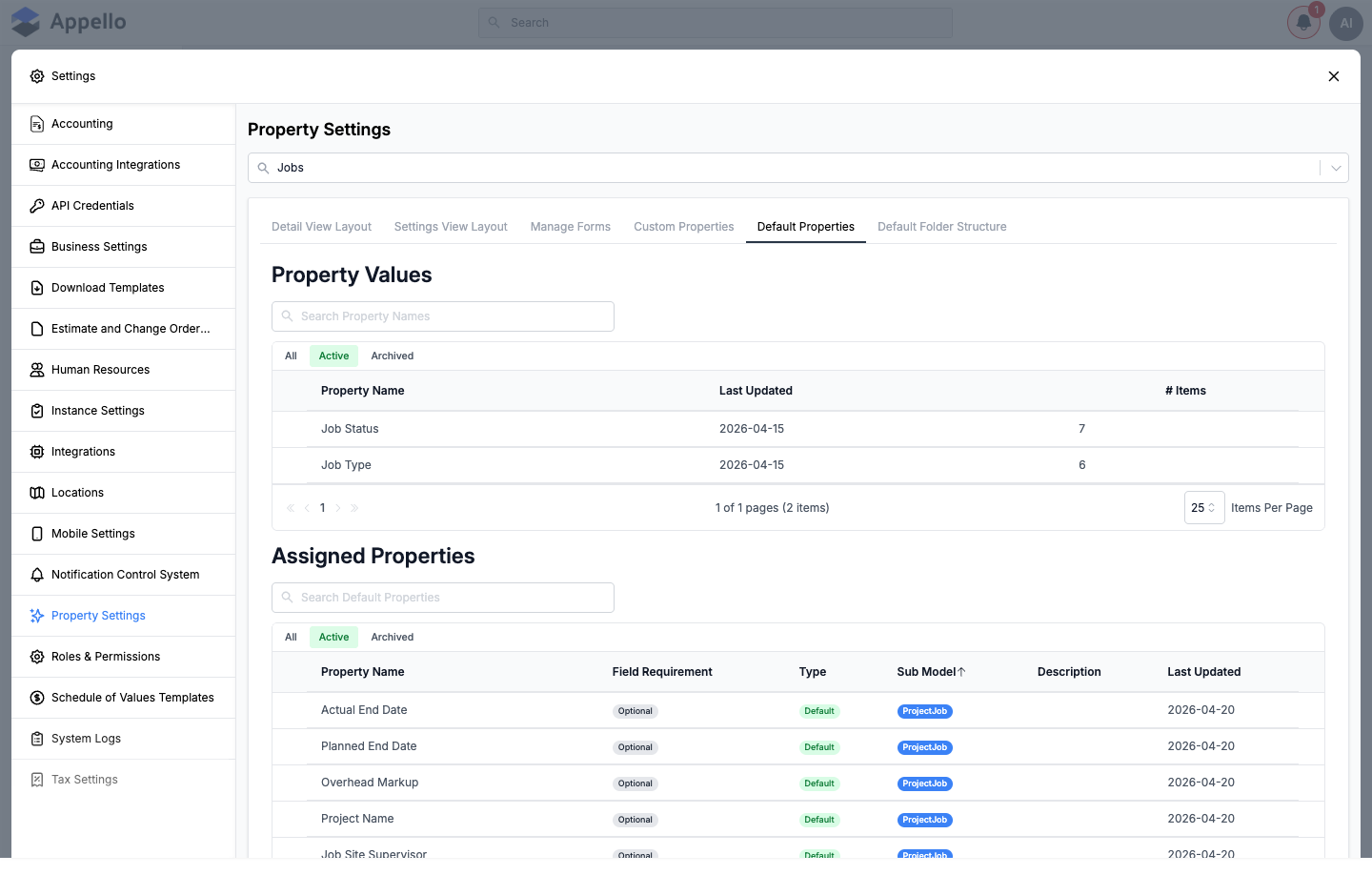
Default Properties
This tab has up to two tables, both scoped to the selected model:
- Property Values — the predefined dropdown option lists tied to that model, such as Job Status or Job Type. Click a row to open its value list, where you add, rename, reorder, or archive individual options. This table only appears for Company, Job (and Work Orders, which shares the Job model), RFI Management, and Inventory Locations — those are the only models with system dropdown lists. Every other model goes straight to the second table.
- Assigned Properties (or Non Editable Default Properties for Projects) — every field on the model, default and custom, with its Field Requirement (Required/Optional) and Type (Default/Custom). Where the table is editable, click a row to override its label, requirement, description, helper text, placeholder, or default value for this instance. Projects' table is read-only here — edit a Project field's requirement from Manage Layout instead.
Default Folder Structure
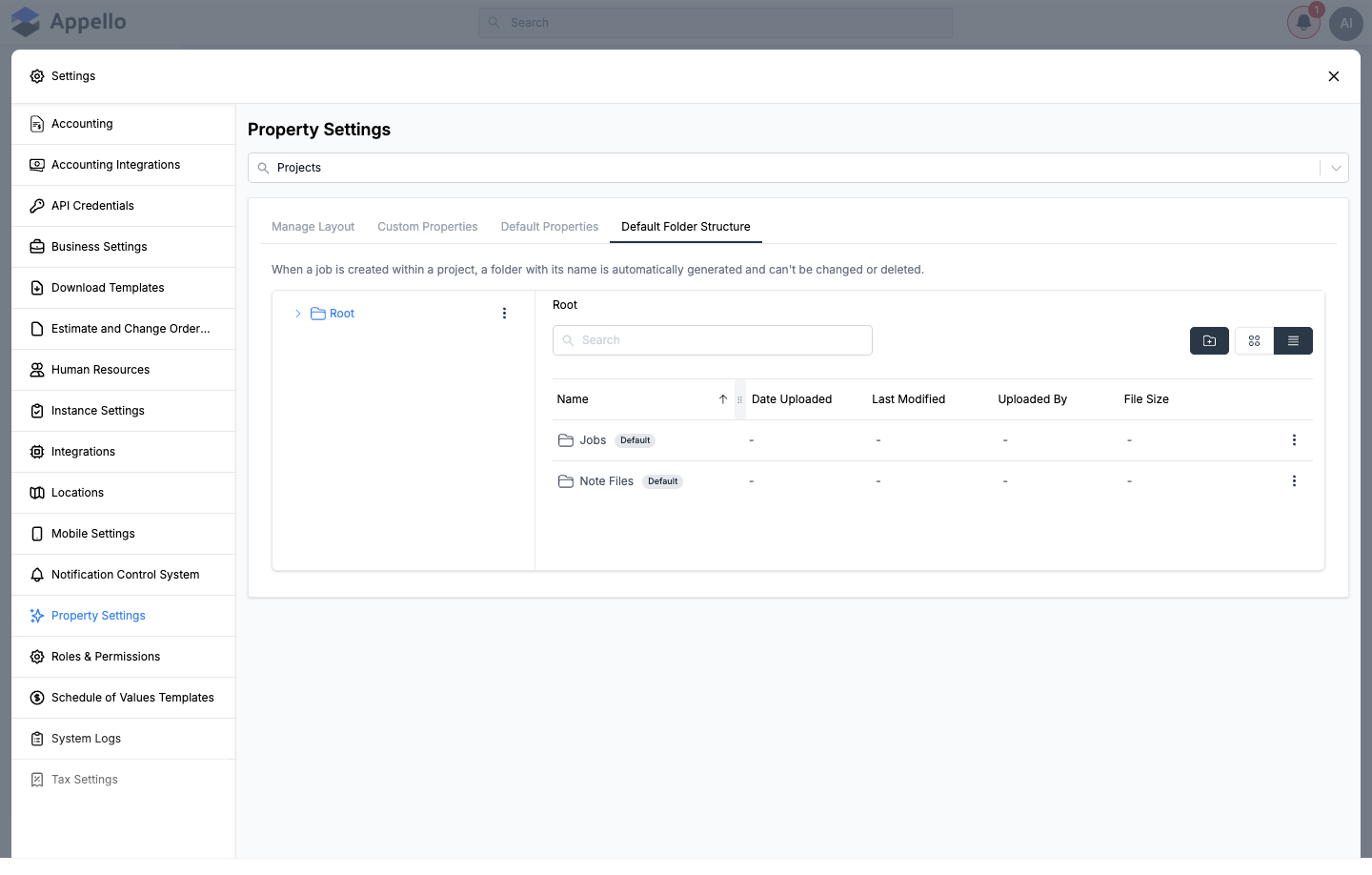
Only models that generate a Files folder automatically when a record is created have this tab: Projects, Jobs, and (because it shares the Job model) Work Orders, plus Estimate/Change Order. Folders marked Default are system folders and can't be renamed, moved, or deleted; add your own folders alongside them with the + button.
Work Orders reads and writes the same jobDefaultFolderStructure instance setting as Jobs — the
Default Folder Structure panel under Work Orders is not a separate structure, it is the Jobs one
shown again because Work Orders is built on the Job model in code.
Manage Forms
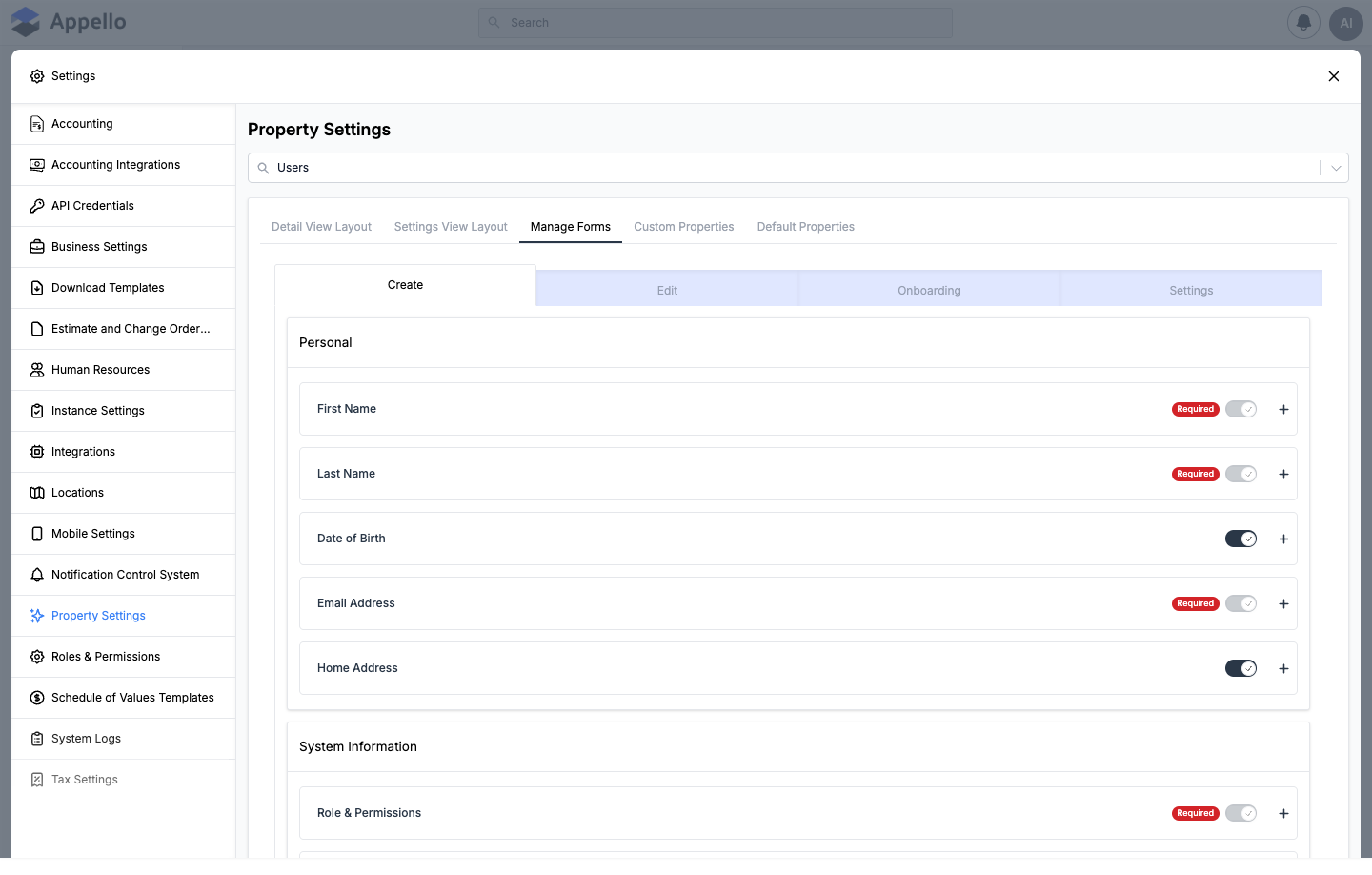
Controls the model's Create, Edit, and Settings forms independently of its layout (Users additionally has an Onboarding form — see Users below). Each sub-tab lists the model's fields grouped into the same sections as the layout builder. Toggle a field on or off for that specific form, or click the + next to it to expand an override panel:
| Override field | Effect |
|---|---|
| Override Label | Replaces the field's label on this one form only. |
| Required | Requires the field on this form only (independent of the layout's Required tag). |
| Override Description | Replaces the field's description on this one form only. |
| Override Helper Text | Replaces the helper text on this one form only. |
| Override Placeholder | Replaces the placeholder text on this one form only. |
| Override Default Value | Replaces the default value on this one form only. |
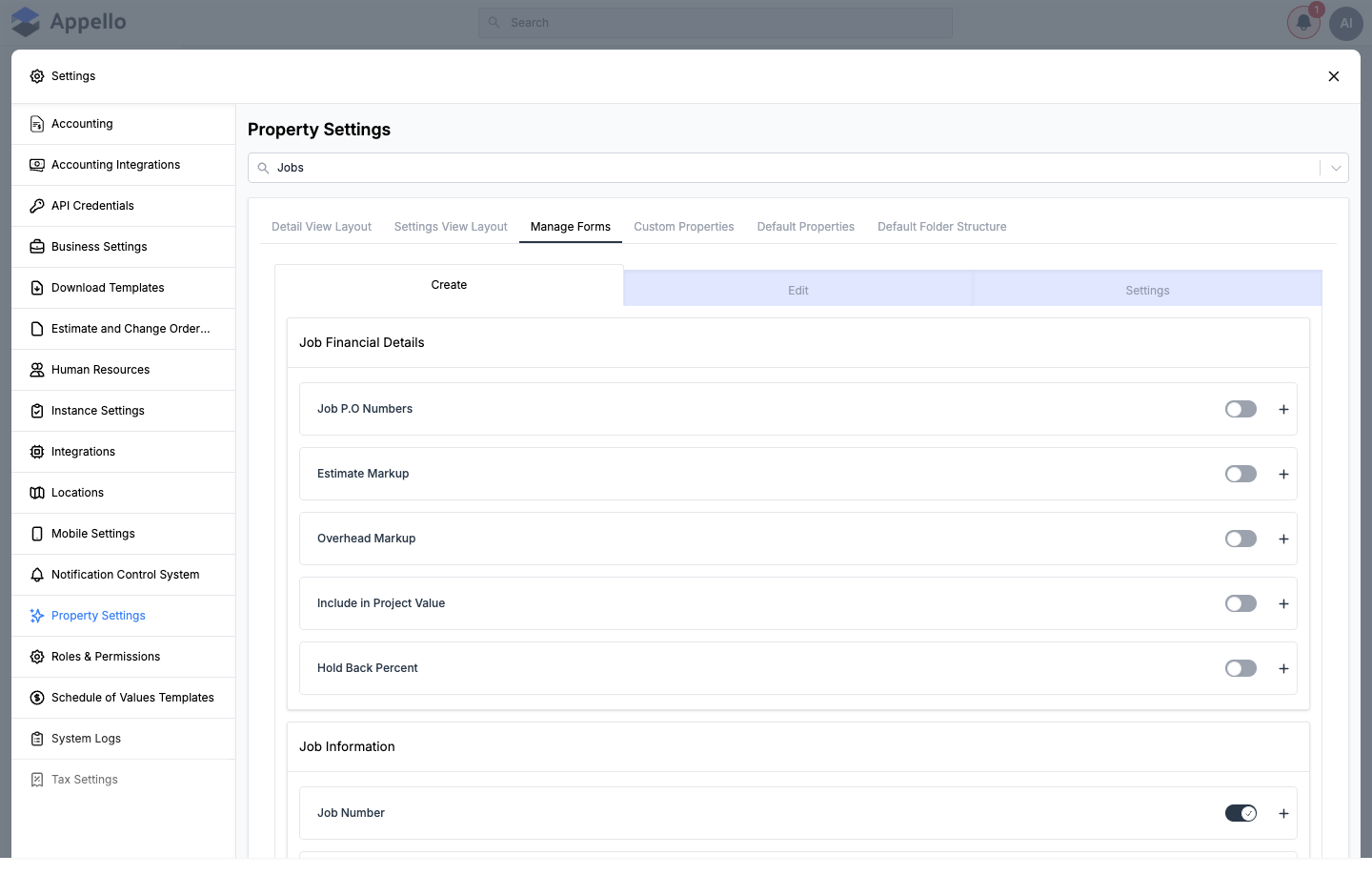
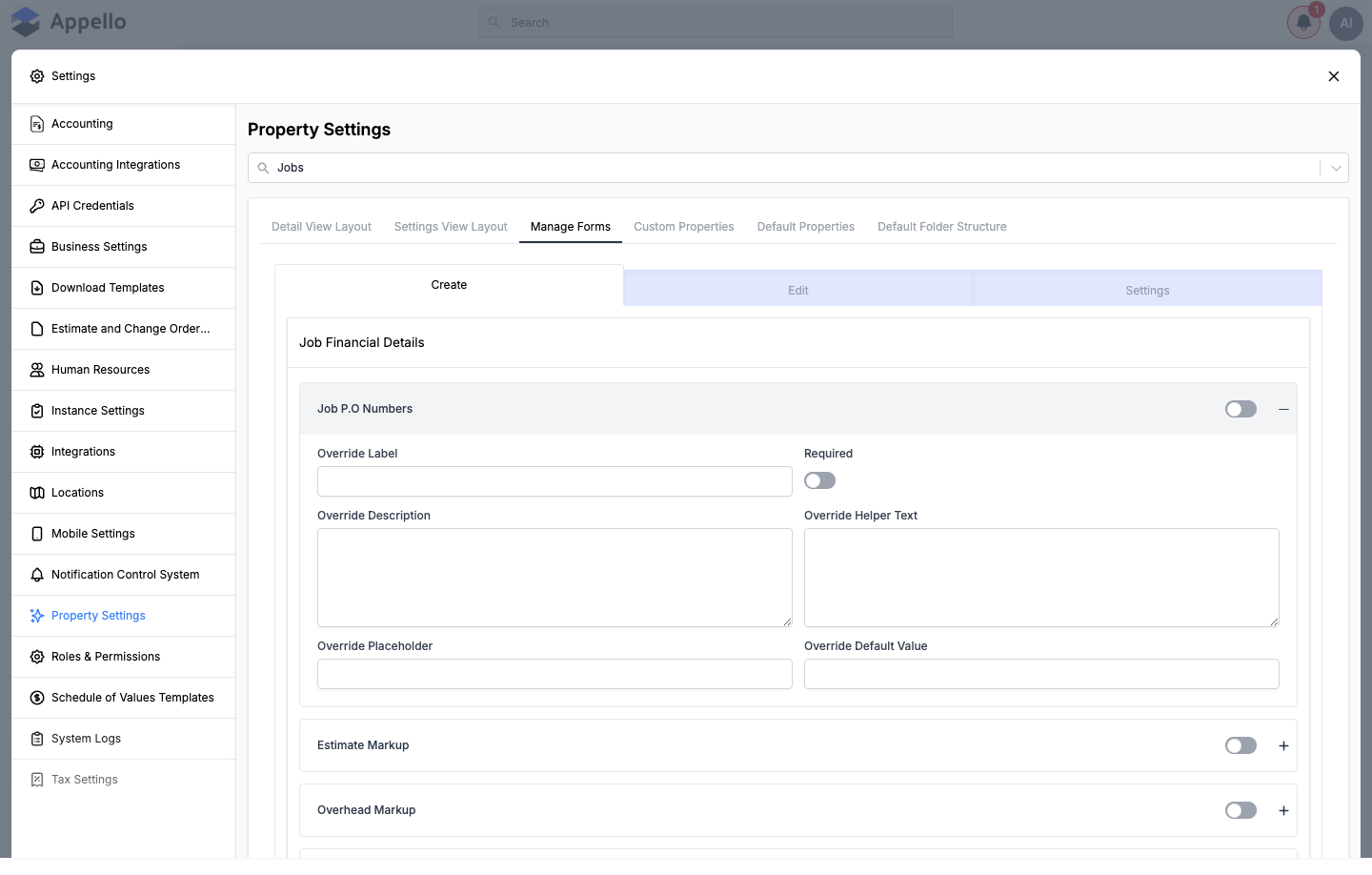
Changes across all sub-tabs are batched together — a Save/Cancel bar appears at the bottom of the screen once you've made at least one change, and Save applies every pending change across every sub-tab at once.
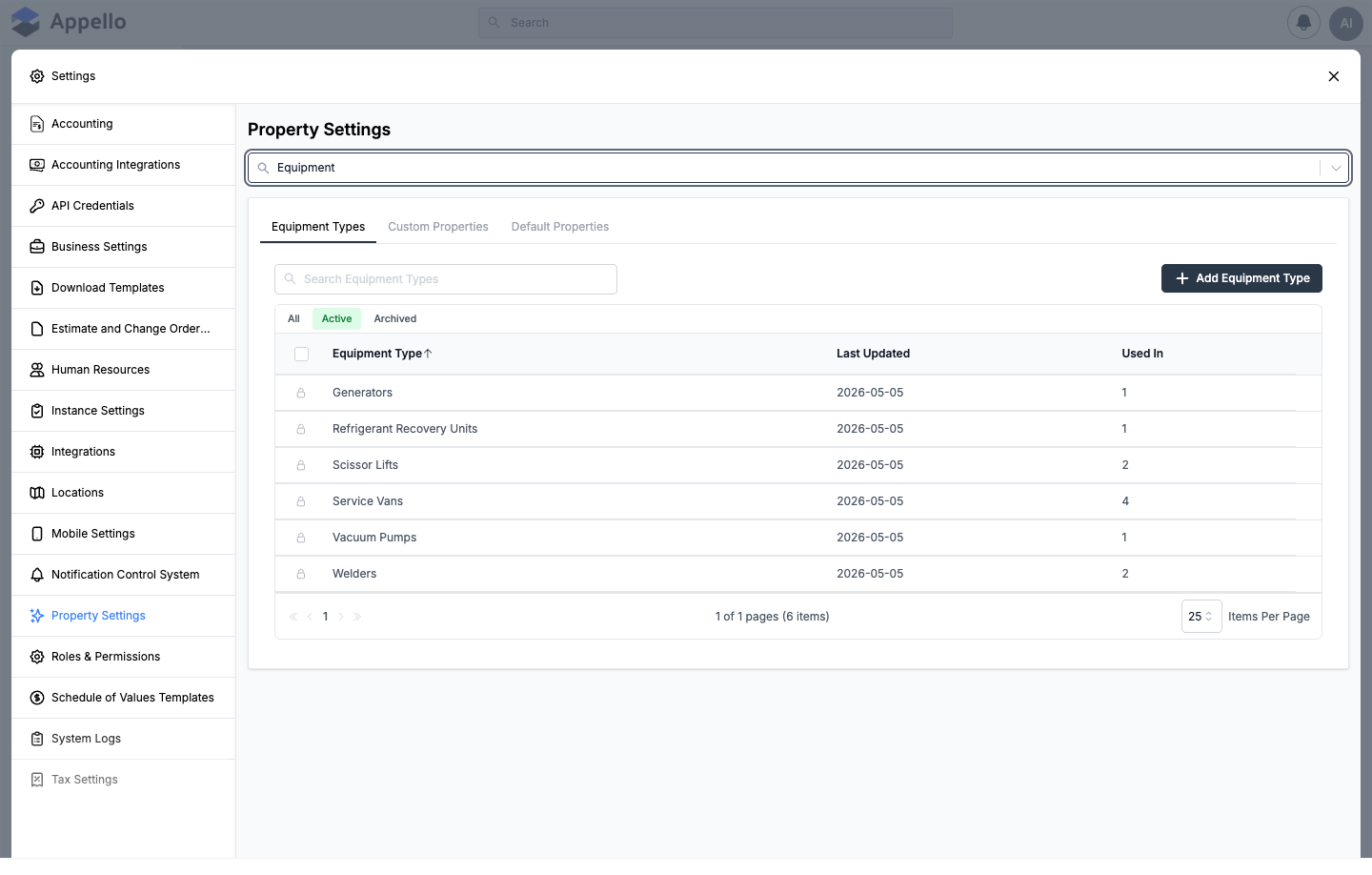
Equipment Types
Equipment's own list panel (not the generic layout builder). A simple archive-able list — Equipment Type, Last Updated, Used In — with Add Equipment Type.
Material List Templates and Material Attributes
Materials-only panels, distinct from the generic Custom Properties concept:
- Material List Templates — reusable groupings of materials that can be applied to a job or estimate as a starting list.
- Material Attributes — attribute definitions specific to materials (e.g. size, grade), managed separately from the instance-wide Custom Properties list.
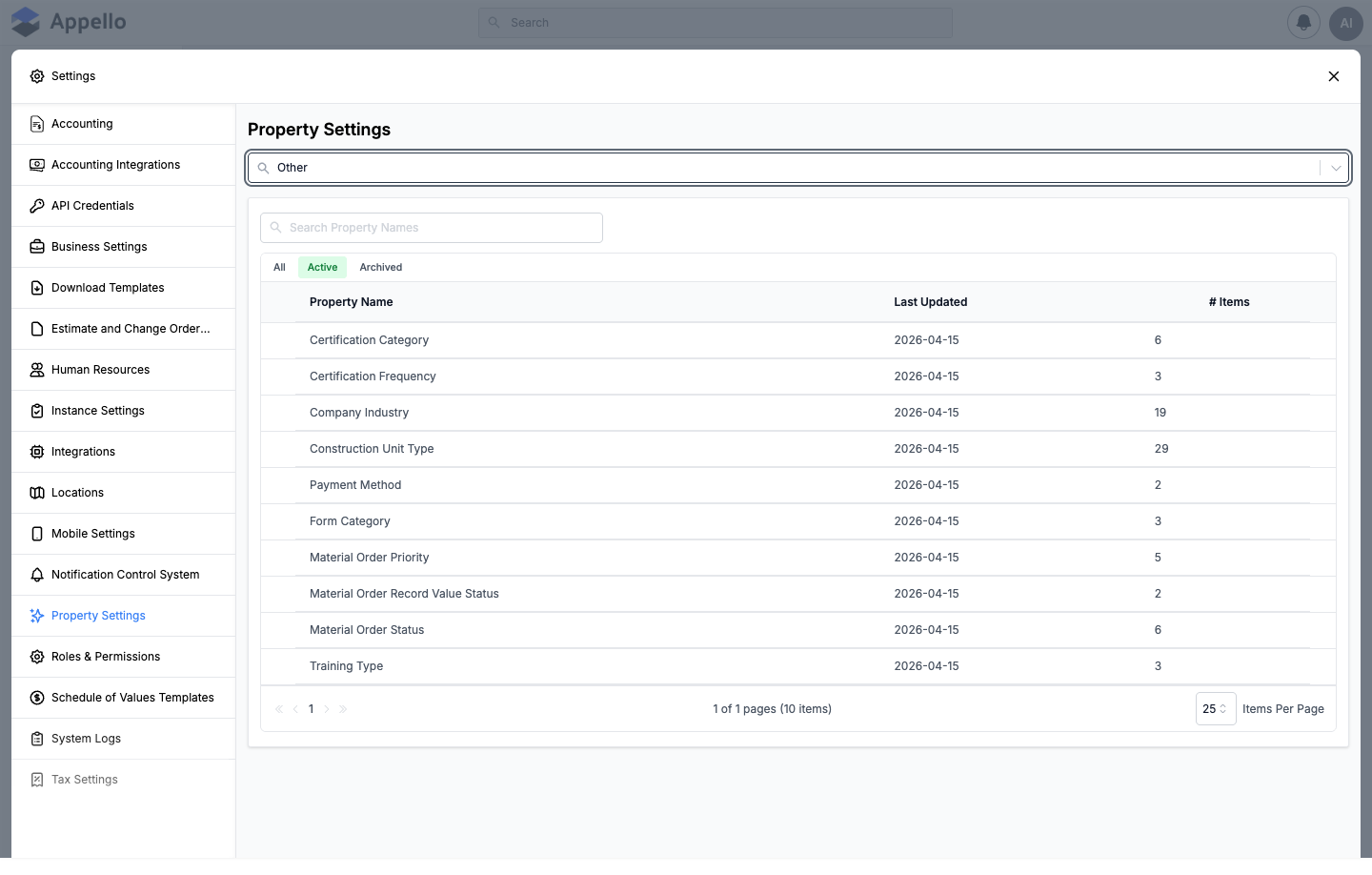
Property Values (the "Other" tab)
A second, separate use of the PropertyValues component — this one is not scoped to a single
model. It shows the shared value lists that don't belong to any one model's Default Properties tab:
Certification, Expense, LeaveRequest, MaterialOrder, SafetyForm, TrainingProvider, and
CostCode. Click a row to open, add, rename, reorder, or archive its values, the same as any
other Property Values table.
Integration Properties
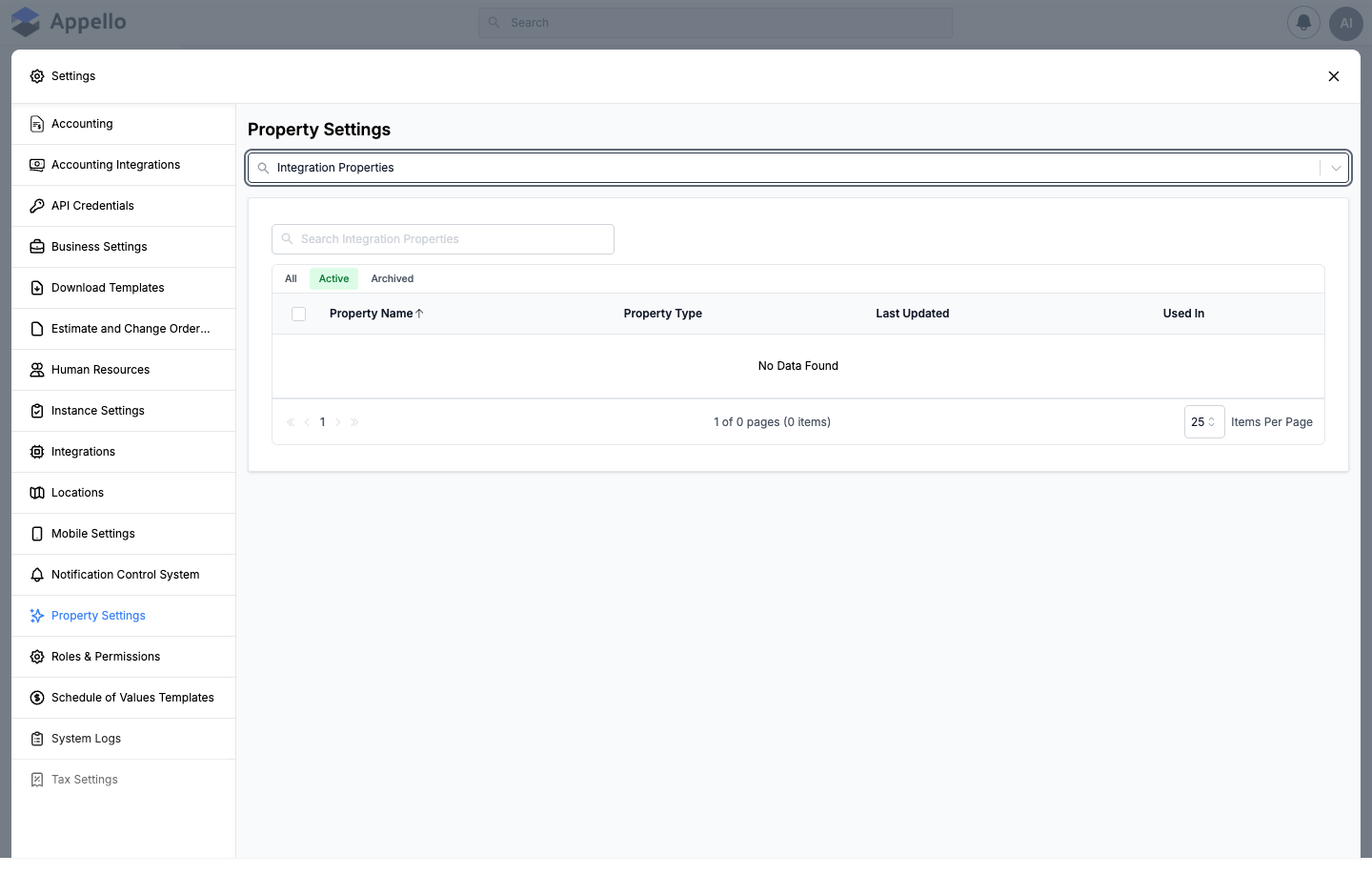
The same Custom Properties list, filtered to properties tagged for the Spectrum accounting
integration (integrateWith = SPECTRUM in code). There is no Add button here — a property
appears in this list only after it has been tagged for the integration elsewhere; this panel is
for reviewing and editing those already-tagged properties.
Which panels each model has
| Model | Panels |
|---|---|
| Projects | Manage Layout, Custom Properties, Default Properties, Default Folder Structure |
| Jobs | Detail View Layout, Settings View Layout, Manage Forms, Custom Properties, Default Properties (with Property Values), Default Folder Structure |
| Work Orders | Same six panels as Jobs — Work Orders is the Job model with subModel: WorkOrder, so it reuses Jobs' Default Folder Structure and Property Values |
| Companies | Detail View Layout, Settings View Layout, Manage Forms, Custom Properties, Default Properties (with Property Values) |
| Contacts | Detail View Layout, Settings View Layout, Manage Forms, Custom Properties, Default Properties (no Property Values table) |
| Departments | Detail View Layout, Settings View Layout, Manage Forms, Custom Properties, Default Properties (no Property Values table) |
| Users | Detail View Layout, Settings View Layout, Manage Forms (Create / Edit / Onboarding / Settings sub-tabs), Custom Properties, Default Properties (no Property Values table) |
| Expenses | Account Payable Layout, Employee Expense Layout, Custom Properties, Default Properties (with Property Values) |
| Equipment | Equipment Types, Custom Properties, Default Properties (with Property Values) |
| Estimate/Change Order | Manage Layout, Custom Properties, Default Properties (with Property Values), Default Folder Structure |
| Invoices | Manage Layout, Custom Properties, Default Properties (with Property Values) |
| RFI Management | Detail View Layout, Settings View Layout, Manage Forms, Custom Properties, Default Properties (with Property Values) — not visible on the demo role used for this page; requires View on Request For Information |
| Materials | Material List Templates, Material Attributes, Default Properties (with Property Values) — no layout builder and no separate Custom Properties tab; not visible on the demo role used for this page |
| Inventory Locations | Detail View Layout, Settings View Layout, Manage Forms, Custom Properties, Default Properties (with Property Values) — not visible on the demo role used for this page; requires View on Inventory |
| Documents | Manage Layout, Custom Properties (no Default Properties, no folder structure) |
| Other | Property Values only (Certification, Expense, LeaveRequest, MaterialOrder, SafetyForm, TrainingProvider, CostCode) |
| Integration Properties | A single filtered Custom Properties list (Spectrum-tagged properties) |
Model notes
Projects
- Custom Properties — the list is instance-wide (shared with every other model), so most rows you'll see here (e.g. "Industry", "Job Description") were created for other models, not Projects. Only properties actually dragged into Projects' Manage Layout are in use on Project records.
- Default Properties — the second table is Non Editable Default Properties and is read-only; Projects had no Property Values table in the demo instance used for this page.
- Default Folder Structure — a new Project's Files tab starts with two default folders: Jobs (holds each job's own default folder structure) and Note Files.
Jobs
- Default Properties — Jobs has a Property Values table (Job Status, Job Type) and an
editable Assigned Properties table. Assigned Properties can include fields whose Sub
Model is
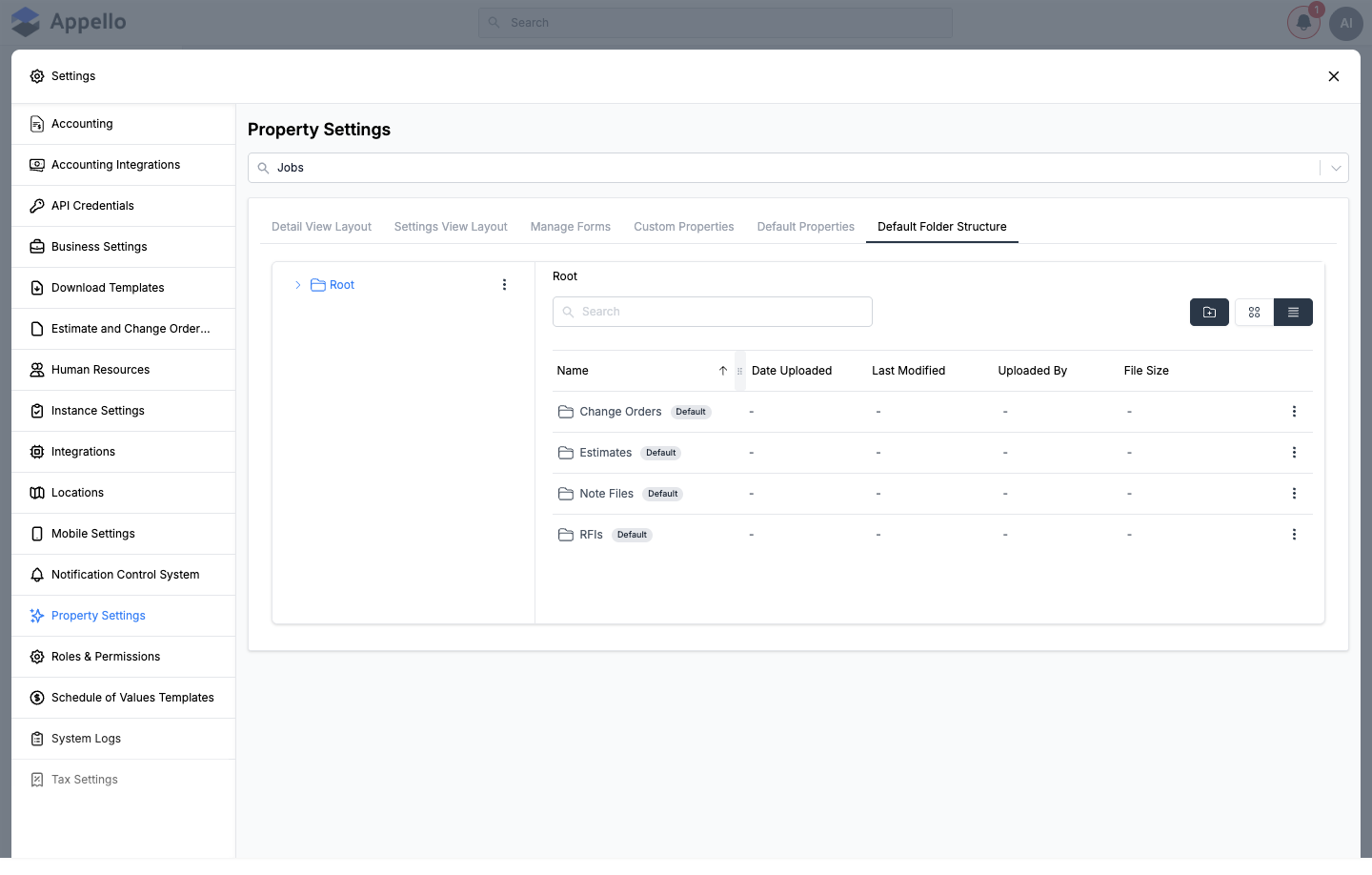
ProjectJob(inherited from the parent Project, shown read-only for context) alongside Job's own fields. - Default Folder Structure — a new Job's Files tab starts with four default folders: Change Orders, Estimates, Note Files, and RFIs.
To customize what appears on a job, use three tabs together:
- Detail View Layout / Settings View Layout — drag a field between Layout Sections and Available Attributes to add, remove, or reorder it. Tag a field Required here to make it mandatory everywhere the job form appears.
- Manage Forms — fine-tune the same fields per form (Create, Edit, Settings) without changing the underlying layout — for example, requiring Job Wage Region on Create but leaving it optional on Settings.
- Custom Properties — click Add Custom Property to define a new field, then add it to the job through step 1.
Work Orders
Work Orders is not its own data model in code — Property Settings renders it as
DataModelSettingsTabs with referenceModel: Job and subModel: WorkOrder. In practice this
means:
- Its layout, forms, and Default Properties are scoped to work orders specifically (the fields offered — Work Order Number, Work Order Status, Work Order Customer, Parent Job, Equipment Serviced, etc. — differ from Jobs' own fields).
- Its Default Folder Structure tab and its Property Values table are the same ones Jobs
uses (
jobDefaultFolderStructure, filtered toworkOrderStatusfor the Property Values table) — there's no independent Work Order folder template.
Companies
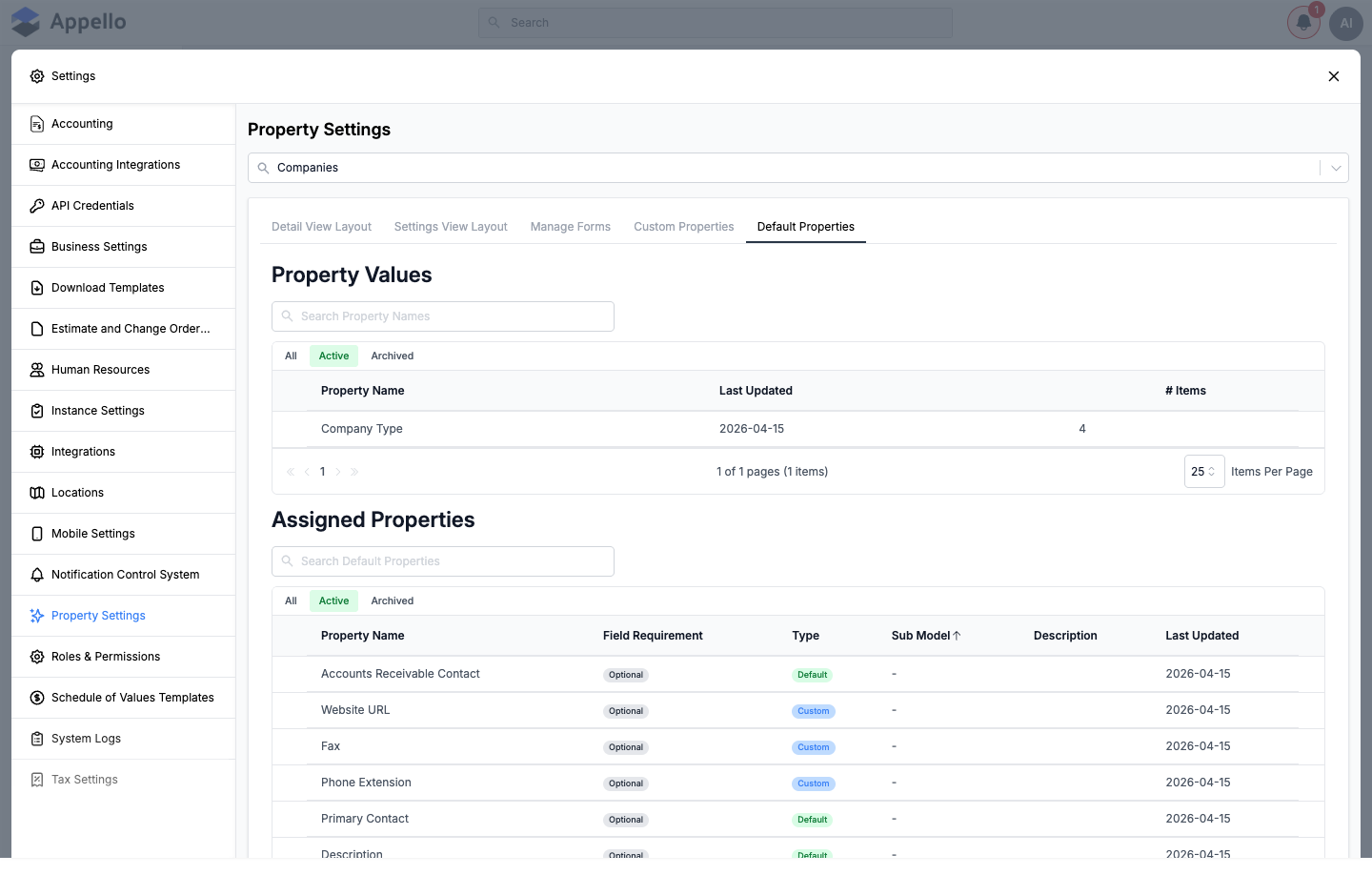
Companies use the five-tab set (no Default Folder Structure — Companies don't generate a Files folder automatically). Default Properties has a Property Values table (Company Type) and an editable Assigned Properties table that, in the demo instance, mixed Default fields (e.g. Accounts Receivable Contact, Primary Contact, Description) with Custom ones already assigned (e.g. Website URL, Fax, Phone Extension) — the Type column tells you which is which.
Contacts
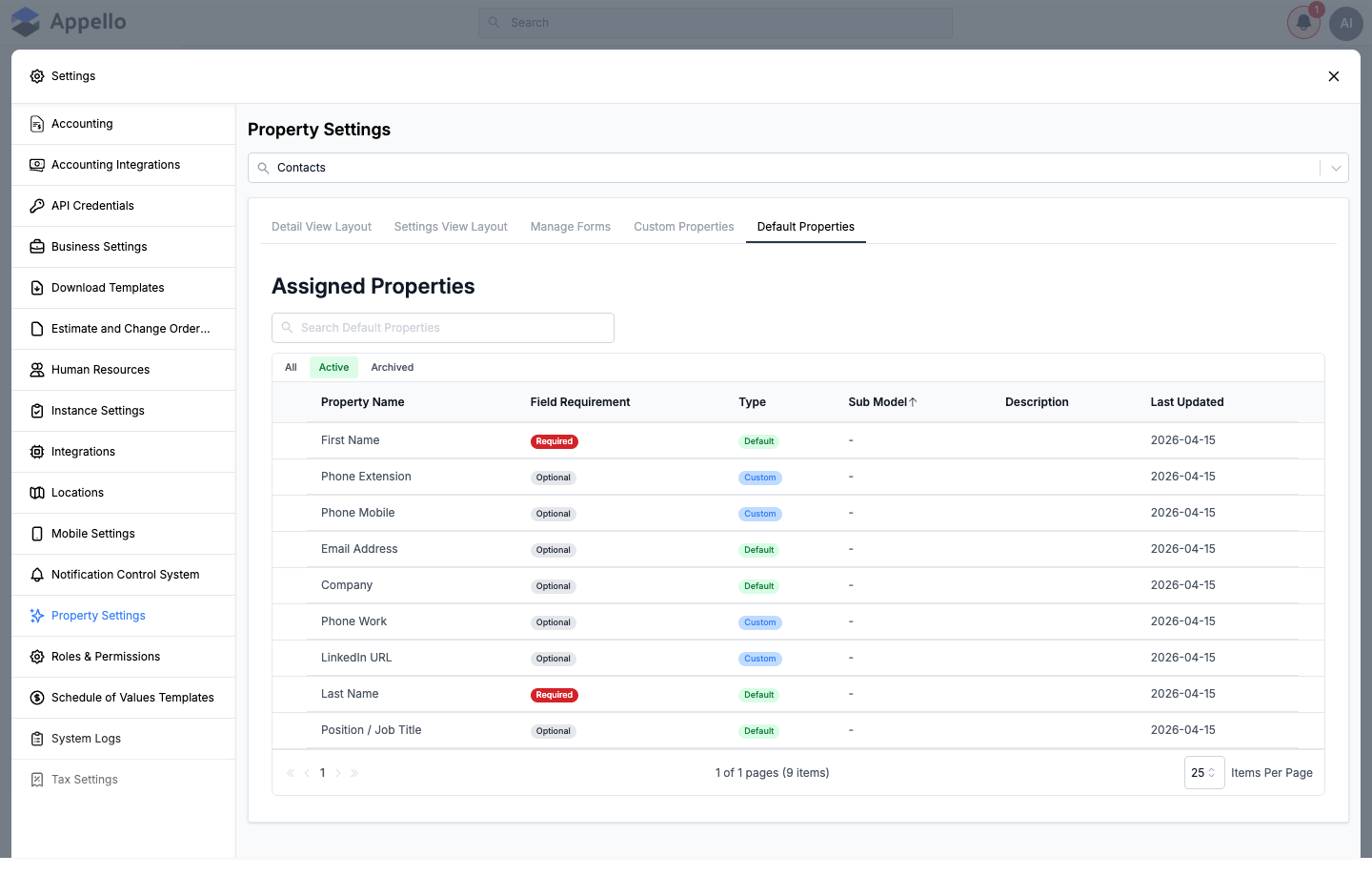
Contacts use the same five tabs as Companies, but have no Property Values table — Contacts don't have any system dropdown lists, so Default Properties goes straight to Assigned Properties. In the demo instance, Contacts had 9 assigned fields, including required First Name and Last Name, and custom fields like Phone Mobile, Phone Work, and LinkedIn URL.
Departments
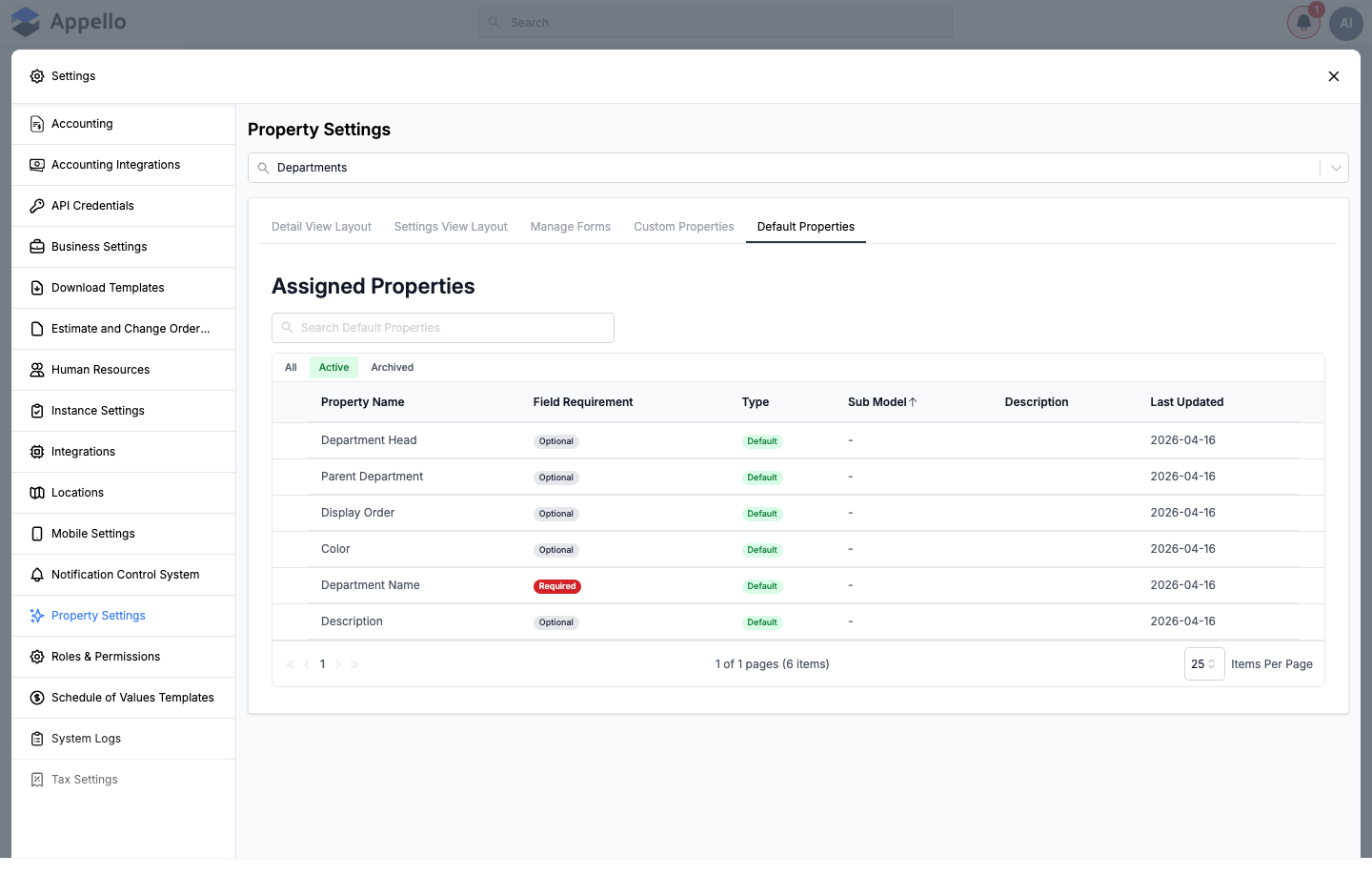
Departments use the same five tabs as Companies and Contacts, and like Contacts has no Property Values table. In the demo instance, all 6 assigned fields (Department Head, Parent Department, Display Order, Color, Department Name, Description) were Default fields — no custom fields had been added to Departments yet.
Users
Users pass supportedTypes: [CREATE, EDIT, ONBOARDING, SETTINGS] into the generic tab set, so its
Manage Forms panel has a fourth sub-tab — Onboarding — alongside Create, Edit, and
Settings, for the form a new user fills in when they first sign in. Users has no Property
Values table and no Default Folder Structure.
Expenses
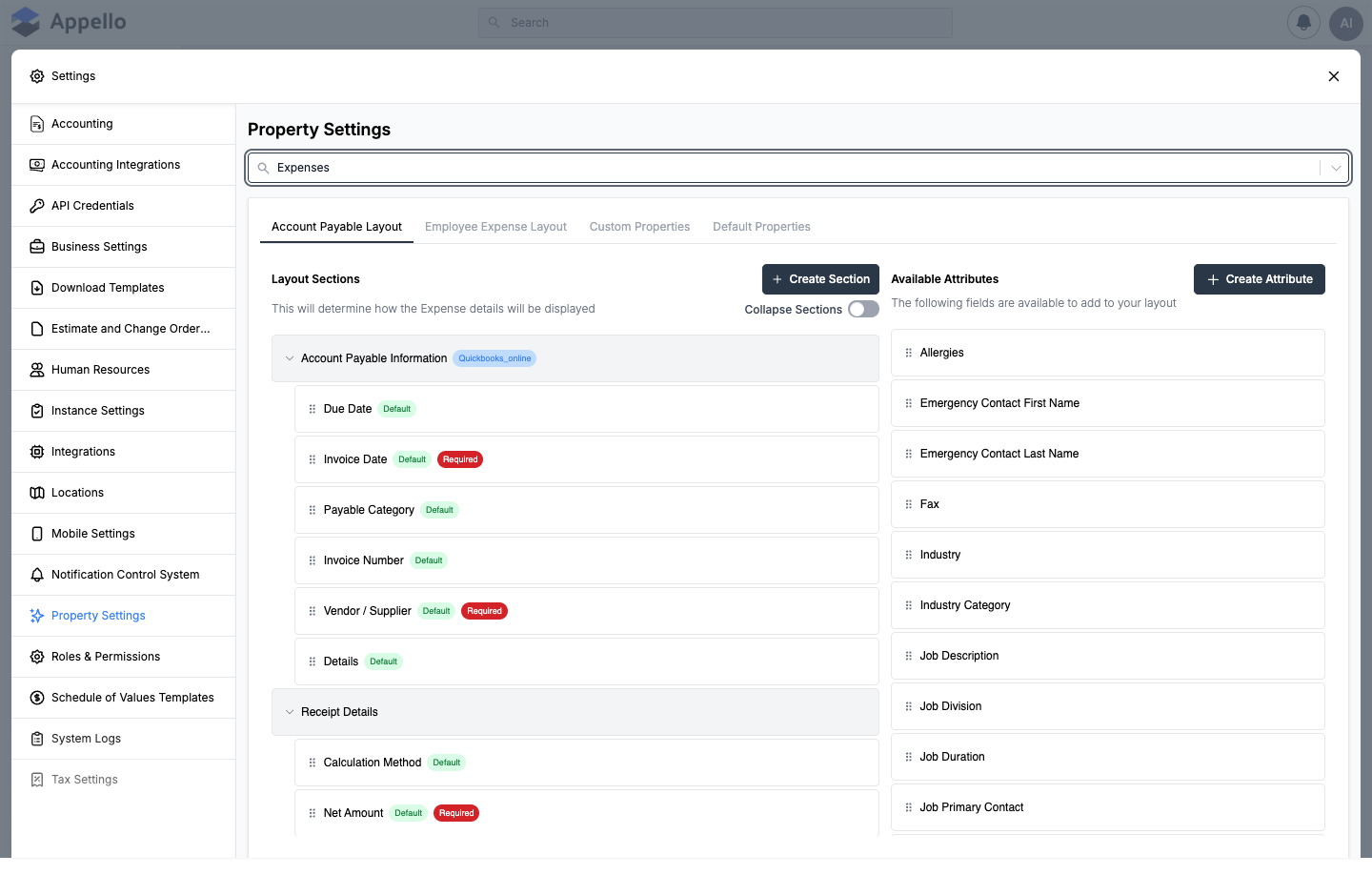
Expenses replaces the single layout builder with two, one per expense type: Account Payable
Layout (subModel: AccountPayable) and Employee Expense Layout (subModel: EmployeeExpense)
— each hides a couple of fields the other type doesn't use (e.g. the Account Payable layout hides
the reimbursement fields entirely). Default Properties has a Property Values table scoped to
Expense.
Equipment
Equipment has no generic layout builder tab at all. Instead: Equipment Types (its own simple
list, see above), Custom Properties (labeled the same as everywhere else
but built from EquipmentAttributes, a component specific to equipment), and Default
Properties with a Property Values table scoped to both Equipment and MaintenanceSchedule.
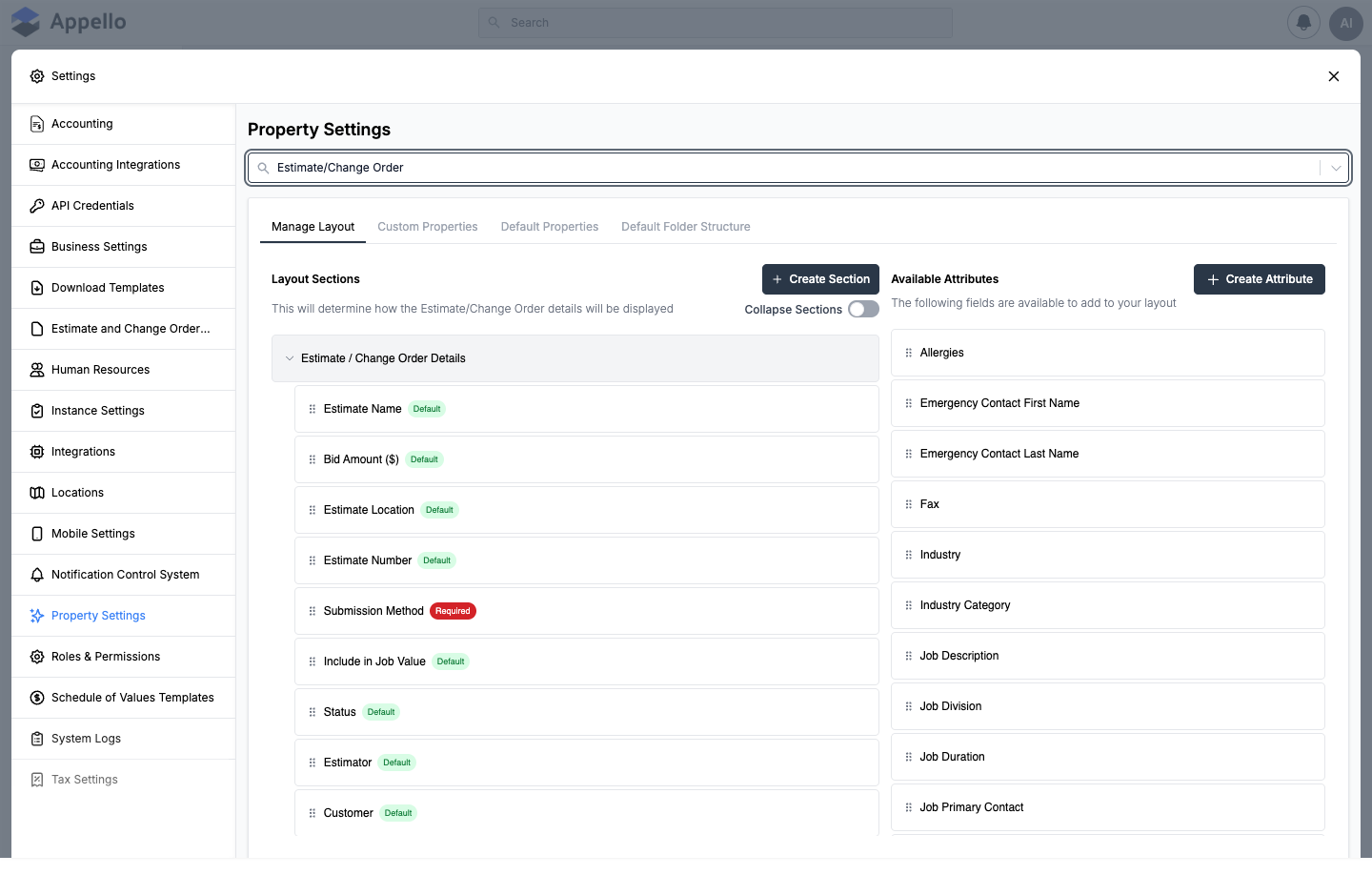
Estimate/Change Order
Uses the four-tab Projects-style layout, scoped to the EstimateChangeOrderRecord model: Manage
Layout, Custom Properties, Default Properties (Property Values scoped to
EstimateChangeOrderRecord), Default Folder Structure (its own folder set, independent of
Jobs').
Invoices
Uses the same four-tab style as Estimate/Change Order but without a folder structure tab: Manage
Layout, Custom Properties, Default Properties — scoped to the JobBill model in code.
RFI Management
Uses the generic five-tab set scoped to RFIs, including a Property Values table (RFI is one of the four models with system dropdown lists). Requires the View permission for Request For Information to see the tab at all — it did not appear for the demo role used for this page, so there is no screenshot of it here.
Materials
Materials has no generic layout builder and no separate Custom Properties tab. Its three panels — Material List Templates, Material Attributes, Default Properties (Property Values for Materials and Material Orders) — are unique to it. The tab also requires the View permission for Materials, and only appears when the Materials module is enabled for your instance; it did not appear for the demo role used for this page.
Inventory Locations
Uses the generic five-tab set scoped to Inventory Locations, including a Property Values table filtered to the Inventory Location Type property. Requires the View permission for Inventory; it did not appear for the demo role used for this page.
Documents
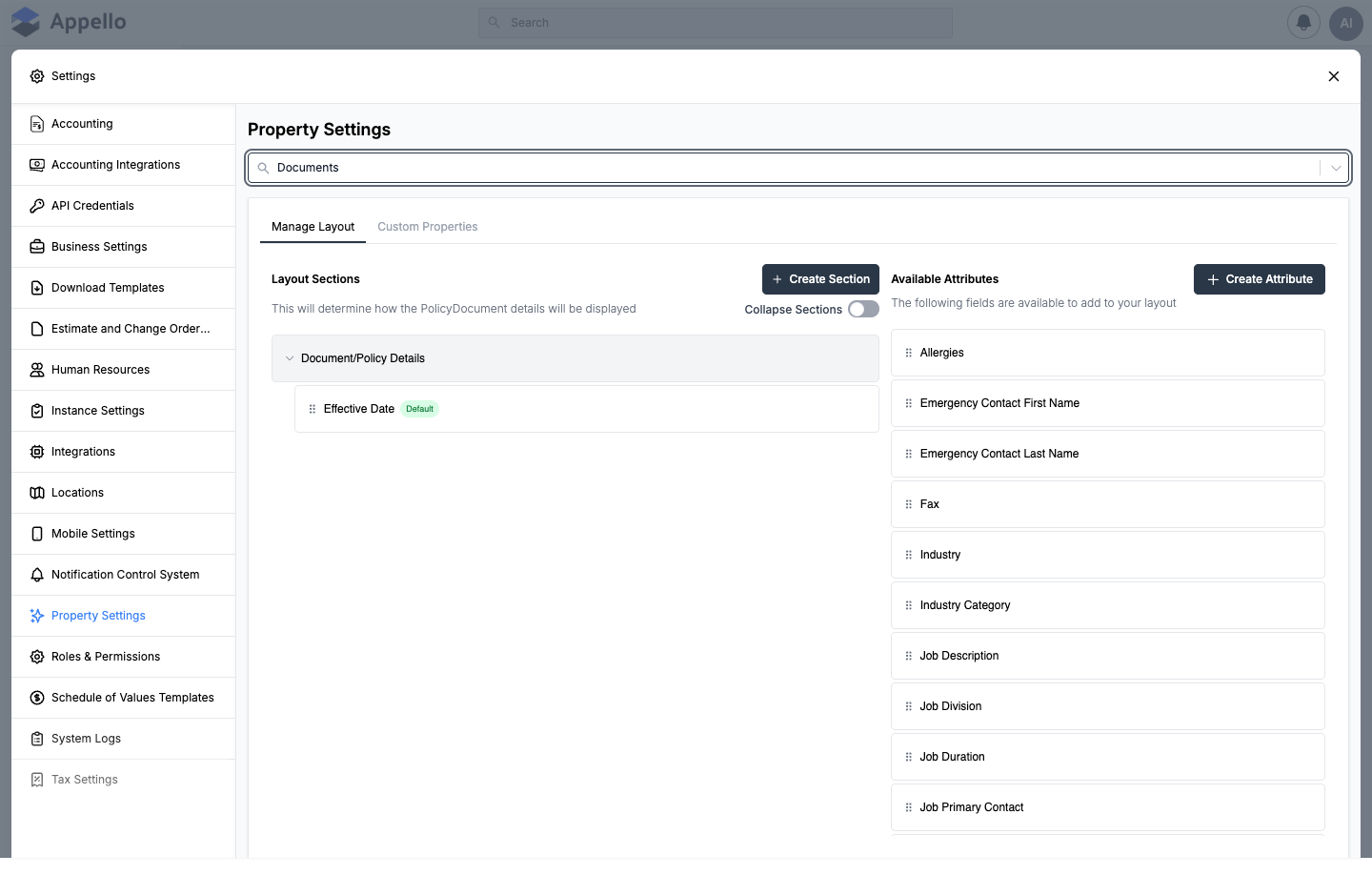
Scoped to the Policy Document model. Only two panels — Manage Layout and Custom Properties — no Default Properties and no folder structure tab.
Other
Not scoped to a model at all — this tab is the shared Property Values table for
Certification, Expense, LeaveRequest, MaterialOrder, SafetyForm, TrainingProvider, and
CostCode. On the demo instance it listed 10 value groups (Certification Category, Certification
Frequency, Company Industry, Construction Unit Type, Payment Method, Form Category, Material Order
Priority, Material Order Record Value Status, Material Order Status, Training Type).
Integration Properties
A read-only-style view (no Add button) over the Custom Properties list, filtered to properties
tagged integrateWith: SPECTRUM. Empty on the demo instance used for this page, meaning no custom
property there is currently tagged for the Spectrum integration.
Typical workflow
- Open Settings → Property Settings and pick the model you want to change from the dropdown.
- To add a brand-new field: open Custom Properties, click Add Custom Property, and fill in the create form. Save.
- Go to that model's Manage Layout (or Detail View Layout / Settings View Layout) tab and drag the new attribute out of Available Attributes into a section — this is the step that actually puts the field on the record.
- If the field should be required only on one form (e.g. required at Create but optional at Settings), fine-tune it on Manage Forms instead of tagging it Required on the layout.
- If the field is a dropdown list, use Default Properties → Property Values (or the shared Other tab, for the seven models that live there) to manage its options afterward.
Permissions
| Permission | Controls |
|---|---|
| Property Settings: View | Whether the Property Settings item appears in the Settings sidebar at all. |
| Property Settings: View (per tab) | Whether an individual model's tab appears in the dropdown, and whether its Custom Properties / Default Properties panels appear. |
| Property Settings: Edit | Whether the layout / form-builder panels (Manage Layout, Detail View Layout, Settings View Layout, Manage Forms) show editable controls, or the "You don't have the permission to modify this setting" banner instead. |
| Equipment: View | Whether the Equipment model tab appears. |
| Equipment: Edit | Whether Equipment Types is editable. |
| Materials: View (and the Materials module being enabled) | Whether the Materials model tab appears. |
| Materials: Edit | Whether Material List Templates / Material Attributes are editable. |
| Request For Information: View | Whether the RFI Management model tab appears. |
| Inventory: View | Whether the Inventory Locations model tab appears. |
| Document Folders: Create, Edit, or Delete (any one) | Whether a Default Folder Structure tab appears at all, for the models that have it. |
Related pages
- /docs/operations/job-detail — where Jobs' layout and custom properties actually render.
- /docs/operations/project-detail — where Projects' layout renders.
- /docs/work-orders/work-orders-overview
- /docs/crm/companies and /docs/crm/company-detail
- /docs/crm/contacts
- /docs/crm/change-orders and /docs/crm/estimate-report — Estimate/Change Order records.
- /docs/finance/billing-report — where Invoices (
JobBill) render. - /docs/expenses/accounts-payable and /docs/expenses/employee-expenses
- /docs/equipment/equipment-list
- /docs/materials/materials-catalog and /docs/materials/inventory-management — Inventory Locations.
- /docs/operations/rfis
- /docs/workforce/departments and /docs/workforce/users
- /docs/documents-policies/policy-documents
- /docs/settings/mobile-settings — the same layout builder, reused to configure mobile-specific layouts.
- /docs/settings/templates
The specific fields, option counts, and dropdown contents shown above (e.g. "9 assigned fields" for Contacts, "10 value groups" for Other) reflect the demo instance at the time this page was written, not a fixed count. Your instance's Property Settings will show whatever fields and custom properties your company has configured.