Tax Settings
Module: Settings | Platform: Web
Tax Settings lets you define the tax rates ("tax types") available across your Appello instance. Configured rates appear as options on estimates, change orders, invoices, and expenses.
Navigation
Sidebar → Settings → Tax Settings
Overview
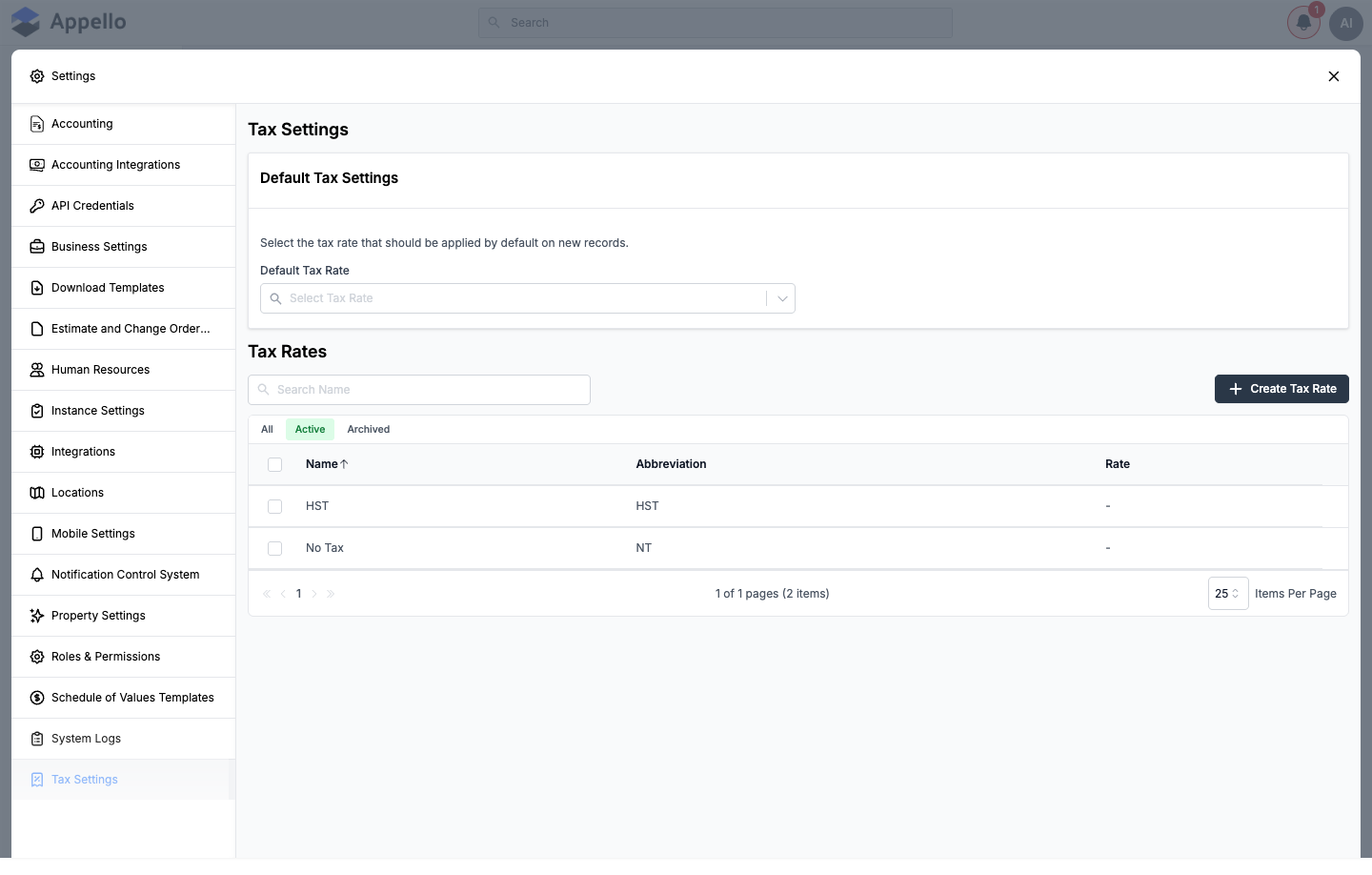
The Tax Settings page has two sections:
- Default Tax Settings — a single Default Tax Rate picker. The rate selected here is pre-filled on new expenses and other new records; users can still change it per record.
- Tax Rates — the list of tax rates ("tax types") configured for your instance, each with a name, abbreviation, and current rate. Rates can be created, edited, archived, restored, or searched from this list.
The same Default Tax Rate field also appears on Business Settings, and both point at the same instance-level setting — changing it in either place updates the other.
Table Columns
| Column | Description |
|---|---|
| Name | Descriptive name for the tax rate (e.g. "HST", "No Tax"). |
| Abbreviation | Short code used on tables, invoices, and estimates (e.g. "HST", "NT"). |
| Rate | The tax rate's currently active percentage. Shows – if no rate has been set yet. |
Actions
- Create Tax Rate — open the create flyout for a new tax rate.
- Search — filter tax rates by name (the Search Name box).
- Filter — toggle the list between All, Active, and Archived.
Creating a tax rate
- Click Create Tax Rate at the top of the Tax Rates list.
- Fill in the fields described below.
- Click Save, or Cancel to discard and close the flyout without saving.
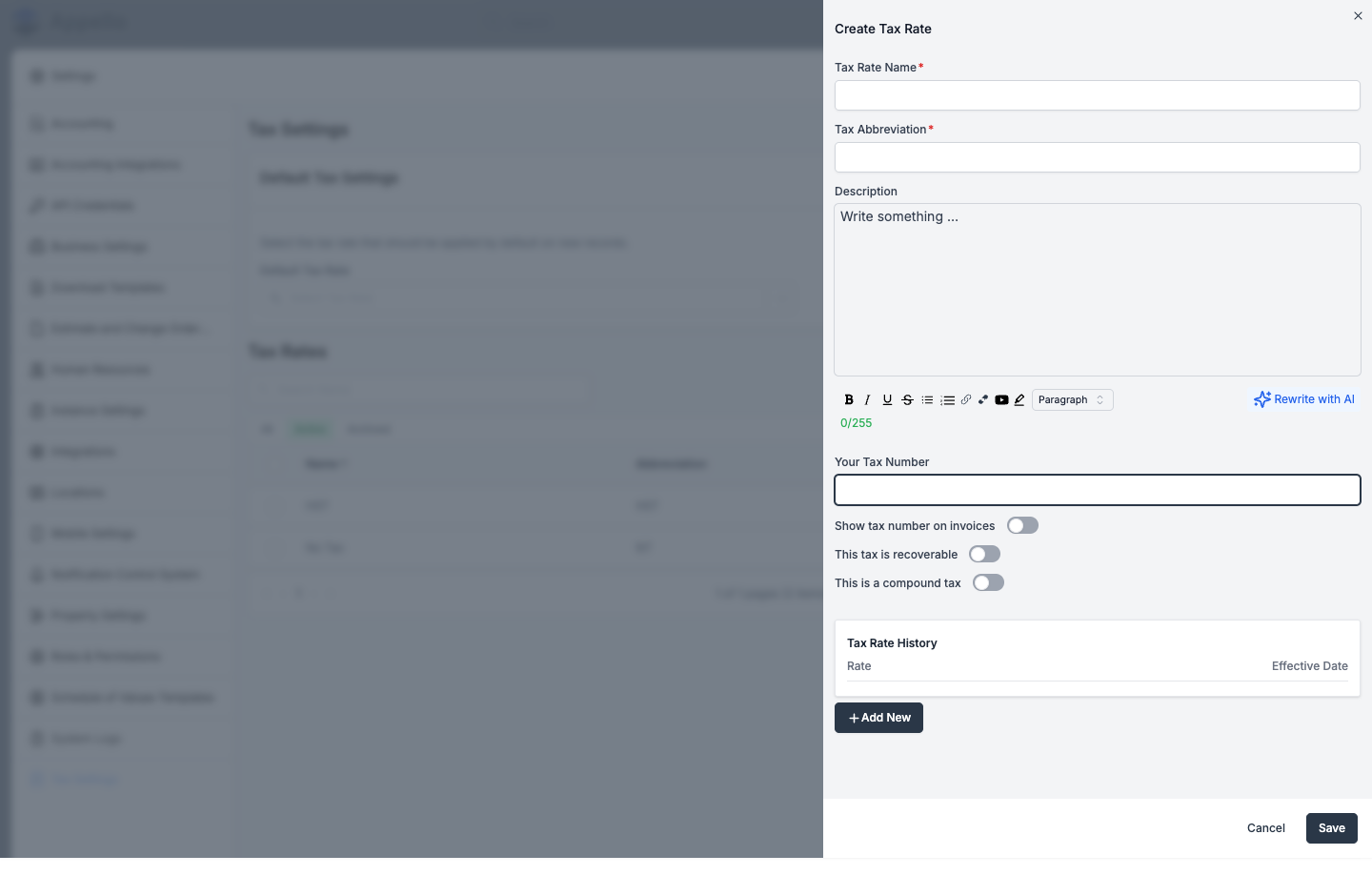
| Field | Required | Description |
|---|---|---|
| Tax Rate Name | Yes | Descriptive label, e.g. "HST – Ontario". |
| Tax Abbreviation | Yes | Short code shown on tables, invoices, and estimates, e.g. "HST". |
| Description | No | Rich-text field (up to 255 characters), with a Rewrite with AI option and a live character counter. |
| Your Tax Number | No | Your organization's registration/reference number for this tax. |
| Show tax number on invoices | No | Toggle. When on, Your Tax Number prints on invoices that use this tax rate. |
| This tax is recoverable | No | Toggle. Marks this tax as recoverable (e.g. for GST/HST input tax credits) — see Applying tax rates to expenses and accounts payable. |
| This is a compound tax | No | Toggle. When on, this tax is calculated on top of any non-compound taxes already applied on the same line, not on the pre-tax amount alone — see Applying tax rates to invoices and estimates. |
There is no single "percentage" field on the tax rate itself — the percentage comes from Tax Rate History instead:
| Tax Rate History | Description |
|---|---|
| Rate | The tax percentage for this dated entry. |
| Effective Date | The date this rate takes effect. |
| Add New | Adds a new rate/effective-date row. Add a future-dated row ahead of a scheduled tax-rate change; the row with the latest effective date that has passed is the Active one, and its rate is what shows in the Tax Rates list and is used on new documents. |
Canadian tax configuration (HST / GST / PST) — a worked example
This section shows one way to model common Canadian sales-tax structures using the fields above. It is not a built-in preset — you create each of these as an ordinary tax rate.
| Tax Type | How you'd typically configure it | Example |
|---|---|---|
| HST | A single tax rate for provinces that use a combined federal/provincial rate (ON, NB, NS, NL, PE). | 13% (Ontario) |
| GST | A single tax rate for the federal component, used where there's no HST. | 5% |
| PST | A separate tax rate for the provincial component, added alongside GST on the same line (BC, SK, MB). | 7% (BC) |
| QST | A separate tax rate for Quebec's provincial tax, added alongside GST. | 9.975% |
| No Tax | A zero-rate entry for exempt items or out-of-province work. | 0% |
Whether a provincial component should be marked This is a compound tax depends on whether that jurisdiction taxes the federal component before applying its own rate — confirm the correct treatment for your province before creating the rate, since Appello does not decide this for you.
Applying tax rates to invoices, estimates, and change orders
Estimate, change order, and invoice line items support more than one tax rate on the same line — a "Tax Rate(s)" stack, not a single dropdown:
- Click Add Tax Rate (or Add Another Tax Rate) on a line to add a rate from the ones configured here.
- Non-compound rates are each calculated on the line's pre-tax base amount (net of line/bill discounts and holdback).
- A rate marked This is a compound tax is instead calculated on the base amount plus the sum of all non-compound rates already on that line — not on the pre-tax amount alone.
- Each rate on the line can be removed independently.
Compound tax formula (confirmed in TaxRateStack.tsx, the shared component behind the line-item
tax stack on estimates, change orders, and invoices):
nonCompoundTax = Σ (baseAmount × nonCompoundRate / 100)   // over every non-compound rate on the line
compoundBase   = baseAmount + nonCompoundTax
compoundTax    = compoundBase × compoundRate / 100        // for each compound rate on the line
Worked example — a $100.00 line with a 5% non-compound rate (e.g. GST) and a 7% rate marked This is a compound tax (e.g. a provincial tax calculated on top of GST):
| Step | Calculation | Amount |
|---|---|---|
| Pre-tax base amount | — | $100.00 |
| Non-compound tax (5%) | $100.00 × 5% | $5.00 |
| Compound base | $100.00 + $5.00 | $105.00 |
| Compound tax (7%) | $105.00 × 7% | $7.35 |
| Total tax | $5.00 + $7.35 | $12.35 |
| Line total | $100.00 + $12.35 | $112.35 |
If the 7% rate were not marked compound, it would instead be calculated on the $100.00 base directly ($7.00), for a total tax of $12.00 — the compound flag is what adds the extra $0.35 in this example.
When QuickBooks Online is connected, invoice lines are restricted to a single tax rate per line — a QuickBooks sync constraint. Estimates and change orders are not restricted this way.
| Context | How tax is applied |
|---|---|
| Estimates | Add one or more tax rates per line item; totals reflect the stacked/compound calculation above. |
| Change Orders | Itemized change-order line items use the same tax-rate stack as estimates. |
| Invoices | Add one or more tax rates per line item (single rate only if QuickBooks Online is connected); the invoice total reflects the tax. |
| Default Tax Rate | Pre-fills new expenses (see below). Estimate, change order, and invoice lines are not pre-filled from it — rates are added per line. |
Applying tax rates to expenses and accounts payable
Employee Expenses and Accounts Payable
bills are both Expense records in the underlying data model (distinguished by type: EmployeeExpense vs. type: AccountPayable), and both use the same single Tax Type field —
not the multi-rate stack used on estimates, change orders, and invoices. The field defaults to the
instance's Default Tax Rate but can be changed per record. Whether that tax counts toward
input tax credits (ITCs) is controlled by the This tax is recoverable setting on the selected
tax rate itself (configured when you create or edit it above), not by a separate choice on the
expense or AP bill.
Managing tax rates
| Action | Description |
|---|---|
| Edit | Click a tax rate row to reopen the same flyout used to create it. You can change the name, abbreviation, description, tax number, and toggles, and add or remove dated entries in Tax Rate History to change the rate going forward. |
| Archive | Archive one or more selected rates to remove them from the active list while preserving them on historical records. |
| Restore | Restore an archived tax rate to make it available again. |
| Delete | Permanently delete one or more selected rates. |
| Search | Use Search Name to find a rate by name. |
| Filter | Toggle between All, Active, and Archived views. |
A rate's percentage is date-driven through Tax Rate History: documents use the rate that was active on the document's date, so adding a future-dated rate does not change the tax already calculated on existing documents.
Permissions
| Permission | Controls |
|---|---|
BusinessSettings: view | Whether the Tax Settings tab appears in the Settings panel at all. |
BusinessSettings: edit | Whether the tab's controls are editable — creating, editing, archiving, restoring, deleting a tax rate, and changing the Default Tax Rate. Without it, a banner reads "You don't have the permission to modify these settings" and every control is disabled. |
Tax Settings has no permission of its own — it shares the BusinessSettings permission with the
Business Settings tab, confirmed in SettingsPanel.tsx: the tab's
visibility check and the TaxSettings component's allowEdit prop both resolve against
BusinessSettings, not a separate TaxSettings permission key.
How tax settings connect to other features
| Feature | Relationship |
|---|---|
| Estimates | Estimate line items reference one or more tax rates from this list — see above. Documented in full on Estimate report. |
| Change Orders | Itemized change-order line items use the same tax rates and stacking behavior as estimates — see Change Orders. |
| Invoicing | Invoice line items reference tax rates from this list to calculate tax and totals. |
| Expenses | Employee expenses and Accounts Payable bills are both Expense records under the hood (type: EmployeeExpense / AccountPayable) and share the single Tax Type field described below — see Employee Expenses and Accounts Payable Expenses. |
| QuickBooks Integration | Tax rates are mapped to QuickBooks Online tax codes on the Tax Types tab of Accounting Integrations — see Accounting connection. Mismatches can cause sync errors. |
| Business Settings | The instance's Default Tax Rate can also be set from Business Settings — it's the same field shown on this page. Business Settings also has a separate Financial Summary Taxes toggle (Exclude/Include) controlling whether tax amounts show in Job and Project Financial Summaries. |
| Accounting | The Accounting tab manages the chart-of-accounts types and categories that tax and other transactions post against; it does not itself map tax rates — that mapping happens on QuickBooks' Tax Types tab above. |
| Billing Report | Tax amounts on invoices are reflected in billing and financial reports — see Billing report. |
There is no dedicated /docs/crm/estimates page — estimate behavior, including tax handling on
estimate line items, is documented on Estimate report, which covers
the estimate list, detail, and line-item editor together.
Related
- Business Settings — the Default Tax Rate picker and the permission this tab shares.
- Accounting — chart of accounts (account types and categories) that tax and other transactions post against.
- Accounting connection — map tax rates to QuickBooks Online tax codes.
- Estimate report
- Change Orders
- Billing report
- Employee Expenses
- Accounts Payable Expenses
- Reports hub