Locations
Module: Settings | Platform: Web
Locations are reusable address records you can attach to jobs, projects, union halls, estimates, employee agreement contracts, and your company profile. Managing addresses centrally here avoids duplicate entry and keeps every linked record pointed at the same, correct address.
Where it is
- Settings → Locations — click path: Settings → Locations (in the left-hand Settings menu). This opens the same list embedded inside the Settings panel.
- Standalone route — the list also has its own page at
/locations, gated by the View permission for Locations. - Detail page — click a location's Name anywhere in Appello to open
/locations/[id]?tab=overview.
As observed on the demo instance on 2026-09-08, the standalone /locations route
currently returns "An unexpected error has occurred" -- both navigating to it directly and
clicking the Locations breadcrumb from a location's detail page reproduce the error. The
same list, reached via Settings → Locations, loads correctly. The screenshots on this page
are taken from the working Settings surface.
Overview
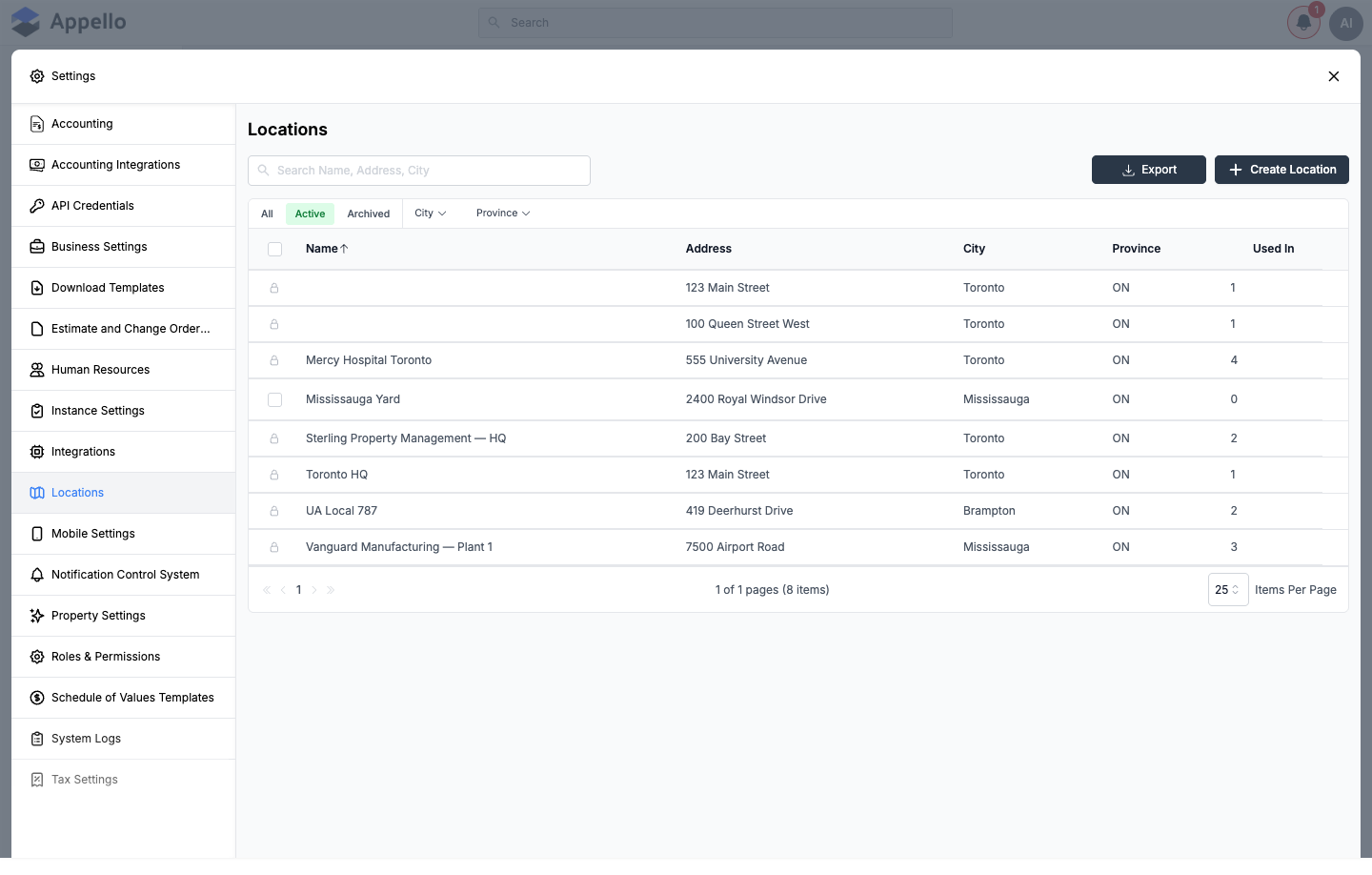
The Locations list shows every saved address with its name, street address, city, province, and how many other records reference it. Rows already referenced by another record show a lock icon in place of the row checkbox, so they can't be selected for bulk archive/delete.
Table columns
| Column | Description |
|---|---|
| Name | A friendly label for the location. Click it to open the location's detail page. Sortable (default sort, ascending). |
| Address | Street address (Address Line 1). |
| City | City or municipality. |
| Province | Province or state. |
| Used In | Settings → Locations only (see below). Number of records referencing this location. Click the count to see the linked items. |
The Used In column appears only on the Settings → Locations list. The standalone
/locations page shows the same columns minus Used In; the two lists otherwise share the
same search, filter, quick tabs, Export, and bulk-action behavior described below.
Clicking a nonzero Used In count opens a popover titled "This data is being used at:" listing every linked record (job, project, company, contact, union hall, or union hall rate card) as a link that opens that record's own detail page in a new tab.
Search, filters, and quick tabs
- Search — the box above the table filters by Name, Address, or City as you type (placeholder: "Search Name, Address, City").
- Quick tabs — All, Active, and Archived. The list opens on Active.
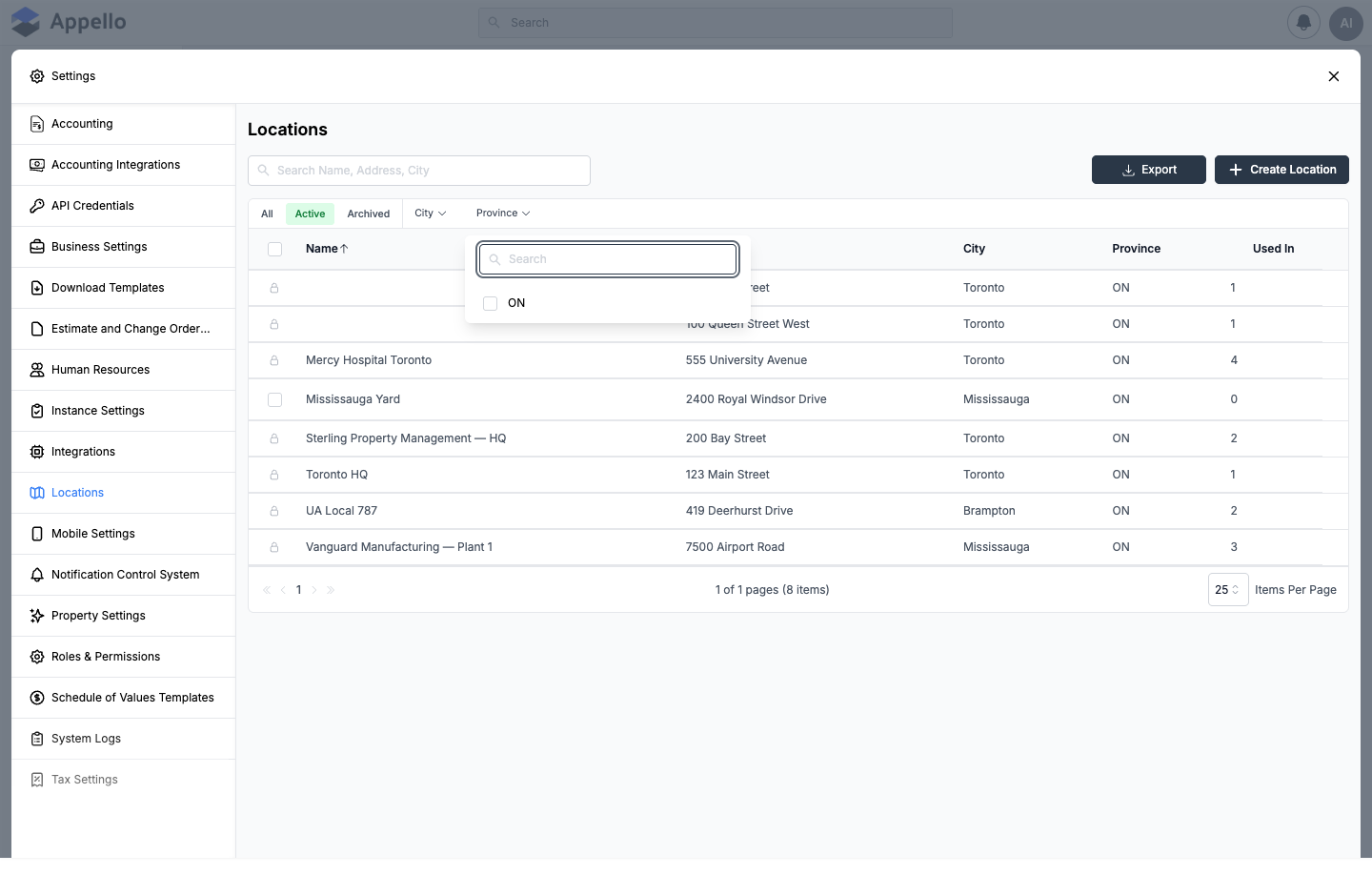
- Filters — dropdown filters for City and Province, populated from the locations already in the list.
Export
Export downloads the current view as a CSV.
Create / Edit Location
Click Create Location, or a location's Name to edit it, to open the same panel.
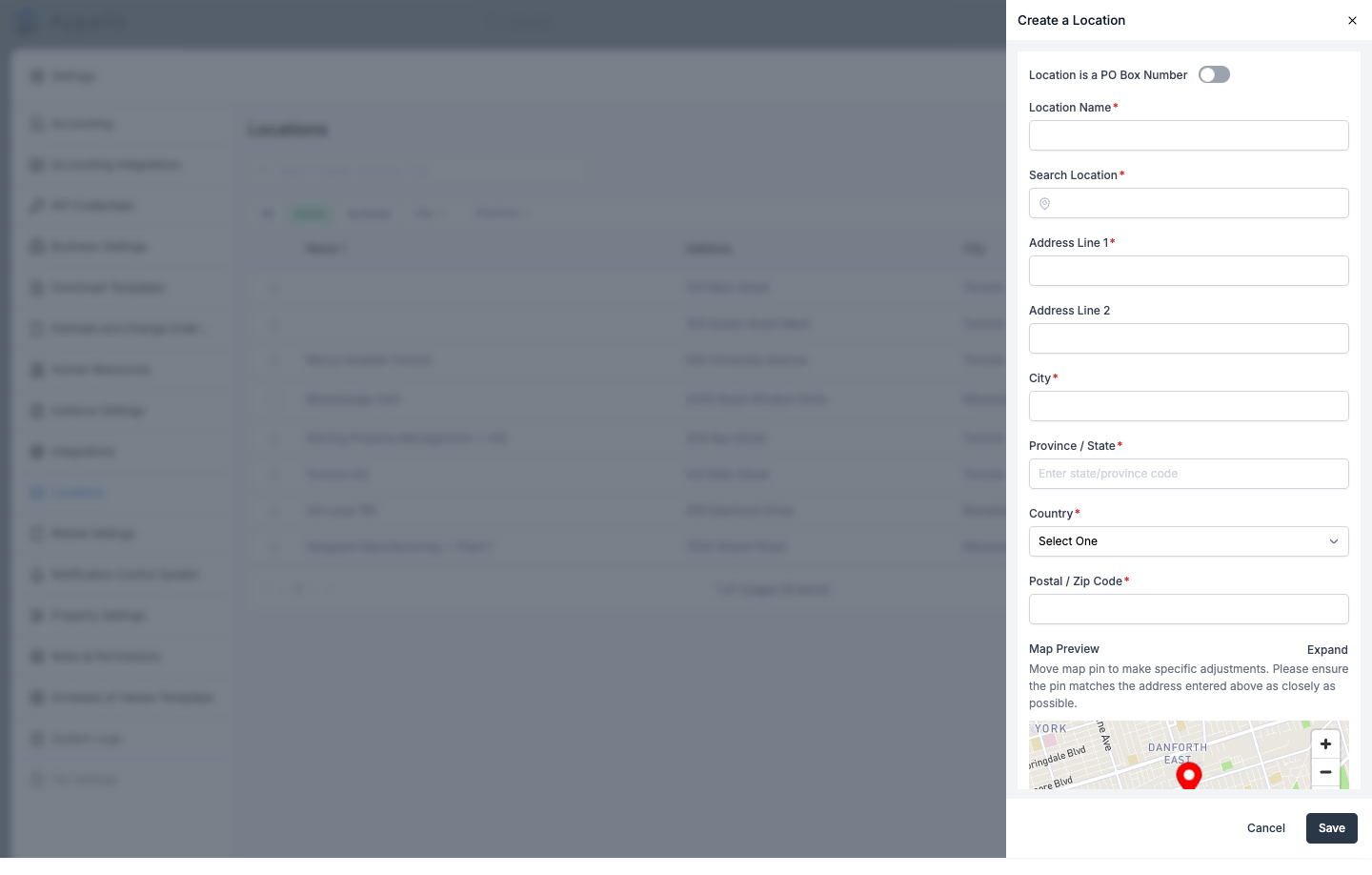
| Field | Required | Notes |
|---|---|---|
| Location is a PO Box Number | No | Toggle. When enabled, Search Location is hidden and the map preview is removed. |
| Location Name | Yes | Friendly label shown throughout Appello. |
| Search Location | Conditional | Address autocomplete (Mapbox geocoding). Selecting a suggestion fills in the address fields, country, and lat/lon below. Hidden for PO Boxes. Required unless valid coordinates are already set. |
| Address Line 1 | Conditional | Required unless a valid address/coordinates were already set via Search Location or the map pin. |
| Address Line 2 | No | |
| City | Conditional | Same conditional rule as Address Line 1. |
| Province / State | Conditional | Same conditional rule as Address Line 1. Stored as a 2-character, uppercase code (e.g. ON). |
| Country | Conditional | Dropdown. Stored as a 2-character country code (e.g. US, CA). Same conditional rule as Address Line 1. |
| Postal / Zip Code | Conditional | Same conditional rule as Address Line 1. |
| Map Preview | -- | Drag the pin (or use Expand for a larger modal) to fine-tune the geocoded latitude/longitude. Moving the pin reverse-geocodes and overwrites the address fields above. Hidden when Location is a PO Box Number is enabled. |
Latitude and longitude are not directly editable fields -- they're set by picking a Search Location suggestion or by moving the map pin, and are geocoded server-side from the address if left blank on save.
Click Save to create or update the location, or Cancel to close the panel without saving.
As of the 1.33 release this form has no Type or Notes field.
Editing a location that's already linked to other records shows a confirmation listing every job, project, company, contact, union hall, or rate card that will pick up the change (or stating that nothing is currently associated, if the location is unused).
Bulk actions
Check the box on one or more rows to reveal a bulk-action bar. A location currently referenced by another record shows a lock icon instead of a checkbox and can't be selected.
| Tab | Action | What it does | Who can do it |
|---|---|---|---|
| Active | Archive | Removes the selected locations from the Active view. Data is preserved and can be restored later. | Requires the Edit permission for Locations. |
| Archived | Restore | Moves the selected locations back to the Active view. | Requires the Edit permission for Locations. |
| Archived | Delete | Permanently deletes the selected locations. Disabled for a location still in use. | Requires the Delete permission for Locations. |
Associate Location flyout (Associate Existing / Associate New)
Wherever another record needs a location -- Business Settings, projects, union halls, employee agreement contracts, and estimates/change orders -- Appello opens the same Associate Location flyout instead of a plain dropdown:
| Tab | What it does |
|---|---|
| Associate Existing | Searches active, saved locations by address and lets you pick one to attach. |
| Associate New | Opens the same Create Location form described above; saving it both creates the location and attaches it. |
Places this flyout opens from:
- Business Settings → Company Address -- see Business Settings.
- Project Location on the project create/edit form.
- Union Hall Location and Rate Card Origin on the Union Hall create/edit panel -- see Union Hall Management.
- Travel Rate Card Origin ("Specified Address" option) on an Employee Agreement Contract -- see Travel Rate Cards & Zones.
- Estimate Location on an Estimate or Change Order, used for its PDF merge tags.
Once a location is attached from any of these places, it shows as a small card (name, address, and a map thumbnail) with Edit and Remove controls -- clicking Edit reopens this same flyout on the Associate Existing tab.
A Company record's own address field does not use this flyout in the 1.33 release -- the "Company Address" location described on this page is the instance's address, set from Business Settings.
Location detail page
Opening a location shows a single Overview tab.
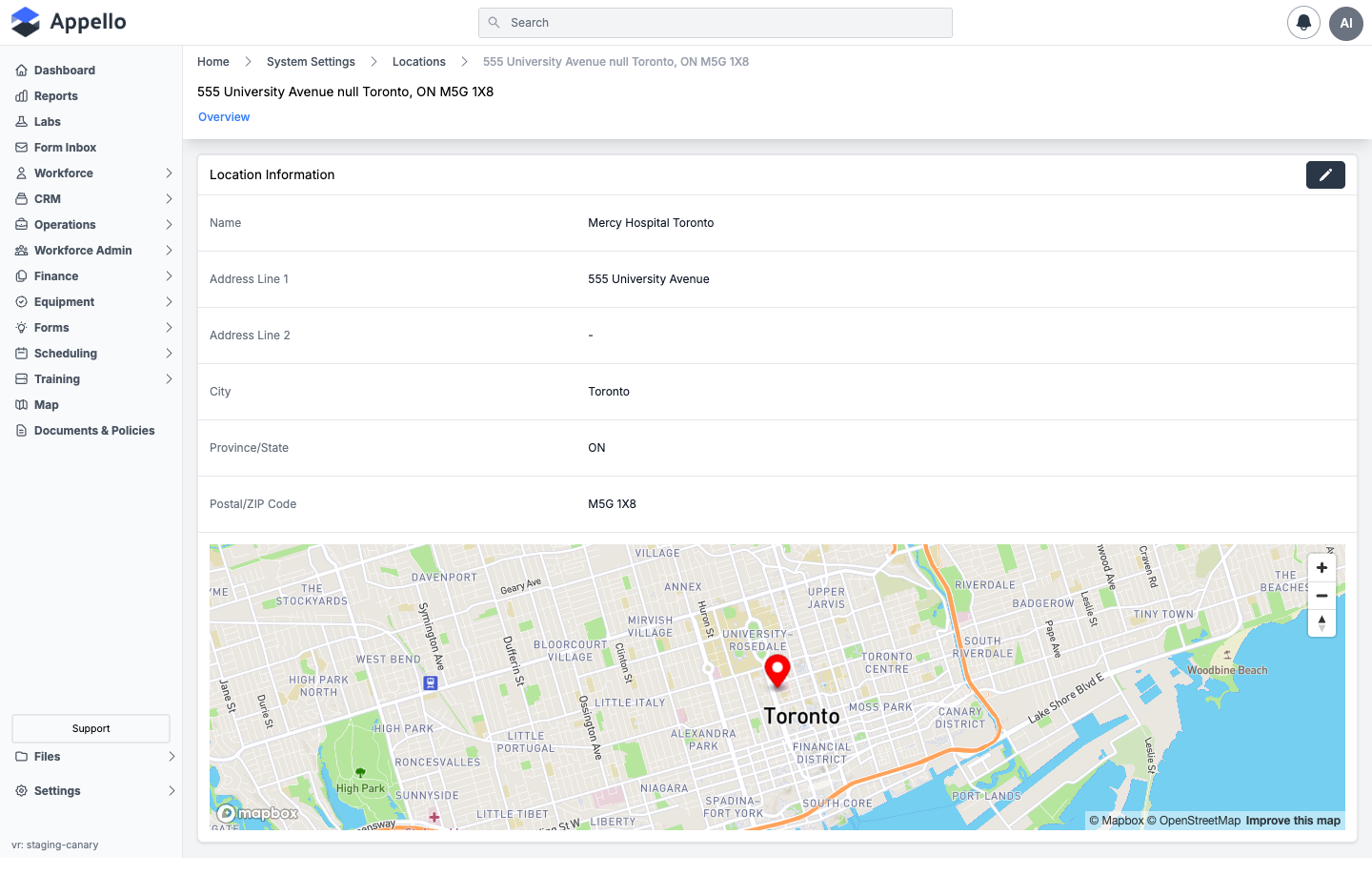
The Location Information card shows every stored field -- Name, Address Line 1, Address Line 2, City, Province/State, and Postal/ZIP Code -- plus a static map centered on the location's coordinates (hidden for PO Boxes). Click the pencil icon on the card to open the same Create / Edit Location panel described above.
This release has no separate custom-properties tab on the location detail page, and no card listing the location's linked records directly on Overview -- to see what a location is used by, use the Used In column on the Settings → Locations list.
How locations are used
A saved location can be selected wherever Appello shows an Assign Location picker, including:
- Company Address — Settings → Business Settings.
- Project Location — on a project.
- Job Location — on a job (often inherited from the job's project or source estimate, but can be set directly). A job's location is also the center point for its clock-in/clock-out geofence radius when Geofence Validation is turned on -- see Instance Settings → Location Tracking and Clock-In/Out Report.
- Union Hall address and Rate Card Origin — see Union Hall Management.
- Travel zones — a union hall's or employee agreement's origin location is the point Appello measures travel-pay zones from -- see Travel Rate Cards & Zones.
- Estimate Location — on an Estimate or Change Order, used for its PDF merge tags.
- Employee Agreement Contract — as the Travel Rate Card Origin ("Specified Address" option), the point travel pay is calculated from.
- Timesheets — the resolved travel rate card origin also appears on individual timesheet entries for travel pay calculations.
- Administrative map — job sites, union halls, and other located records plotted with their saved coordinates -- see Administrative map.
Clock-in geofencing is configured per job, not on the location record itself. When Geofence Validation is enabled in Settings → Instance Settings, Appello centers the geofence radius on the job's location coordinates.
Permissions
These are the action groups on the Locations permission item, set per role under Settings → Roles & Permissions.
| Permission | Controls |
|---|---|
| View | Gates the standalone /locations page, the Settings → Locations tab, and the detail page. |
| Create | Required to open the Create Location / Associate New form. Without it, the form shows a "You do not have permission to create locations" message instead. |
| Edit | Required to edit an existing location, and used for the Archive/Restore bulk actions. |
| Delete | Required for the Delete bulk action. |
Related pages
- Business Settings — sets the instance's own address via this same Associate Location flyout.
- Union Hall Management — union hall address and travel-pay origin.
- Travel Rate Cards & Zones — how a location's coordinates become travel-pay zones.
- Instance Settings — Location Tracking and geofence configuration.
- Clock-In/Out Report — how a job's location geofence shows up against actual punches.
- Administrative map — where located records are plotted.