Accounts Receivable & Billing
The Billing Report (Accounts Receivable) provides a comprehensive view of all invoices, their statuses, and outstanding balances across your projects. Track what's been billed, what's pending, and what's overdue — with drill-down into individual invoices and integration with QuickBooks for automated AR sync.
Navigation
Sidebar → Finance → Accounts Receivable
URL: /overview/billing-report
Permission: the page is gated by Invoices → View — see Permissions below for the full set of invoice permission actions.
Overview
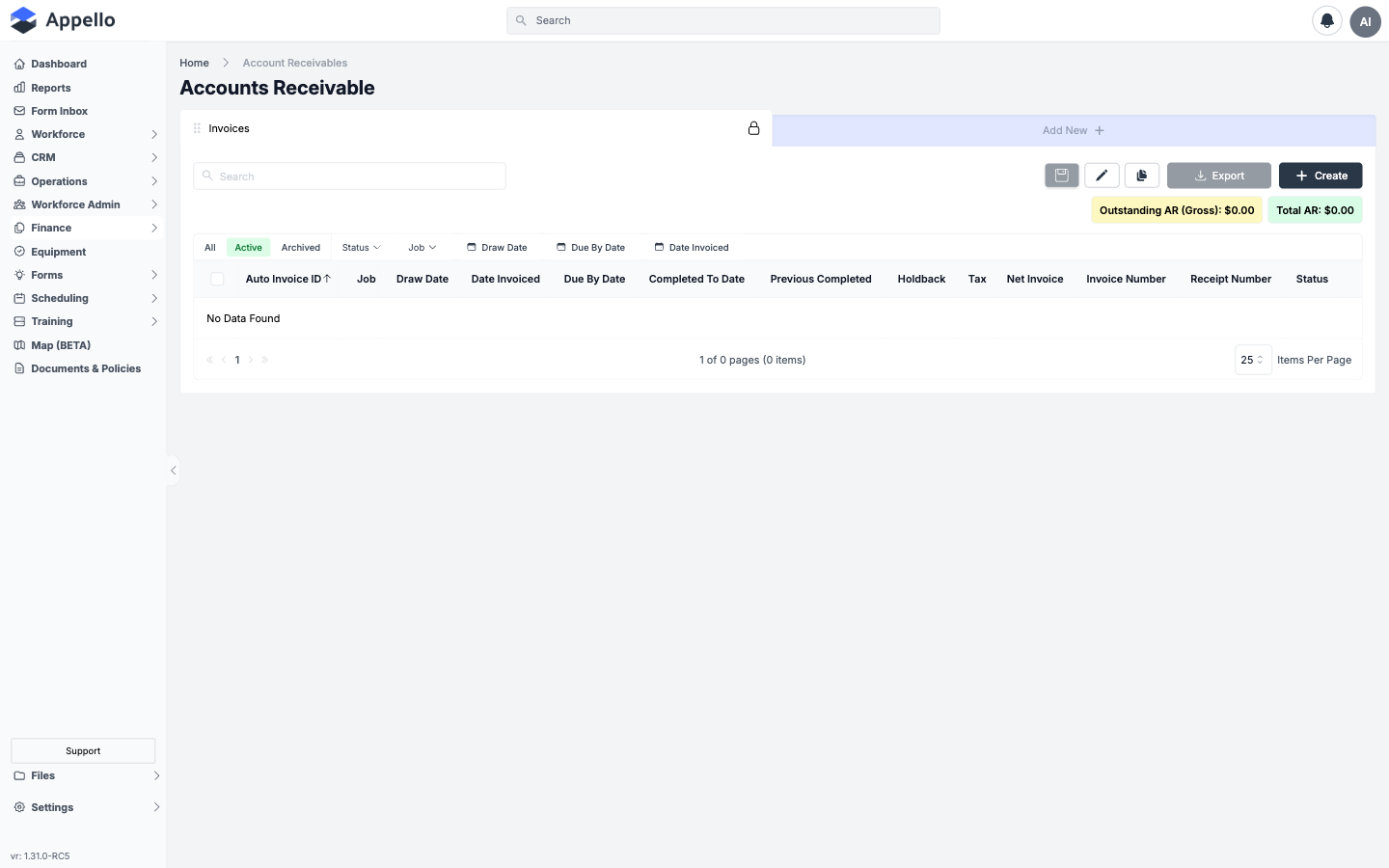
The billing report is the account-wide invoice list. The same list also appears, pre-scoped, on a Company's own Accounts Receivable tab and on a Job's Financials & Reporting → Invoicing tab — the columns, filters, and behavior described here apply in all three places.
| Column | Description |
|---|---|
| Auto Invoice ID | System-generated invoice number, built from the job's full number plus a sequence (e.g. 26-02-INV-01). Always present and read-only. |
| Job | The job the invoice is billed against. |
| Draw Date | The date the invoice is required to be submitted by (optional). |
| Date Invoiced | When the invoice was issued. Required on every invoice. |
| Due By Date | Payment due date. |
| Completed To Date | Cumulative work-completed value this invoice represents (Progress/Holdback/Subsidy templates). |
| Previous Completed | The prior invoice's completed-to-date value, for comparison. |
| Holdback | Dollar value of holdback/retention withheld on this invoice. |
| Tax | Tax amount from the invoice's connected tax type(s). |
| Net Invoice | Computed list column — net invoice total. |
| Invoice Number | Optional, user-entered invoice number (separate from the read-only Auto Invoice ID). |
| Receipt Number | Optional user-entered receipt reference. |
| Status | Configurable per instance -- see Invoice Statuses below. |
The two dollar chips above the table in the screenshot — Outstanding AR (Gross) and Total AR — total the currently filtered rows, not table columns. A third chip, Selected AR, appears once you check one or more rows.
Controls
| Control | Effect |
|---|---|
| Search | Full-text search across the list. |
| All / Active / Archived tabs | Filters by archive state. Row checkboxes expose bulk Archive, Delete, and Restore (restore only under Archived). |
| Column header sort arrows (e.g. Auto Invoice ID ↑) | Re-orders the list by that column. Completed To Date, Previous Completed, Holdback, Tax, and Net Invoice are not sortable. |
| Status / Job / Draw Date / Due By Date / Date Invoiced filter chips | Per-column filters — see Filters below. |
| Views / edit-columns / duplicate-view icons | The standard Appello list "views" system — save named column layouts, reorder/hide columns, duplicate a saved view. |
| Export | Downloads the current filtered view as a spreadsheet. |
| Create | Opens the Create Invoice form in a flyout. |
| Items Per Page / pagination | Standard table paging. |
Invoice Statuses
Invoice statuses are not a fixed system list. Each Appello instance defines its own set of statuses as configurable values (label plus color), the same way Job Status and RFI Status work. An admin manages the list from Settings → Instance Settings → Invoice Status.
Two statuses on that list carry special meaning:
| Role | What it does | Factory-default label |
|---|---|---|
| Default Invoice Status | Applied automatically to every newly created invoice. | Sent |
| Final Paid and Locked Invoice Status | Once an invoice reaches this status, it is locked and can no longer be edited. | Paid |
Beyond those two, an admin can add any number of additional statuses (for example Partially Paid or Overdue) -- there is no built-in status beyond the two roles above.
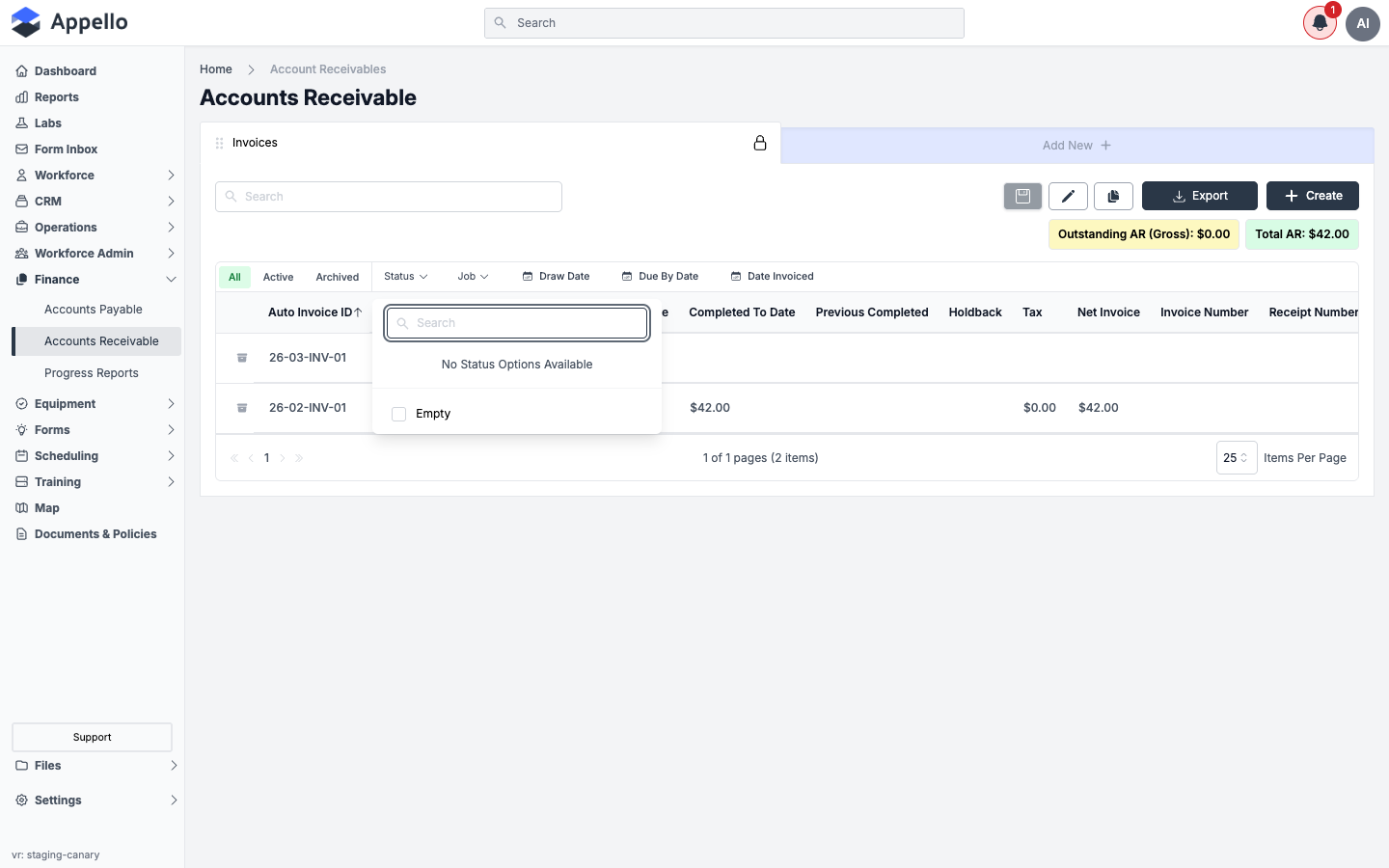
The screenshot above reflects the demo instance used for this guide, which has no invoice statuses configured yet. On an instance with statuses set up, the same dropdown lists each configured status with its color, plus "Empty" for invoices that have never had a status set.
How a status changes
Manually:
- From the Billing Report list, use the status dropdown in the invoice's row.
- From an open invoice, use the required Status field near the bottom of the Invoice Details sidebar.
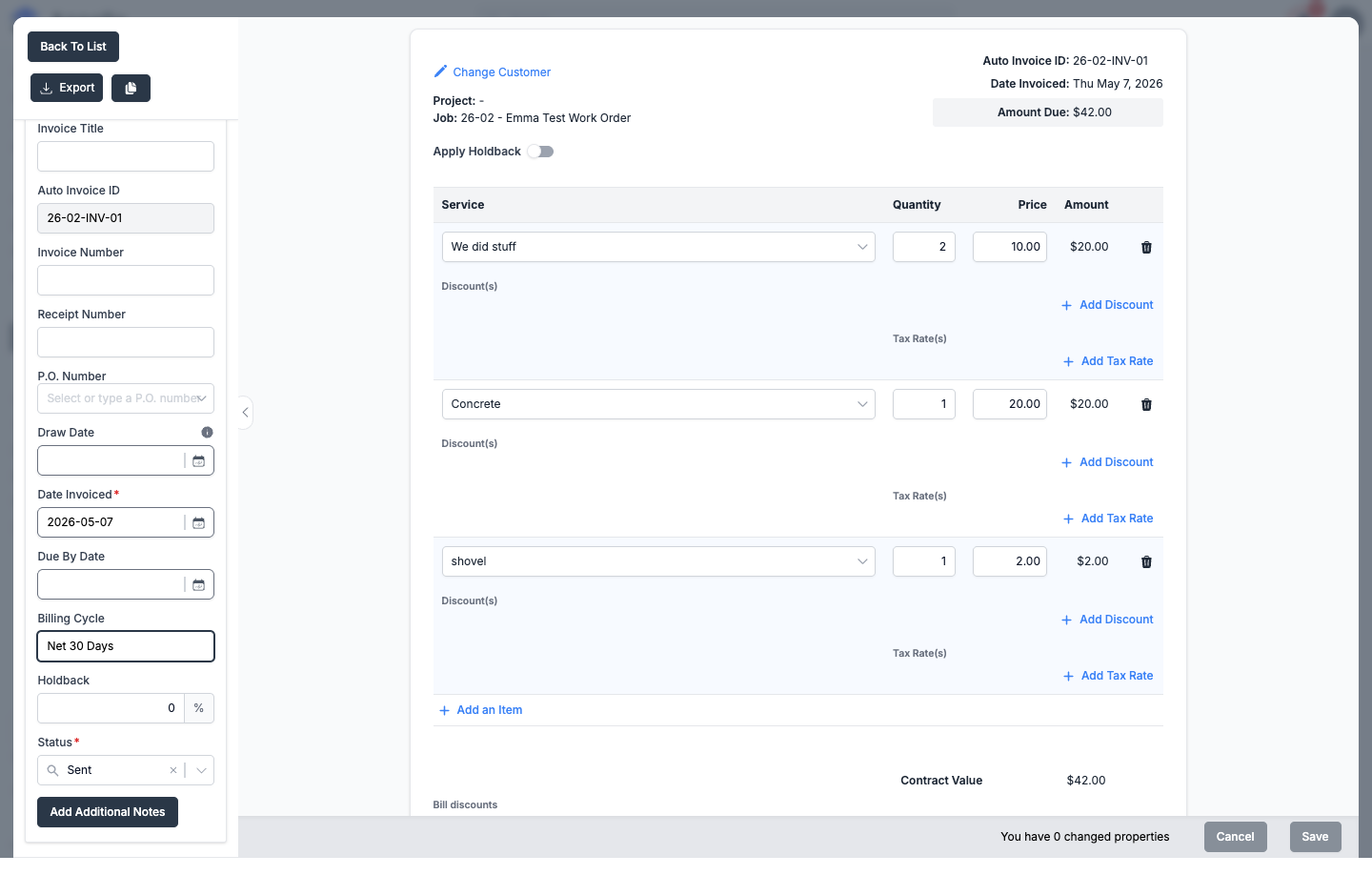
Changing an invoice's status to the Final Paid and Locked Invoice Status locks it from further edits -- Appello confirms before applying it, since the change can't be undone from the invoice itself.
Automatically, via QuickBooks sync:
When Appello is connected to QuickBooks Online (see Accounting Connection), payments recorded in QBO can move an invoice's status without anyone touching the dropdown:
- When QuickBooks reports the invoice's balance has reached $0, Appello moves it to the Final Paid and Locked Invoice Status, locking it from further edits.
- If a later change in QuickBooks (for example a voided payment) puts the balance back above $0, Appello reverts the invoice to the Default Invoice Status.
Rollup status
A separate, multi-select setting — Instance Settings → Invoice Status → Financial Summary rollup statuses (checkboxes, one per configured status; Paid and Sent by default) — controls which statuses count toward a job's invoiced-to-date figure on its Financial Summary. An invoice can carry any status and still appear in this report, but only invoices whose status is checked in that rollup list count toward the job-level rollup total. See Instance Settings for the full settings table.
Filters
| Filter | Description |
|---|---|
| Status | Filter by one or more configured invoice statuses (see above), or Empty. |
| Job | Filter by the job the invoice is billed against. |
| Draw Date | Filter by draw date range. |
| Due By Date | Filter by due date range. |
| Date Invoiced | Filter by the date the invoice was issued. |
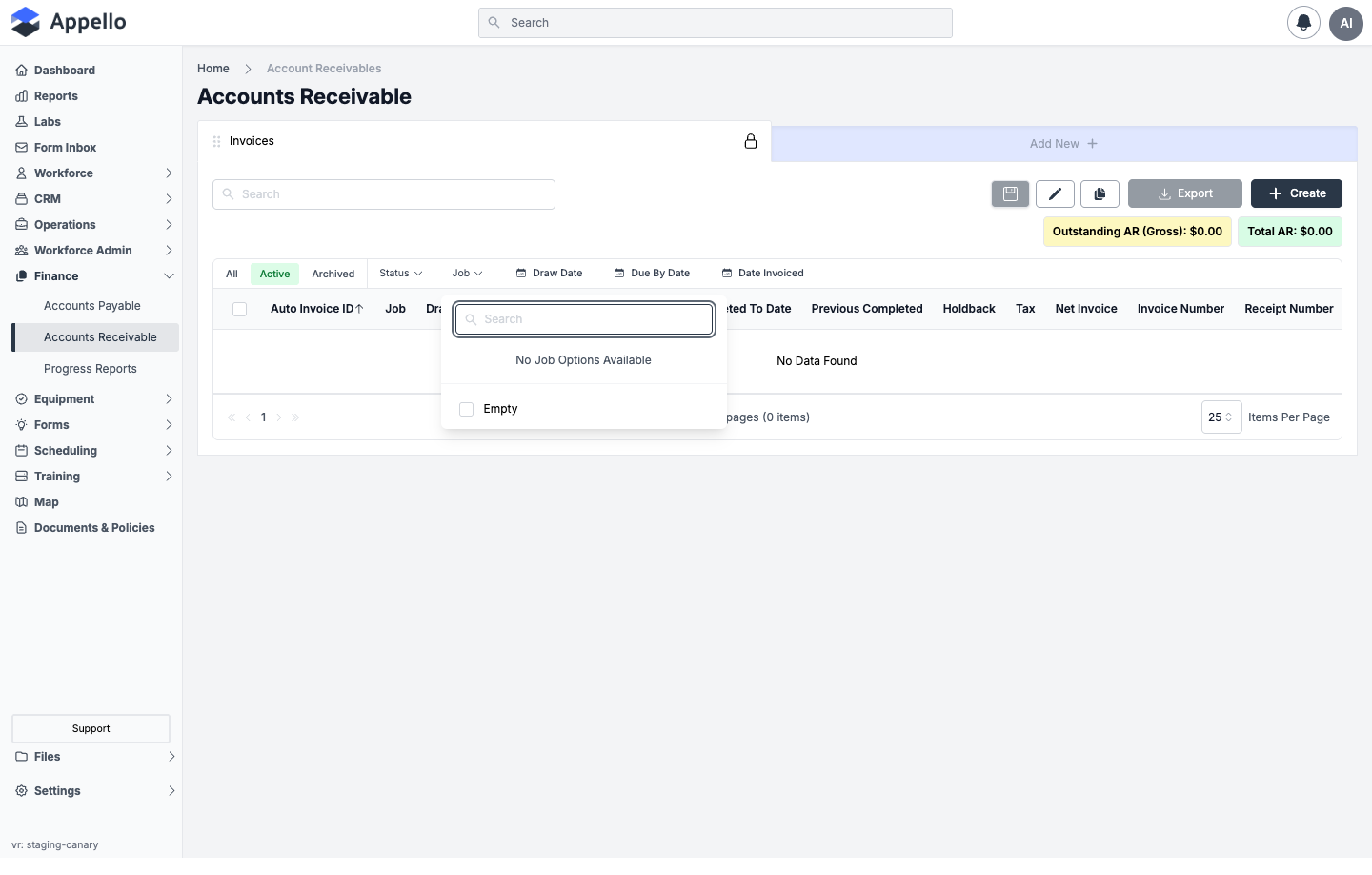
There is no separate Project, Customer, or "unresolved" filter chip on this page. The Job filter narrows to one job at a time; to see only one customer's invoices, open that Company's own Accounts Receivable tab instead (same list, pre-scoped to that customer) — see Overview above. "Unresolved" isn't a status or filter concept in this feature; the closest equivalents are the Outstanding AR (Gross) summary chip and filtering by a specific non-final status.
Permissions
All invoice actions are gated by the Invoices permission item:
| Action | Gates |
|---|---|
| view | Seeing the Billing Report route, a Company's or Job's invoice list, and opening invoice details. |
| create | Using Create, completing the Duplicate Invoice draft, generating an invoice from equipment time or from a Work Order. |
| edit | Editing fields and changing status on an invoice that isn't locked. |
| unlock | Editing an invoice, or moving its status away from the Final Paid and Locked Invoice Status, once it's already locked. Without this permission, a locked invoice's Edit button doesn't appear at all. |
| archive / restore | The list's bulk Archive / Restore row actions. |
| delete | The list's bulk Delete row action, and deleting a line item from an open invoice. |
Invoices also carry an Assign permission action. No control exercised in this pass of the product was found to depend on it specifically, so its effect is unconfirmed.
Creating an Invoice
Invoices in Appello can be generated manually from the Create form, generated from a Progress Report, converted from equipment time entries or a Work Order, or produced by duplicating an existing invoice.
-
Navigate to a job's Financials & Reporting → Invoicing tab, a company's Accounts Receivable tab, or Finance → Accounts Receivable for the company-wide list.
-
Click Create.
-
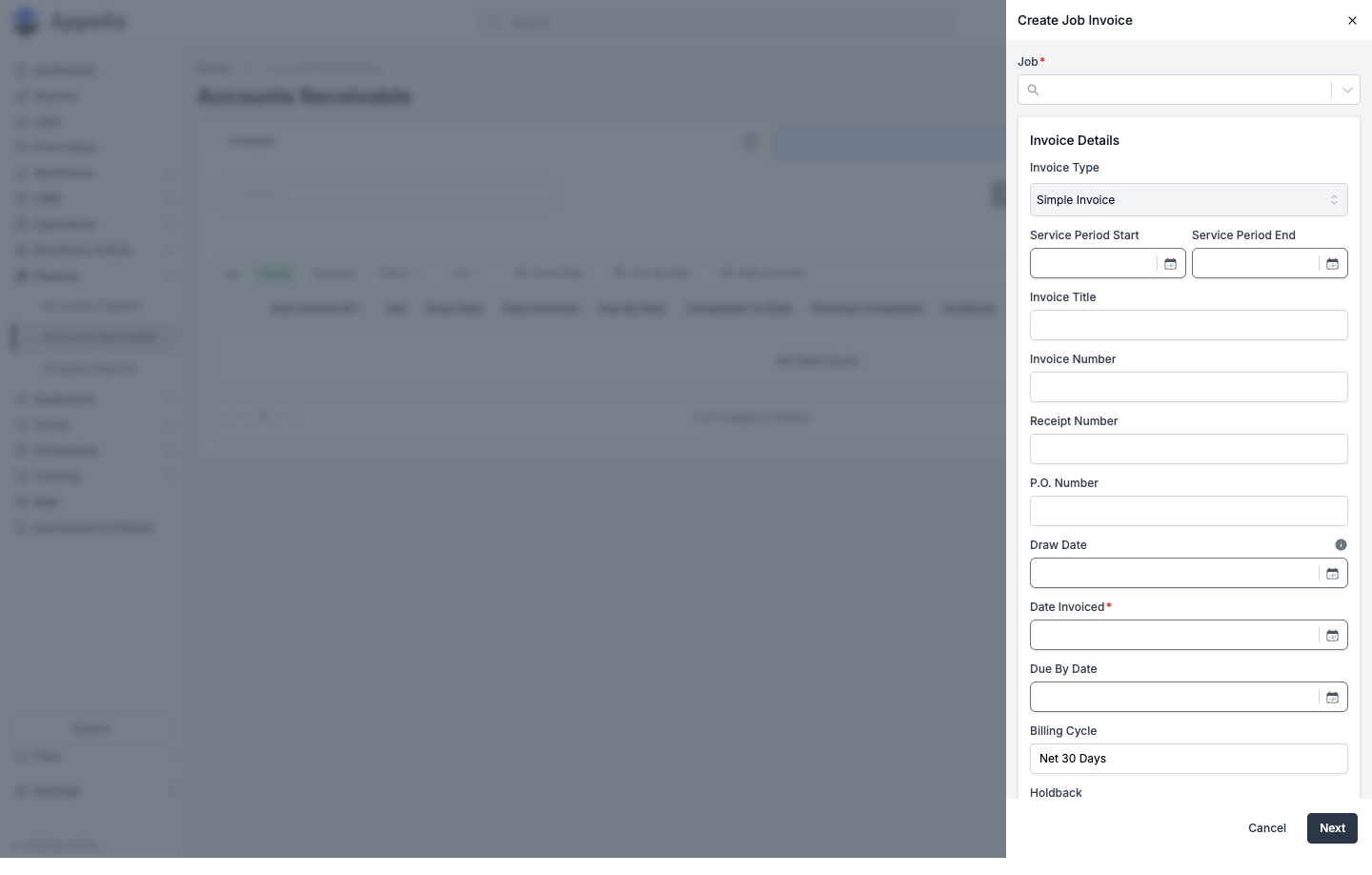
Fill in the form (see field table below) and click Next.
-
Appello creates the invoice with the instance's Default Invoice Status (Sent by default) and immediately opens it in the invoice detail panel for line items, discounts, and tax.
Create form fields
| Field | Required | Type | Effect |
|---|---|---|---|
| Job | Yes | Combobox (job number/name) | The job this invoice bills against. Locked if opened from within a job's own Invoicing tab. |
| Invoice Type | No (defaults to Simple) | Select | Simple, Progress Based Invoice, Subsidy Invoice, or an instance-labeled Holdback invoice type — only the templates the selected job actually qualifies for are offered (Progress requires the job to have cost codes; Subsidy requires a job subsidy amount; Holdback requires a job holdback percent). |
| Service Period Start / End | No | Date pair | The billing period this invoice covers. |
| Invoice Title | No | Text | Free-text title shown on the invoice. |
| Invoice Number | No | Text | User-entered invoice number, separate from the system Auto Invoice ID. Saving with a number that already exists for this customer prompts a "Duplicate Invoice Number Detected" confirmation before it lets you save anyway. |
| P.O. Number | No | Combobox / free text | Selecting or typing a P.O. number; can also inherit the job's own P.O. |
| Draw Date | No | Date | The date the invoice is required to be submitted by. |
| Date Invoiced | Yes | Date | Bounded to a minimum date for Progress/Subsidy templates (must be on/after the prior invoice of that type). |
| Due By Date | No | Date | Payment due date. |
| Billing Cycle | No | Text (defaults from instance settings) | Payment terms shown on the invoice, e.g. "Net 30 Days"; defaults differ for Holdback-template invoices. |
| Holdback % | No (Simple/Progress only) | Numeric (%) | Percentage of this invoice withheld as holdback/retention. |
| Additional Notes | No | Rich text (WYSIWYG) | Free-text notes on the invoice. |
Which of these fields actually render, and their exact labels, are driven by the instance's instance's own invoice field configuration — an admin can relabel or hide most of them. The table above reflects the default set seen on the demo instance.
The Invoice Detail Panel
Opening an invoice (from any of the three list locations) opens the same detail/edit panel. It adds several fields beyond the create form, plus the line-item table, discounts, and tax:
| Field / area | Effect |
|---|---|
| Auto Invoice ID | Read-only, system-generated — shown alongside the editable Invoice Number. |
| Status (required) | See Invoice Statuses. Picking the Final Paid and Locked Invoice Status auto-locks the invoice on save. |
| Locked toggle | Only appears once the invoice's status equals the instance's locked status; requires Invoices → Unlock to change. |
| Tax Rate(s) | Hidden for Simple-template invoices. One or more connected tax types, each shown with its rate and computed dollar amount; compound taxes apply on top of non-compound tax amounts. QuickBooks-connected instances cap this at a single tax type. |
| QBO Product Name | Only shown when QuickBooks Online is connected — maps this invoice's line items to a QuickBooks product/service on sync. |
| Line items (Service, Quantity, Price, Amount) | A table with an Add an Item control; each row supports its own Add Discount and Add Tax Rate. Removing a row deletes that line item on Save. |
| Bill-level discounts | Discounts applied to the whole invoice (percent or fixed amount), with Add Discount. |
| Contract Value / Subtotal / Total | Running calculation shown below the line items. |
| Additional Notes | Opens a rich-text editor modal. |
| Attachments | File-upload document attributes (instance-configurable), same attach/remove pattern used elsewhere in Appello. |
| Export / Duplicate / Back To List | See Invoice PDF Export and Duplicating an Invoice below. |
Locking and editing
- An unlocked invoice always shows an Edit (pencil) button to anyone with Invoices → Edit.
- A locked invoice (status = the instance's Final Paid and Locked Invoice Status) only shows an Edit button to a user who also holds Invoices → Unlock — everyone else sees it read-only.
- Locking is one-way and automatic: saving any change that sets the status to the locked status locks the invoice.
- While locked, Appello shows the banner: "Once an invoice has been changed to [the instance's locked status label], it becomes locked to prevent any further edits. This is done automatically to preserve the integrity of the invoice." Changing the status field to the locked status before saving shows a second warning that the change will lock the invoice.
Duplicating an Invoice
Available only on Simple-template invoices (the small duplicate icon next to Export, in the detail panel header):
-
Open a Simple invoice and click the duplicate icon.
-
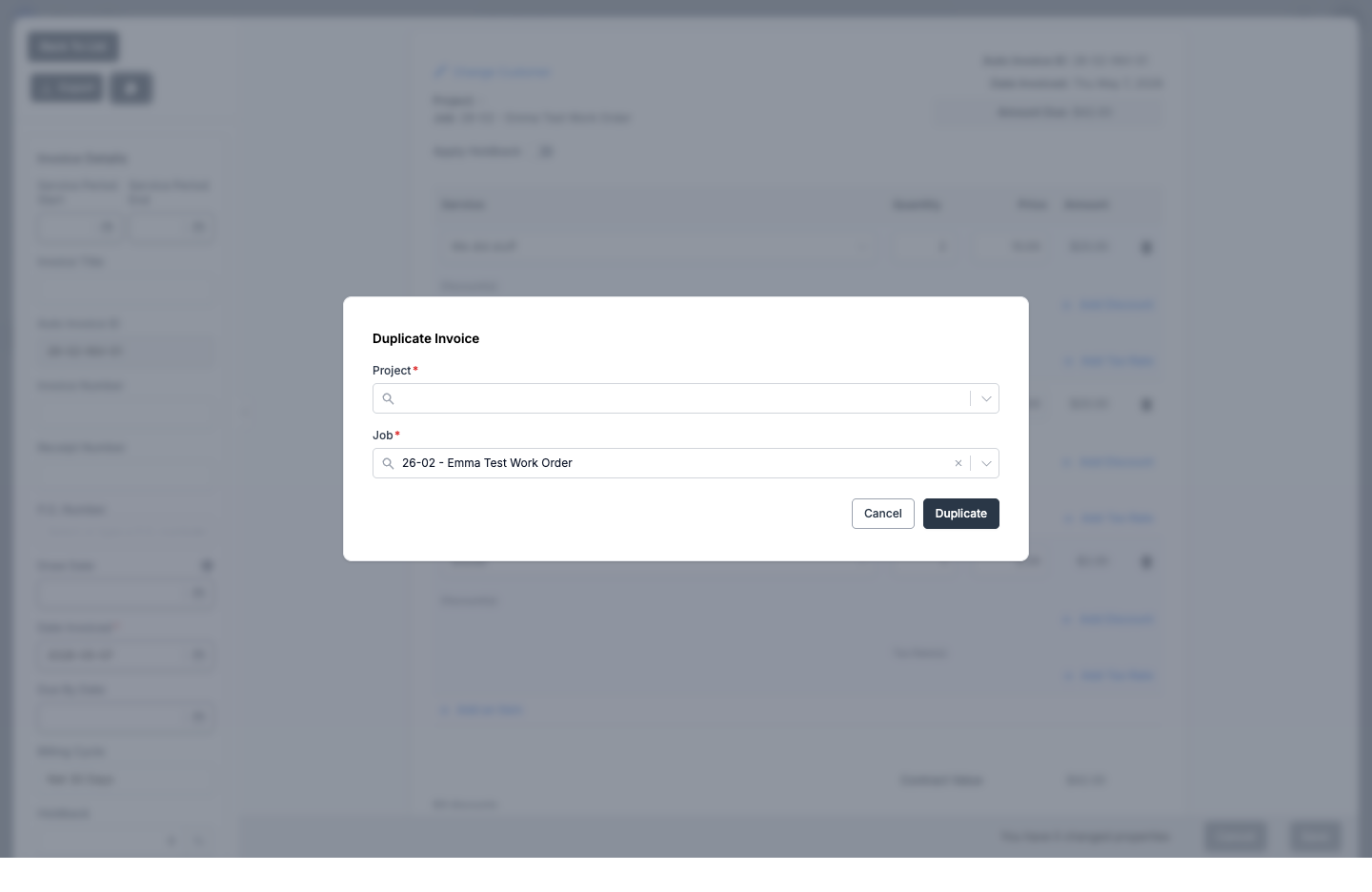
Pick a Project and a Job (both required) — this can be a different job than the source invoice, so duplicating across jobs is supported. The Job field defaults to the source invoice's own job.
-
Click Duplicate.
Clicking Duplicate doesn't create anything by itself — it puts the currently open invoice into a draft state against the chosen target job (banner: "Draft — This invoice has not been created yet. Save to create it."). Only when you click Save does Appello actually copy the invoice (line items, taxes, and discounts included) onto the target job and open that new invoice.
Equipment Time → Invoice
From a job's Financials & Reporting → Invoicing tab (not the company-wide Accounts Receivable page), a Create Equipment Invoice (N) button appears above the invoice list whenever that job has unbilled equipment time entries.
- Click Create Equipment Invoice (N).
- A modal lists the job's unbilled equipment time, bucketed by equipment and rate label, with columns Period, Equipment, Rate Label, Billed Per, Qty, Rate, Amount; rows expand to show the daily breakdown. A single date-range filter narrows the list.
- Check the rows to bill (a running Selected: N lines (M time entries) · Total: $X footer updates), then click Generate Invoice.
- Appello creates a brand-new Simple invoice from the selected time entries and opens it in the invoice detail panel.
This control wasn't reachable in this documentation pass — the demo job used for testing has no unbilled equipment time, so no screenshot was captured. The steps above are described rather than captured live.
Work Order → Invoice Conversion
A completed Work Order converts into a Simple Invoice from its own Generate Invoice button — see From a completed Work Order to an invoice for the full workflow, permissions, and screenshots on that page. In short:
- Appello previews the labor, material, and equipment line items the Work Order would bill, and blocks the conversion (with "This Work Order has no line items to invoice…") if there are none.
- Confirming creates a Simple Invoice pre-filled with those line items and opens it in this same invoice detail panel — every field and control described on this page (line items, tax, discounts, export, duplication) applies to a Work Order's invoice exactly as it does to any other Simple invoice.
- Generating the invoice does not change the Work Order's own status — that's a separate, manual step.
- Only one invoice can be generated this way per Work Order.
Invoice PDF Export
-
Open an invoice from the Billing Report list (or any of its scoped variants).
-
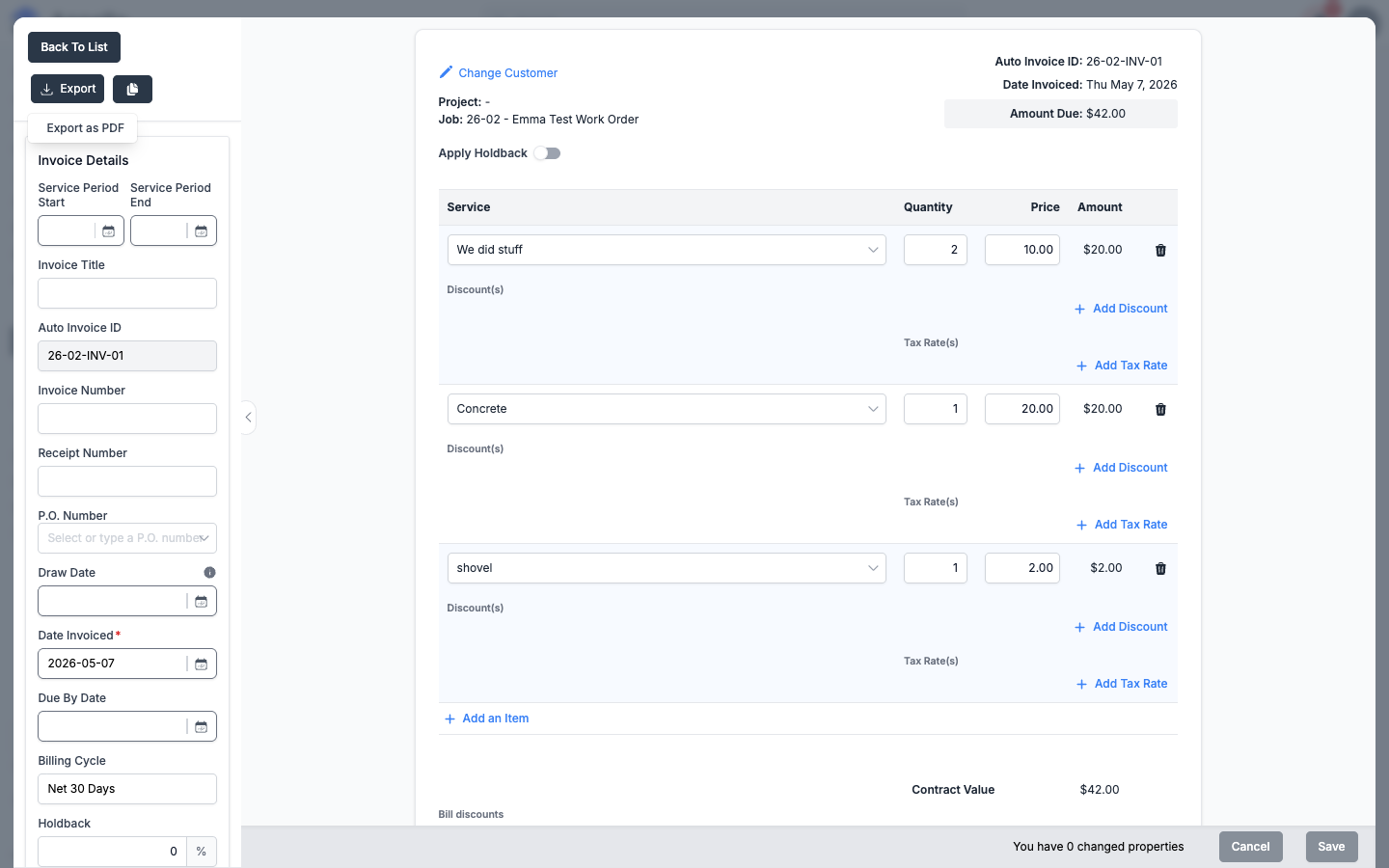
Click Export in the top-left corner of the invoice detail panel. For most invoices this opens a single option, Export as PDF; Progress-template invoices also show Export AIA G702/G703 — see AIA G702/G703 Export below.
-
Export as PDF opens a customization panel where you can toggle which optional fields print on the PDF before it generates: Title, Invoice No (or Auto Invoice ID — these two are mutually exclusive; whichever the invoice actually has populates is checked and the other is disabled), Service Period, Draw Date, Date Invoiced (always included), Due Date, Receipt Number, and P.O. Number. Invoices generated from a Work Order add a Work Completed Document option to merge that Work Order's own completed-work document into the PDF.
-
The PDF downloads directly to your device. This action does not email anything to the customer — it's a local download only.
What "branded" means
The exported PDF picks up your company's branding automatically, with no per-invoice setup:
- Your Logo, uploaded under Business Settings → Profile Appearance, prints on every invoice PDF.
- The downloaded file's name follows the Invoice PDF Download Naming Convention configured under Business Settings → Company Billing Information, which supports merge tags like Invoice #, Job #, and P.O. # so exported files are named consistently across your instance.
Invoice PDFs are not one of the configurable Download Templates — those cover Projects, Jobs, Work Orders, Companies, Contacts, Equipment, and RFIs, but not invoices. An invoice's PDF layout is fixed; only branding (logo, file naming) is configurable, via Business Settings as described above. See Templates for the full template system Appello does expose.
AIA G702/G703 Export
Only Progress-template invoices can export an AIA-style pay application, as a two-sheet spreadsheet (.xlsx) rather than a PDF:
- G702 – Application — the summary sheet: contractor/owner/project header block, then the standard AIA lines 1–9 (Original Contract Sum, Net Change by Change Orders, Contract Sum To Date, Total Completed and Stored To Date, Retainage, Total Earned Less Retainage, Less Previous Certificates for Payment, Current Payment Due, Balance To Finish), plus blank Contractor/Architect signature and date rows.
- G703 – Continuation Sheet — one row per cost code and per approved change order, with columns Item No., Description of Work, Scheduled Value, From Previous Application, This Period, Materials Presently Stored (always $0 — not modeled in Appello), Total Completed and Stored to Date, %, Balance to Finish, and Retainage, plus a Grand Total row.
Appello derives the Schedule of Values for this export directly from the job's own Cost Codes — there's no separate SOV entity to configure first; see Cost Codes & Schedule of Values. The "From Previous Application" column comes from the single immediately-prior Progress invoice on the same job, so a cost code skipped in that one prior invoice will understate this column.
This export wasn't reachable during this documentation pass — the demo instance's only two seeded invoices are both Simple-template, and attempting the export on any other template raises "AIA G702/G703 export is only available for Progress invoices." No screenshot could be captured; the field list above is described rather than captured live.
QuickBooks Integration
When connected to QuickBooks Online:
- AR sync pushes invoices from Appello to QBO.
- Payment sync records payments received in QBO back to Appello, and can change the invoice's status automatically -- see How a status changes above.
- Customer mapping links Appello CRM companies to QBO customers.
See Accounting Connection for setup details.
Related Pages
- Progress Reports — Generate progress billing from SOV
- Cost Codes & SOV — Schedule of Values configuration
- Accounting Connection — QuickBooks integration
- Instance Settings → Invoice Status — default, locked, and rollup status configuration
- Templates — Appello's document/download template system
- Work Orders — Work Order → Invoice conversion
- Job Detail → Invoicing tab — the job-scoped version of this list