Human Resources Settings
Module: Settings | Platform: Web
Human Resources Settings manages your company's employment agreements, union configurations, leave policies, wage regions, and company holidays.
Navigation
Sidebar → Settings → Human Resources
Overview
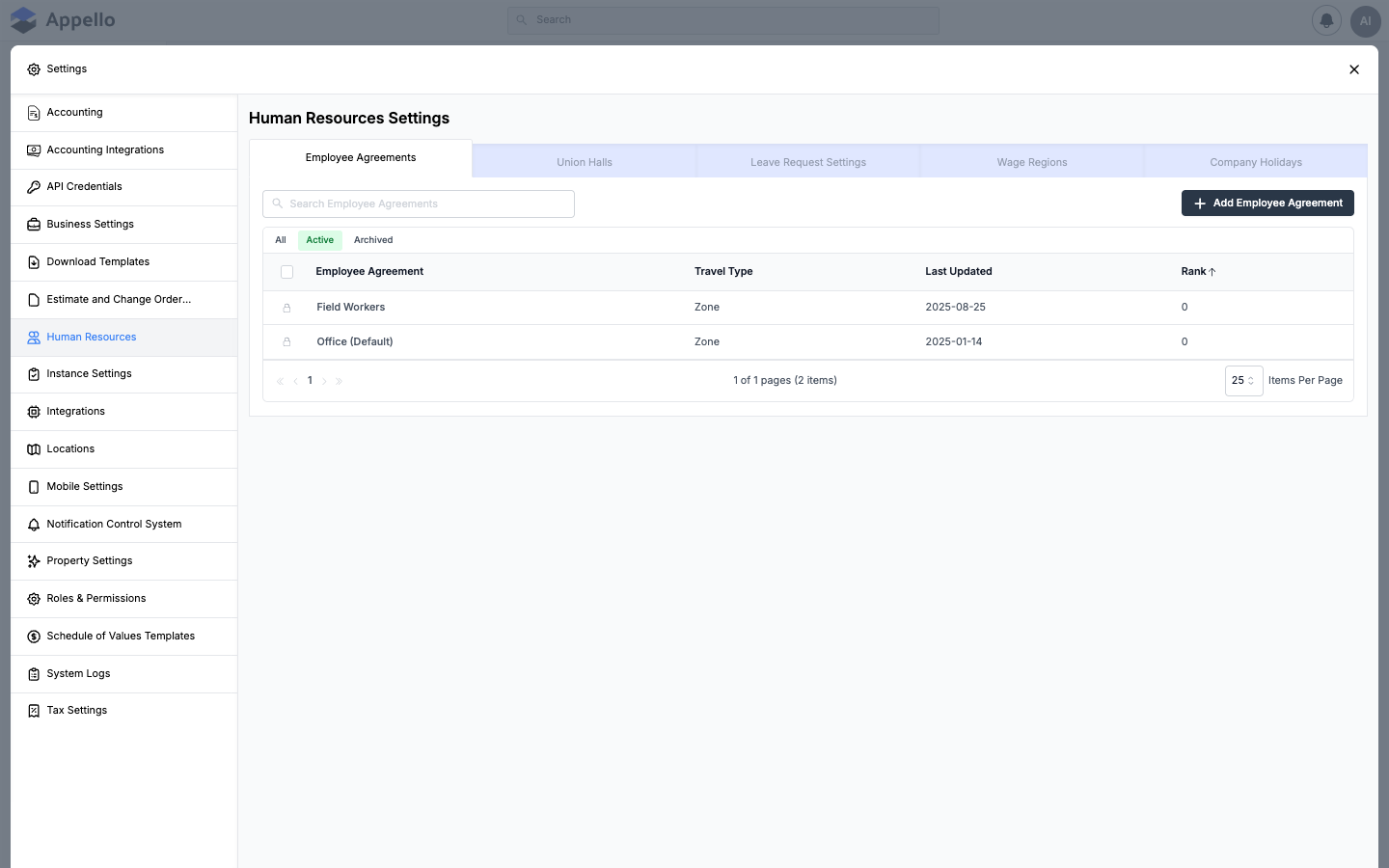
The tab has five sub-tabs -- Employee Agreements, Union Halls, Leave Request Settings, Wage Regions, and Company Holidays -- each covered in its own section below. Every sub-tab is gated by its own permission item, so which tabs a user sees (and whether they can edit, versus only view) depends on their role.
Tabs
Employee Agreements
Define the different employment agreement types in your company (e.g. Field Workers, Office).
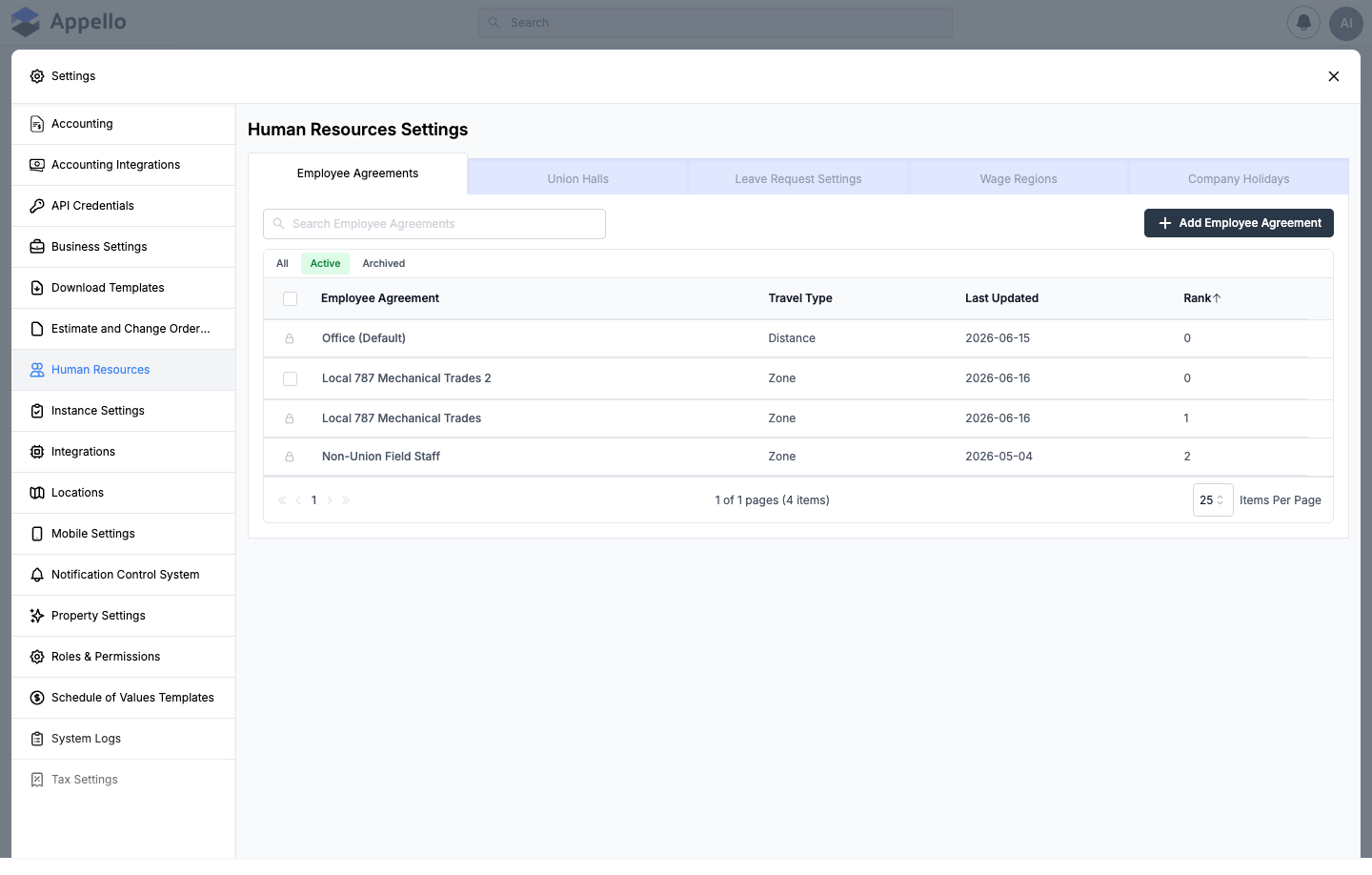
| Column | Description |
|---|---|
| Employee Agreement | Name of the agreement type. Click to open its detail page (see Wage category setup below). |
| Travel Type | How travel is calculated — Distance (per KM/mile) or Zone (by Travel Rate Card Zone). |
| Last Updated | When the agreement was last modified. |
| Rank | Sort order for display purposes (e.g. the order agreement tabs appear on the Timesheet Log). |
Use All / Active / Archived to filter, and Search Employee Agreements to find a specific agreement. A locked (padlock) row indicates the agreement is a system default and cannot be archived or deleted while it's the instance's default agreement.
Actions: Add Employee Agreement, Search, filter (All/Active/Archived); select one or more rows to Archive, Delete, or Restore. Opening an existing agreement's edit panel exposes an Actions → Duplicate option that copies the agreement (its wage categories, trade classifications, and line items) and opens the new copy for editing.
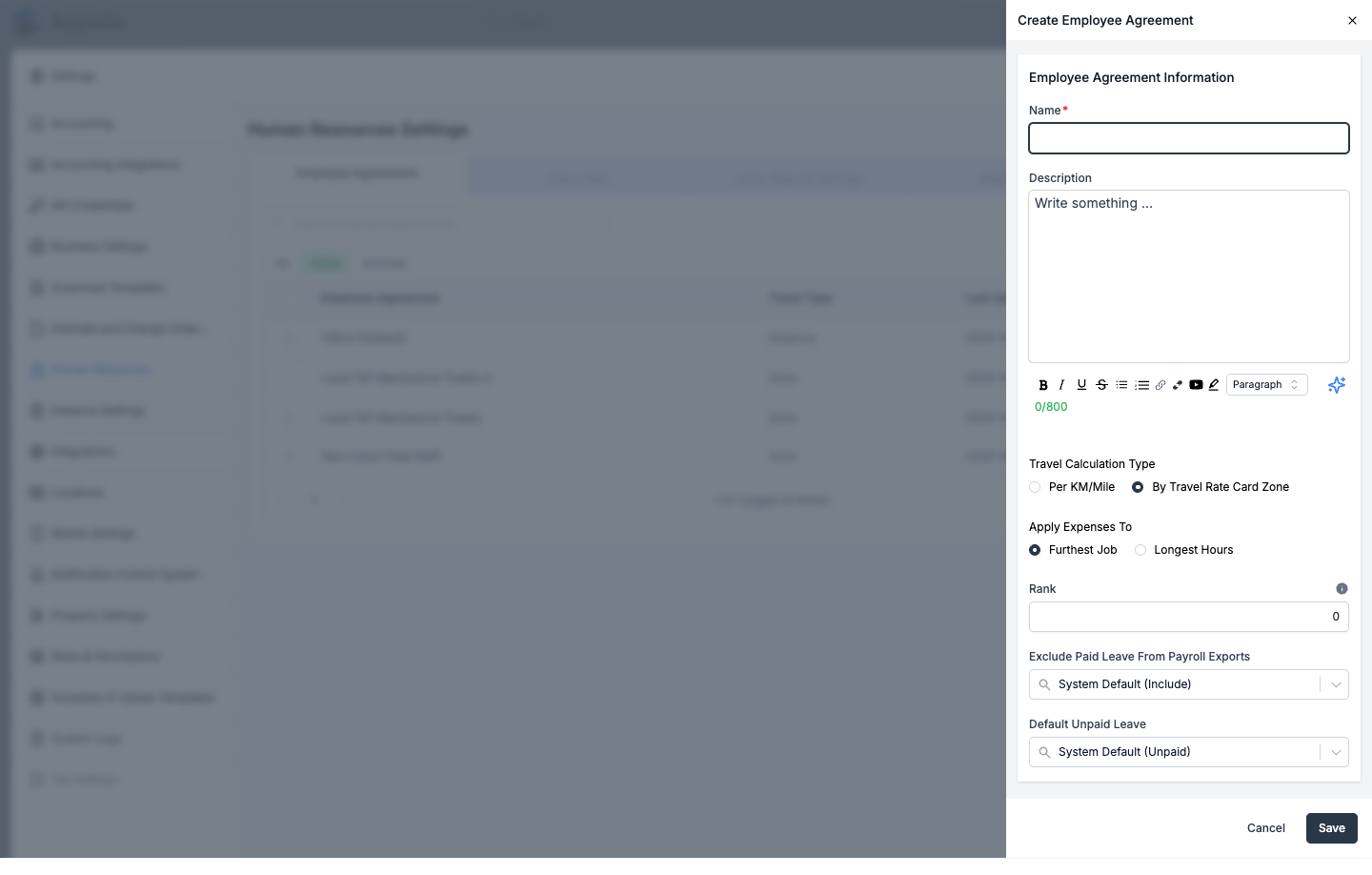
To create or edit an Employee Agreement, click Add Employee Agreement (or open an existing one's edit panel):
| Field | Required | Type | Effect |
|---|---|---|---|
| Name | Yes | Text | The agreement's display name. |
| Description | No | Rich text (WYSIWYG, 800 char max) | Free-text notes. |
| Travel Calculation Type | Yes | Radio: Per KM/Mile or By Travel Rate Card Zone | Sets travelCalculationType (Distance or Zone), which determines whether this agreement uses distance-based or zone-based travel pay. See Travel Rate Cards & Zones. |
| Apply Expenses To | Only shown for Zone | Radio: Furthest Job or Longest Hours | Default rule for which job a multi-job day's travel/board expense is attributed to. |
| Rank | No (defaults to 0) | Numeric | Sort order for this agreement's tab in places like the Timesheet Log. |
| Exclude Paid Leave From Payroll Exports | No | Combobox (defaults to the instance's own setting, shown in parentheses) | Overrides how this agreement's paid leave is treated on payroll exports. |
| Default Unpaid Leave | No | Combobox (defaults to the instance's own setting, shown in parentheses) | Overrides whether unpaid leave defaults to Paid or Unpaid for workers under this agreement. |
Click Save to create or update the agreement, or Cancel to discard changes.
Creating a new agreement seeds it with a starter Base Rate line item, a 1X wage category, and a first Agreement Version dated today, so it has a working wage table immediately — see Employment Agreements for the full detail-page workflow (agreement versions, wage rates, overtime rules, holiday rates, and travel/board rate cards).
Permissions: gated by the Employee Agreement permission item — View to see the tab, Edit to create, edit, archive, restore, or delete agreements. Without Edit, the tab shows a read-only banner and the create/edit controls are hidden.
Union Halls
Configure union hall associations for unionized workforces. Define hall names, locals, and associated trades.
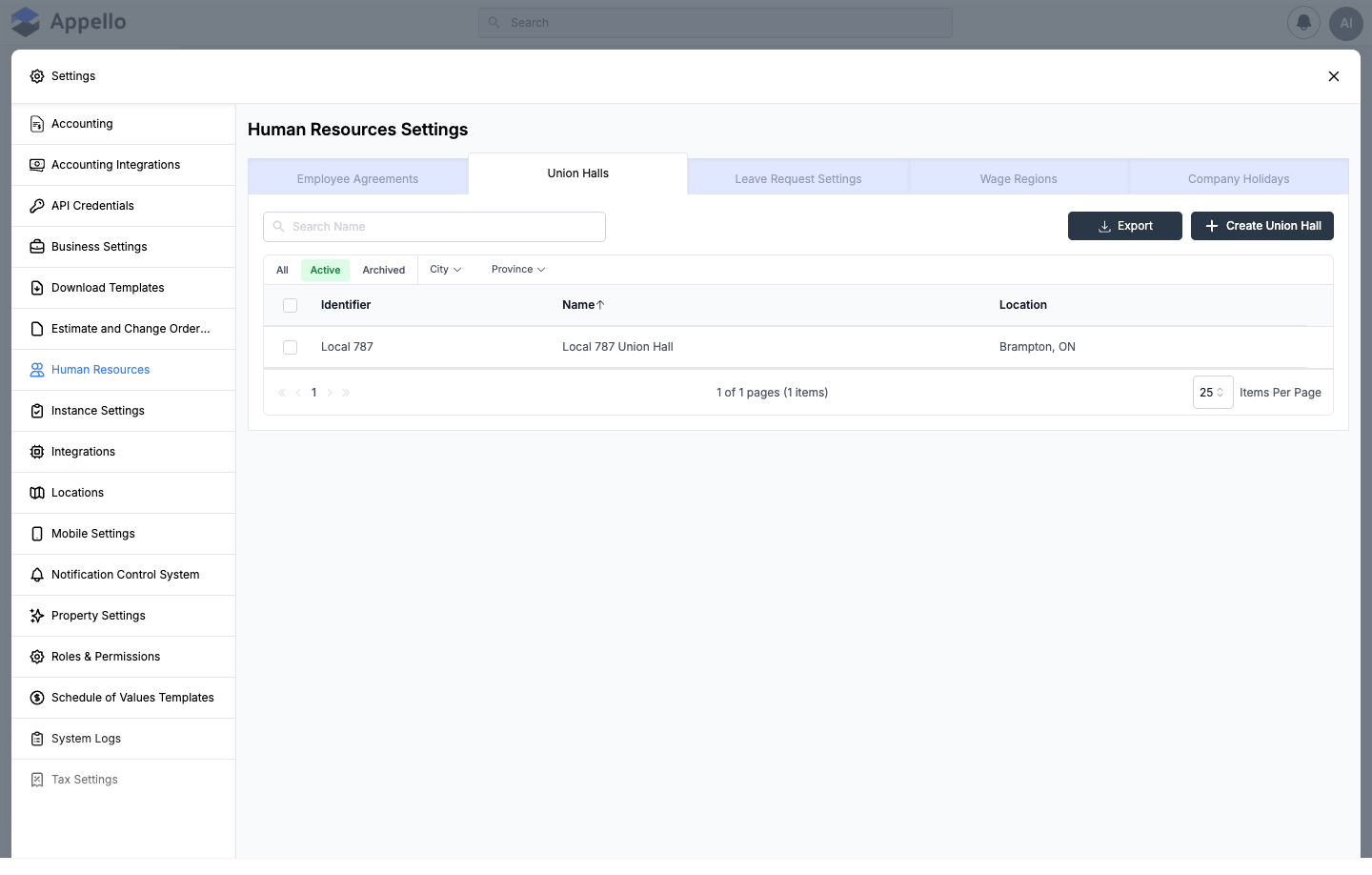
| Column | Description |
|---|---|
| Identifier | A short code entered for the hall (e.g. a local number), linked to the hall's detail page. |
| Name | The hall's full name, linked to its detail page. |
| Location | The city and province/state of the hall's address. |
Use All / Active / Archived, and the City / Province filters, to narrow the list, or Search Name to find a specific hall. Export downloads the filtered list as a CSV. Selecting one or more halls exposes actions to archive, restore, or delete them.
To create a Union Hall, click Create Union Hall:
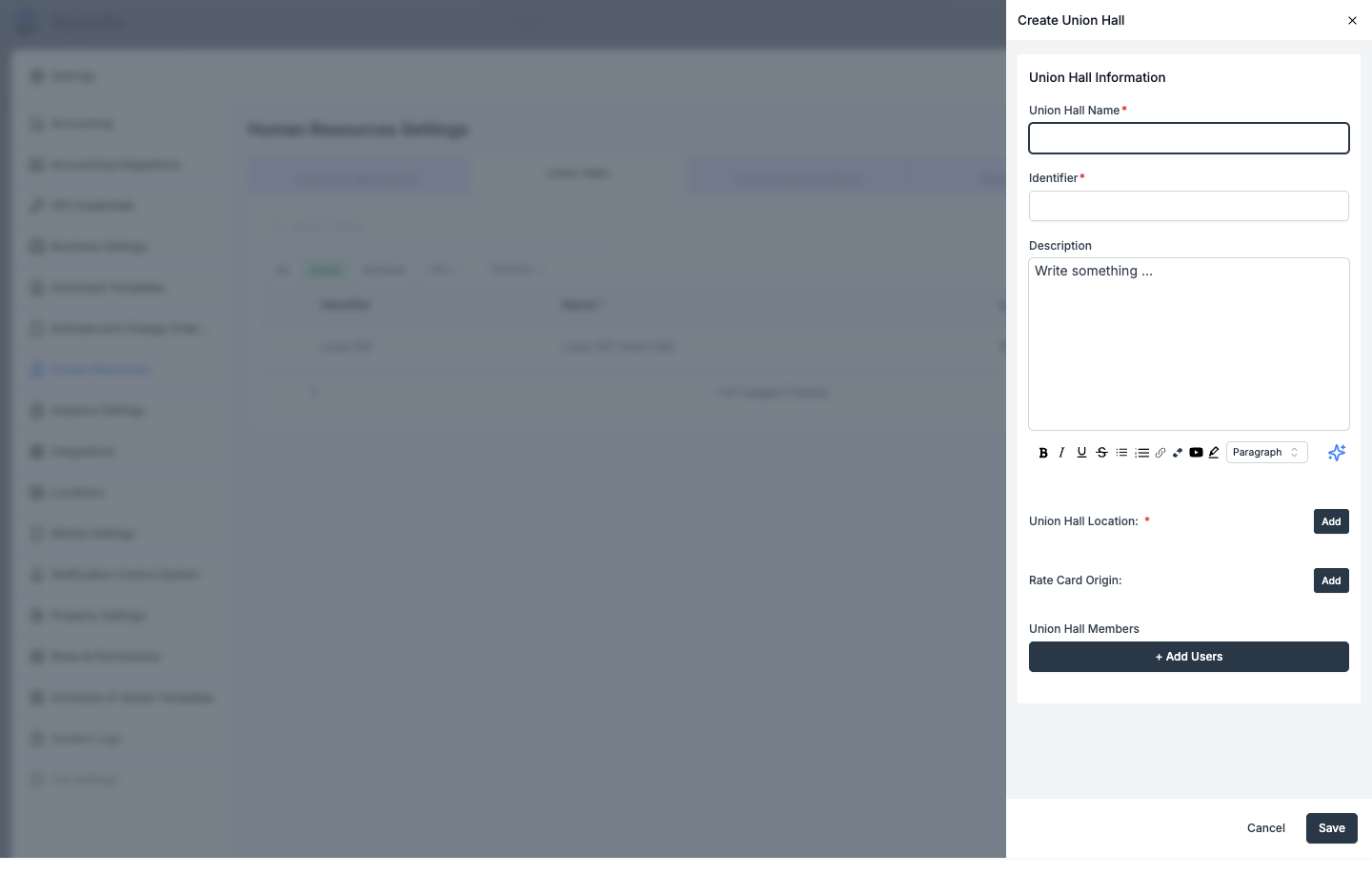
| Field | Required | Type | Effect |
|---|---|---|---|
| Union Hall Name | Yes | Text | The hall's display name. |
| Identifier | Yes | Text | A short code for the hall (for example, a local number). Shown in the list's Identifier column. |
| Description | No | Rich text (WYSIWYG) | Free-text notes. |
| Union Hall Location | Yes | Address (click Add) | The hall's dispatch address, and the default origin for travel-pay calculations. |
| Rate Card Origin | No | Address (click Add) | A different address to use as the travel-pay origin. If left blank, Appello uses the hall's own Union Hall Location instead. |
| Union Hall Members | No | User picker (click + Add Users) | Assigns workers to this hall directly from the create/edit panel, with an effective date. |
Click Save to create the hall, or Cancel to discard changes. A union hall's linked Employee Agreement is not set here — it's set from that agreement's own Union Halls tab (see Wage category setup below).
Permissions: gated by the Union Hall permission item — View to see the tab, Edit to create, edit, archive, restore, or delete halls.
See Union Hall Management for the hall's detail page (Overview and Assigned Users tabs, the travel-zone map) and how to assign a worker to a hall from their own profile.
Leave Request Settings
Set up the types of leave available to employees (vacation, sick, personal, etc.) and their approval workflows.
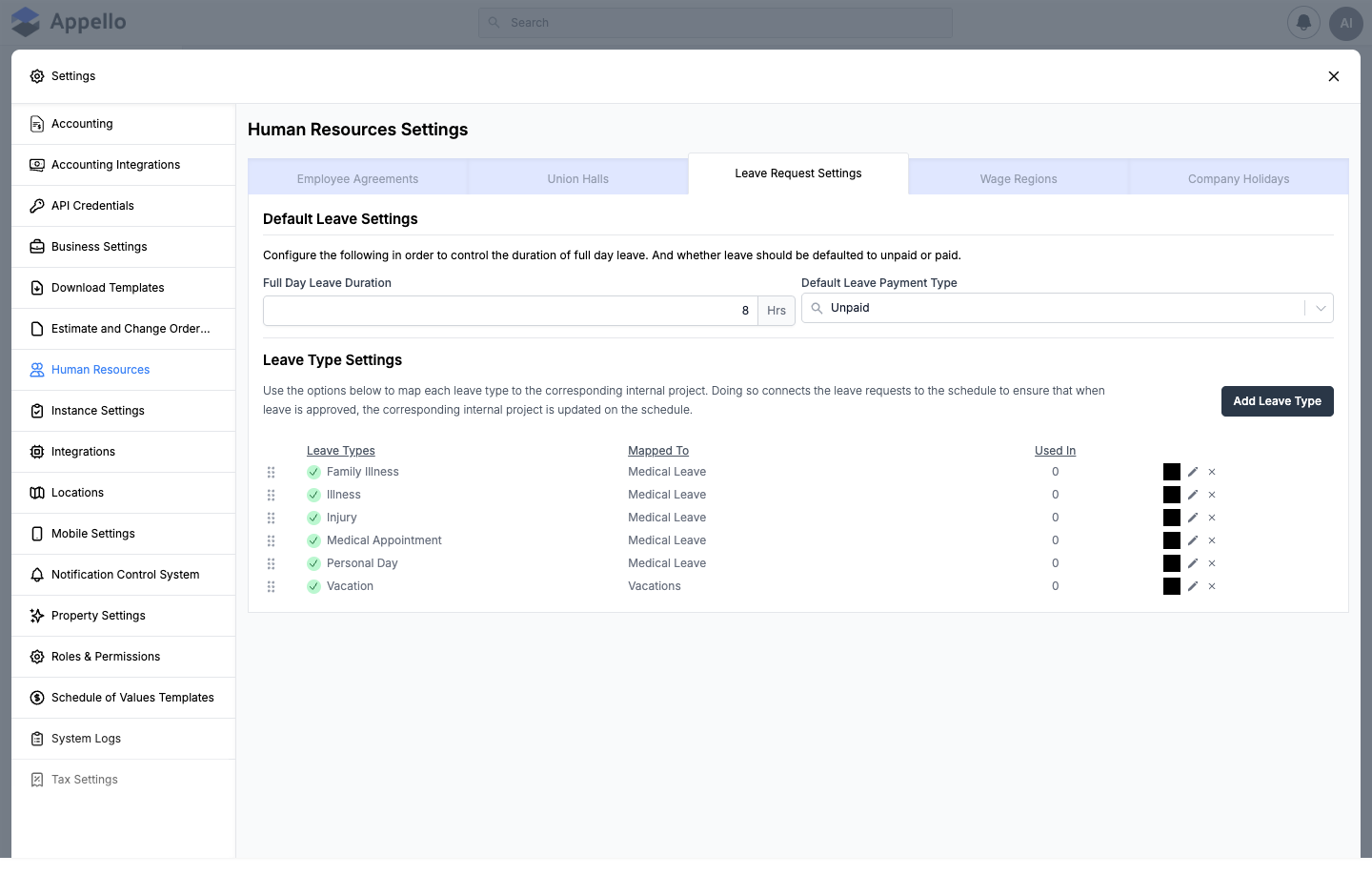
Default Leave Settings are instance-wide values that apply to every leave request:
| Field | Required | Type | Effect |
|---|---|---|---|
| Full Day Leave Duration | No | Numeric (hours) | How many hours a full-day (or multi-day) leave request counts as, per day (defaults to 8). |
| Default Leave Payment Type | No | Combobox: Paid or Unpaid | The default for a new leave request's Paid Leave toggle, used wherever nothing else overrides it (an Employee Agreement's own Default Unpaid Leave setting can override this per agreement — see above). |
Changing either field shows an unsaved-changes bar at the bottom of the panel with Save and Cancel — there's no separate "edit" click for these two fields.
Below that, the Leave Type Settings table lists every configured leave type:
| Column | Description |
|---|---|
| Leave Types | The leave type's display name, with a drag handle on the left for reordering the list (drag-and-drop, saved immediately). |
| Mapped To | The internal project this leave type is linked to — approving a leave request on this type updates that project on the schedule. |
| Used In | A count of how many leave requests currently use this leave type. Hover the count to see where it's used. |
| (unlabeled) | The leave type's color swatch, an edit (pencil) icon, and a delete (×) icon. |
The delete icon only appears when Used In is 0 — a leave type already referenced by a leave
request can't be deleted until it's no longer referenced.
To add or edit a Leave Type, click Add Leave Type (or the pencil icon on an existing row):
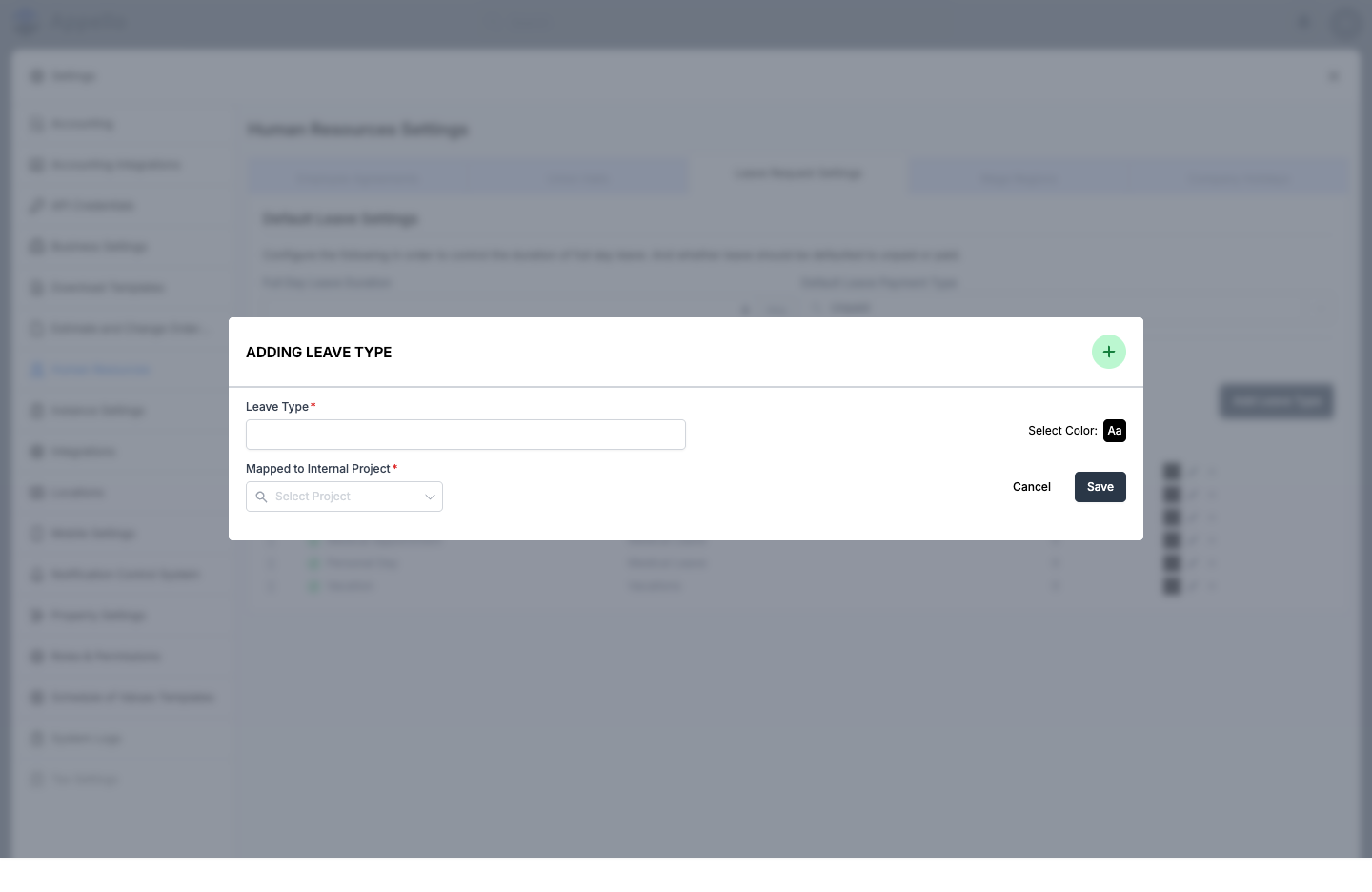
| Field | Required | Type | Effect |
|---|---|---|---|
| Leave Type | Yes | Text | The display name shown to workers and admins when requesting/reviewing leave. |
| Select Color | No (defaults to black) | Color picker | The color swatch shown next to this leave type in lists and on the calendar. |
| Mapped to Internal Project | Yes | Combobox (internal projects) | The internal project this leave type reports against on the schedule. |
Click Save to create or update the leave type, or Cancel to close the panel without changes.
Confirmed from the LeaveType model and its add/edit form: a leave type itself carries only
name, color, order, and its mapped internal project (plus an internal
description field the current form does not expose). There is no per-type Paid/Unpaid,
accrual, annual-limit, or approval-required setting. Whether a request is paid follows the
instance-wide Default Leave Payment Type above (or the agreement-level override) and the
Paid Leave toggle on the request itself; every leave request always requires administrator
approval — there is no per-type toggle for that either. See
Leave Submissions for how a request is actually submitted,
approved, and paid.
Permissions: gated by the Leave Type permission item — View to see the tab and the
Default Leave Settings, Edit to change the defaults or reorder leave types, Create to add
a leave type, and Delete to remove one (only available while Used In is 0).
See Leave Types for the full leave lifecycle (mobile submission, desktop approval, and how approved leave blocks the scheduling calendar) and Leave Submissions for managing individual requests.
Wage Regions
Wage regions are geographic pay zones you can assign to wage rates, break time allowances, and other pay-affecting settings. Use them when your company operates across multiple jurisdictions that require different prevailing wage rates for the same job classification.
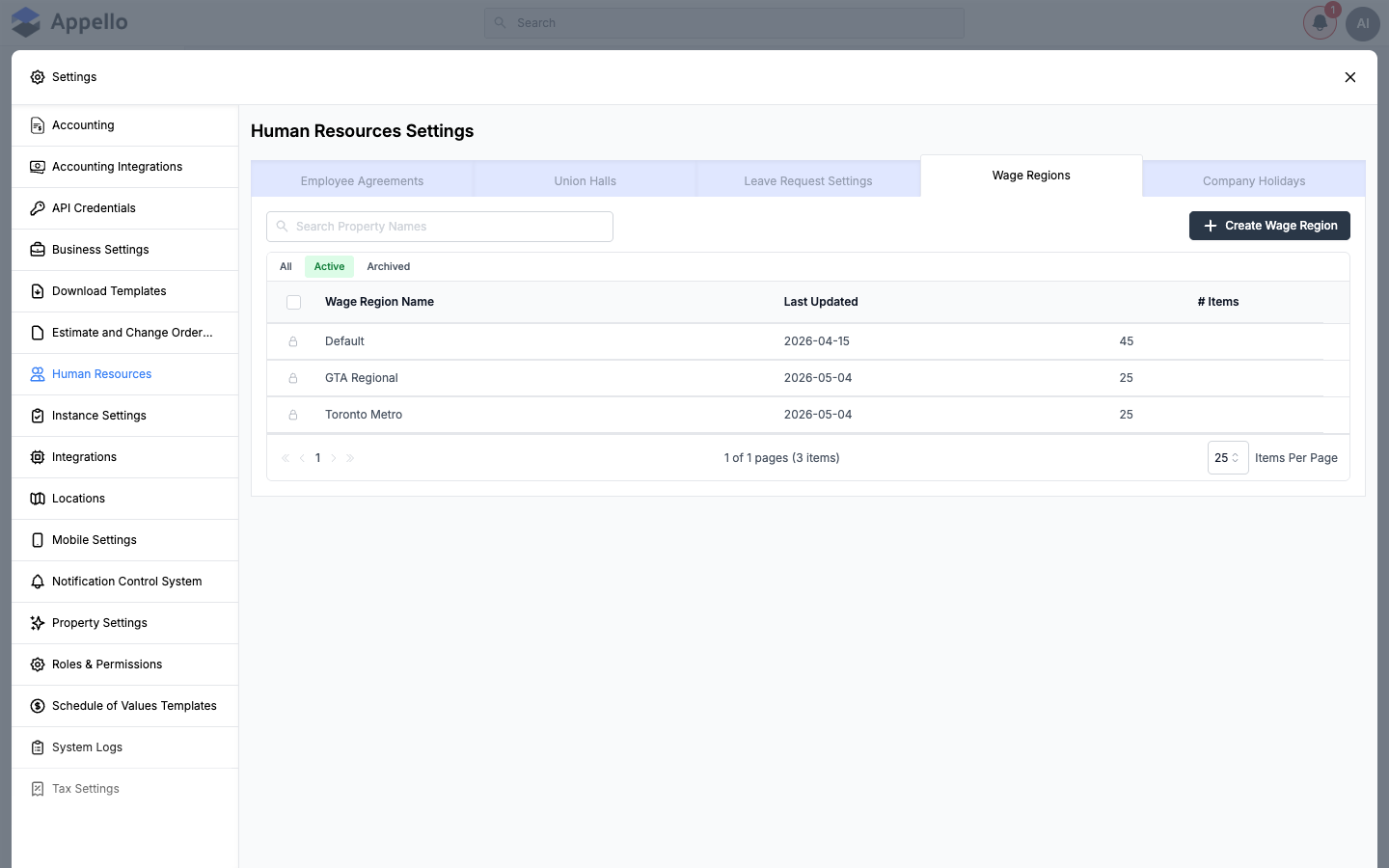
| Column | Description |
|---|---|
| Wage Region Name | Name of the region (e.g. a city, county, or custom zone). |
| Last Updated | When the region was last modified. |
| # Items | How many wage rate or other pay records currently reference this region. |
Every instance starts with a Default wage region. It is used automatically wherever a wage region is required but none has been explicitly chosen (for example, as the fallback region for wage rate lookups on jobs and employee agreements). The lock icon next to each row indicates the region cannot be deleted while other records still reference it.
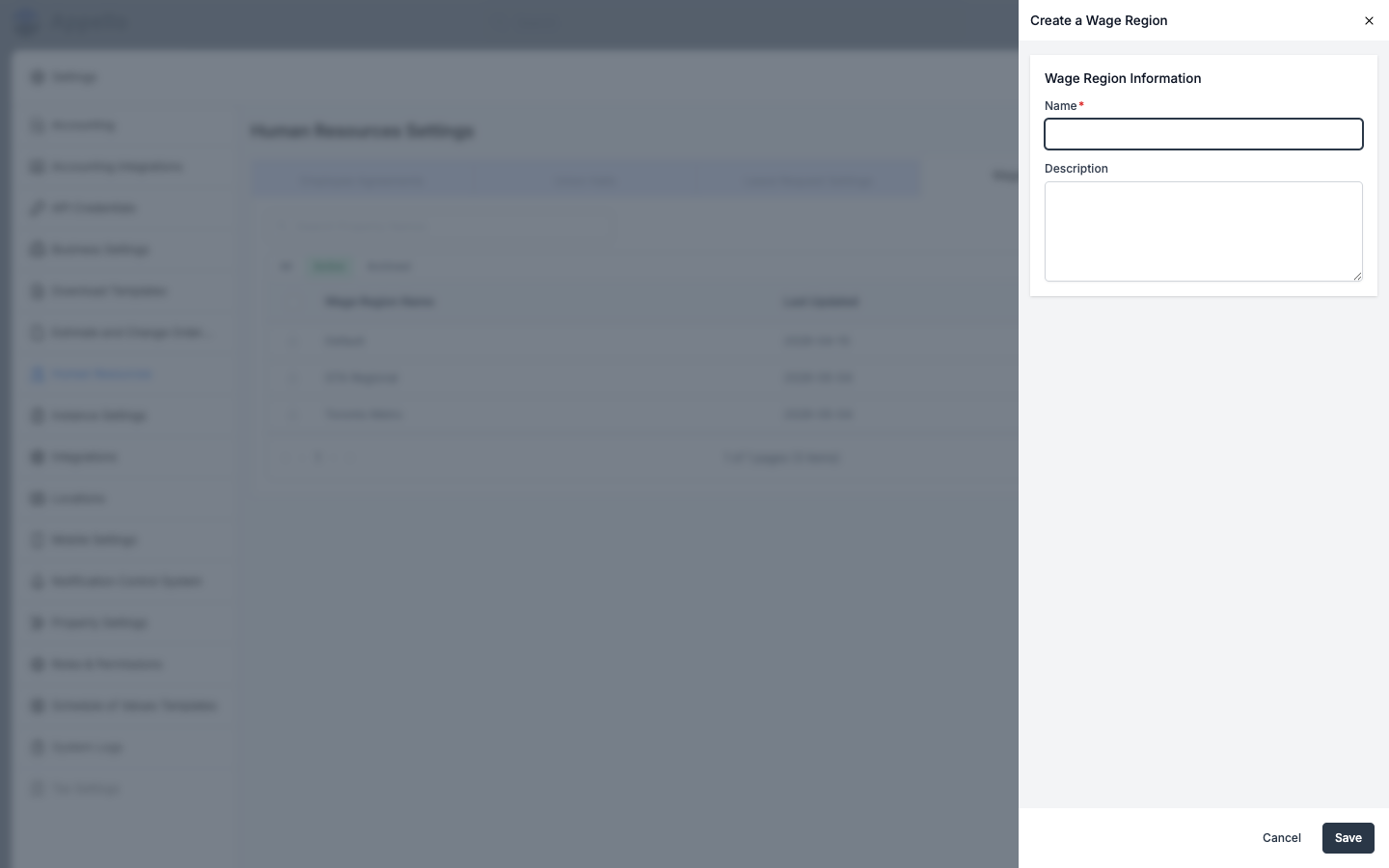
To create a wage region:
-
From the Wage Regions tab, click Create Wage Region.
-
Fill in the fields:
- Name -- Required. The name shown wherever wage regions are selected.
- Description -- Optional free-text notes.
-
Click Save.
Confirmed from source: a wage region is referenced by (and feeds rates for) trade level rates, employee agreement rate labels and line items, jobs, timesheet detail records, and overtime rule sets — so the region you pick here determines which wage-rate lookup a worker's clock in/out, job default, or overtime configuration resolves against. On the Timesheet & Payroll Reports page, note the Wage Region column currently always displays the literal text "Default" rather than the worker's actual assigned region — a placeholder in the current build rather than a live value.
Actions: Create Wage Region, Search, filter (All/Active/Archived), Archive/Delete/Restore selected rows.
Permissions: gated by the Employee Agreement permission item — View to see the tab, Edit to create, edit, archive, restore, or delete wage regions.
Company Holidays
Configure statutory and company holidays. Holidays appear on the scheduling calendar and can affect payroll calculations (for example, holiday pay rates configured on an employee agreement contract).
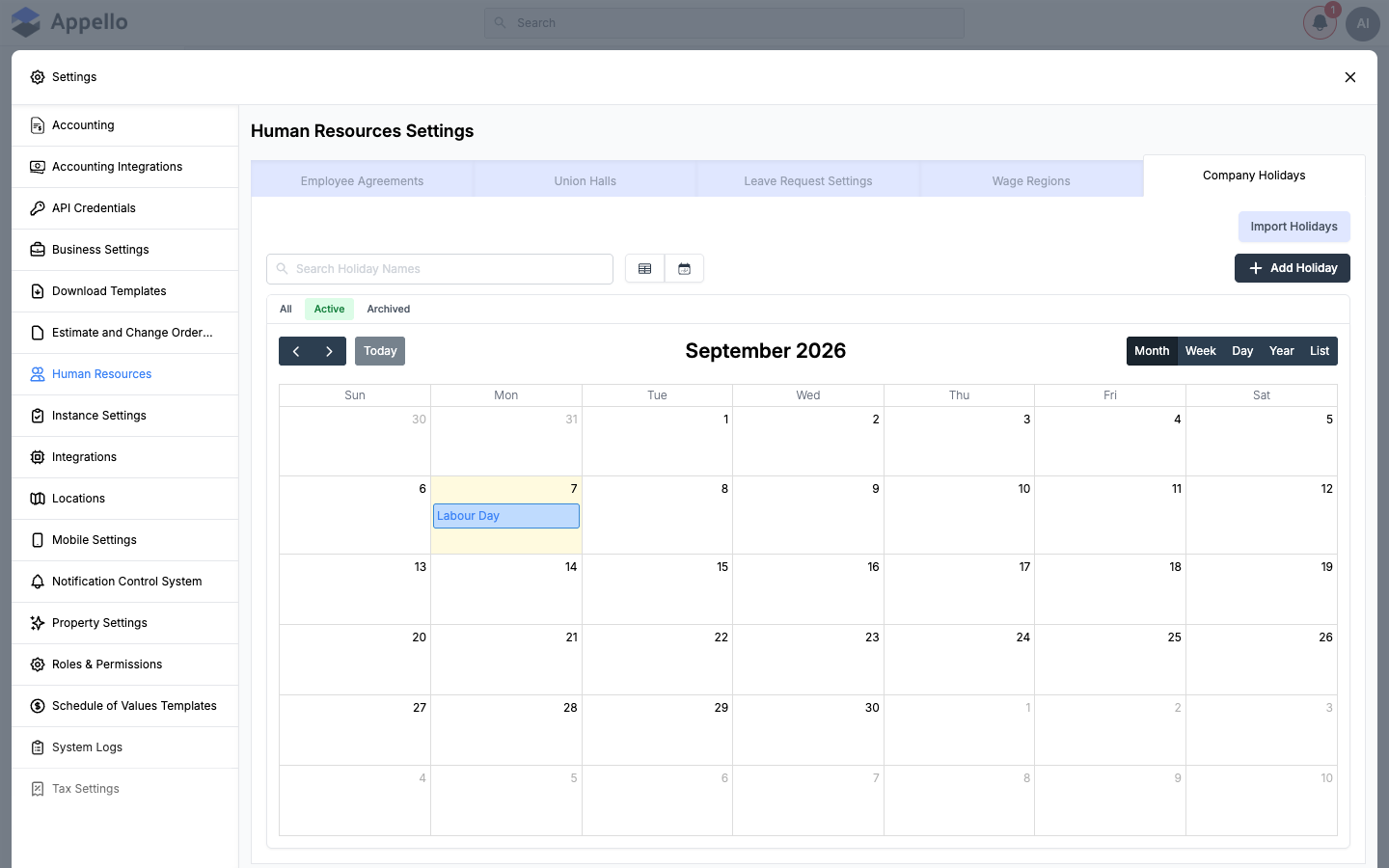
The tab defaults to a calendar view (Month/Week/Day/Year/List) but can be switched to a table view using the toggle next to the search box. Use All / Active / Archived to filter, and Search Holiday Names to find a specific holiday.
| Column | Description |
|---|---|
| Date | The calendar date of the holiday. |
| Holiday Name | Name of the holiday. |
| Country | United States or Canada. |
| Scope | Global if it applies to all states/provinces, otherwise the specific regions listed. |
| Recurring | Whether the holiday repeats automatically every year on the same date. |
To add a holiday:
-
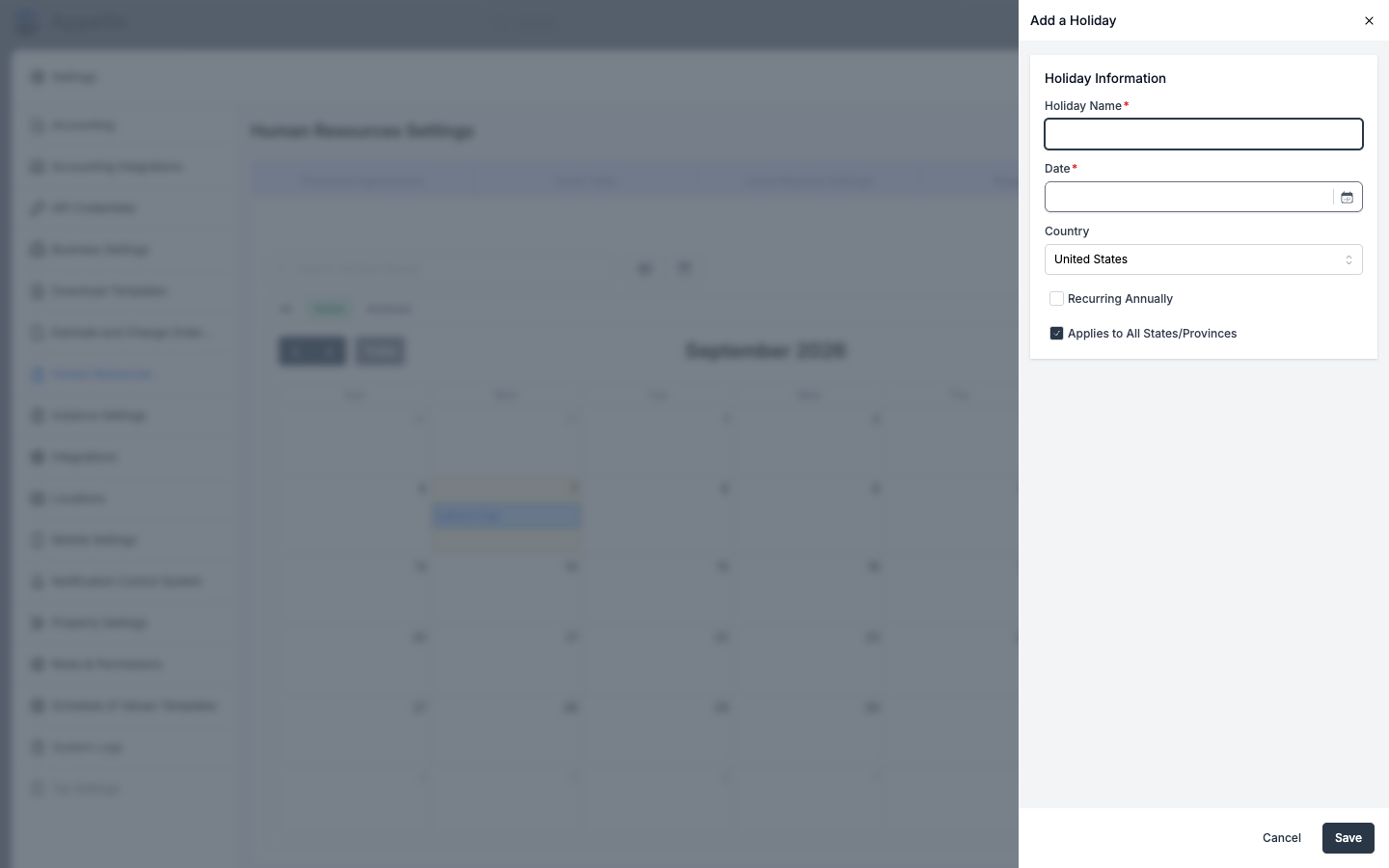
Click Add Holiday (or click a date on the calendar, if editing is allowed).
-
Fill in the fields:
- Holiday Name -- Required.
- Date -- Required.
- Country -- United States or Canada.
- Recurring Annually -- Check to have the holiday repeat every year on the same date.
- Applies to All States/Provinces -- Checked by default (Global scope). Uncheck to reveal
a Regions field where you enter a comma-separated list of state/province codes (e.g.
US-CA,US-NY) the holiday applies to.
-
Click Save.
Import Holidays: click Import Holidays (top-right of the tab) to bulk-import a country's public holidays instead of adding them one at a time — pick United States or Canada, then choose which of that country's fixed and floating holidays to bring in (floating holidays, like Thanksgiving, can be imported several years ahead at once since their date changes every year). See Public holidays import for the full country-selection and holiday-selection steps, controls, and permissions for that modal — it reuses the same Employee Agreement permission as the rest of this tab.
Permissions: gated by the Employee Agreement permission item — View to see the tab, Edit to add, edit, delete, or import holidays.
Wage category setup
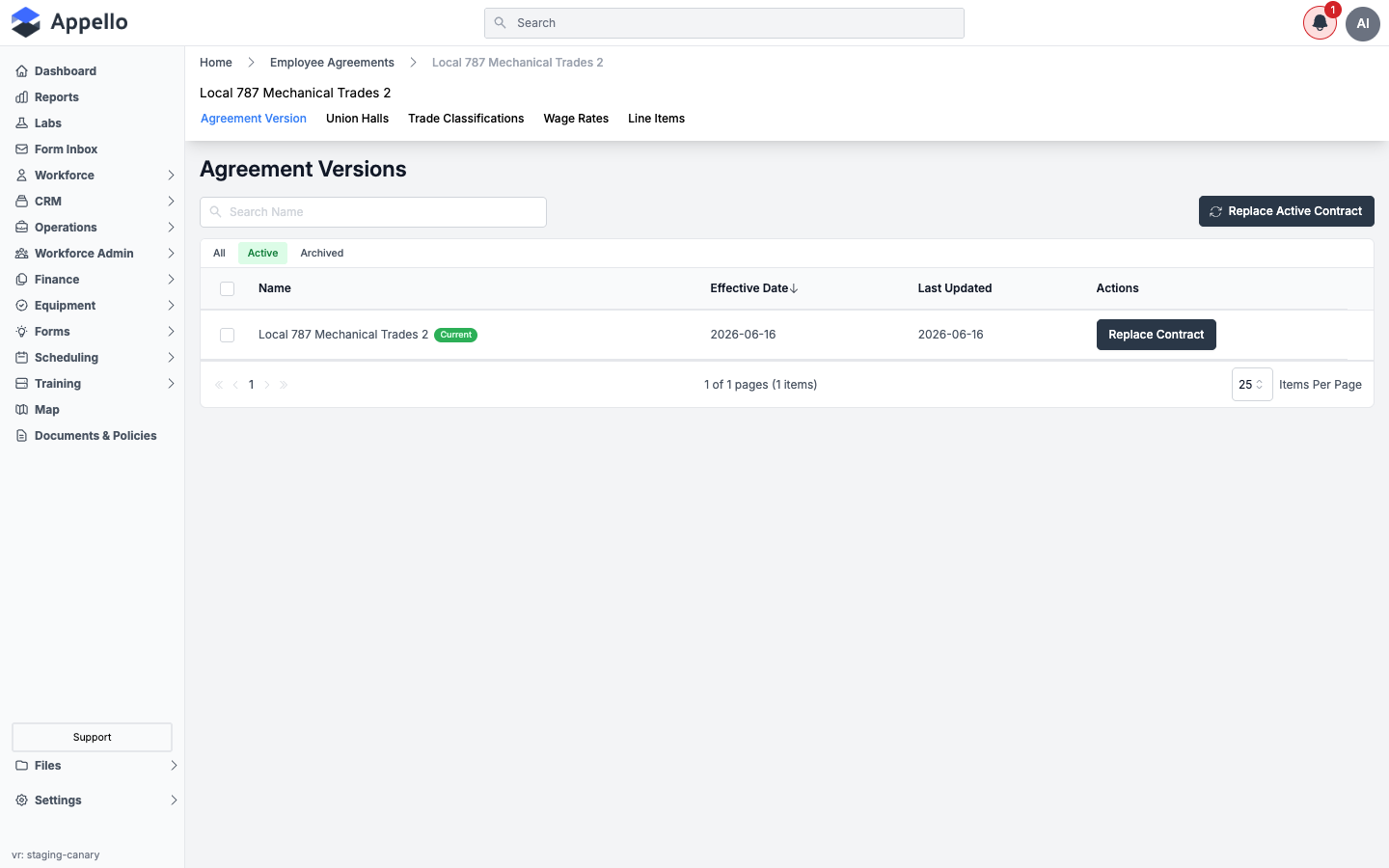
Clicking into an Employee Agreement from the Employee Agreements tab opens a detail page with its own set of tabs. This is where wage categories, trade classifications, and rate line items are configured for that agreement.
| Tab | Purpose |
|---|---|
| Agreement Version | Lists the agreement's contracts (versions) by effective date. The Current badge marks the version in effect. Click a contract's name to open its own tab set -- Wage Rates, Billable Rates, Travel & Board Rates, Overtime Rules, Holiday Rates, and (if enabled) Break Time Allowances -- described in Overtime Rule Sets and Break time allowance below. |
| Union Halls | Union halls associated with this agreement -- this is also where a union hall's Employee Agreement link is actually set (see Union Halls above). |
| Trade Classifications | The trade/job classifications available under this agreement (e.g. Foreman, Journeyman). |
| Wage Rates | The named wage categories (rate types) available under this agreement. |
| Line Items | Additional pay/expense line items available under this agreement. |
Use Replace Active Contract (Agreement Version tab) to create a new contract version with a future effective date -- this is how you roll in a new pay period or bargaining agreement without losing the history of the old one.
See Employment Agreements for the full detail-page workflow with screenshots -- Agreement Versions, Wage Rates, Billable Rates, Travel & Board Rates, Overtime Rules, and Holiday Rates -- and Trade Classifications for the Trade Classifications tab specifically.
Trade Classifications
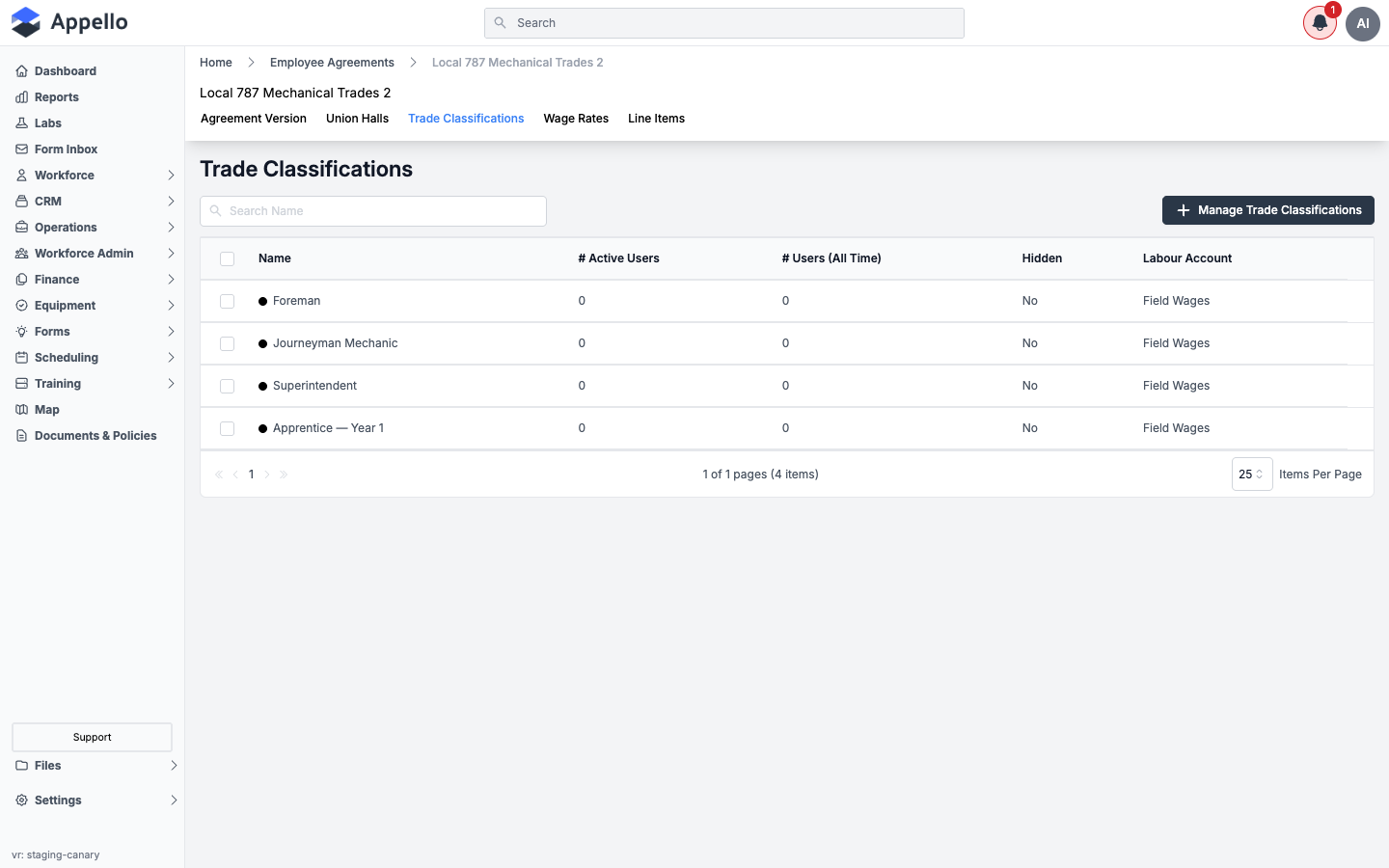
| Column | Description |
|---|---|
| Name | Trade/job classification name, with its assigned color indicator. |
| # Active Users | Employees currently assigned this trade classification. |
| # Users (All Time) | Total employees ever assigned this trade classification. |
| Hidden | Whether the classification is hidden from selection elsewhere. |
| Labour Account | The accounting labour account this classification's costs post to. |
Click Manage Trade Classifications to add, edit, reorder, or hide classifications. See Trade Classifications for the management panel's field detail.
Wage Rates (wage categories)
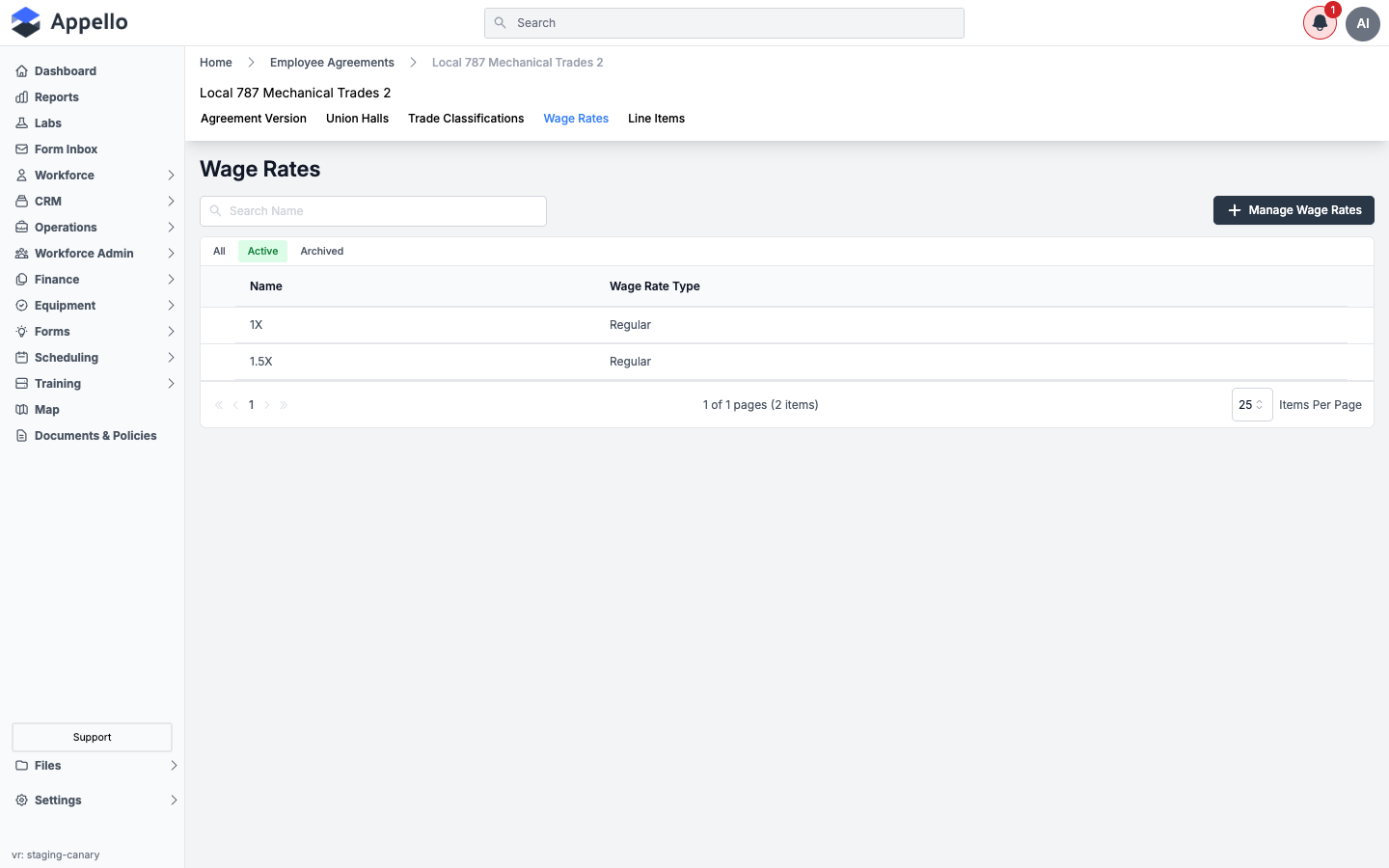
Wage rates (also called wage categories) are the named multipliers or rate tiers used when paying
employees under this agreement -- for example, 1X (Regular) and 1.5X (overtime premium).
| Column | Description |
|---|---|
| Name | The wage category's name (e.g. 1X, 1.5X). |
| Wage Rate Type | The underlying rate type (e.g. Regular). |
Click Manage Wage Rates to open the management panel, which lists every rate label as an editable row plus fields for:
| Field | Effect |
|---|---|
| Sort | Custom (drag to reorder) or Alphabetic (Ascending). |
| Label | The rate's name. |
| Export Override Label | Customizes the wage rate's name on payroll exports to match your accounting software's expected format. |
| Rate Type | The underlying rate type this label uses (e.g. Regular, Overtime). |
| Default | Marks the one rate that clocking in/out automatically logs time against. Exactly one wage rate must be the default. |
| Exclude OT | When enabled, excludes this rate from the Overtime Rule Sets option list -- use this for holiday-only rates that shouldn't factor into overtime. |
| Used In | Read-only count; a rate with values already recorded against it can't be deleted. |
Click Add an option to add a new rate row, or select rows and click Delete Items to remove ones not in use. Click Save to apply changes, or Cancel to discard them.
Line Items
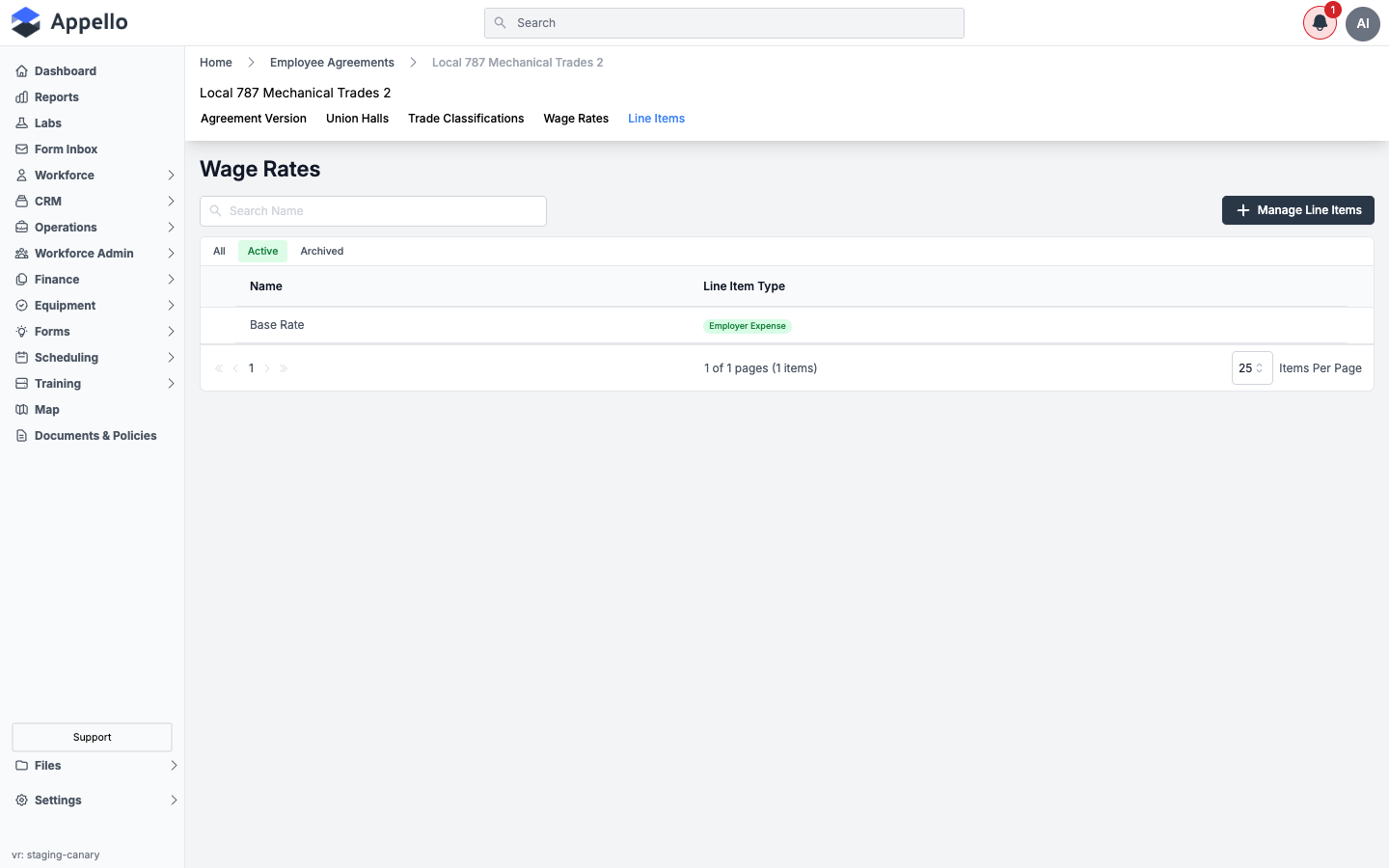
Line items are additional pay or expense entries beyond the base wage categories -- for example, per-diems, tool allowances, or other add-ons. Each line item is tagged as an Employer Expense or Employee Expense.
| Column | Description |
|---|---|
| Name | The line item's name. |
| Line Item Type | Employer Expense or Employee Expense. |
Click Manage Line Items to open the same management panel used for Wage Rates (see the field table above), minus the Rate Type/Default/Exclude OT columns -- line items instead carry a Line Item Type toggle (Employer Expense / Employee Expense) in their place.
Overtime Rule Sets
The contract's Overtime Rules tab configures how overtime thresholds and premium rates are calculated for a given Wage Region. Select a wage region from the combobox at the top of the tab, then click the edit (pencil) icon to configure day-group thresholds and which wage rates apply once overtime kicks in.
Only wage rates that are not flagged Exclude OT (see the Wage Rates table above) are offered as overtime options, and a wage region must have at least one eligible rate label before rules can be configured for it. See Employment Agreements for the Overtime Rules tab's screenshots and day-group configuration.
Permissions: the contract-level tabs above (Billable Rates, Travel & Board Rates, Overtime Rules, Holiday Rates, Break Time Allowances) are gated by the Employee Agreement Contract permission item, separately from the top-level Employee Agreement permission that gates the Employee Agreements list itself. Wage Rates and Line Items are gated by the Employee Agreement Rate Label permission item.
Break time allowance
Break Time Allowances are configured per employee agreement contract (a specific version of an employee agreement), not as a standalone Human Resources Settings tab. From an employee agreement's Agreement Version tab, click the contract's name to open its tab set, then select Break Time Allowances.
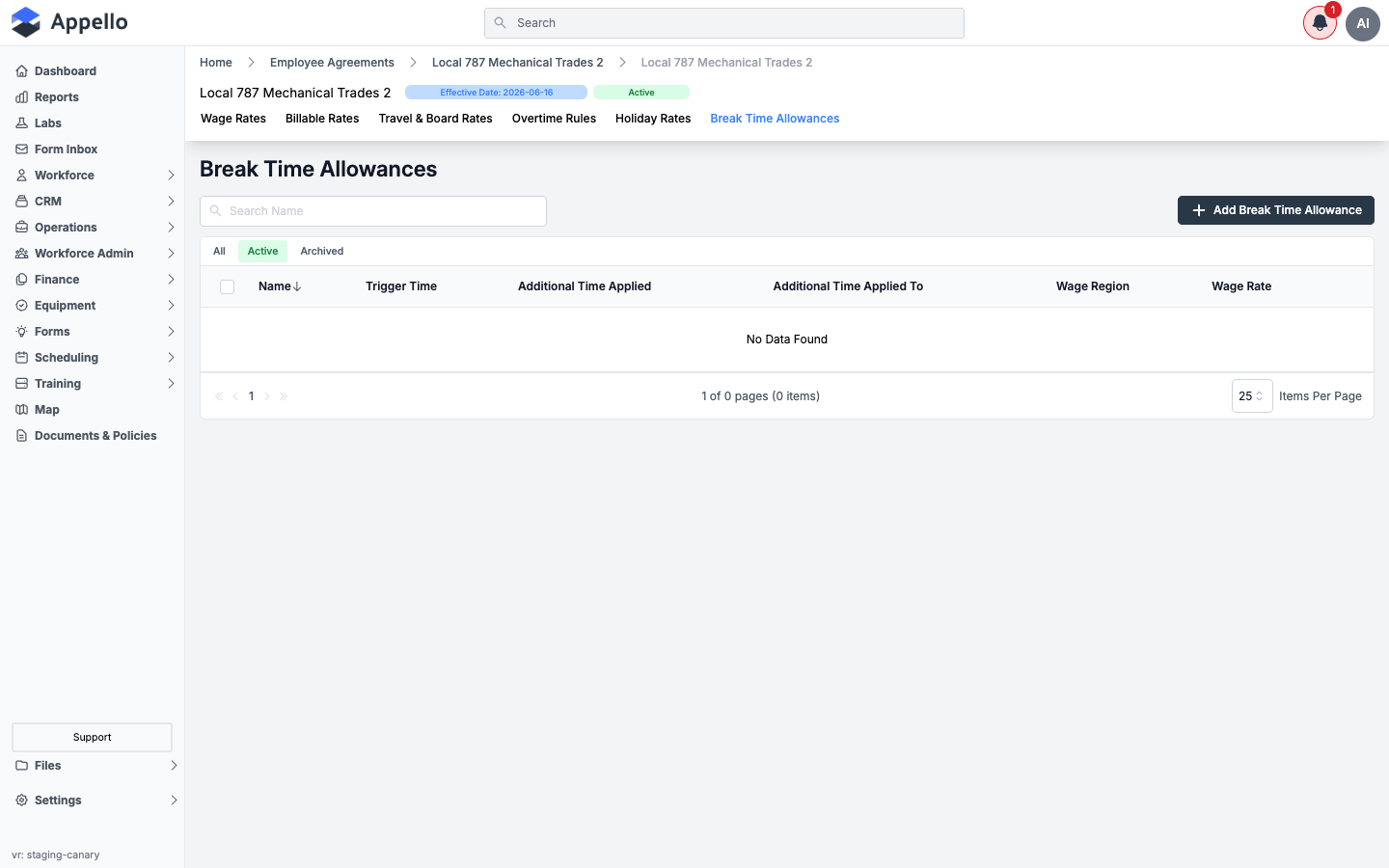
A break time allowance defines a rule that automatically adds (or, using a negative value, deducts) paid or unpaid time on an employee's timesheet after they have worked a set number of hours -- for example, adding a 30-minute paid break after 5 hours worked.
| Column | Description |
|---|---|
| Name | The allowance's name. |
| Trigger Time | Hours worked before the allowance applies. |
| Additional Time Applied | Hours added (or, if negative, deducted) once triggered. |
| Additional Time Applied To | Which timesheet entry the time is applied to (see Assignment options below). |
| Wage Region | The wage region this allowance applies within. |
| Wage Rate | The wage category the added/deducted time is paid at. |
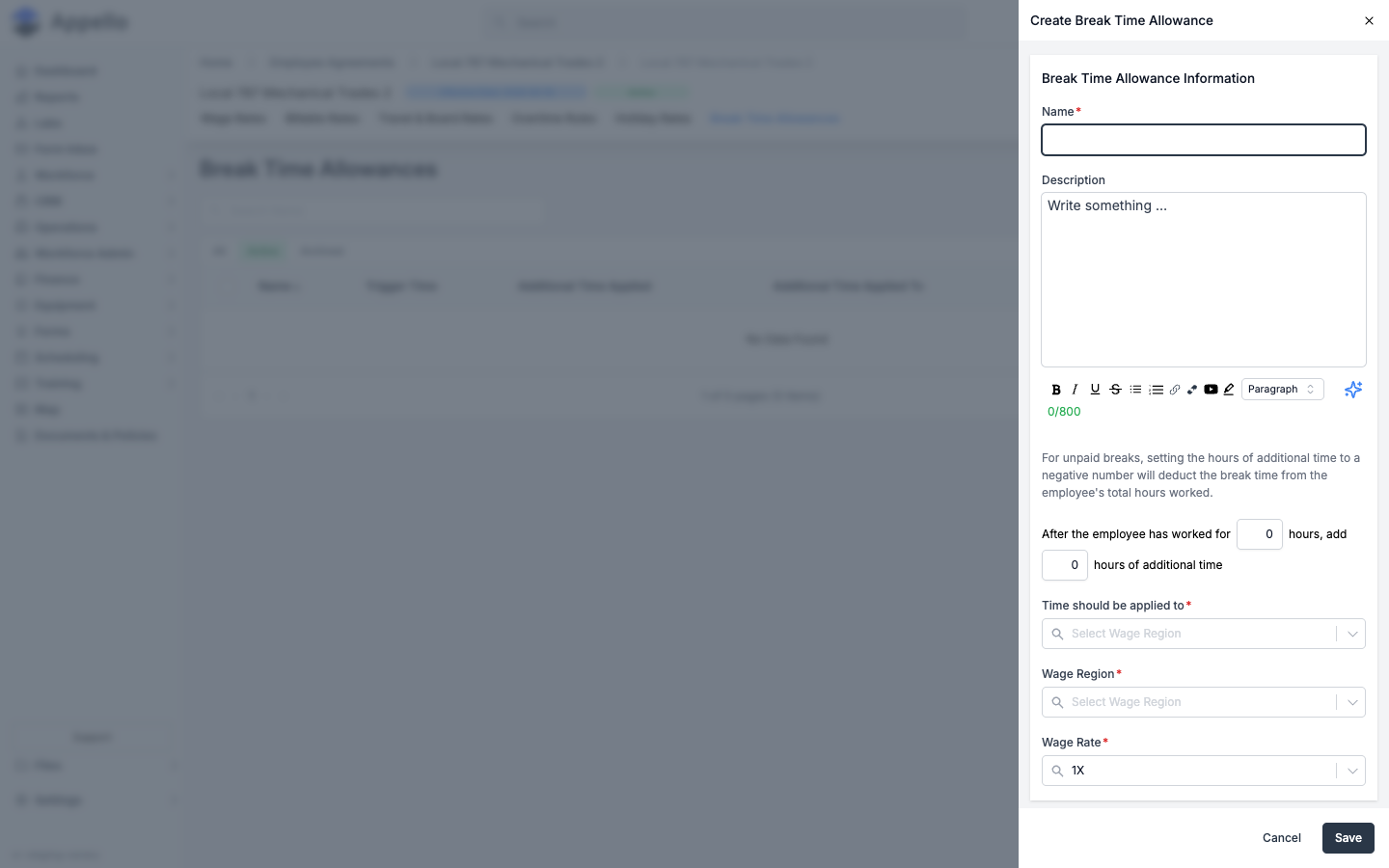
To create a break time allowance:
-
Click Add Break Time Allowance.
-
Fill in the fields:
- Name -- Required.
- Description -- Optional, up to 800 characters.
- After the employee has worked for
_hours, add_hours of additional time -- Required. Enter a negative number in the second field to deduct break time from hours worked instead of adding paid time. - Time should be applied to -- Required. Choose how the additional/deducted time is assigned on the timesheet: to the employee's last timesheet entry of the day, to their longest timesheet entry of the day, or to a specified job (which reveals a Default Job field -- Appello seeds an internal "Internal Break Time Job" option for this).
- Wage Region -- Required. Defaults to your company's default wage region.
- Wage Rate -- Required. The wage category (from this agreement's Wage Rates tab) the time is paid at.
-
Click Save.
The Break Time Allowances tab only appears when your instance has the break time allowance feature enabled. If you do not see this tab on an employee agreement contract, ask your Appello contact to confirm whether the feature is enabled for your company.
Related Pages
- Employment Agreements -- full detail-page workflow for an agreement's contracts, wage rates, billable rates, overtime rules, and holiday rates
- Trade Classifications -- managing an agreement's trade/job levels
- Union Hall Management -- the hall detail page, travel-zone map, and assigning workers to a hall
- Leave Types -- the full leave-request lifecycle from mobile submission to calendar impact
- Leave Submissions -- reviewing and approving individual leave requests
- Timesheet & Payroll Reports -- how wage regions and rate labels surface on payroll exports
- Exports, Imports and Bulk Actions -- the Import Holidays modal's full step-by-step