Instance Settings
Module: Settings | Platform: Web
Instance Settings controls how data is displayed across your Appello instance — user name format, list pagination, date formats, time zone, and measurement units. It is also where most tenant-wide feature toggles and workflow defaults live: location tracking, timesheet and clock-in rounding rules, travel/board/parking expense eligibility, mobile app behavior, employee expense defaults, certification thresholds, job/project/estimate/cost-code numbering formats, and the default statuses that Jobs, Estimates & Change Orders, RFIs, Work Orders, and Invoices start in.
Navigation
Sidebar → Settings → Instance Settings (there are no sub-tabs — everything below is one scrolling panel)
Overview
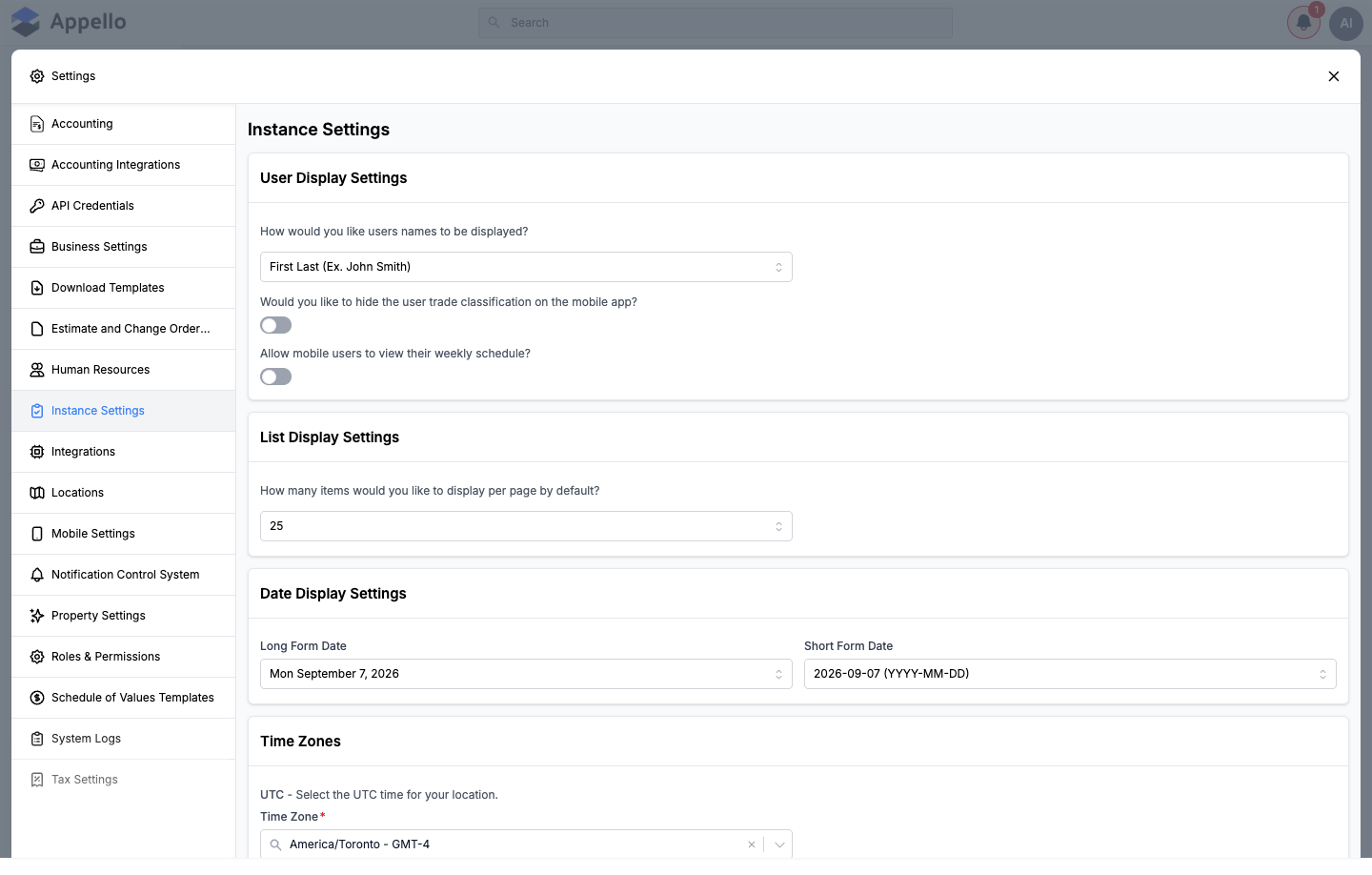
Instance Settings is a single long scrolling panel opened from the Settings icon in the main sidebar, not a set of separate URLs. Every section below is a card on that same panel, in the order it appears on the page.
Permissions
| Permission | Controls |
|---|---|
| Instance Settings: View | Whether the Instance Settings tab appears in the Settings panel nav at all. |
| Instance Settings: Edit | Whether the fields on the tab are editable. Without it, every control is disabled and a banner at the top of the panel reads "You don't have the permission to modify this setting." The same permission also gates the Accounting Integrations tab, which reads and writes a different set of instance-wide settings. |
There is one Save for the whole tab (a floating bar appears at the bottom once anything is changed), not one per card.
Sections
User Display Settings
| Setting | Description |
|---|---|
| User name display format | Choose how names appear throughout the app. Options include "First Last" (e.g. John Smith), "Last, First", and others. |
| Hide trade classification | Toggle to hide the user's trade classification label on the mobile app. |
| Allow mobile users to view their weekly schedule | Toggle to let mobile users see their own weekly schedule from the mobile app. Default: Disabled. |
List Display Settings
| Setting | Description |
|---|---|
| Items per page default | Number of rows shown in list views before pagination (default: 25). |
Date Display Settings
| Setting | Description |
|---|---|
| Long Form Date | Format for full date display throughout the app (e.g. "Sun April 5, 2026"). |
| Short Form Date | Compact date format used in tables and lists (e.g. "2026-04-05 (YYYY-MM-DD)"). |
Time Zones
| Setting | Description |
|---|---|
| Time Zone | The UTC time zone for your location (e.g. America/Toronto - GMT-4). Affects all date/time displays. |
Distance Unit
| Setting | Description |
|---|---|
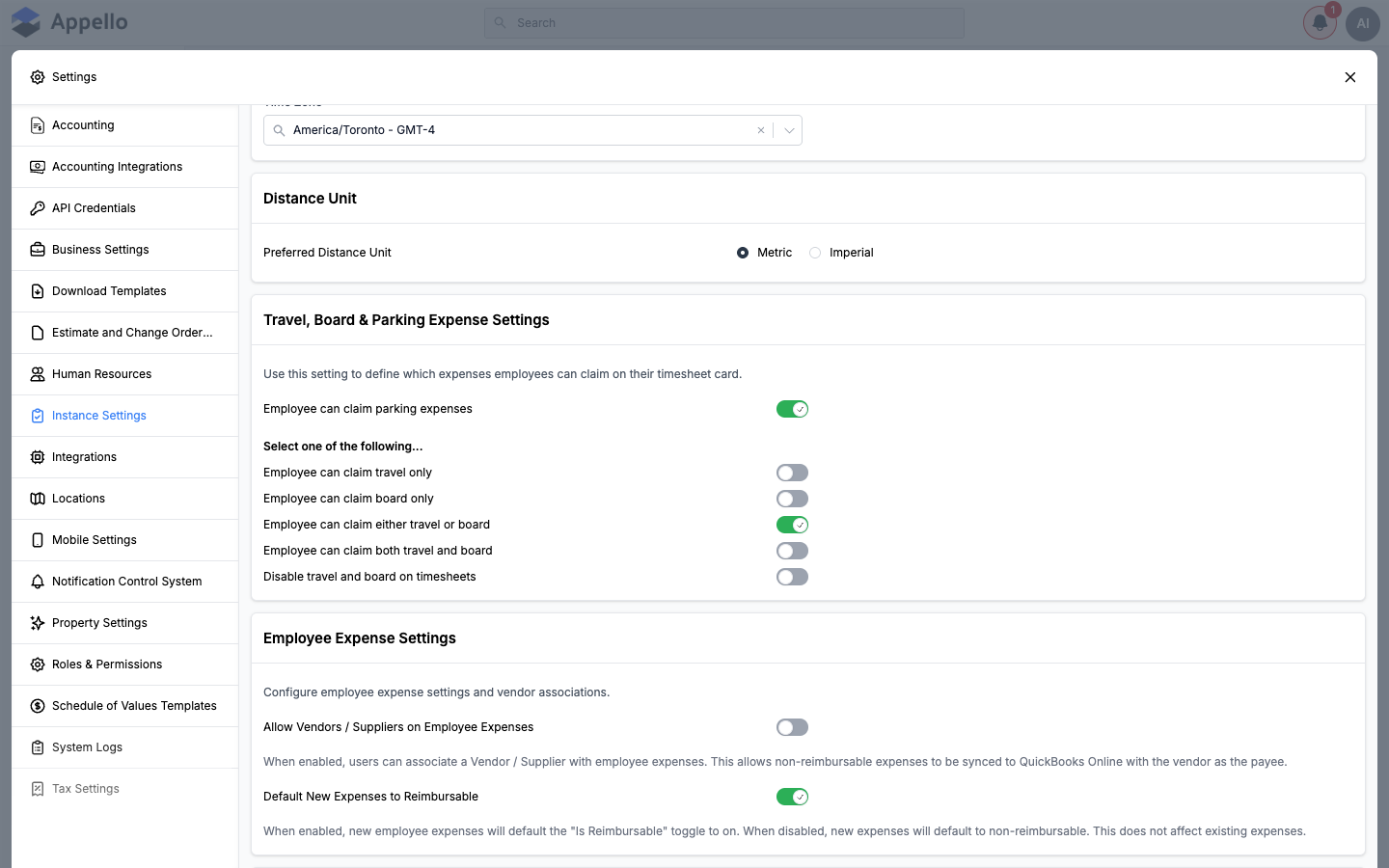
| Preferred Distance Unit | Choose Metric (km) or Imperial (miles) for distance calculations such as geofence radius and travel tracking. |
Travel, Board & Parking Expense Settings
Controls which travel, board, and parking expense fields appear on a timesheet entry, and whether parking can be claimed at all. These toggles surface directly on the Travel/Board/Parking fields of every timesheet entry (desktop Timesheet Log add/edit panel), and the resulting dollar amounts and travel zone roll up into the Timesheet Log's Travel ($), Board ($), and Parking ($) columns and totals, as well as Bulk Timesheet Entry's automatic travel/board/parking calculations.
| Setting | What it turns on | Default |
|---|---|---|
| Employee can claim parking expenses | Adds a Parking claim field to every timesheet entry so a worker can log a parking cost for the day. Independent of the five options below -- it can be combined with any of them. | Enabled |
| Employee can claim travel only | Timesheet entries expose only the Travel claim field; Board is hidden. | -- |
| Employee can claim board only | Timesheet entries expose only the Board claim field; Travel is hidden. | -- |
| Employee can claim either travel or board | Timesheet entries let the worker choose Travel or Board (not both) for a given day. | Selected |
| Employee can claim both travel and board | Timesheet entries expose both the Travel and Board claim fields together. | -- |
| Disable travel and board on timesheets | Removes both the Travel and Board claim fields from timesheet entries; only Parking (if enabled above) remains available. | -- |
The five "Employee can claim..." toggles behave as one setting with five mutually exclusive options (only one is enabled at a time) -- picking one automatically turns the others off. The demo instance used for these screenshots has Employee can claim either travel or board selected, which is also the system default.
Employee Expense Settings
Configures employee (non-timesheet) expense defaults and vendor associations for the Employee Expense module.
| Setting | What it turns on | Default |
|---|---|---|
| Allow Vendors / Suppliers on Employee Expenses | Lets a Vendor/Supplier be attached to an employee expense, so a non-reimbursable expense can sync to QuickBooks Online with that vendor as the payee. | Disabled |
| Default New Expenses to Reimbursable | New employee expenses start with Is Reimbursable switched on. When disabled, new expenses default to non-reimbursable instead. Does not change existing expenses. | Enabled |
Location Tracking
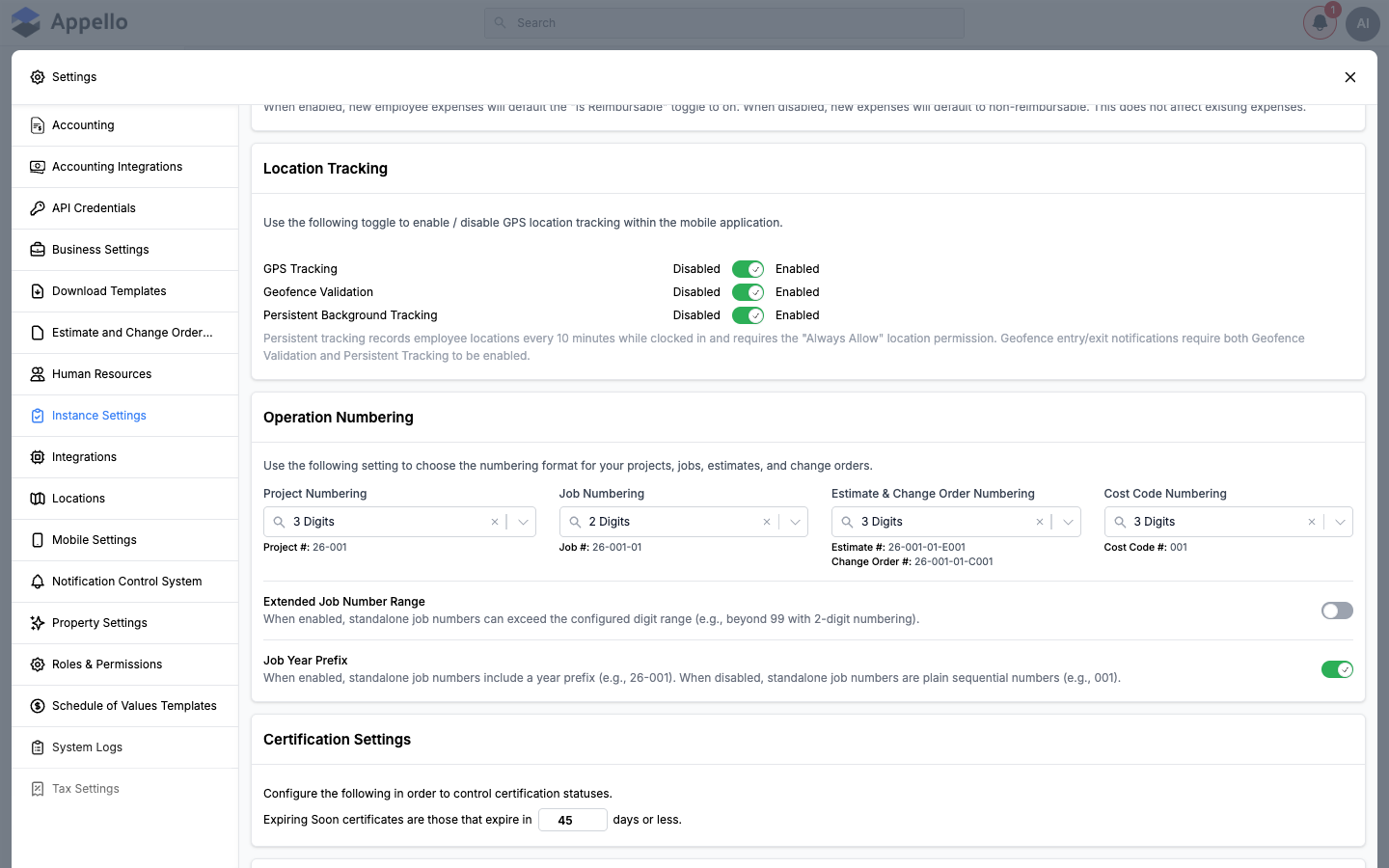
Enables or disables GPS location tracking inside the mobile app, and the two features that depend on it.
| Setting | What it turns on | Default |
|---|---|---|
| GPS Tracking | Turns on GPS location tracking in the mobile app. Must be enabled before Geofence Validation or Persistent Background Tracking can be turned on. | Disabled |
| Geofence Validation | Validates a worker's clock-in/clock-out against the job's geofence radius. Requires GPS Tracking. | Disabled |
| Persistent Background Tracking | Records a worker's location every 10 minutes while clocked in, even while the app is backgrounded. Requires the device's "Always Allow" location permission. Geofence entry/exit notifications require both this and Geofence Validation to be on. | Enabled (has no effect until GPS Tracking is also on) |
If GPS Tracking is turned off, Appello also turns off Geofence Validation and Persistent Background Tracking for you -- both fields depend on it.
Operation Numbering
Sets the digit format used when Appello auto-generates project, job, estimate/change order, and cost code numbers (each from 1 to 5 digits), plus two toggles that change how standalone job numbers behave.
| Setting | What it turns on | Default |
|---|---|---|
| Extended Job Number Range | Lets a standalone job number exceed the configured digit range (e.g. beyond 99 with 2-digit numbering) instead of being capped at it. | Disabled |
| Job Year Prefix | Standalone job numbers include a two-digit year prefix (e.g. 26-001). When off, they are plain sequential numbers (e.g. 001). | Enabled |
The digit-count fields (Project Numbering, Job Numbering, Estimate & Change Order
Numbering, Cost Code Numbering) have no fixed factory default in the data model -- each
instance is seeded with its own values. The demo instance shown in the screenshot above is set to
Project: 3 digits, Job: 2 digits, Estimate & Change Order: 3 digits, Cost Code: 3 digits,
producing the live examples Project #: 26-001, Job #: 26-001-01, Estimate #: 26-001-01-E001,
Change Order #: 26-001-01-C001, and Cost Code #: 001.
Certification Settings
| Setting | What it turns on | Default |
|---|---|---|
| Expiring Soon threshold (days) | Sets how many days before its expiry date a user certification is flagged Expiring Soon across certification tracking. | Not set out of the box -- each instance configures its own value (the demo instance used here is set to 45 days). |
Timesheet & Clock In Settings
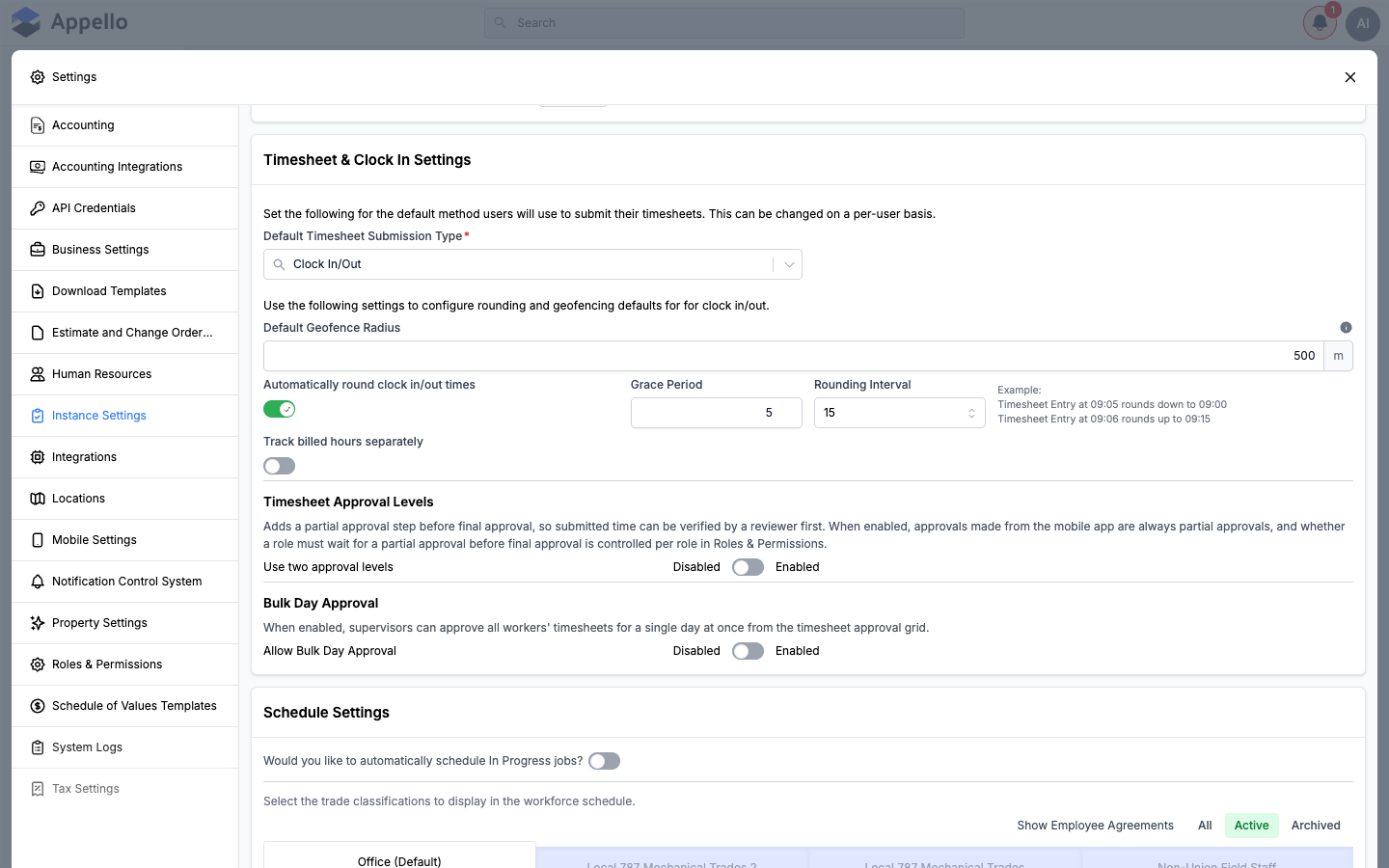
Sets the default timesheet submission method, and the rounding, geofence, billed-hours, and approval rules applied when a user clocks in or out.
| Setting | What it turns on | Default |
|---|---|---|
| Default Timesheet Submission Type | Sets whether newly created users submit time by Manual entry or Clock In/Out by default. Can still be changed per user. | Manual |
| Default Geofence Radius | The clock-in/clock-out geofence radius applied instance-wide unless a job overrides it. Only shown once Geofence Validation is enabled (see Location Tracking above). Minimum 25 meters. | 500 meters |
| Automatically round clock in/out times | Rounds every clock-in/clock-out entry to the nearest configured interval instead of recording the exact punch time. | Disabled |
| Grace Period | How many minutes into an interval a punch can fall before it rounds up instead of down. Only shown once rounding is enabled -- see the rounding example below. | 5 minutes |
| Rounding Interval | The block size (5, 10, 15, or 30 minutes) that clock-in/clock-out times round to. Only shown once rounding is enabled. | 15 minutes |
| Track billed hours separately | Adds a separate billed-hours figure to the timesheet (with Minimum billable time and Round billable time up to fields), so billed time can differ from worked time. | Disabled |
| Use two approval levels | Adds a partial-approval step before final approval. Mobile-app approvals are always partial when this is on; whether a role must wait for partial approval is set per role in Roles & Permissions. | Disabled |
| Allow Bulk Day Approval | Lets a supervisor approve every worker's timesheet for a single day at once, from the timesheet approval grid. | Disabled |
With Grace Period at its default of 5 minutes and Rounding Interval at its default of 15 minutes, a 09:05 clock-in rounds down to 09:00, while a 09:06 clock-in rounds up to 09:15.
Rounding here only changes what a clock-in/clock-out event reports and calculates as -- it does not change the raw punch time. See the Clock In / Out report guide for how rounded vs. actual times appear in that report.
Schedule Settings
Controls whether jobs auto-populate the workforce schedule, and which trade classifications show up as filters/groupings on schedule views.
| Setting | What it turns on | Default |
|---|---|---|
| Automatically schedule In Progress jobs | Jobs that move to In Progress status are automatically added to the workforce schedule. | Disabled |
| Show on Schedule (per trade classification) | Shows that trade classification as a filter/grouping option on the workforce schedule views. Set per Employee Agreement and Trade Classification, active or archived. | Varies by trade classification |
A separate Schedule Grouping card on the same panel sets whether jobs are grouped by Customer (default) or Project on the scheduling interfaces -- it is a display option rather than a feature toggle.
Mobile Settings
The largest card on the page. It bundles mobile job visibility, mobile file visibility, the mobile landing page, and several mobile timesheet toggles -- including the Work Orders on mobile landing page setting.
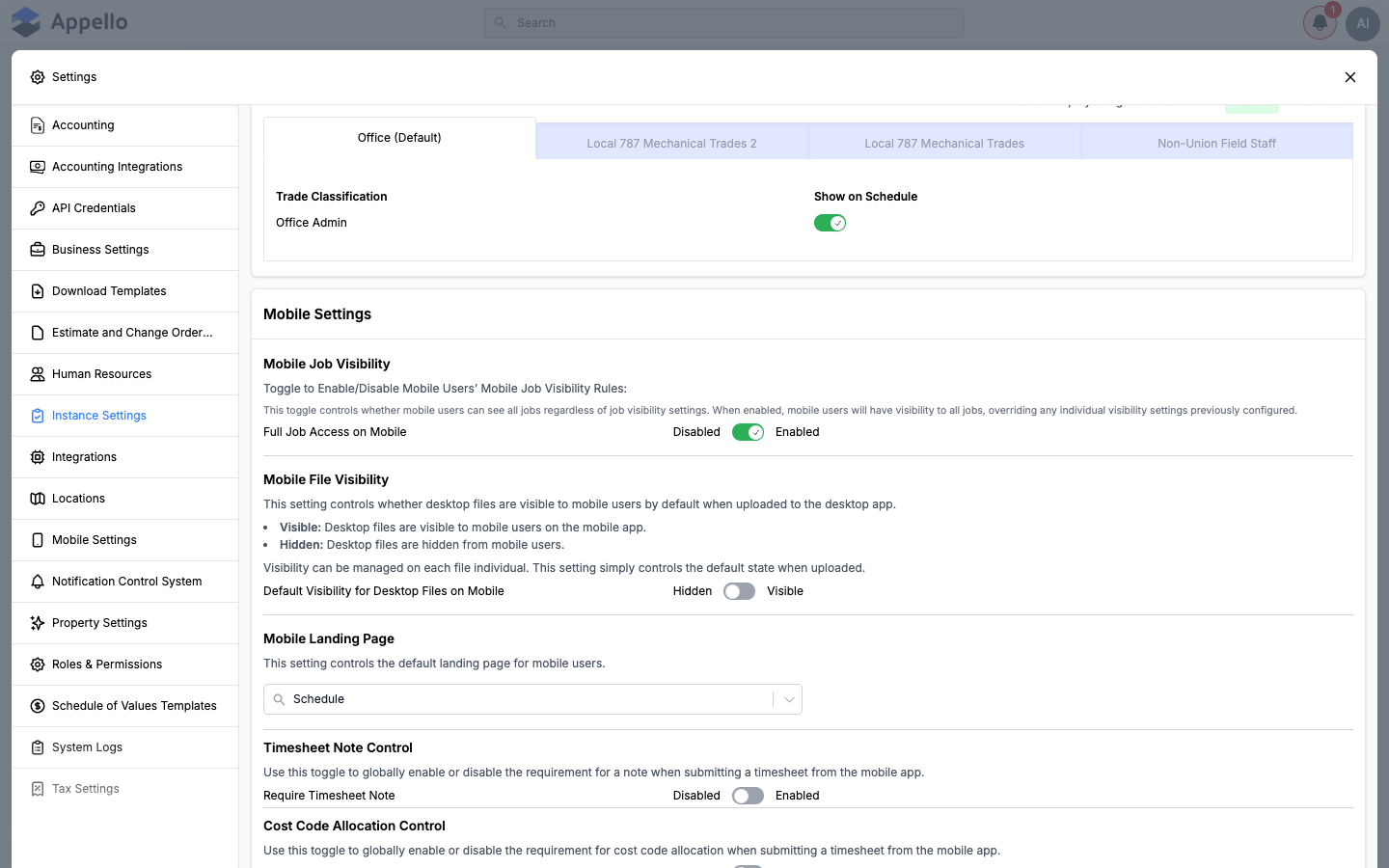
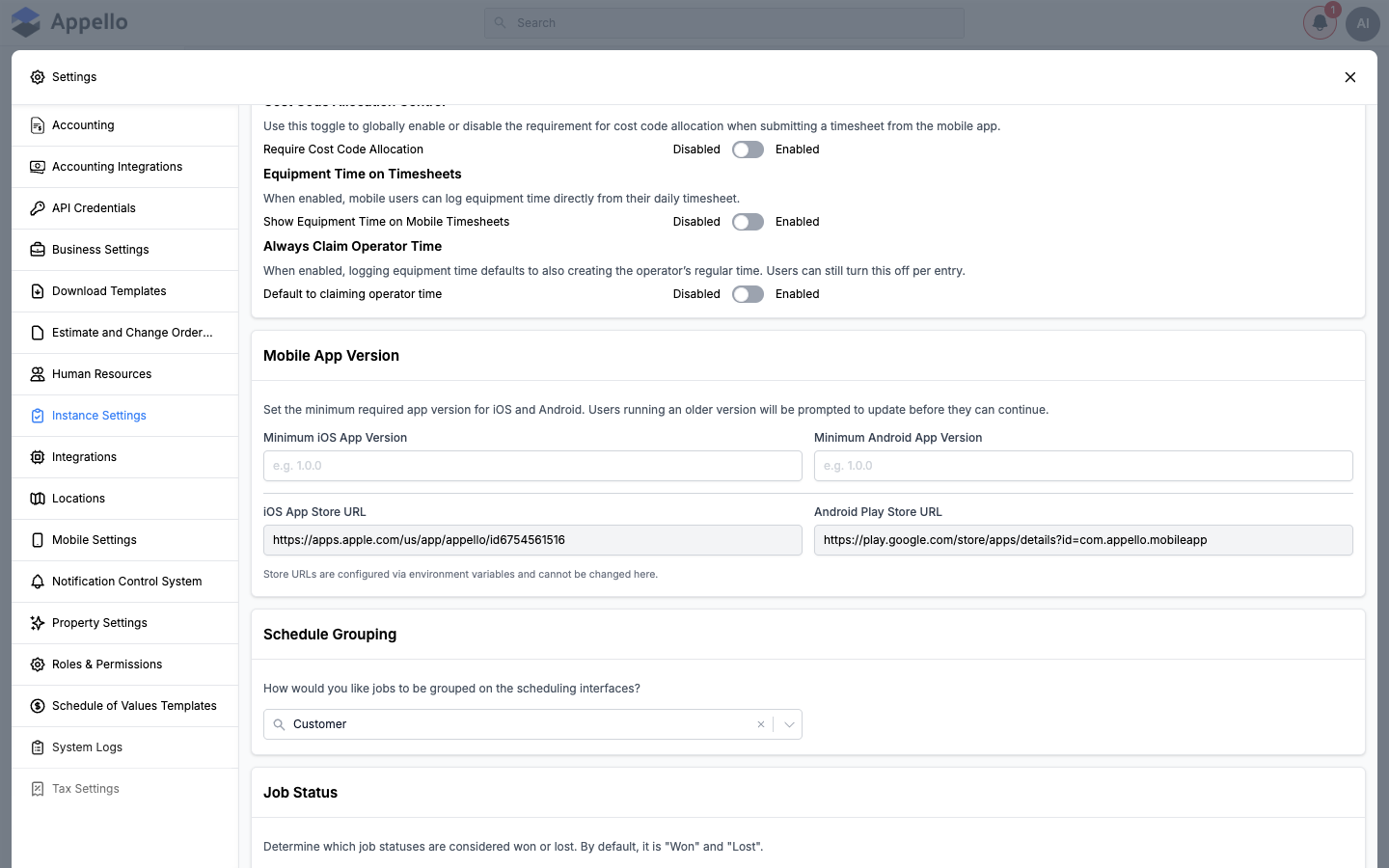
| Setting | What it turns on | Default |
|---|---|---|
| Full Job Access on Mobile | Mobile users see every job regardless of individual job visibility settings, overriding any per-job mobile visibility rules previously configured. | Enabled |
| Default Visibility for Desktop Files on Mobile | Sets whether a file uploaded from the desktop app is visible to mobile users by default. Visibility can still be changed per file afterward. | Hidden |
| Mobile Landing Page | Sets the default screen (Jobs or Schedule) mobile users land on. Not a toggle, but gates several of the settings below -- they only appear when this is set to Jobs. | Schedule |
| Include Work Orders (mobile landing page) | Lists Work Orders alongside Jobs on the mobile landing page. Only shown when Mobile Landing Page is Jobs -- Work Orders always remain reachable from the mobile Work Orders page regardless of this setting. | Enabled |
| Require Timesheet Note | Requires a note before a mobile user can submit a timesheet. | Disabled |
| Require Cost Code Allocation | Requires cost code allocation before a mobile user can submit a timesheet. | Disabled |
| Show Equipment Time on Mobile Timesheets | Lets mobile users log equipment time directly from their daily timesheet. | Disabled |
| Default to claiming operator time | When logging equipment time, also creates the operator's regular time by default. Users can still turn this off on an individual entry. | Disabled |
When Mobile Landing Page is set to Jobs, two additional controls appear: checkboxes to choose which job workflow states (Todo, In Progress, Done) show on the landing page, and a job-sort dropdown (by Job Number or Job Proximity, ascending or descending). The demo instance used for these screenshots has Mobile Landing Page set to Schedule, so those controls are not shown in the screenshots above.
Mobile App Version
Sets the minimum app version mobile users must be running. Users on an older version are prompted to update before they can continue using the app.
| Setting | Type | Default | What it does |
|---|---|---|---|
| Minimum iOS App Version | Text | Blank | Users on an older installed iOS app version are prompted to update before they can keep using the app. |
| Minimum Android App Version | Text | Blank | Same enforcement for Android. |
| iOS App Store URL | Read-only text | Set via environment configuration | The link shown in the in-app update prompt. Cannot be changed from this form. |
| Android Play Store URL | Read-only text | Set via environment configuration | The link shown in the in-app update prompt. Cannot be changed from this form. |
Schedule Grouping
| Setting | Type | Default | What it does |
|---|---|---|---|
| Schedule Grouping | Select | Customer | Whether jobs are grouped by Customer or Project on the scheduling interfaces. A display option, not a feature toggle. |
Job Status
Sets which of your instance's job statuses are treated as Won or Lost for reporting and rollups.
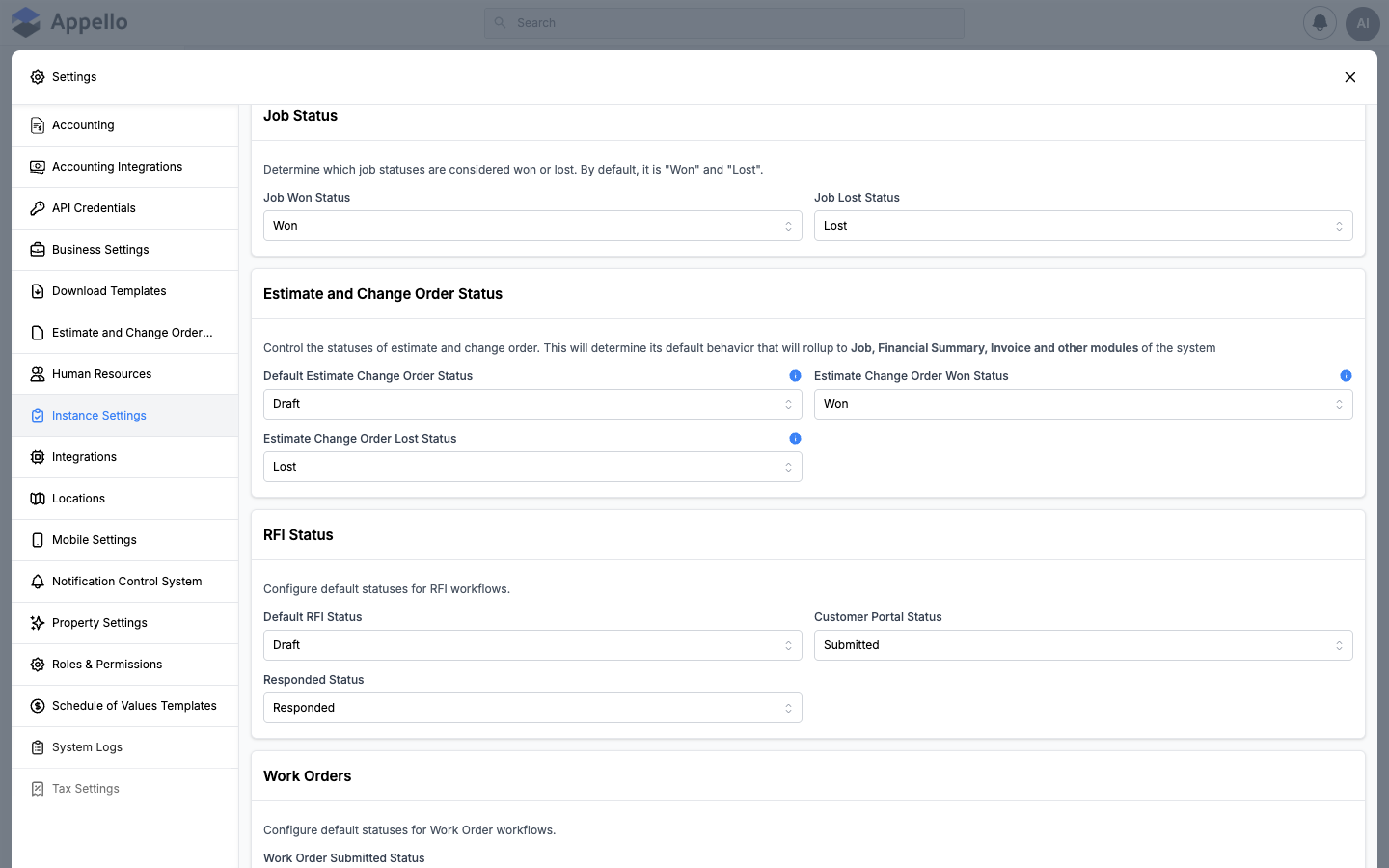
| Setting | Type | Default | What it does |
|---|---|---|---|
| Job Won Status | Select (from your Job Status list) | Won | The job status that reporting treats as a won job. |
| Job Lost Status | Select (from your Job Status list) | Lost | The job status that reporting treats as a lost job. |
The options in both dropdowns come from your instance's own list of job statuses (configured elsewhere as Property Values), not a fixed list -- the demo instance shown has statuses named "Won" and "Lost" available, which is also what ships by default.
Estimate and Change Order Status
Sets the default status new estimates and change orders are created in, and which statuses count as won or lost. The page's own copy calls out that this rolls up into Job, Financial Summary, Invoice, and other modules.
| Setting | Type | Default | What it does |
|---|---|---|---|
| Default Estimate Change Order Status | Select (from your Estimate/CO status list) | Draft | The status every newly created estimate or change order starts in. |
| Estimate Change Order Won Status | Select (from your Estimate/CO status list) | Won | The status that marks an estimate or change order as won -- feeds the same Job/Financial Summary/Invoice rollups as Job Status above. |
| Estimate Change Order Lost Status | Select (from your Estimate/CO status list) | Lost | The status that marks an estimate or change order as lost. |
See Estimate and Change Order Templates for the document-level Title, Footer, and Note text used on estimates and change orders -- that's a separate settings tab from this status configuration.
RFI Status
Sets the default and workflow-transition statuses used across RFIs -- what a new RFI starts as, what status the customer portal shows by default, and which status an RFI automatically moves to once it's been responded to.
| Setting | Type | Default | What it does |
|---|---|---|---|
| Default RFI Status | Select (from your RFI status list) | Draft | The status every newly created RFI starts in. |
| Customer Portal Status | Select (from your RFI status list), or "None (show all)" | Submitted | Which RFI status the customer portal filters to by default. Left as "None" it shows RFIs of every status. |
| Responded Status | Select (from your RFI status list), or "None (no auto-transition)" | Responded | The status an RFI automatically transitions to once it has been responded to. Left as "None," RFIs don't auto-transition on response. |
See RFIs for the day-to-day RFI workflow these statuses drive.
Work Orders
Sets the status that marks a work order as submitted, and the default General Ledger accounts custom Work Order line items post to when no account is chosen on the line itself.
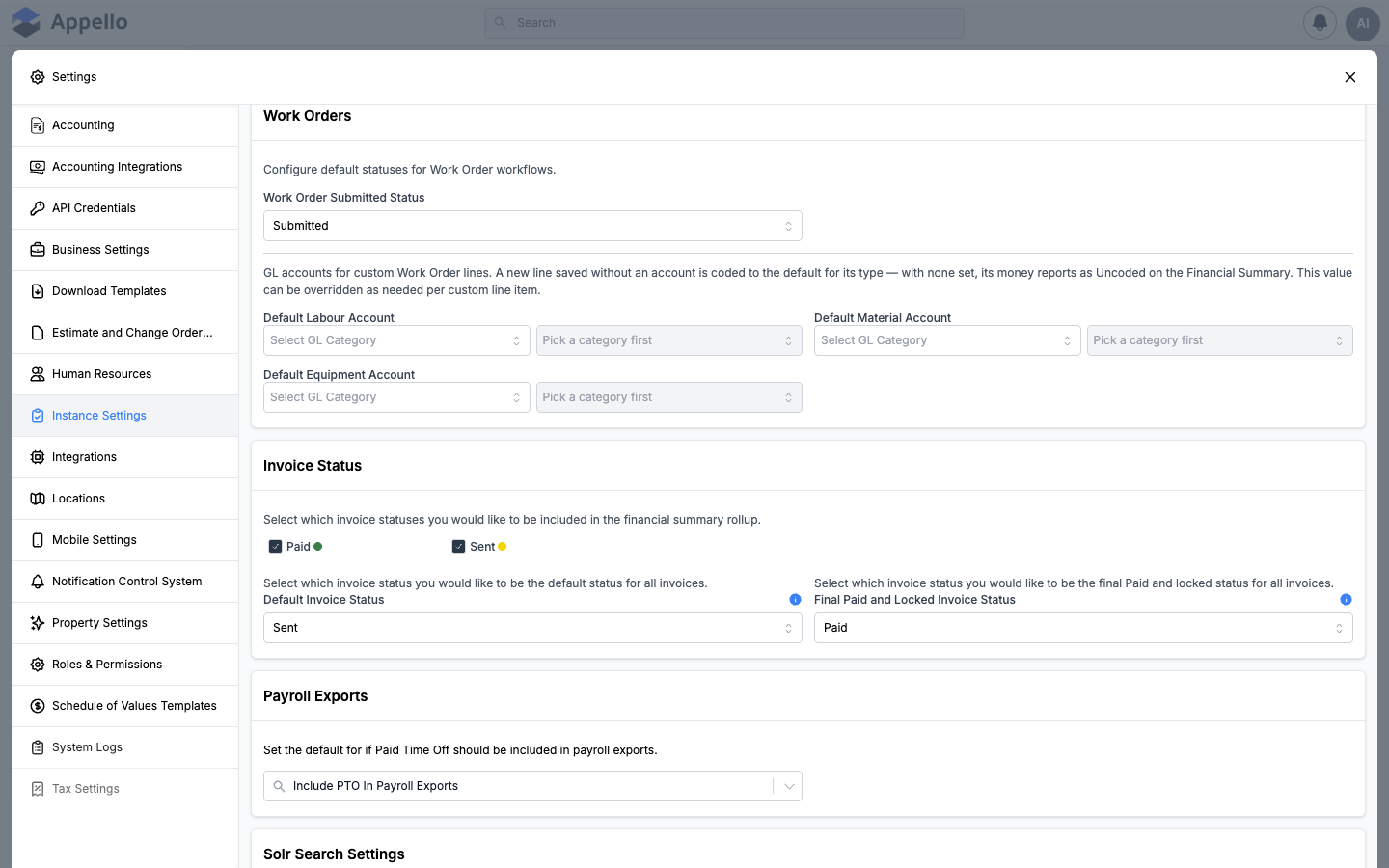
| Setting | Type | Default | What it does |
|---|---|---|---|
| Work Order Submitted Status | Select (from your Work Order status list), or "None (no submit trigger)" | Submitted | The status a work order moves to that's treated as "submitted" by the rest of the system. |
| Default Labour Account | Two-step select: GL Category, then Account Item | None | The GL account a custom Work Order labour line is coded to when the line itself doesn't specify one. |
| Default Material Account | Two-step select: GL Category, then Account Item | None | Same, for custom material lines. |
| Default Equipment Account | Two-step select: GL Category, then Account Item | None | Same, for custom equipment lines. |
With no default GL account set for a line type, a custom Work Order line saved without an explicit account reports as Uncoded on the Financial Summary. Any of the three defaults can still be overridden per line item. See Work Orders for the line-item workflow these accounts feed.
Invoice Status
Sets which invoice statuses count toward the Financial Summary rollup, and the default and final/locked statuses used on every invoice.
| Setting | Type | Default | What it does |
|---|---|---|---|
| Financial Summary rollup statuses | Multi-select checkboxes, one per invoice status | Paid, Sent (both checked) | Which invoice statuses are counted in the Financial Summary rollup. Each option shows the status's own color dot. |
| Default Invoice Status | Select (from your Invoice status list) | Sent | The status every newly created invoice starts in. |
| Final Paid and Locked Invoice Status | Select (from your Invoice status list) | Paid | Once an invoice reaches this status it is locked and can no longer be edited. |
Payroll Exports
| Setting | Type | Default | What it does |
|---|---|---|---|
| Paid Leave Payroll Export | Select | Include PTO In Payroll Exports | Whether Paid Time Off is included in or excluded from payroll exports by default. |
This form also fetches two leave-related fields (a default unpaid/paid leave type, and a full-day leave duration) as part of the same query, but neither one is rendered as an editable control on this tab. Both are actually configured on the Leave Types settings page under Human Resources -- this Payroll Exports card is the only leave-related control that lives on Instance Settings.
Search Settings
The last card on the panel. It shows the status of the tenant's search index (one row per searchable model, each with a checkmark once indexed) and gives an admin two maintenance actions: Re-Index Search (re-runs indexing) and, if the last run errored, Reset Search Index.
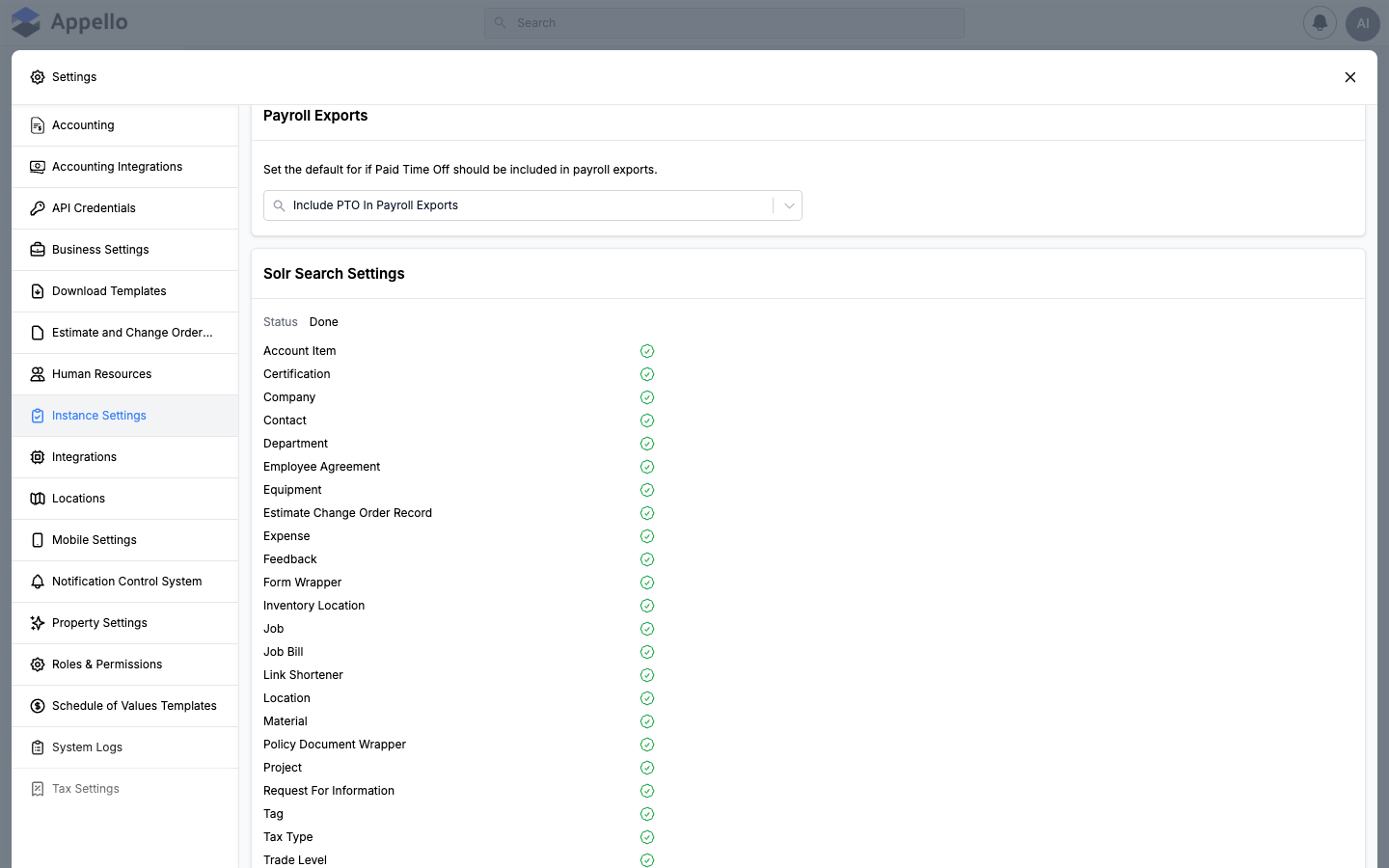
On some instances this card's on-screen heading reads "Solr Search Settings" rather than the plain "Search Settings" -- some builds name the underlying search engine (Solr) in the heading. Functionally it's the same card described above.
What's not on this tab
A few things that sound like they'd live on Instance Settings are not part of this model or this tab at all:
- Switches that enable or disable whole modules -- Materials, Work Orders, Inventory, Labs, or the customer Portal -- are not part of Instance Settings and have no control anywhere on this tab. Turning a module on or off for your instance is handled by your Appello administrator or Appello support, not from Settings.
- Time zone, date/number formats, and job/project/estimate/cost-code numbering documented above live only here -- Business Settings has no controls for them.
- Company identity, financial defaults, payroll period/schedule, billing information, and branding live on Business Settings, not here, even though both tabs read from the same underlying instance record.
- Custom field, form-layout, and default-value configuration for entities like Jobs, Projects, and Users lives on Property Settings, not here.
- Leave type definitions, default unpaid/paid leave, and full-day leave duration live on the Leave Types page under Human Resources -- see the note under Payroll Exports above.
- Role-level permissions (including which roles must wait for partial timesheet approval, referenced under Timesheet & Clock In Settings above) are set on Roles & Permissions, not here.
Related pages
- Business Settings — company identity, financial defaults, payroll period/schedule, billing information, and branding; what's on that tab instead of this one.
- Property Settings — custom fields, form layout, and default values for Jobs, Projects, Users, and other core entities.
- Roles & Permissions — the Instance Settings View / Edit permissions that gate this tab, and per-role timesheet approval behavior.
- Estimate and Change Order Templates — document-level Title, Footer, and Note text for estimates and change orders.
- Leave Types — default unpaid/paid leave type and full-day leave duration, fetched by this page but edited there.
- RFIs — the RFI workflow driven by the RFI Status defaults above.
- Work Orders — the line-item workflow driven by the Work Orders GL account defaults above.
- Clock In / Out report — how rounded vs. actual clock-in/out times appear once Timesheet & Clock In rounding is enabled.