Notification Control System
Module: Settings | Platform: Web
The Notification Control System sets the global default notification preferences for all users. Administrators can enable or disable specific notification types for both in-app notifications and SMS alerts.
Navigation
Sidebar → Settings → Notification Control System
Overview
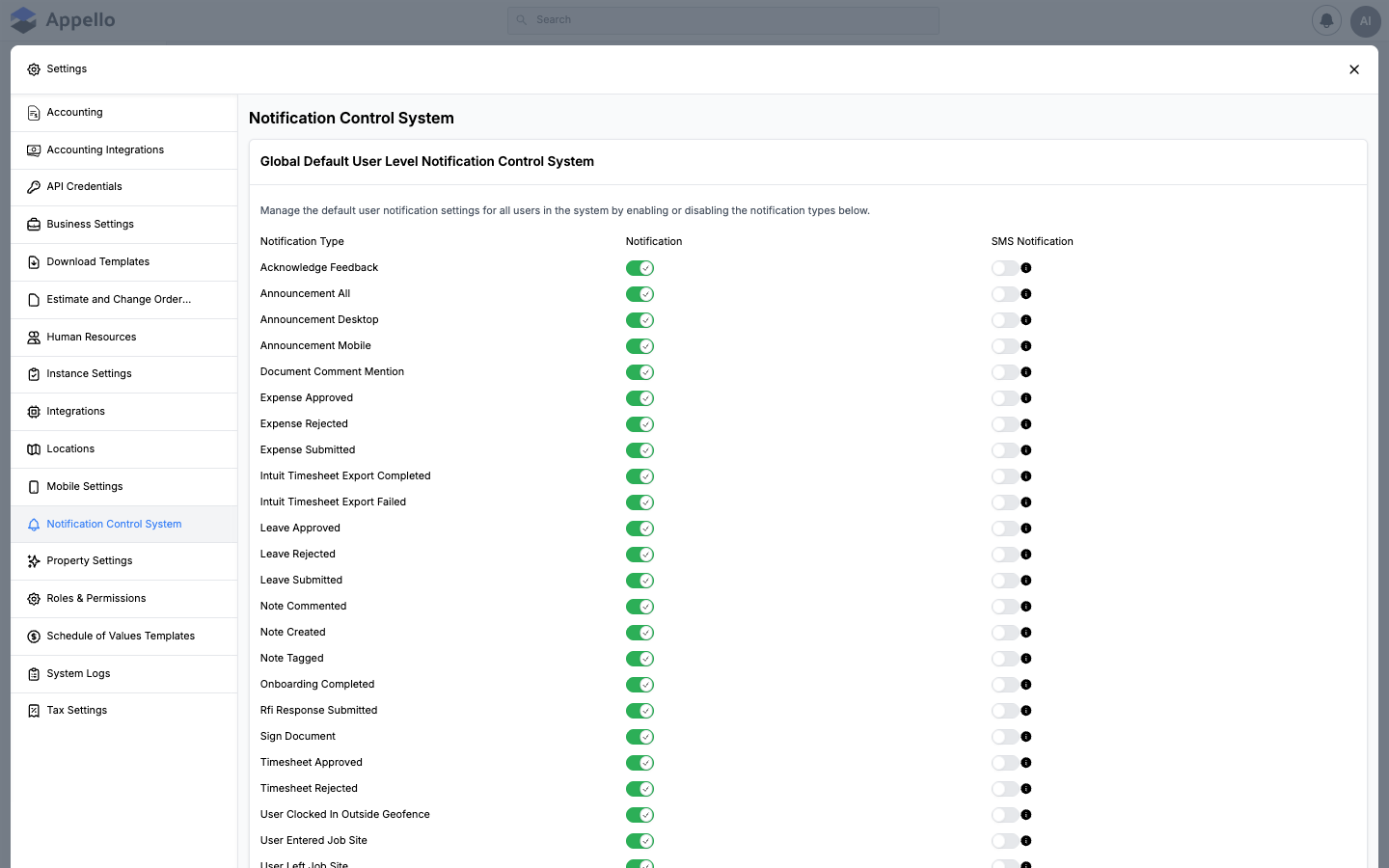
Each row represents a notification event. Two toggle columns control delivery:
| Column | Description |
|---|---|
| Notification | In-app notification (green = enabled) — shown in the notification bell panel. On mobile this same toggle also gates push; see Channels below. |
| SMS Notification | Text message via the Twilio integration (its toggle stays disabled, with a tooltip, until Twilio is configured there). |
Notification Types
| Notification Type | Description |
|---|---|
| Acknowledge Feedback | When a user acknowledges feedback on a note or form. |
| Announcement All / Desktop / Mobile | Company-wide announcements, split by platform. |
| Document Comment Mention | When a user is mentioned in a document comment. |
| Expense Approved / Rejected / Submitted | Expense lifecycle events. |
| Intuit Timesheet Export Completed / Failed | QuickBooks timesheet sync status. |
| Leave Approved / Rejected / Submitted | Leave request lifecycle events. |
| Note Commented / Created / Tagged | Activity on job notes. |
| Onboarding Completed | When a new user completes onboarding. |
| RFI Response Submitted | When an RFI response is submitted. |
| Sign Document | Digital signature request notifications. |
| Timesheet Approved / Rejected | Timesheet review outcomes. |
| User Clocked In Outside Geofence | Geofence violation alerts for field workers. |
| User Entered / Left Job Site | GPS-based job site arrival and departure notifications. |
How It Works
- These are global defaults — they apply to all users when their account is created.
- Individual users can override their notification preferences from their own profile settings.
- SMS notifications require a configured Twilio integration (see Settings → Integrations).
Channels
This screen only ever shows two toggle columns, and that is the complete set of channels an administrator configures here:
| Channel | Configured here? | Notes |
|---|---|---|
| In-App | Yes — the Notification column | Drives the notification bell panel on web. |
| Push | No separate toggle | The mobile app works out push recipients from the same In-App preference the bell panel uses (see Mobile app overview → Push notifications) — turning Notification off for a type also turns off push for it. There is no independent push column anywhere in this system. |
| SMS | Yes — the SMS Notification column | Requires a working Twilio integration. Until Twilio is configured, every SMS toggle on this page is disabled (with an info tooltip) regardless of what it's set to underneath. |
| No | As of the 1.33 release there is no email channel anywhere in the notification system, on this screen or otherwise. |
"Notification" is the only lever that also affects mobile push — there is no separate "Push" column to toggle. Toggling Notification off for a type removes it from both the in-app bell panel and mobile push at once.
Where notification recipients are configured
The single Notification Control System screen actually holds two separate tools, stacked one above the other:
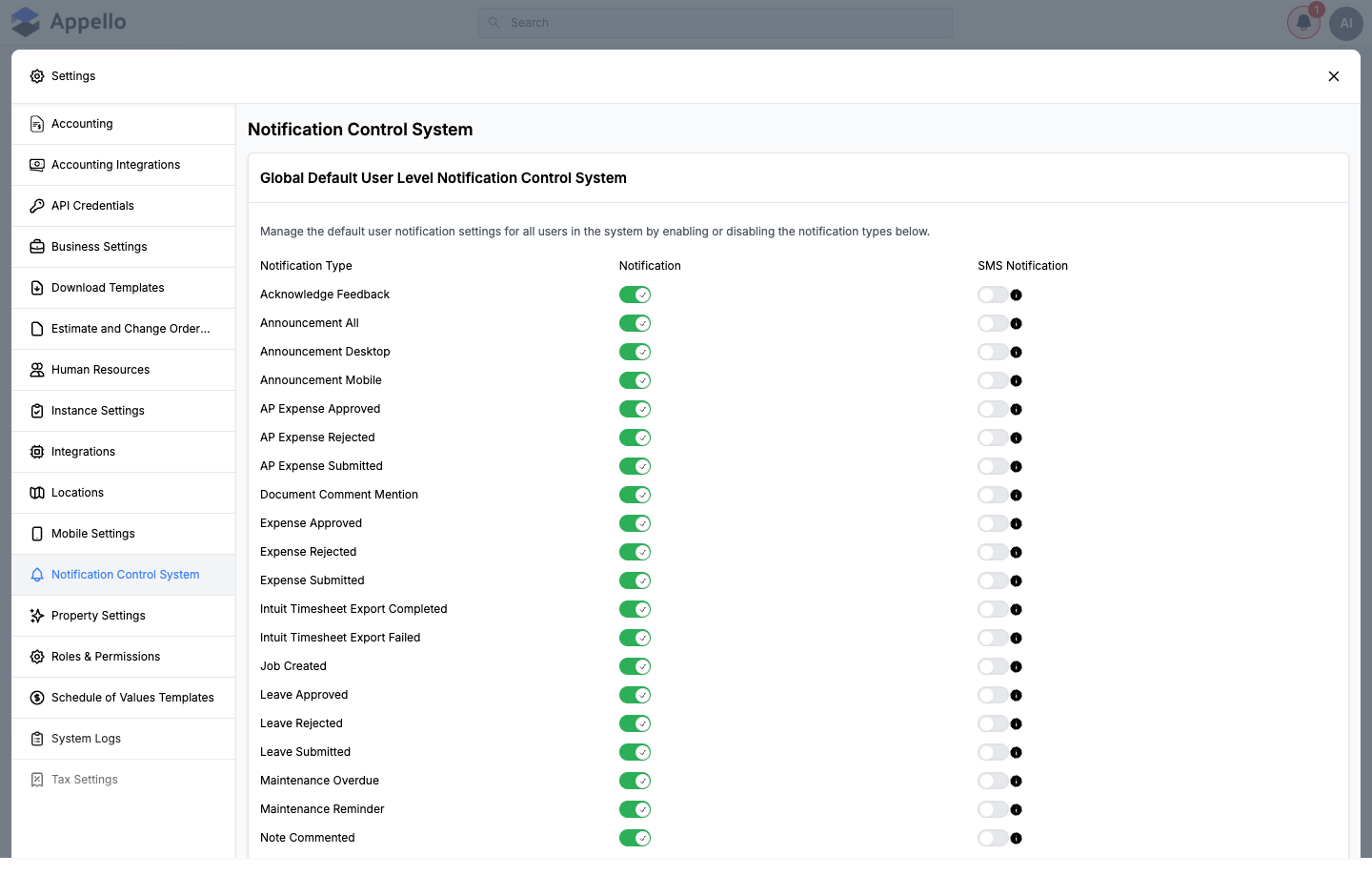
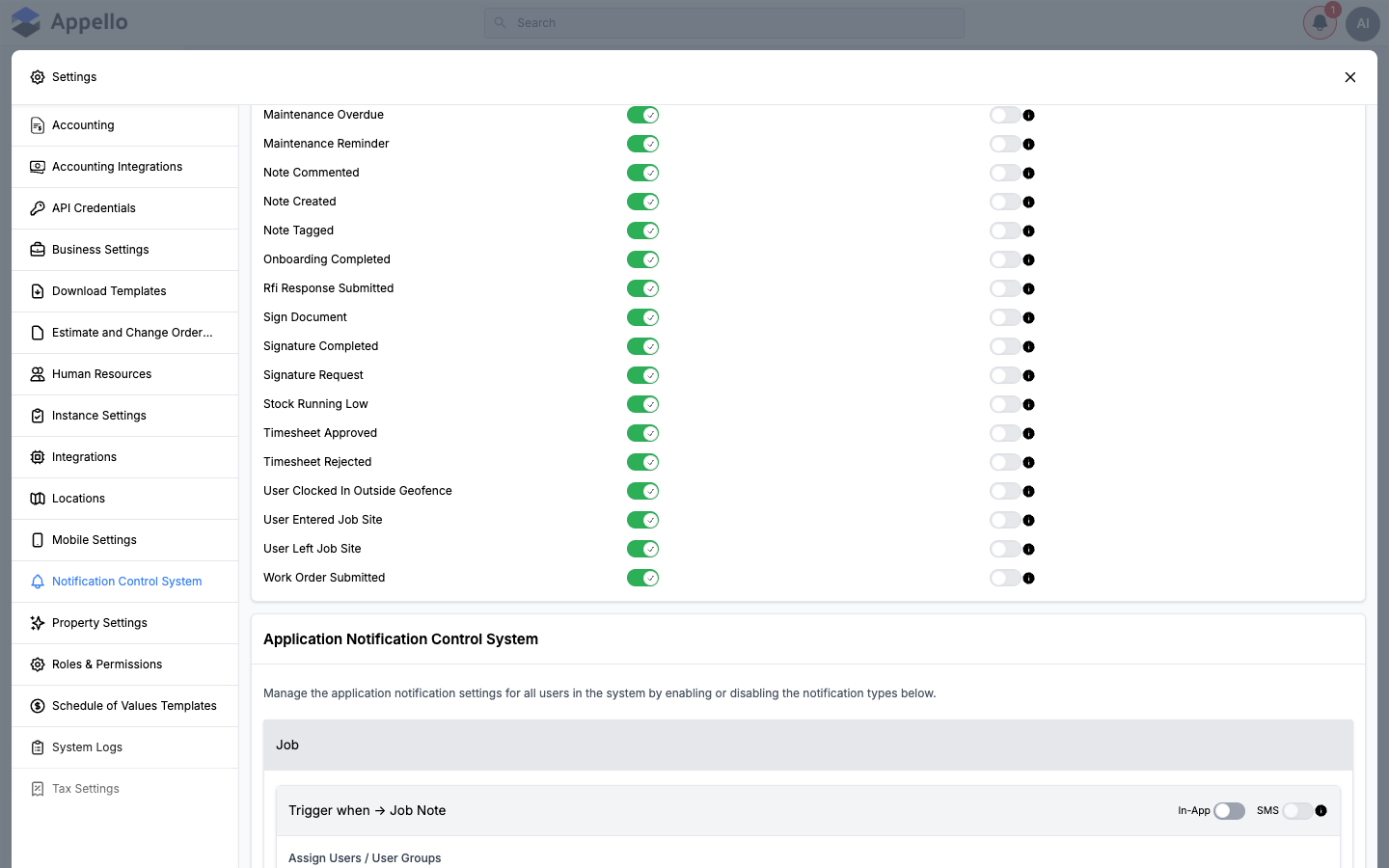
The matrix continues below the fold with the remaining types — including Timesheet Rejected and the three geofence types — and is immediately followed by the Application Notification Control System:
- Global Default User Level Notification Control System (top) — the toggle matrix described above. It turns a notification type on or off, instance-wide, for both channels. This sub-section is also referred to as the "Default Notification System."
- Application Notification Control System (bottom) — lets an administrator assign specific users or user groups to receive a notification type, with its own In-App / SMS toggle per type. Only a subset of notification types support this (see the table below). Types are grouped by area — Job, Expense, AP Expense, Leave, and so on — each shown as its own card with a "Trigger when → ___" heading. This sub-section is also referred to as the "Mandatory Notification System." Nothing on screen reads "Mandatory"; the name reflects that these are the types an admin can force onto specific people (assignment isn't optional the way a personal bell-icon preference is), not a literal label in the UI.
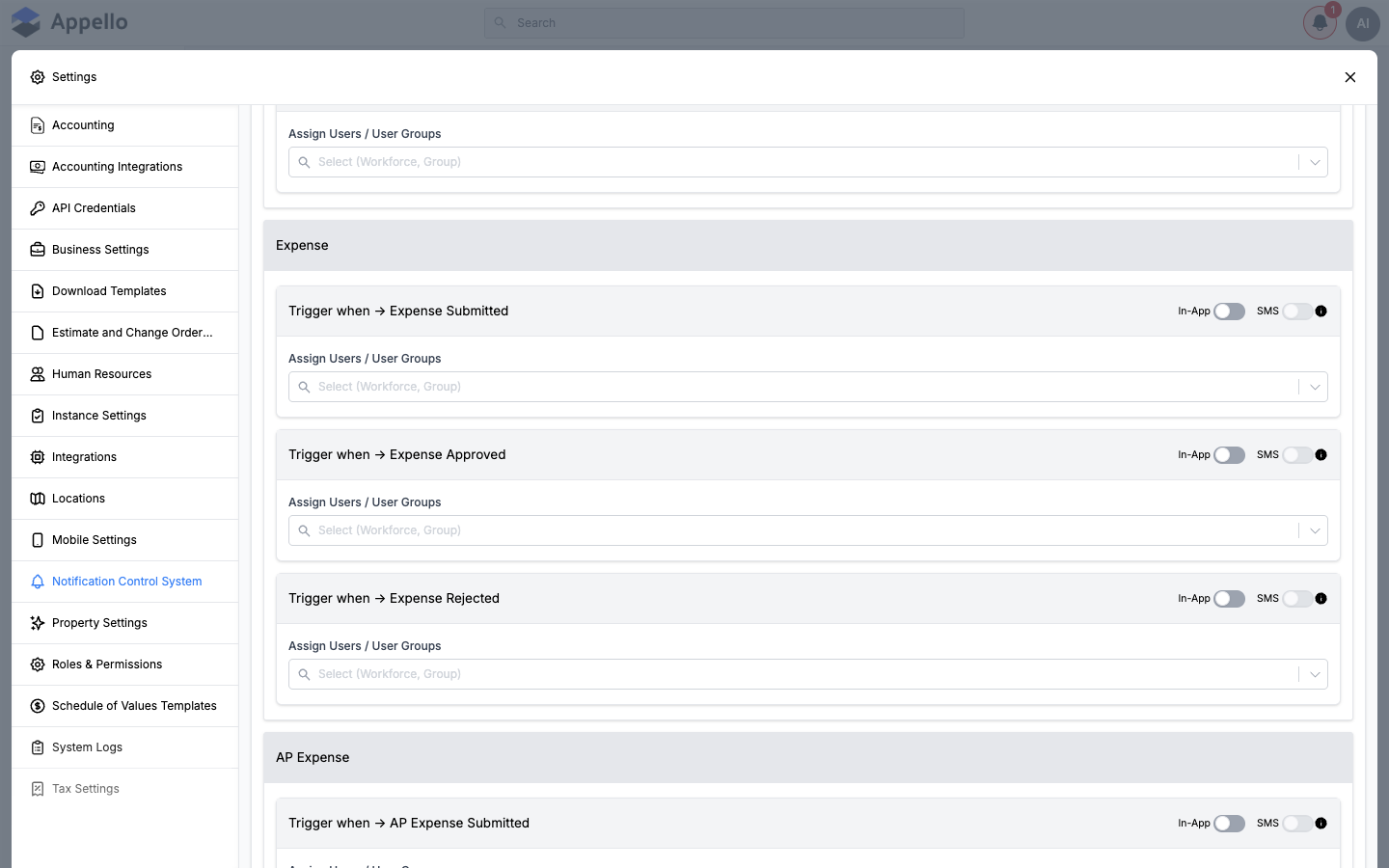
Beyond these two admin-facing tools, two more layers can affect whether a given user actually sees a notification:
- Per-job assignment — geofence notifications are assigned per job, not instance-wide. See Geofence violation notifications below.
- Personal preferences — a signed-in user can fine-tune their own In-App / SMS toggles from the notification bell in the top nav (bell icon → Manage Notification Preferences), not from their user profile. See My Profile → Notification preferences, which documents and links the same panel from the profile side.
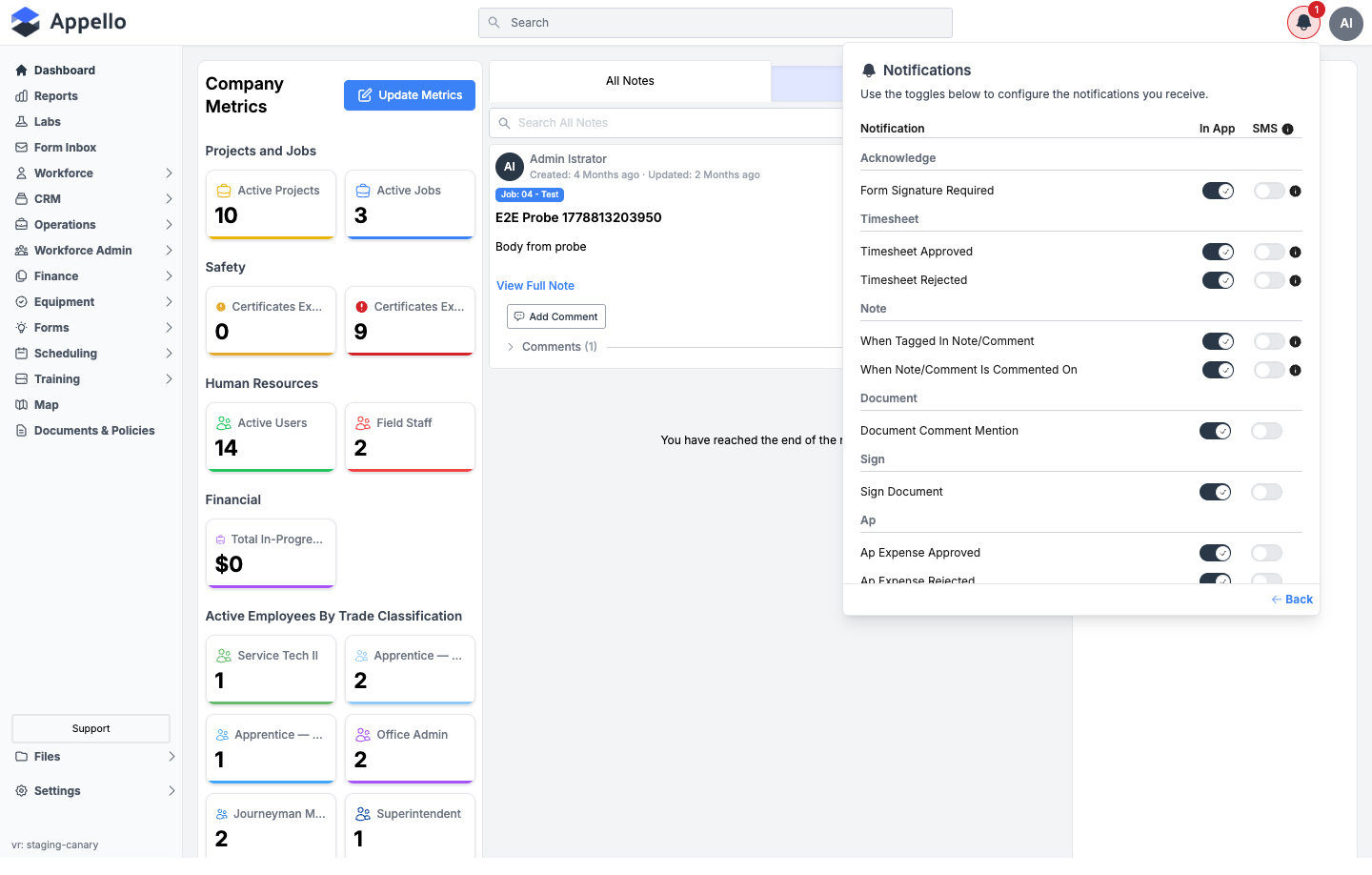
A user's notification preferences do not live under Users → a user → Overview/profile. This panel is opened from the notification bell icon in the top navigation bar and only ever shows the signed-in user's own preferences — there is no admin screen for setting preferences on another user's behalf from the Users list. An administrator's only lever over another user's notifications is the global default matrix, the Application Notification Control System's user/group assignment, and (for geofence types) the per-job assignment.
A handful of notification types are deliberately left out of this personal preferences panel and can only be controlled globally or by admin assignment: Expense Submitted, Expense Approved, Expense Rejected, Leave Submitted, Leave Approved, Leave Rejected, AP Expense Submitted, Note Created, Onboarding Completed, and Job Created. Every other type that appears in the Global Default matrix is eligible to show in a user's personal panel (confirmed on screen for Timesheet Rejected, Acknowledge Feedback, Document Comment Mention, Sign Document, Signature Request/Completed, Note Tagged/Commented, Intuit Timesheet Export Completed/Failed, RFI Response Submitted, Maintenance Reminder/Overdue, Work Order Submitted, AP Expense Approved/Rejected, and the three geofence types). The Announcement types and Stock Running Low are also eligible, though they weren't visible in the portion of the panel captured in the screenshot above.
Row controls close-up
Every row in the Application Notification Control System pairs the same three controls: an In-App / SMS toggle for that trigger, and an Assign Users / User Groups search field. Clicking into the field opens a live search over users and user groups; nothing is added until an option is picked, so opening it and clicking away (as below) makes no change:

This field was opened to capture the screenshot above and then clicked away from — no user or group was selected or saved, per the read-only crawl rule.
Save behaviour
Both sub-sections share one Save action, not two. Appello tracks a combined change count across the Default and Mandatory sub-sections; as soon as either one has a pending change, a sticky bar appears at the bottom of the panel showing the total number of changes with Save and Cancel actions (the same unsaved-changes bar used elsewhere in Settings).
- Change any toggle in either sub-section (or add/remove a user or group in an Assign Users / User Groups picker).
- The sticky bar appears, counting every changed cell across both sub-sections combined.
- Save commits both sub-sections together, reloads them, and clears the bar.
- Cancel resets both sub-sections back to what they last loaded, discarding every uncommitted change in both at once — there is no way to save one sub-section without the other.
This combined Save does not cover every control on the page. The per-job Geofence Notifications picker (see below) and the Twilio fields on Settings → Integrations save independently of this bar.
How a change shows up for a user
- Turning a type's Notification toggle off in the Default sub-section removes it from that type's entry in every user's bell panel and — per Channels — from mobile push at the same time, instance-wide, the next time a triggering event fires. It does not retroactively remove notifications already delivered.
- Turning a type's SMS Notification toggle off stops the text message the same way, instance- wide, once Twilio is configured.
- For a type with an entry in the Mandatory sub-section, only the assigned users/groups (or everyone minus the excluded users/groups) receive it at all — the Default sub-section's toggle for that type still gates whether In-App/SMS fire for that assigned audience.
- For the handful of types exposed in a user's own bell-icon Notification Preferences panel, that person's own toggle is layered on top of the instance-wide default — see Where notification recipients are configured above for exactly which types are eligible.
- None of this is retroactive: changing a toggle here only affects notifications triggered after the change is saved.
Complete notification type reference
The table below lists every notification type shown in the Global Default matrix as of Release 1.33 (34 types), what triggers it, who receives it, which channels apply, and where an individual can override the global default. "Assigned" recipients means an administrator has picked specific users/groups for that type in the Application Notification Control System; "Per-job" means the recipients are picked separately for each job; anything else is sent to the person or people tied to the record itself (its submitter, approver, the person tagged, and so on) with no separate recipient list to configure.
| Notification Type | Trigger | Recipients | Channels | Personal override |
|---|---|---|---|---|
| Acknowledge Feedback | A user acknowledges feedback that required sign-off | The person tied to the record | In-App, SMS | Bell icon |
| Announcement All | A company-wide announcement is published (desktop + mobile) | The announcement's audience | In-App, SMS | Not confirmed |
| Announcement Desktop | A company-wide announcement is published, desktop only | The announcement's audience | In-App, SMS | Not confirmed |
| Announcement Mobile | A company-wide announcement is published, mobile only | The announcement's audience | In-App, SMS | Not confirmed |
| AP Expense Approved | An accounts-payable expense is approved | Assigned (Application Notification Control System) | In-App, SMS | Bell icon |
| AP Expense Rejected | An accounts-payable expense is rejected | Assigned (Application Notification Control System) | In-App, SMS | Bell icon |
| AP Expense Submitted | An accounts-payable expense is submitted | Assigned (Application Notification Control System) | In-App, SMS | Not available |
| Document Comment Mention | A user is @-mentioned in a document comment | The mentioned user | In-App, SMS | Bell icon |
| Expense Approved | An employee expense is approved | Assigned (Application Notification Control System) | In-App, SMS | Not available |
| Expense Rejected | An employee expense is rejected | Assigned (Application Notification Control System) | In-App, SMS | Not available |
| Expense Submitted | An employee expense is submitted | Assigned (Application Notification Control System) | In-App, SMS | Not available |
| Intuit Timesheet Export Completed | A QuickBooks (Intuit) timesheet export finishes | The user who ran the export | In-App, SMS | Bell icon |
| Intuit Timesheet Export Failed | A QuickBooks (Intuit) timesheet export fails | The user who ran the export | In-App, SMS | Bell icon |
| Job Created | A new job is created | Assigned (Application Notification Control System) | In-App, SMS | Not available |
| Leave Approved | A leave request is approved | Assigned (Application Notification Control System) | In-App, SMS | Not available |
| Leave Rejected | A leave request is rejected | Assigned (Application Notification Control System) | In-App, SMS | Not available |
| Leave Submitted | A leave request is submitted | Assigned (Application Notification Control System) | In-App, SMS | Not available |
| Maintenance Overdue | Scheduled equipment maintenance passes its due date | Assigned (Application Notification Control System) | In-App, SMS | Bell icon |
| Maintenance Reminder | Scheduled equipment maintenance is coming due | Assigned (Application Notification Control System) | In-App, SMS | Bell icon |
| Note Commented | A comment is added to a job note | The note's participants | In-App, SMS | Bell icon |
| Note Created | A new job note is created | Users following the job | In-App, SMS | Not available |
| Note Tagged | A user is tagged in a job note | The tagged user | In-App, SMS | Bell icon |
| Onboarding Completed | A new user finishes onboarding | Assigned (Application Notification Control System) | In-App, SMS | Not available |
| RFI Response Submitted | A response is submitted to a Request for Information | The RFI's stakeholders | In-App, SMS | Bell icon |
| Sign Document | A document requires the user's signature | The requested signer | In-App, SMS | Bell icon |
| Signature Completed | A requested signature is completed | The requester | In-App, SMS | Bell icon |
| Signature Request | A signature is requested from the user | The requested signer | In-App, SMS | Bell icon |
| Stock Running Low | An inventory item reaches its low-stock threshold | Assigned (Application Notification Control System) | In-App, SMS | Not confirmed |
| Timesheet Approved | A submitted timesheet is approved | The timesheet's owner | In-App, SMS | Bell icon |
| Timesheet Rejected | A submitted timesheet is rejected | The timesheet's owner | In-App, SMS | Bell icon |
| User Clocked In Outside Geofence | A worker clocks in from outside the job's geofence radius | Per-job (Geofence Notifications) | In-App, SMS | Bell icon |
| User Entered Job Site | A worker's location enters the job's geofence | Per-job (Geofence Notifications) | In-App, SMS | Bell icon |
| User Left Job Site | A worker's location leaves the job's geofence | Per-job (Geofence Notifications) | In-App, SMS | Bell icon |
| Work Order Submitted | A work order is submitted | Assigned (Application Notification Control System) | In-App, SMS | Not confirmed |
The trigger and recipient descriptions above are derived from each notification type's name and from what the Notification Control System exposes for it, not from watching a live event fire on a working instance.
Schedule change notifications
No "schedule change" notification exists as of the 1.33 release. There is no row for one in the Global Default matrix shown above, and no admin-assignable version in the Application Notification Control System. Appello does not currently send an in-app, SMS, or any other notification when a worker's schedule changes.
Timesheet rejection notifications
Timesheet Rejected is a row in the Global Default matrix (In-App and SMS toggles, on by default) and also appears in a user's personal Notification Preferences panel under a "Timesheet" heading, alongside Timesheet Approved.
Timesheet Rejected is not one of the types available in the Application Notification Control System — there is no admin-assignable recipient list for it. The notification goes to the timesheet's owner; an administrator's only lever is the global on/off toggle, and the affected user can further silence it for themselves from the bell icon.
Certification expiry alerts
Certification expiry does not fire a push or SMS notification the way the other rows on this page do — there is no certification-expiry notification type at all. Instead, it is a status threshold set once for the whole instance:
Sidebar → Settings → Instance Settings → Certification Settings
Expiring Soon certificates are those that expire in 45 days or less.
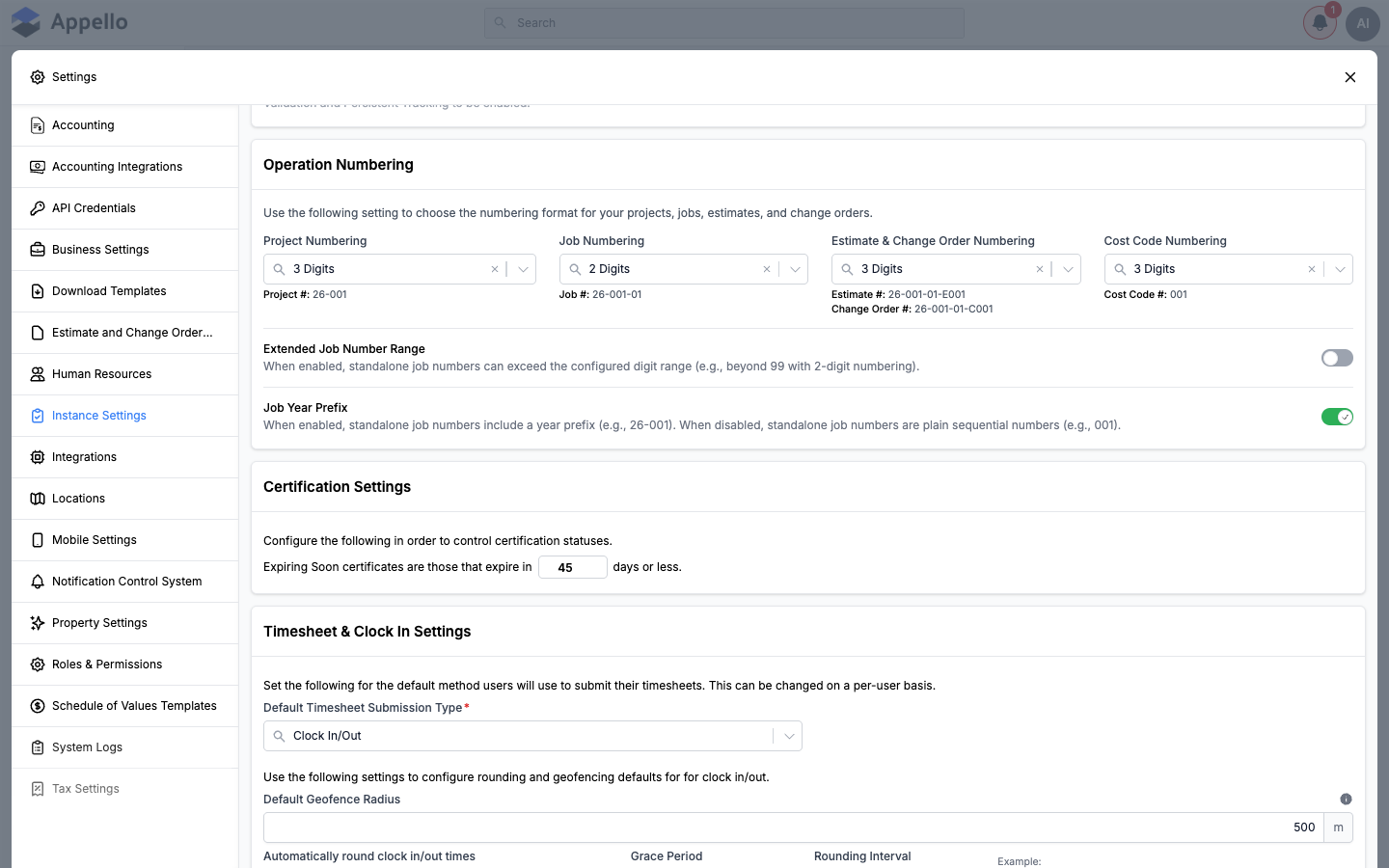
This instance setting (45 days by default) controls when a certification is labeled "Expiring Soon" in Training and certification lists/reports across the app. Each certification type can override this instance-wide value with its own "Expires Soon Days" field on the certification's own add/edit form (falls back to the instance value, which itself falls back to 45, if left blank).
This is a display/reporting threshold, not a proactive alert. Nothing here causes a push notification, SMS, or email to go out when a certification approaches or passes that threshold — certification expiry has to be checked by looking at the Training area, not by waiting for a notification.
Geofence violation notifications (5.4 & 19.6)
Geofence violations share one toggle in the Global Default matrix — User Clocked In Outside Geofence — alongside the related User Entered Job Site and User Left Job Site rows. All three appear together in a user's personal Notification Preferences panel too, under a "User" heading:
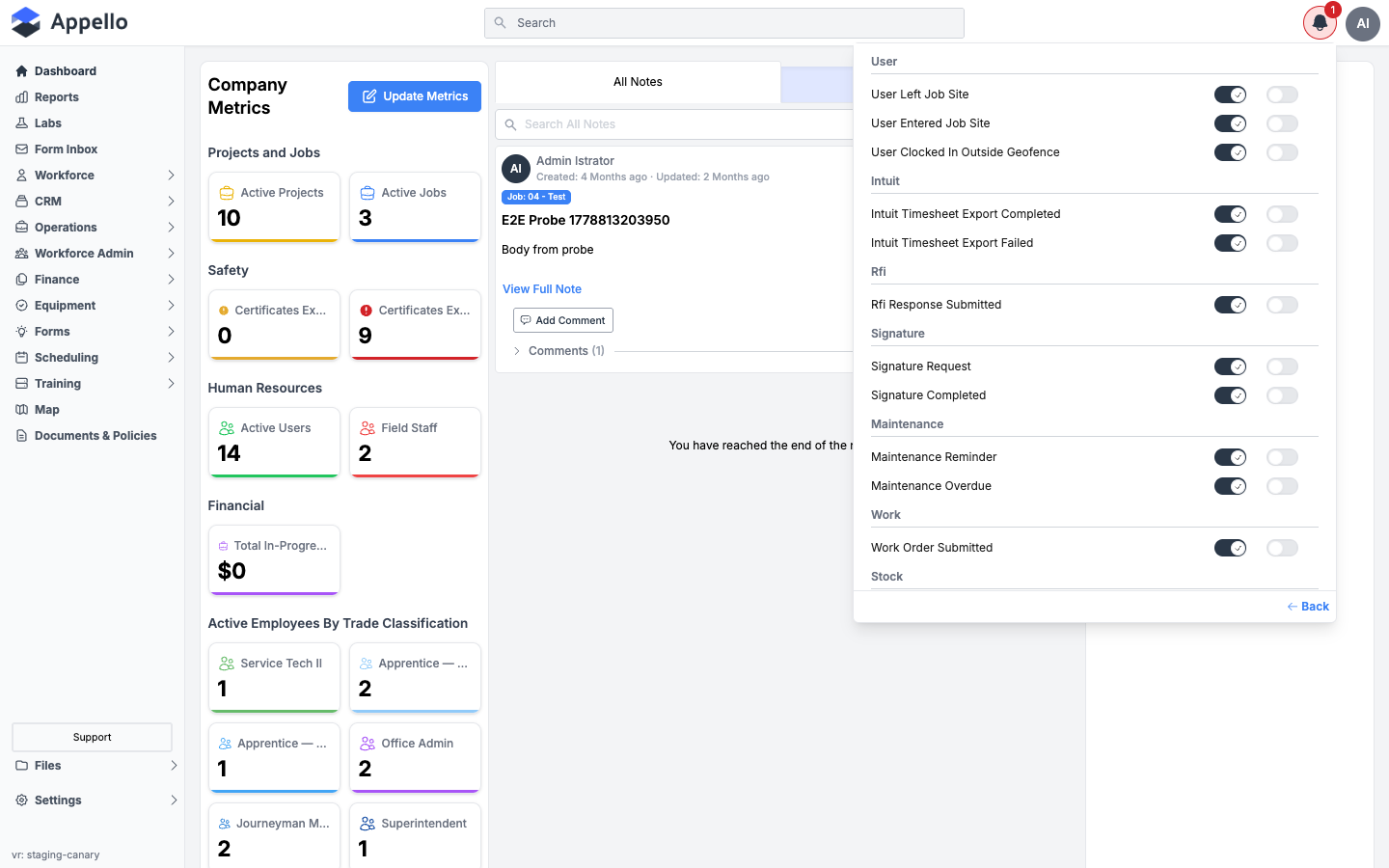
Unlike most other types, geofence notifications are not managed through the Application Notification Control System. Instead, each job has its own recipient list, set on the job's own Settings tab:
Job → Settings tab → Geofence Notifications
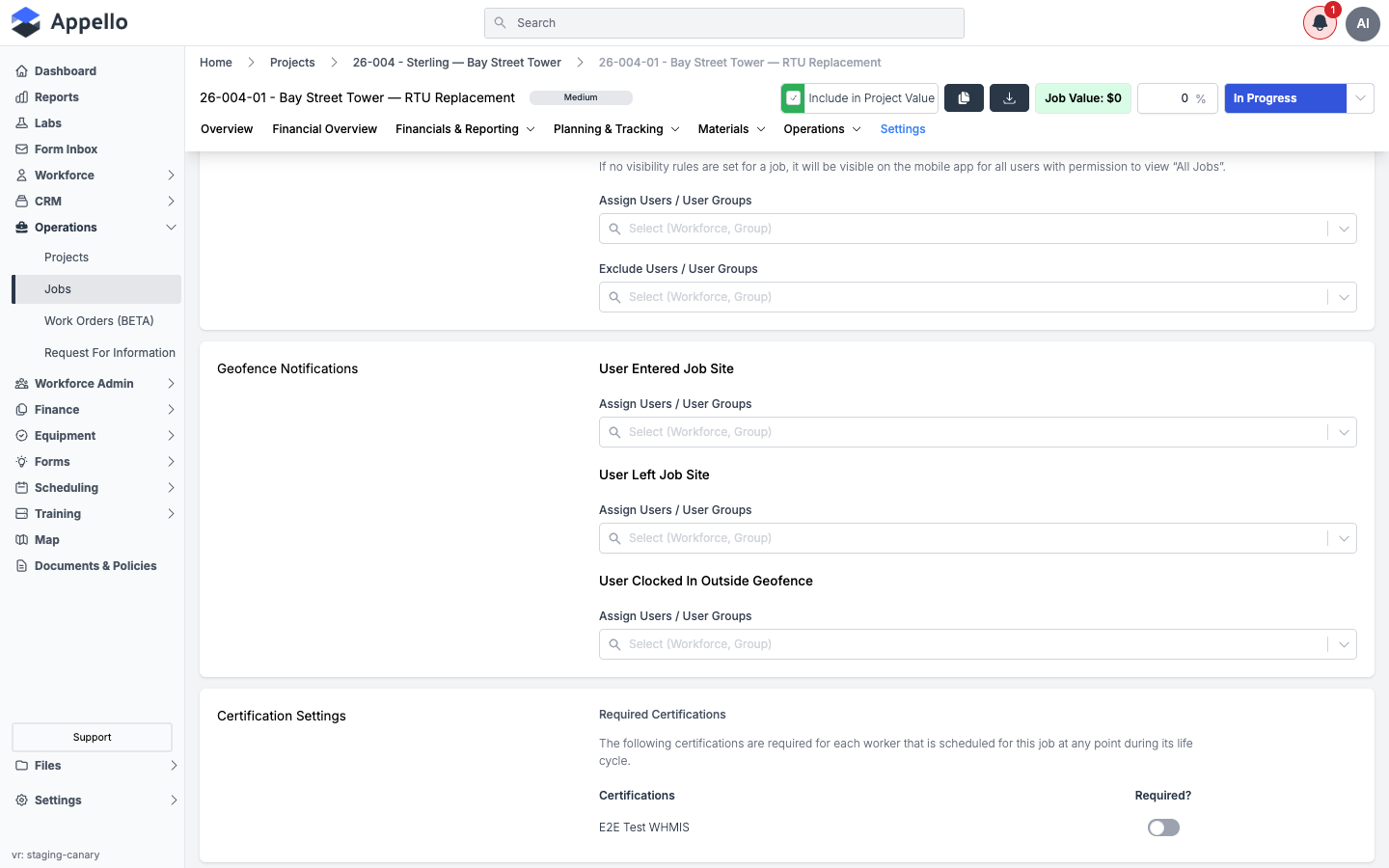
- Open the job and go to its Settings tab.
- Scroll to the Geofence Notifications card.
- For each of the three event types, use Assign Users / User Groups to pick who should be notified for that job specifically.
This picker auto-saves a moment after you make a selection — there is no separate Save button for this section.
So a geofence violation notification for a given job depends on three layers together: the job's own Geofence Notifications recipient list, the instance-wide Global Default toggle for User Clocked In Outside Geofence, and the affected user's own bell-icon preference for that type.
Expense notifications
Expense notifications span two separate groups of three (Submitted / Approved / Rejected each): plain employee Expense and vendor-side AP Expense. Both groups appear as rows in the Global Default matrix, and both have their own card in the Application Notification Control System where an administrator assigns specific users/groups per trigger:
- Sidebar → Settings → Notification Control System
- Scroll to Application Notification Control System.
- Open the Expense or AP Expense card.
- For each trigger (Expense Submitted, Expense Approved, Expense Rejected, and the AP equivalents), toggle In-App / SMS and use Assign Users / User Groups to pick recipients.
Plain Expense Submitted/Approved/Rejected and AP Expense Submitted are excluded from a user's personal preferences panel entirely — only AP Expense Approved and AP Expense Rejected can be adjusted by an individual user. For the rest, the global default and the Application Notification Control System's assignment are the only controls.
Form submission notifications
No "form submission" notification type exists as of the 1.33 release — there is no row for one in the Global Default matrix and no admin-assignable version in the Application Notification Control System. A job's Form Submissions tab (for safety/inspection forms) and a separate one-off "email this submission" action exist elsewhere in the product, but neither is a toggleable notification type on this page.
Permissions
These are the action groups on the Notification Settings permission item, under Settings Access on Roles & Permissions.
| Permission | Required for |
|---|---|
| Notification Settings: View | The Notification Control System item to appear in the Settings sidebar at all. Without it, a user cannot open this screen. |
| Notification Settings: Edit | Every toggle and picker on the screen to be interactive. Without it, the screen is still shown but read-only, with a banner reading "You don't have the permission to modify this setting" in place of working controls. |
Both sub-sections share the same single edit permission — there is no way to grant edit access to one sub-section but not the other.
Related pages
- In-app notifications — the bell-icon panel this
screen's In-App toggle feeds, and the only other page under
docs/notifications. - My Profile → Notification preferences — where a signed-in user finds their own bell-icon preferences from the profile side.
- Integrations & API → Integrations (Twilio SMS) — configuring the Twilio account that the SMS Notification column depends on.
- Mobile app overview → Push notifications — how the same Notification toggle documented here also gates push on mobile.