Companies
Manage customer, general contractor, and vendor company records. Companies are linked to projects, estimates, and invoices — forming the customer side of Appello's operational data model.
Where it is
Sidebar → CRM → Companies
URL: /companies
Requires the Companies → View permission. This is the same permission that gates the Company Detail page each row opens.
What it is for
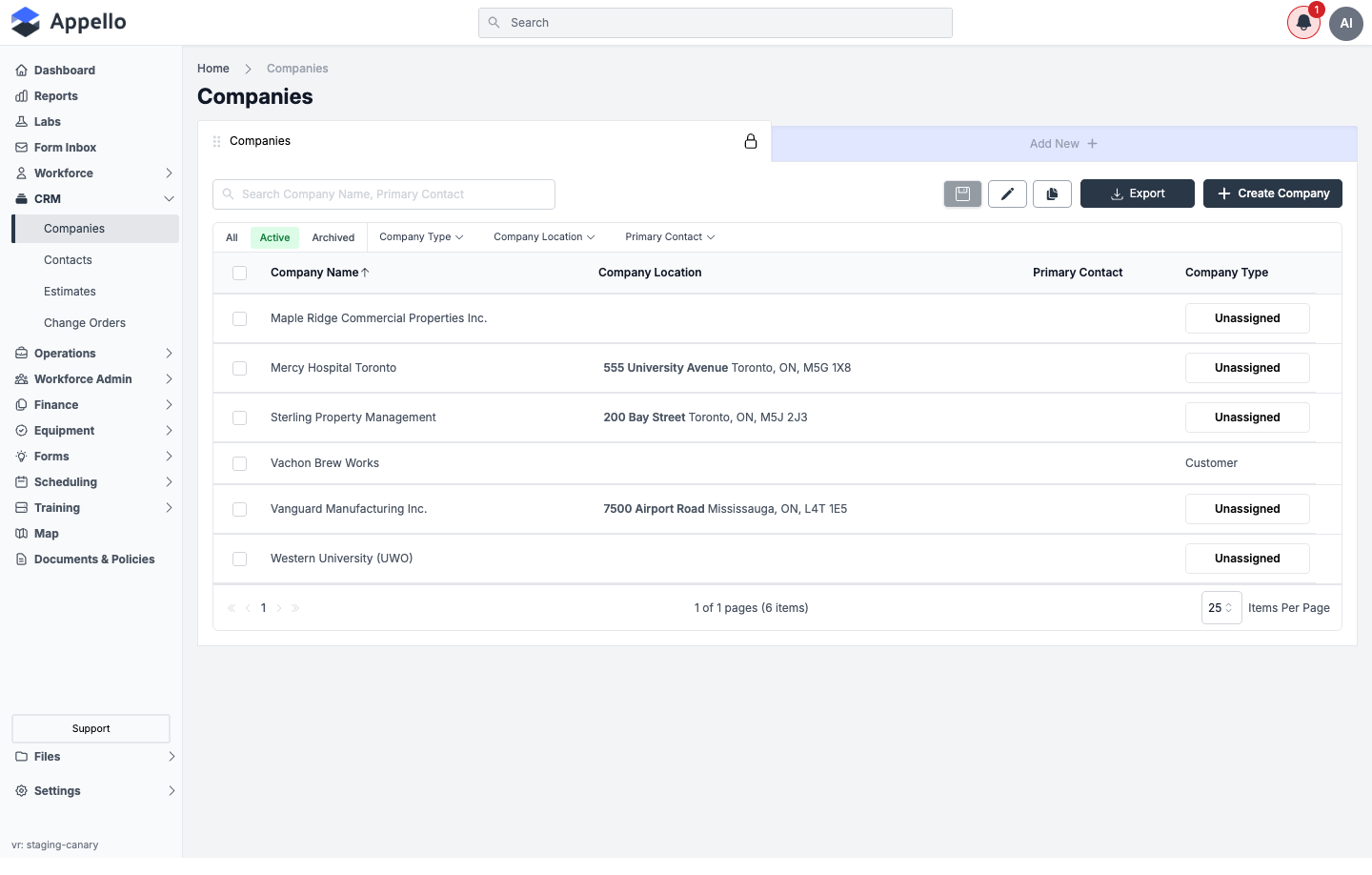
The Companies page is the searchable, filterable list of every customer, general contractor, vendor, and subsidiary company record in the instance. It is the entry point for creating a new company and for bulk archive/delete/restore housekeeping on existing records.
Columns
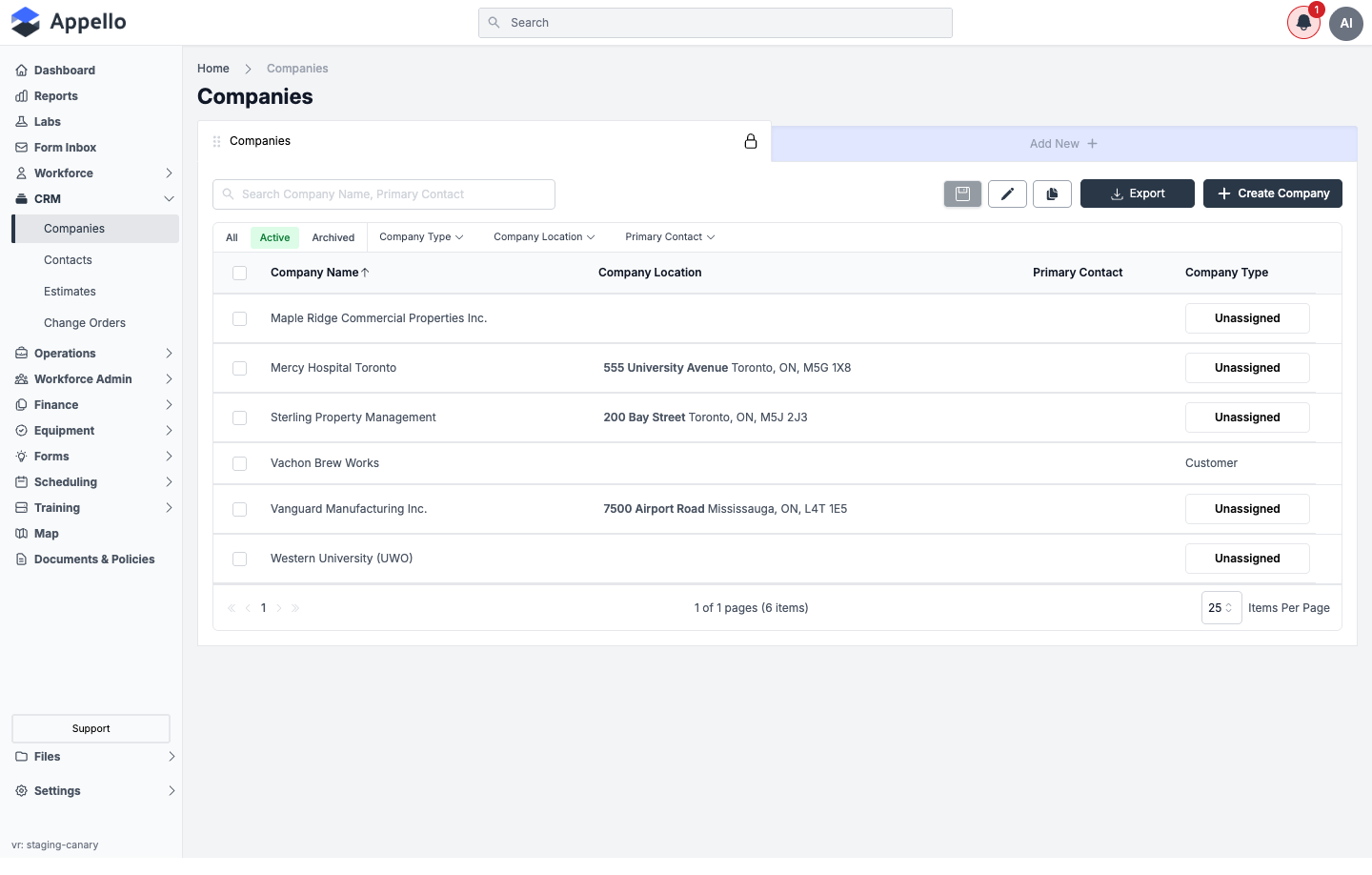
Company uses the same configurable list used across Appello, so any column below can be added to a view — the four marked below are what the demo instance shows by default.
| Column | Shown by default | Notes |
|---|---|---|
| Company Name | Yes | The default sort column (ascending) |
| Company Location | Yes | The company's linked address. Labelled Address when configuring columns and in exports, but shown as Company Location in the live column header |
| Primary Contact | Yes | — |
| Company Type | Yes | Custom property; the option list is configured in Property Settings |
| Description | No | — |
| Account Payable Contact | No | — |
| Account Receivable Contact | No | — |
| Payable Type | No | One of Account Payable, Account Receivable, both, or -, derived from the Company Type's payable/receivable flags (see Company type below) |
| QuickBooks Online Sync Status | No | Only meaningful on instances with the QuickBooks Online integration connected |
| All Contacts | No | Every Contact linked to this company — broader than the three named contact roles above |
| Created At / Updated At | No | Standard record timestamps |
Parent Company and Note are excluded from the column list entirely — they cannot be added to any view.
Adding, removing, and reordering columns, and saving that as a named view, is done from the pencil (Edit View) icon next to the Companies tab, or from Add New to create another view/tab with its own column set. Its icon-only trigger could not be opened by the read-only crawl tool used for this page, so this section has no live screenshot.
Quick tabs, filters, and search
| Control | Type | Effect |
|---|---|---|
| All / Active / Archived | Quick tabs | Filters by the record's archived state. Active is selected by default |
| Company Type | Filter chip (multi-select, searchable) | Filters to companies whose Company Type matches one or more checked values |
| Company Location | Filter chip | Filters by the company's linked address |
| Primary Contact | Filter chip | Filters by the company's linked Primary Contact |
| Search Company Name, Primary Contact | Search box | Free-text search across the Company Name and Primary Contact fields only, per the placeholder text |
| Column header click (e.g. Company Name) | Sort | Toggles ascending/descending sort on that column. Default sort is Company Name, ascending |
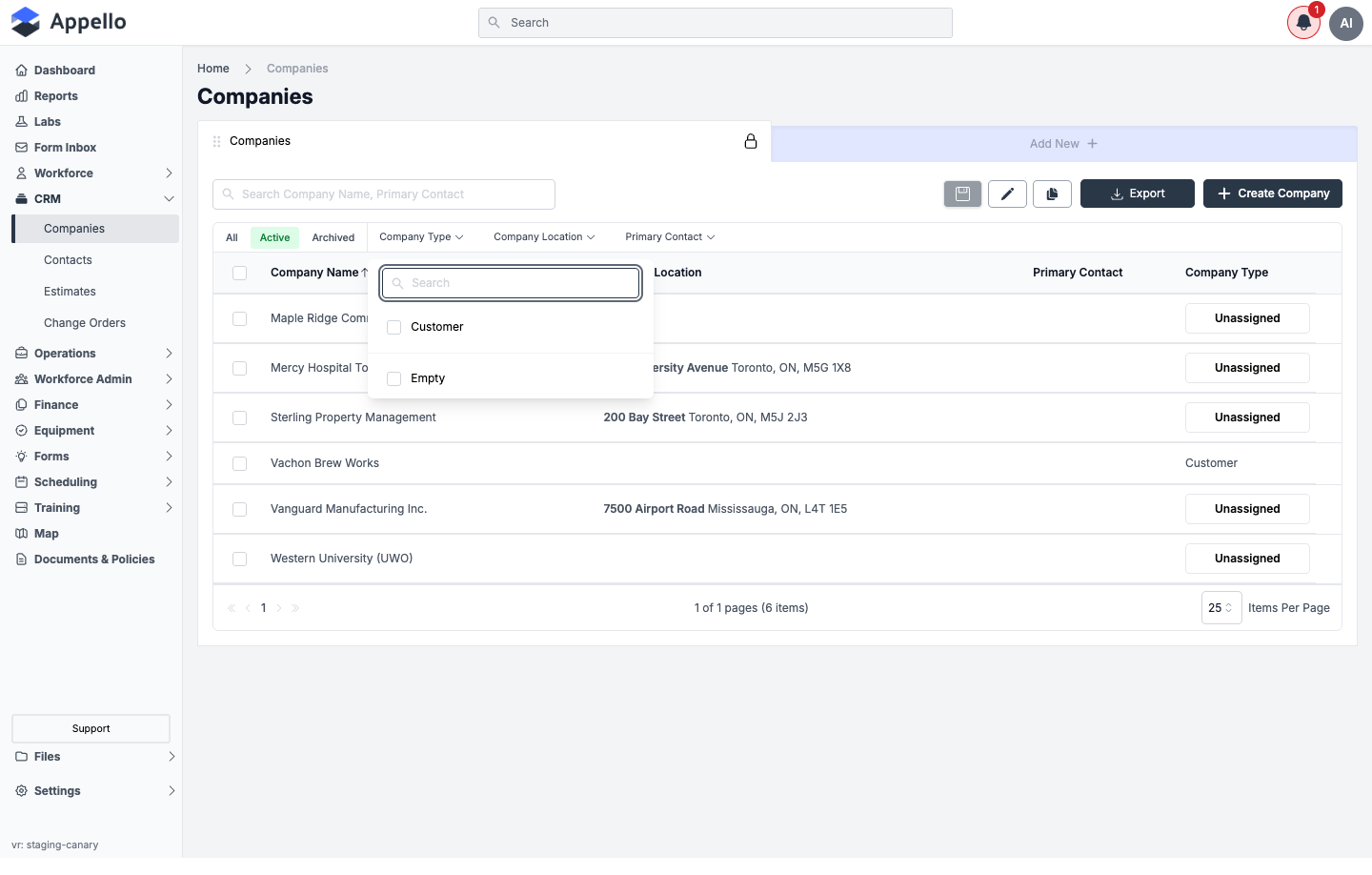
A filter chip's checkbox list only shows values actually present on at least one company record (plus an Empty bucket for unassigned), not the full option list configured in Property Settings. On the demo instance the Company Type property has more configured options, but only Customer is in use on the six seeded companies — so Customer and Empty are the only choices offered here.
Table / Board view
Some Appello list pages offer a Table/Board (kanban) toggle. Companies does not — the Companies list is table-only.
Export
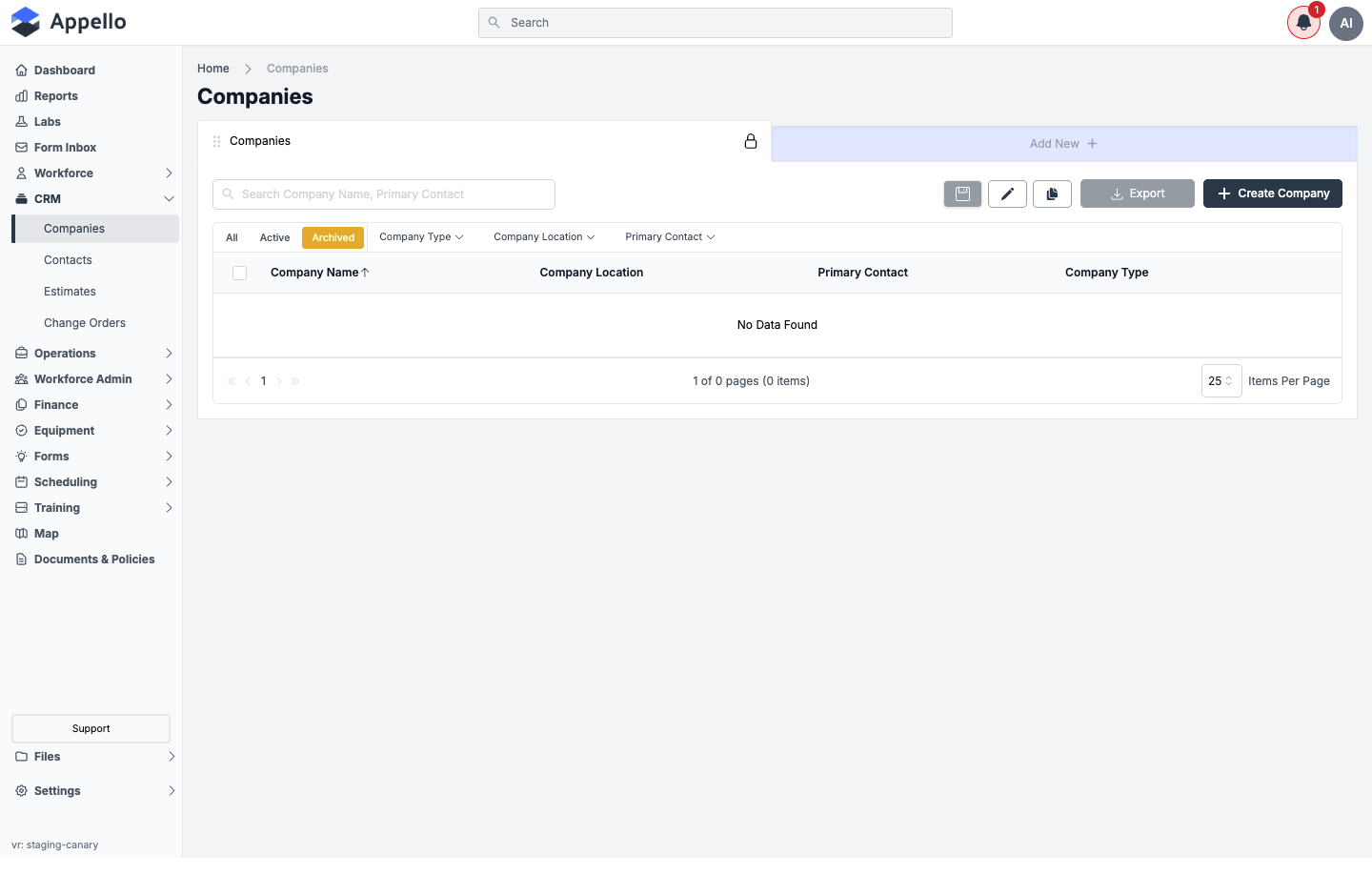
Click Export to download the current view as CSV or PDF; either file reflects the columns, sort, filters, and any selected rows at the time of export. The button is disabled when the current tab has zero rows (for example, an empty Archived tab). Export is available to any user who can see the page — it carries no separate permission of its own.
Creating a company
- Click Create Company in the top right of the list.
- Fill in the Company Create Form (see Create Company panel below).
- Click Save. You are taken to the new company's detail page.
Cancel closes the panel without saving.
Create Company panel
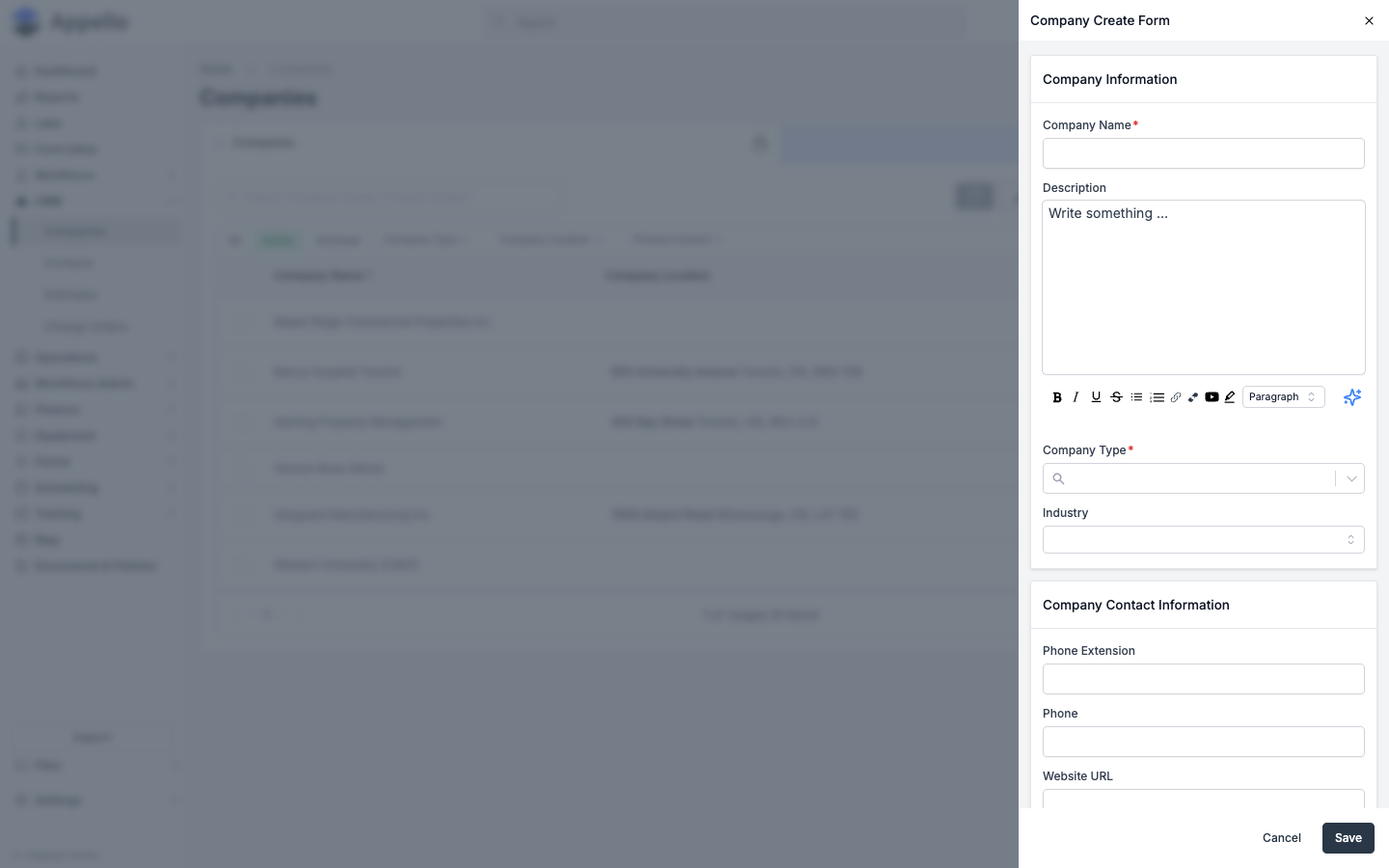
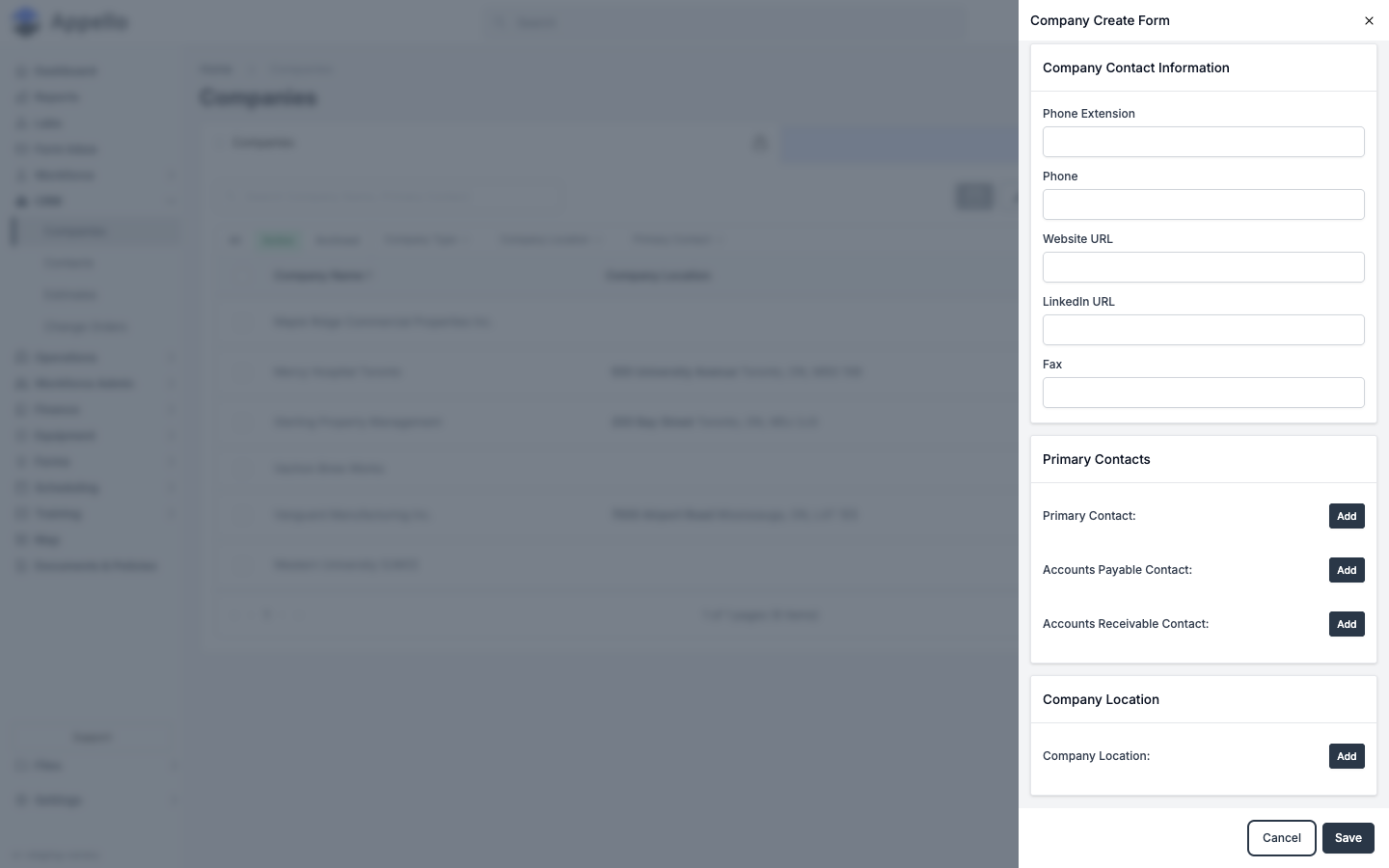
The panel is configuration-driven — Appello builds it from the Company model's field setup, so the exact fields, their order, and which ones are required can differ per instance. Which fields appear and whether they're required is configured in Property Settings (Companies → Detail View Layout / Manage Forms). The fields below are what the demo instance shows today.
| Field | Required | Type | Effect |
|---|---|---|---|
| Company Name | Yes | Text | The company's display name |
| Description | No | Rich text | Free-form notes, with a formatting toolbar (bold, italic, lists, links) |
| Company Type | Yes | Searchable single-select | Drives which tabs the detail page shows — see below |
| Industry | No | Select | — |
| Phone Extension | No | Text | — |
| Phone | No | Text | — |
| Website URL | No | Text | — |
| LinkedIn URL | No | Text | — |
| Fax | No | Text | — |
| Primary Contact — Add | No | Associate-contact picker | Links an existing (or newly created) Contact as the company's primary contact |
| Accounts Payable Contact — Add | No | Associate-contact picker | Links the contact used for accounts-payable correspondence |
| Accounts Receivable Contact — Add | No | Associate-contact picker | Links the contact used for accounts-receivable correspondence |
| Company Location — Add | No | Associate-location picker | Links (or creates) the company's address, the same Associate Existing / Associate New flow used for job locations |
Bulk actions
Select one or more rows with the row checkboxes to reveal a bulk-action bar. Which actions appear depends on the active quick tab:
| Tab | Action | Permission | Effect |
|---|---|---|---|
| Active | Archive | Companies → Archive | Archives the selected companies. If any have related records (contacts, jobs, projects, etc.), a confirmation lists the affected counts |
| Archived | Restore | Companies → Restore | Returns the selected companies to Active |
| Archived | Delete | Companies → Delete | Permanently deletes the selected companies. The confirmation lists related-record counts and requires typing the total count to confirm. Disabled if a selected company is still in use elsewhere |
On the Contacts detail page, this same list renders in a "detach" mode (companies linked to that contact) — there the bulk action reads Detach instead of Archive/Delete and requires Companies → Assign instead. That mode is out of scope for this page.
Company type drives the detail page
Company Type is more than a label — each configured value carries payable and receivable flags (set in Property Settings), and those flags decide which tabs show up on the company's detail page:
- A company whose type is marked receivable (typically Customer) gets the Estimates and Accounts Receivable tabs.
- A company whose type is marked payable (typically Vendor or Subcontractor) gets the Accounts Payable tab, and the Employee Expenses tab if the instance also allows vendors on employee expenses.
- A company can be marked both payable and receivable, in which case it gets both sets of tabs.
- A company marked neither gets none of the financial tabs — only the tabs gated purely by Companies → View (Overview, Tax Numbers, Settings) and other module permissions (Contacts, Projects, Jobs, Equipment List) apply.
See the Company Detail Page → Tabs table for the full list of tabs and every gate that hides or shows them — it is not repeated here.
Linking to Projects
When creating a project, you select the customer company from the CRM. This links the project to the company for reporting and billing purposes.
Archived tab (empty state)
Lead management and follow-up
Appello does not have a dedicated Leads screen or a lead-scoring/qualification workflow, and no "Leads" item in the sidebar. New prospects are tracked using the same Company (and Contact) records used for active customers, combined with the Company Type field and the notes feed on the company record. Confirmed against the demo instance on 2026-09-07.
Because there is no separate pipeline object, "lead management" in Appello means using the fields and features already on the Company and Contact records:
-
Company Type marks where a company sits in the relationship. This field is a configurable custom property (Settings → Custom Properties), so the values shown depend on your instance's setup — for example a demo instance may only have Customer configured, while another instance adds values such as Prospect or Lead alongside Customer, General Contractor, and Vendor. Use the Company Type filter dropdown on the list page to see every value currently configured for your instance.
-
Active / Archived status (the tabs above the list) tracks whether a company record is still in play. Archiving a company that never converted is the closest equivalent to closing out a dead lead.
-
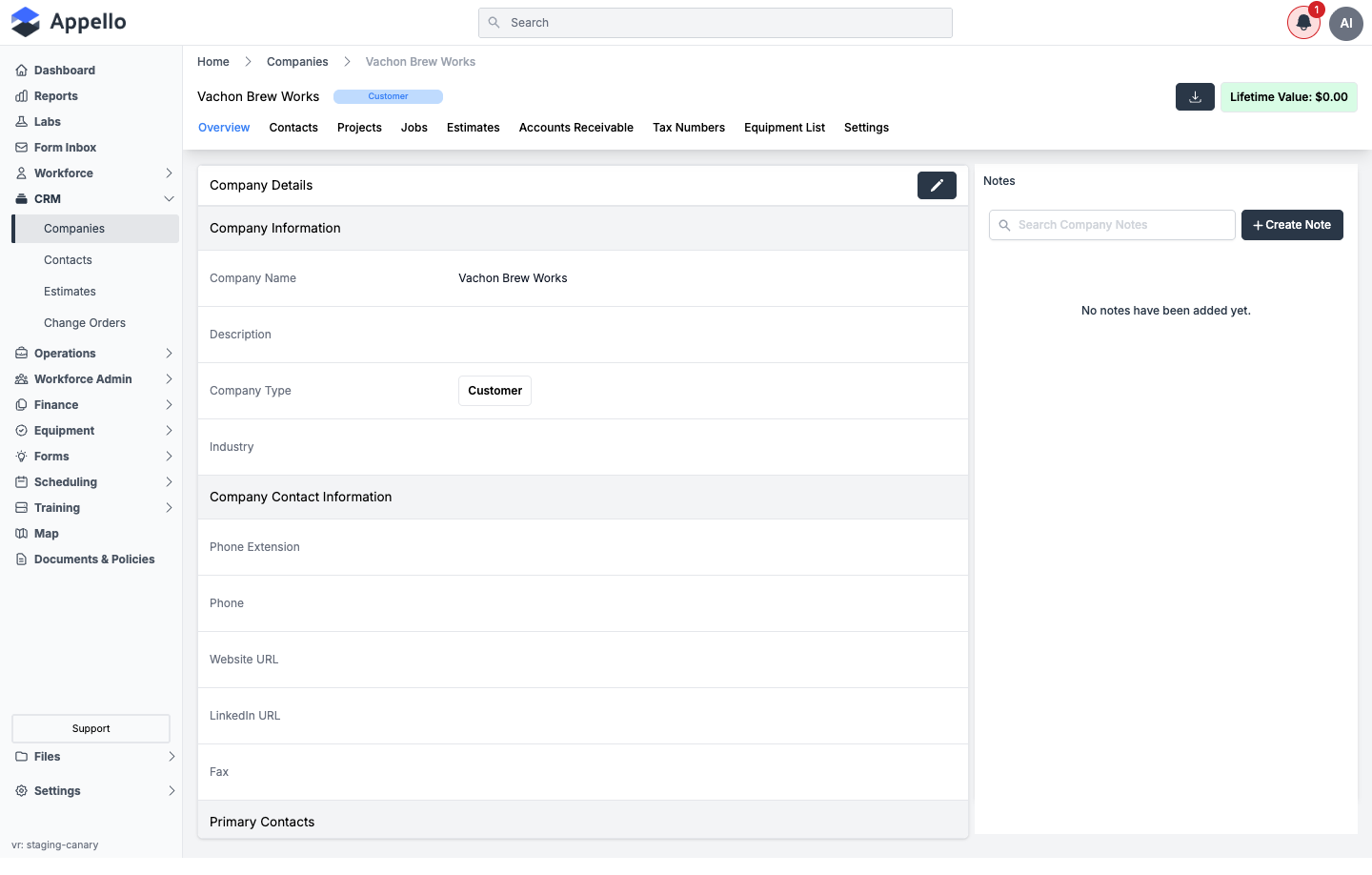
Notes, on the company's Overview tab, is the follow-up log. Use Create Note to record calls, site visits, or next steps, and Search Company Notes to find earlier entries. Notes are timestamped and stay attached to the company record for the life of the relationship.
-
Contacts on the company carry the same idea at the person level — see Contacts for the contact-level note and follow-up fields.
If your team needs a formal lead qualification stage before a company becomes a customer, model it with a custom Company Type value (or a custom property) rather than looking for a separate Leads module.
Sales pipeline tracking
There is no pipeline board (no kanban/stage view) in Appello. Pipeline tracking is done through Estimates — each estimate carries a status, a bid amount, and closing/won dates, and estimates roll up per company and across the whole instance. Confirmed against the demo instance on 2026-09-07.
A company's pipeline lives on its Estimates tab (only shown for companies whose Company Type is marked receivable, i.e. customers). It lists every estimate tied to that company with the same fields used company-wide: Status, Estimate Date, Closing Date, Won Date, Grand Total, and Bid Amount.
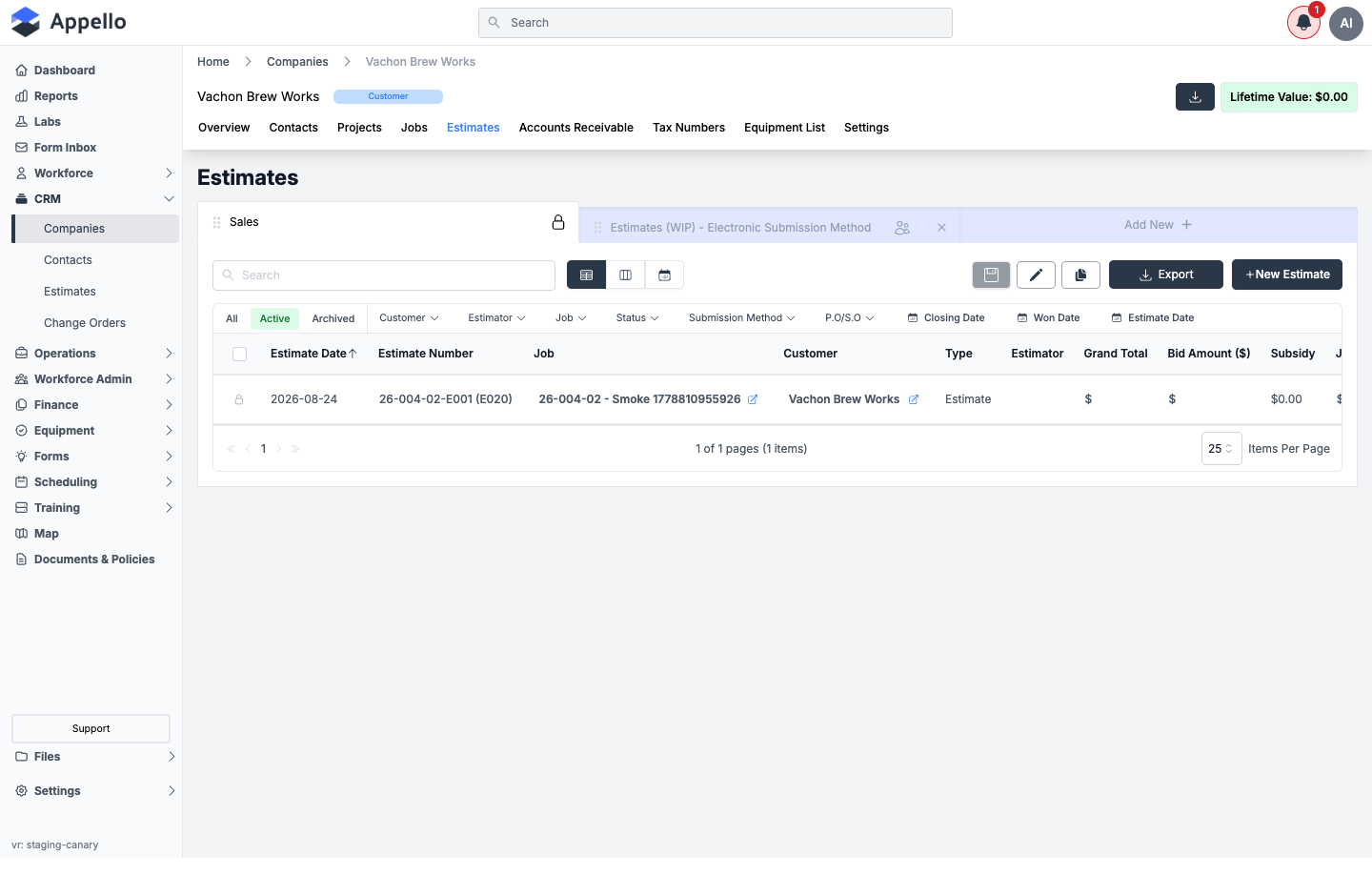
Use this tab to see one company's deal history at a glance. To see pipeline value and stage across every company at once -- the closer equivalent of a sales pipeline report -- use the Estimate report, which covers estimate statuses, the won/lost workflow, and converting a won estimate into a project or job in full.
Related Pages
- Company Detail Page — The record each row opens, including every tab, gate, and form
- Contacts — People associated with companies
- Property Settings — Configures Company Type options, Create/Edit form fields, and custom properties
- Projects — Projects linked to CRM companies
- Estimate report — Pipeline value, statuses, and conversion tracking across all companies