Accounting
Module: Settings | Platform: Web
Accounting settings let you manage your chart of accounts structure — the account types and categories used to classify financial transactions across Appello.
Navigation
Sidebar → Settings → Accounting
Overview
Tabs
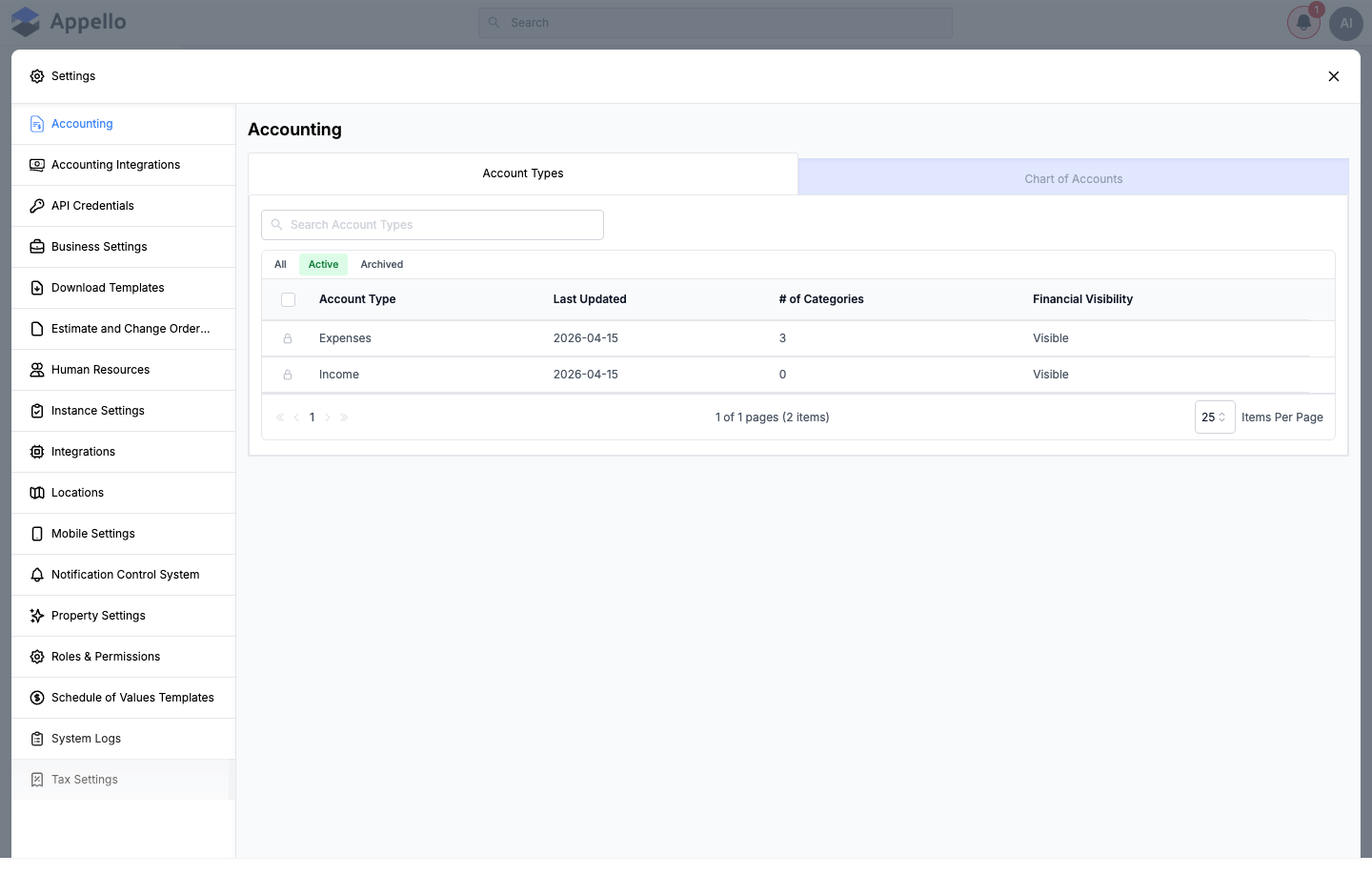
Account Types
The default view shows a table of account types.
| Column | Description |
|---|---|
| Account Type | The type of account (e.g. Expenses, Income). |
| Last Updated | Date the account type was last modified. |
| # of Categories | Number of sub-categories defined under this type. |
| Financial Visibility | Whether the type is visible in financial summaries and reports. |
Click the edit (pencil) icon on an account type row to view and manage its categories.
Chart of Accounts
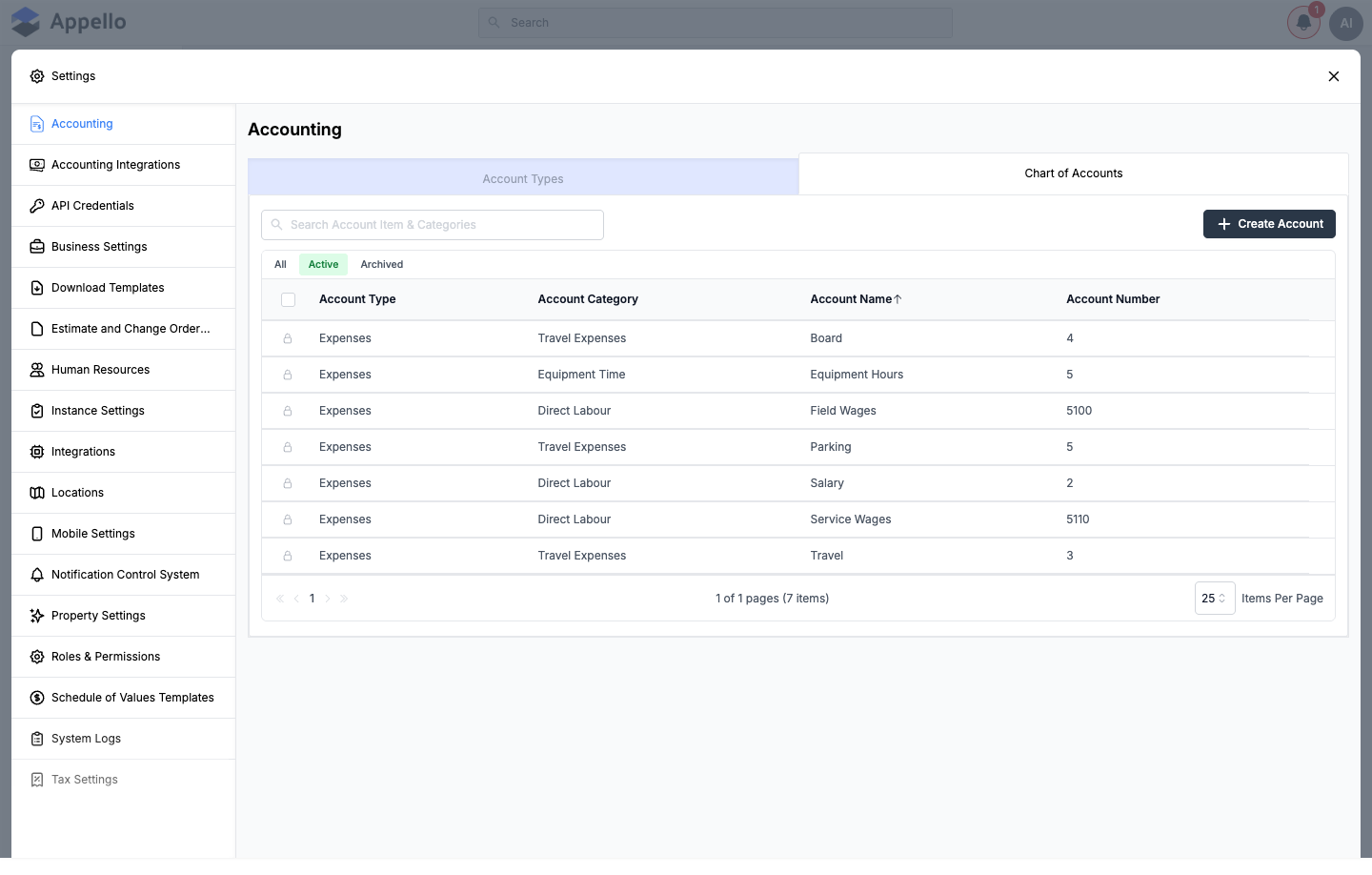
The second tab provides a consolidated view of all accounts organized by type and category. Use this view to see the full account hierarchy at a glance.
| Column | Description |
|---|---|
| Account Type | The account's parent type (e.g. Expenses). |
| Account Category | The account's category within that type (e.g. Direct Labour). |
| Account Name | The account's display name (e.g. Field Wages). |
| Account Number | The GL account number, used for accounting-system field mapping. |
Actions
- Search — filter account types by name, or accounts by name/number.
- Filter — toggle between All, Active, and Archived.
Permissions
Both sub-tabs are gated by the same Accounting permission, listed under Settings Access in Roles and Permissions:
| Permission action | What it controls |
|---|---|
| View | Whether the Accounting item appears in the Settings sidebar at all, and whether Account Types and Chart of Accounts load. Without it, neither sub-tab is reachable. |
| Create | Whether + Add Item (categories) and + Create Account are enabled. |
| Edit | Whether the account type/category edit panels and the Chart of Accounts row edit (pencil) icon are enabled. |
| Archive | Whether the Archive action in the selection bar is enabled. |
| Delete / Restore | Whether items can be permanently deleted, and whether archived items can be restored. |
There is no separate permission for Account Types versus Chart of Accounts — one Accounting permission set gates both. A user with View only sees a banner reading "You don't have the permission to view this setting" if they somehow reach the page without it, and a similar banner for missing Create/Edit/Archive/Delete/Restore if any of those is missing while View is present.
Settings → Accounting Integrations (the tab where you pick your accounting system, e.g. QuickBooks Online — see Integrations) is gated by a different permission, Instance Settings, not Accounting. A user can have access to one without the other.
Create an account type
In the current build, the Account Types tab does not expose a button to create a brand-new top-level type — only the account type row's edit (pencil) icon is available, which opens the same panel for editing the type's name, sort order, visibility, and categories. New instances are provisioned with the Expenses and Income types; day-to-day account management happens through their categories and the Chart of Accounts, as described below.
-
Open Settings → Accounting → Account Types.
-
Hover over an account type row and click the edit (pencil) icon that appears on the right.
-
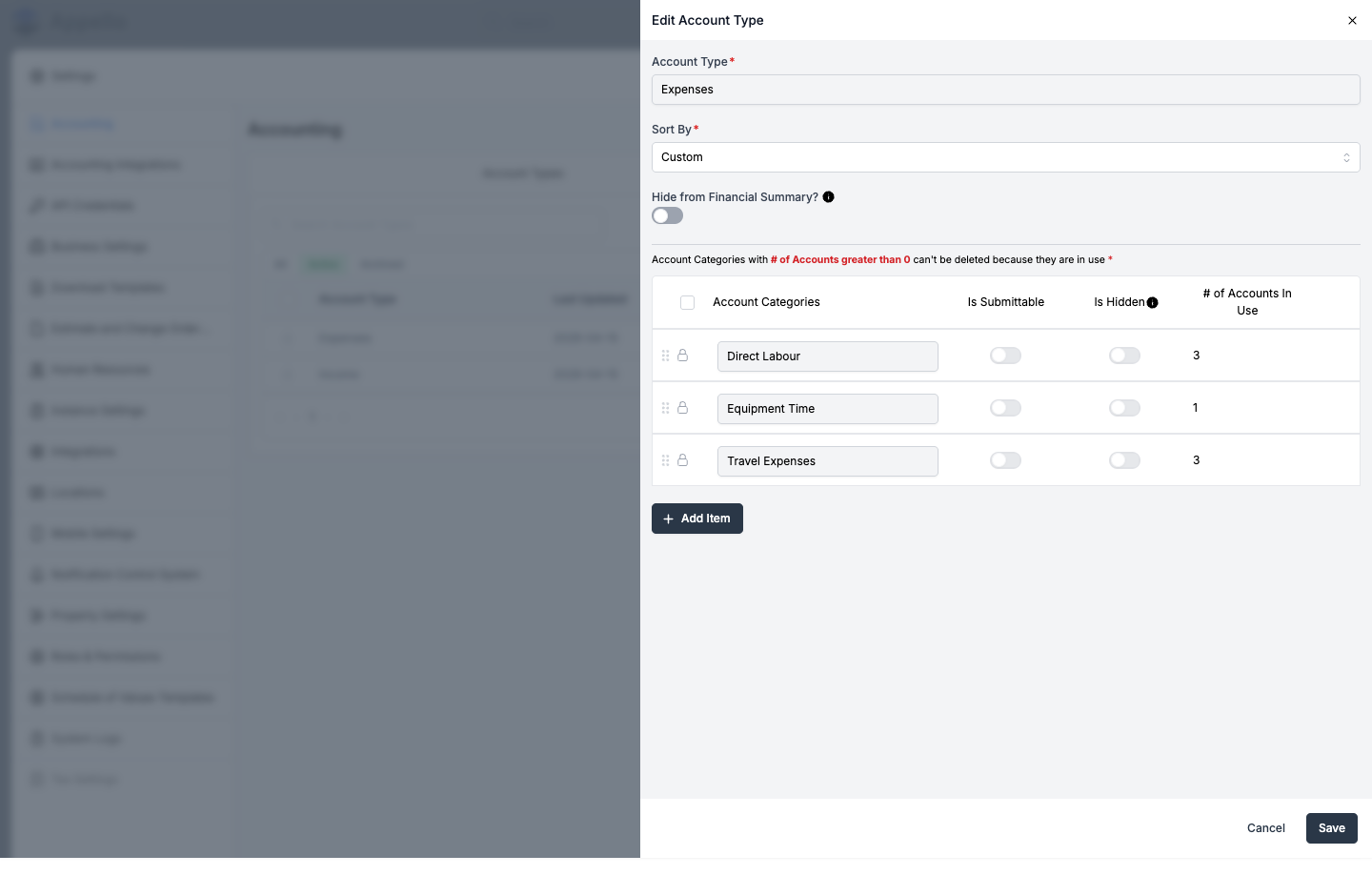
In the Edit Account Type panel, update:
Field Description Account Type The type's name. Locked for system types (e.g. Expenses, Income). Sort By Custom (drag categories into order) or Alphabetic (Ascending). Hide from Financial Summary? Hides this type from financial summaries when its value is 0. If the value is greater than 0, it still shows. -
Click Save, or Cancel to discard changes.
Manage categories
Categories group the individual accounts within a type (e.g. Direct Labour, Equipment Time, and Travel Expenses under the Expenses type).
-
Open the account type's edit panel (see above).
-
For each category row, set:
Field Description Account Categories The category name. Is Submittable Whether this category can be selected when submitting timesheets or expenses. Is Hidden Hides this category from financial summaries when its value is 0. # of Accounts In Use Read-only count of accounts under this category; click it to see which accounts are using it. -
Click + Add Item to add a new category, or drag the handle on the left to reorder categories (only when Sort By is Custom).
-
Check the box next to a category to select it, then click Delete Items to remove it. Categories with accounts in use show a lock icon instead of a checkbox and can't be deleted.
-
Click Save, or Cancel to discard changes.
Add an account to the chart
-
Open Settings → Accounting → Chart of Accounts.
-
Click + Create Account in the top-right corner.
-
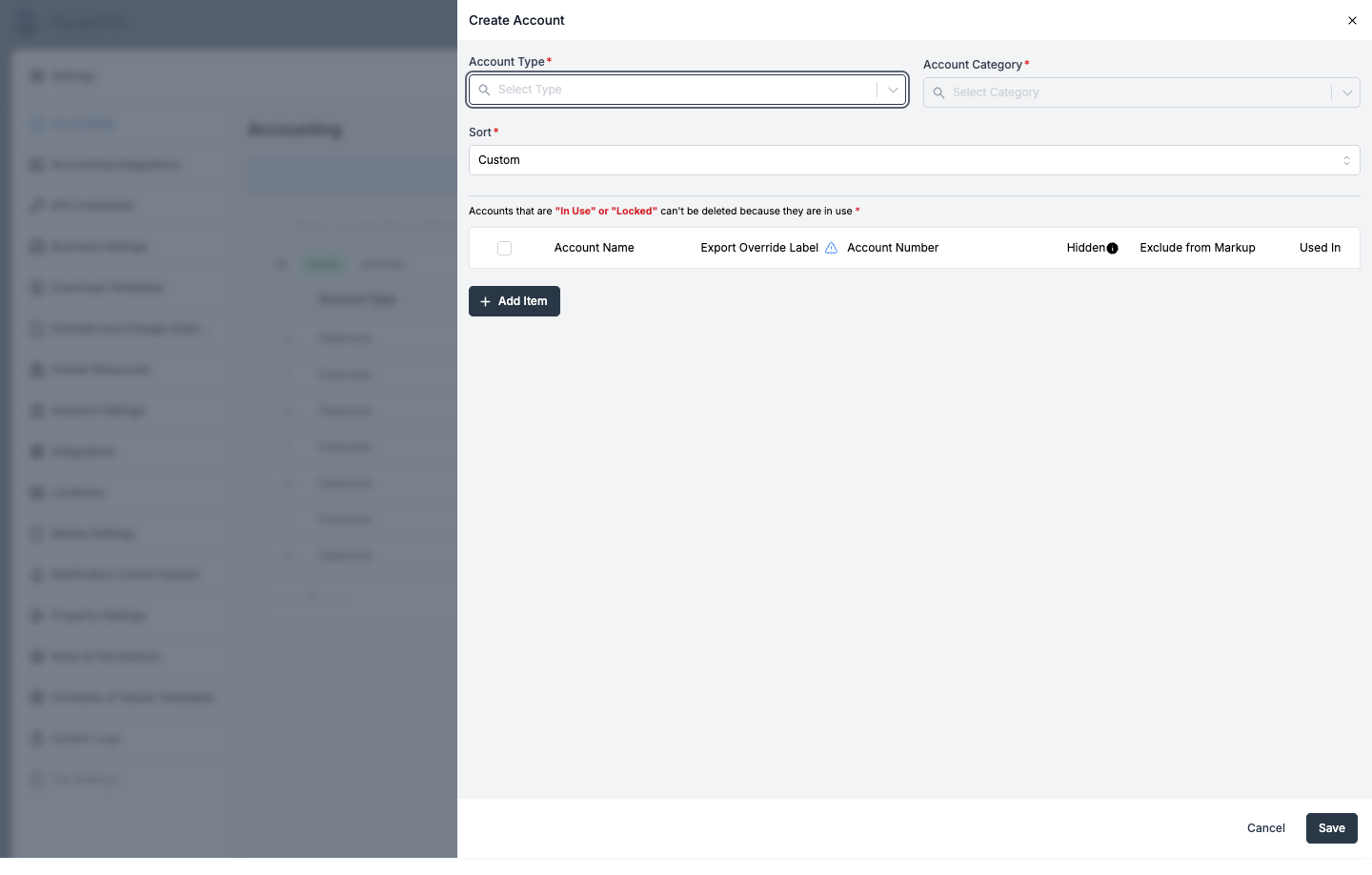
In the Create Account panel, select an Account Type and Account Category, then choose a Sort order (Custom or Alphabetic (Ascending)).
-
Click + Add Item for each account you want to create, and fill in:
Field Required Description Account Name Yes The account's display name (e.g. Field Wages). Export Override Label No Customizes the account's name when exported, so it matches the format your accounting software expects. Account Number No The GL account number. Hidden No Hides this account from financial summaries when its value is 0. Exclude from Markup No Excludes this account's cost from markup calculations.
- Click Save, or Cancel to discard changes.
Linking accounts to trade classifications, equipment, and materials
Accounts under the Direct Labour, Equipment Time, and material categories carry an extra column so timesheet and material costs roll up to the right GL account:
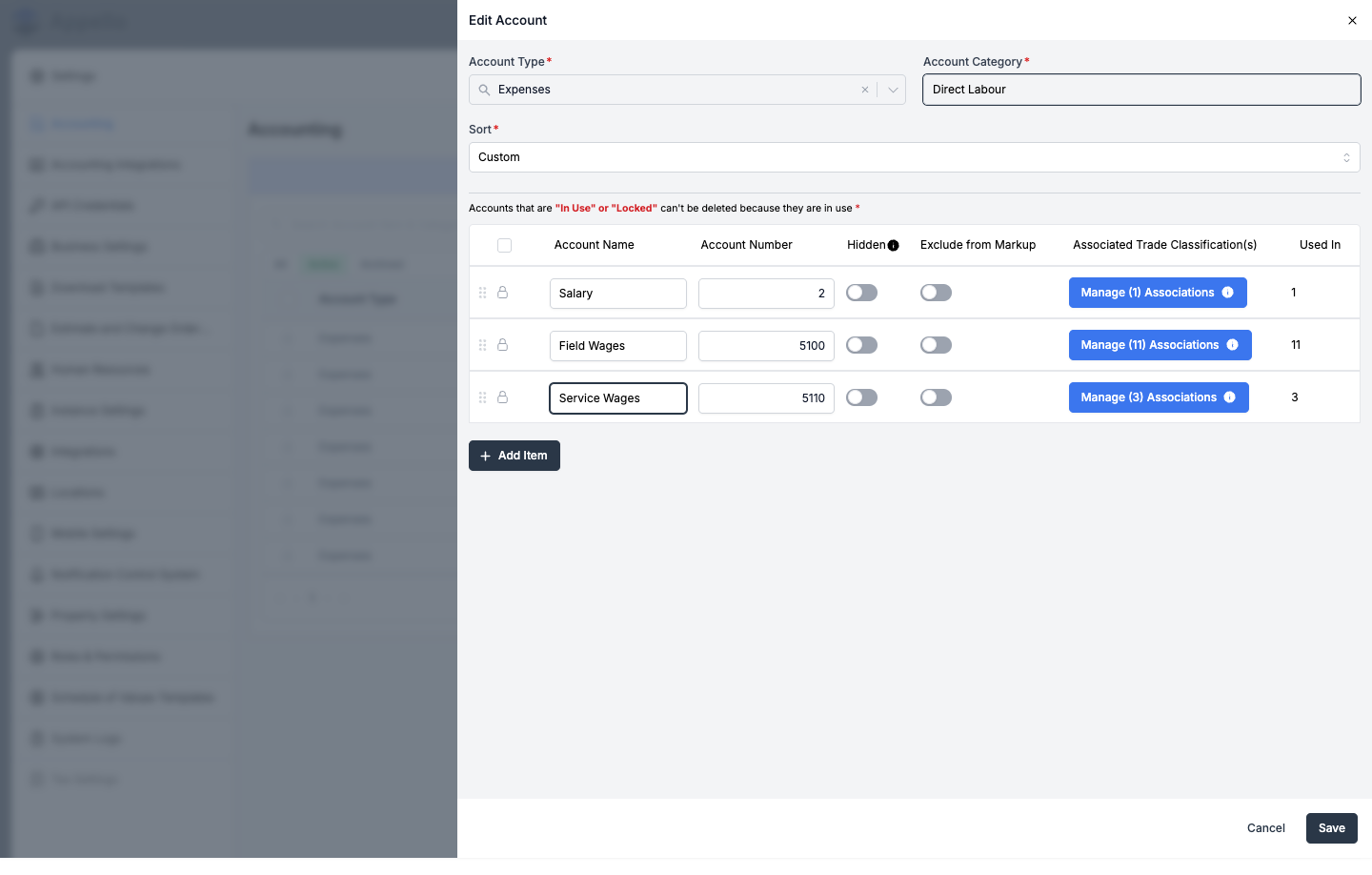
- Direct Labour accounts show Associated Trade Classification(s) — click Manage Associations to link the account to one or more trade classifications.
- Equipment Time accounts show Associated Equipment Categories the same way.
- Material categories show Associated Material Type(s).
Trade classifications, equipment categories, and material types without an assigned account won't appear in timesheet or financial summaries. When you close the panel with any left unassigned, Appello warns you and lists them before letting you continue.
Archive an account
Account types, categories, and accounts that are locked or currently in use show a lock icon instead of a checkbox and can't be archived or deleted.
- On the Account Types or Chart of Accounts tab, switch to the Active (or All) filter.
- Check the box next to an account type, category, or account that isn't locked or in use.
- Click Archive in the action bar that appears.
- Switch to the Archived filter to view archived items. Select one and click Restore to bring it back.
Every account type, category, and account in the canary demo instance used for this page was locked or in use, so the checkbox and Archive action bar couldn't be screenshotted live. The steps above are confirmed from the settings source code, not observed directly.
How these accounts are used elsewhere
The chart of accounts isn't just a settings list — accounts you create here feed into costing and reporting across Appello:
- Employee Expenses — Employee Expenses require an Expense Account (a GL account item) per line, and that account is what the expense's cost rolls up under on the job's Financial Summary.
- Accounts Payable — Accounts Payable bills use the same underlying expense record as Employee Expenses (they differ only by a Payable Category of Account Payable versus Employee Expense), so every AP allocation line also requires a GL Account — the same account items managed on this page. The GL Account column on the Accounts Payable list is this account item's name.
- Cost codes and invoices — a Cost Code (see Cost Codes & Schedule of Values) can itself carry a GL Account. Invoice, change order, and progress-billing line items code to a cost code, so an invoice's cost rolls up to the GL account assigned on that cost code, not to an account chosen directly on the invoice line.
- Work order labour, material, and equipment accounts — Settings → Instance Settings → Work Orders lets you set instance-wide Default Labour Account, Default Material Account, and Default Equipment Account values. A custom Work Order line saved without its own account is coded to that default; with no default set, its cost reports as Uncoded on the Financial Summary. Each line can still override the default account individually.
- QuickBooks and other accounting-system mapping — the Export Override Label field on an account (see above) lets you rename an account for export so it lines up with your accounting software's chart of accounts. See Accounting system connection for how account, customer, and vendor mapping works end to end, or Integrations for the full list of supported accounting systems and the Select Accounting System dropdown.
- Accounting-format exports — CSV export options such as QuickBooks, Sage 50 (Canada/US), Avantage, Payroll4Construction, Dayforce Powerpay, and ComputerEase are available for timesheet exports. Which of these named formats you see is driven by the accounting system selected on Settings → Accounting Integrations (see Integrations); each account's Export Override Label on this page controls how that account's name is written into the export.
This page could not confirm from the product exactly which screen surfaces the named timesheet accounting-format export options (e.g. QuickBooks, Sage 50) to end users — this is confirmed from the export API's source code, not observed directly on the canary demo instance.
Related
- Employee Expenses — expense line items and their Expense Account field.
- Accounts Payable — AP bills, their GL Account field, and how they share the Expense record with Employee Expenses.
- Cost Codes & Schedule of Values — cost codes' own GL Account and GL Category fields, and how invoicing rolls up through them.
- Accounts Receivable & Billing — the invoice list itself, statuses, and QuickBooks AR sync.
- Accounting system connection — QuickBooks Online integration, sync, and field mapping.
- Integrations — the Accounting Integrations tab, supported accounting systems, and the Select Accounting System dropdown.
- Roles and Permissions — the Accounting permission and Settings Access permissions generally.