Roles & Permissions
Module: Settings | Platform: Web
Roles & Permissions controls what each user role can see and do across the Appello platform. Every user is assigned one or more roles, and the combined permission matrix of those roles determines their access to modules, features, and settings.
Navigation
- Sidebar → Settings → Roles & Permissions -- opens the same role list inside the Settings panel.
- Standalone page:
/roles-- the full-page version of the same list, reached from a role link elsewhere in the product (e.g. a user's Roles tab).
Both surfaces render the same underlying list component; only the surrounding chrome differs.
Role List
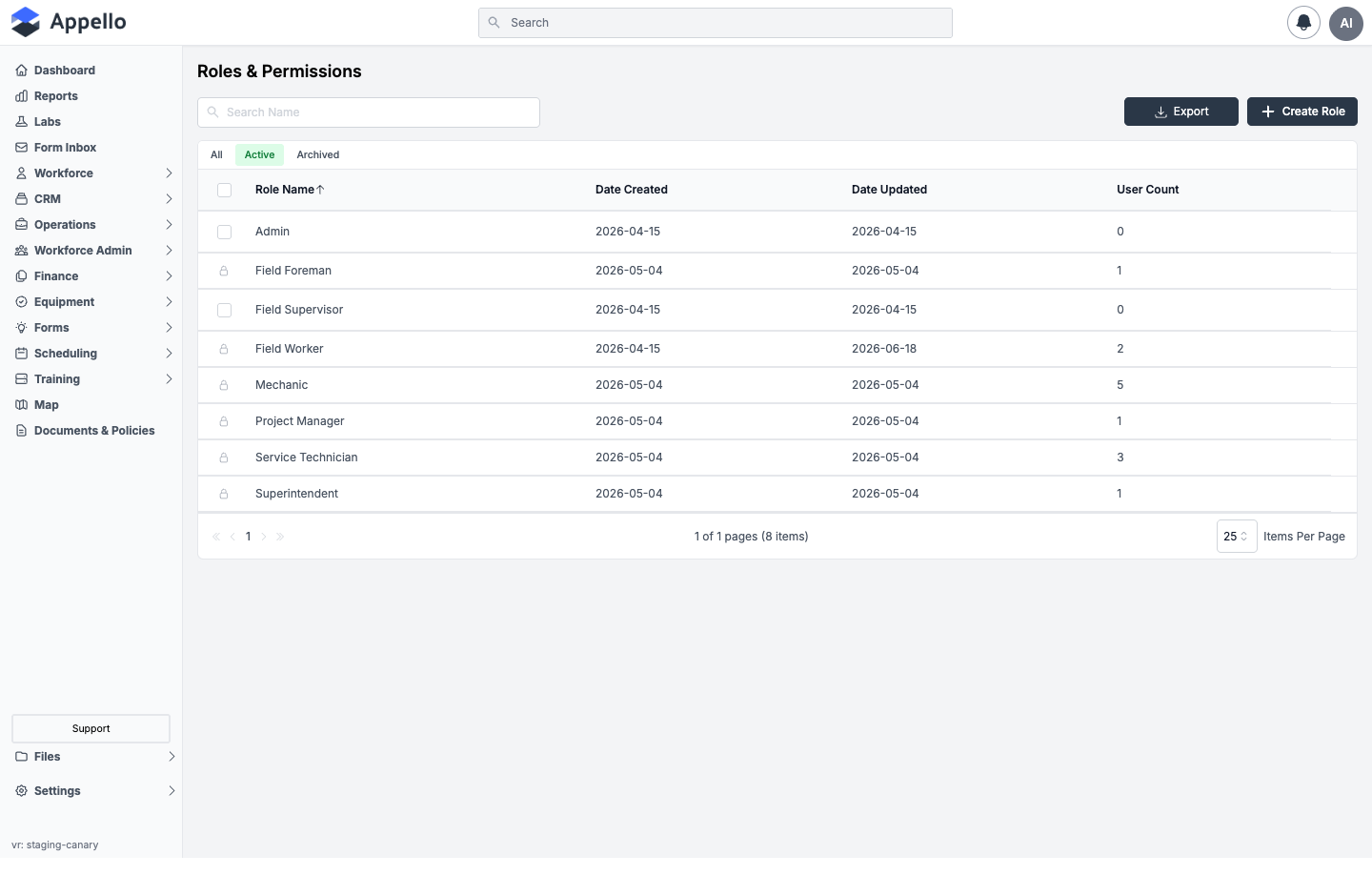
Route: /roles (gated by the View permission for Roles & Permissions). The same list
is embedded, unrouted, on
Settings → Roles & Permissions.
The main view shows all defined roles in a table.
| Column | Description |
|---|---|
| Role Name | The name of the role (e.g. Admin, Field Worker). Links to that role's edit page. |
| Date Created | When the role was first created. |
| Date Updated | When the role was last modified. |
| User Count | Number of users currently assigned to this role. |
Actions
| Control | Effect |
|---|---|
| Create Role | Opens /roles/add to define a new role. |
| Export | Downloads the visible roles list. |
| Search Name | Filters roles by name. |
| All / Active / Archived | Quick tabs that filter the list by archive status -- the list's only filters. |
| Row checkbox + bulk toolbar | Select one or more roles to Archive, Delete, or Restore in bulk. |
A role row shows a lock icon in place of its checkbox whenever that role currently has one or
more users assigned to it (User Count > 0) -- those roles cannot be selected for bulk
archive/delete/restore. A role with zero assigned users shows a normal, selectable checkbox. This
mirrors the single-role rule on a role's own edit page: a role cannot be deleted while users are
assigned to it (see Duplicate and Editing a Role below).
The Roles & Permissions list itself never shows the built-in Super Admin role unless the signed-in user is themselves a super user -- everyone else sees it filtered out entirely, not merely marked hidden. See System and Default Roles.
Create a Role
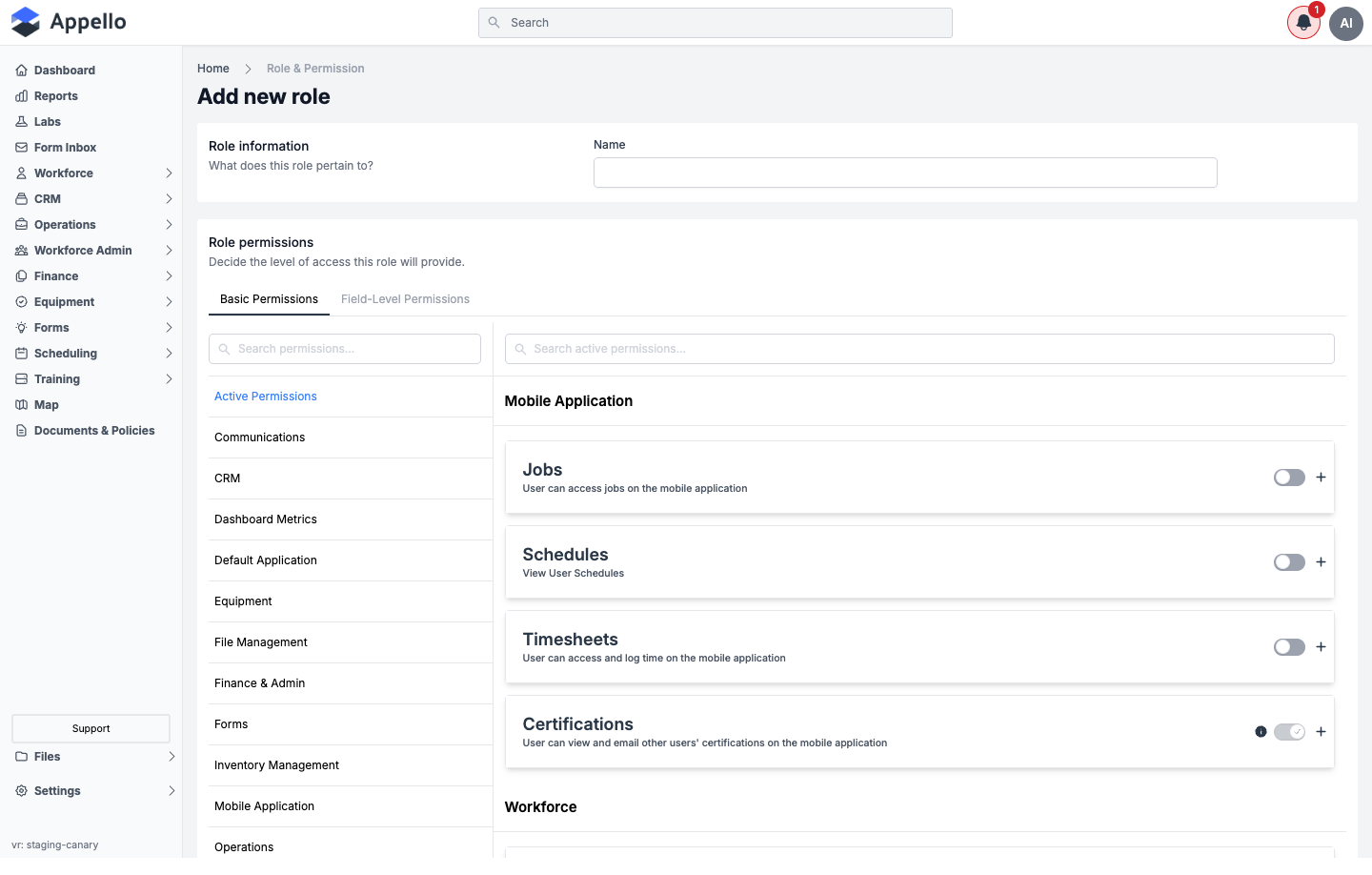
Route: /roles/add. Reached by clicking Create Role on the role list (the button only
appears for users with the Edit permission for Roles).
What it's for: Defines a brand-new role by name and then opens straight into that role's permission matrix so you can configure access before saving.
| Field | Required | Type | Effect |
|---|---|---|---|
| Name | Yes | Text | The role's display name. Checked for uniqueness on save. |
| Permissions | No | Matrix | See Permission Categories and Permission Operations below. |
A brand-new role starts with a small baseline set of permissions already switched on in the form (before you touch anything), so the matrix doesn't appear empty while you're building it out. This page could not confirm the exact contents of that baseline set from the UI alone -- review the matrix before saving a new role rather than assuming it starts from zero.
There is no dedicated permission on the /roles/add page itself; access in practice is
controlled by whether the Create Role button is shown (the Edit permission for Roles) and
by the same Assign permission for Roles & Permissions that the editor uses for saving changes
(see below).
Editing a Role
Route: /roles/[id]/edit (gated by the Assign permission for Roles & Permissions).
Reached by clicking a role's name
from the list, or Update Roles from a user's profile pointing back at a role.
Click a role name to open its permission editor.
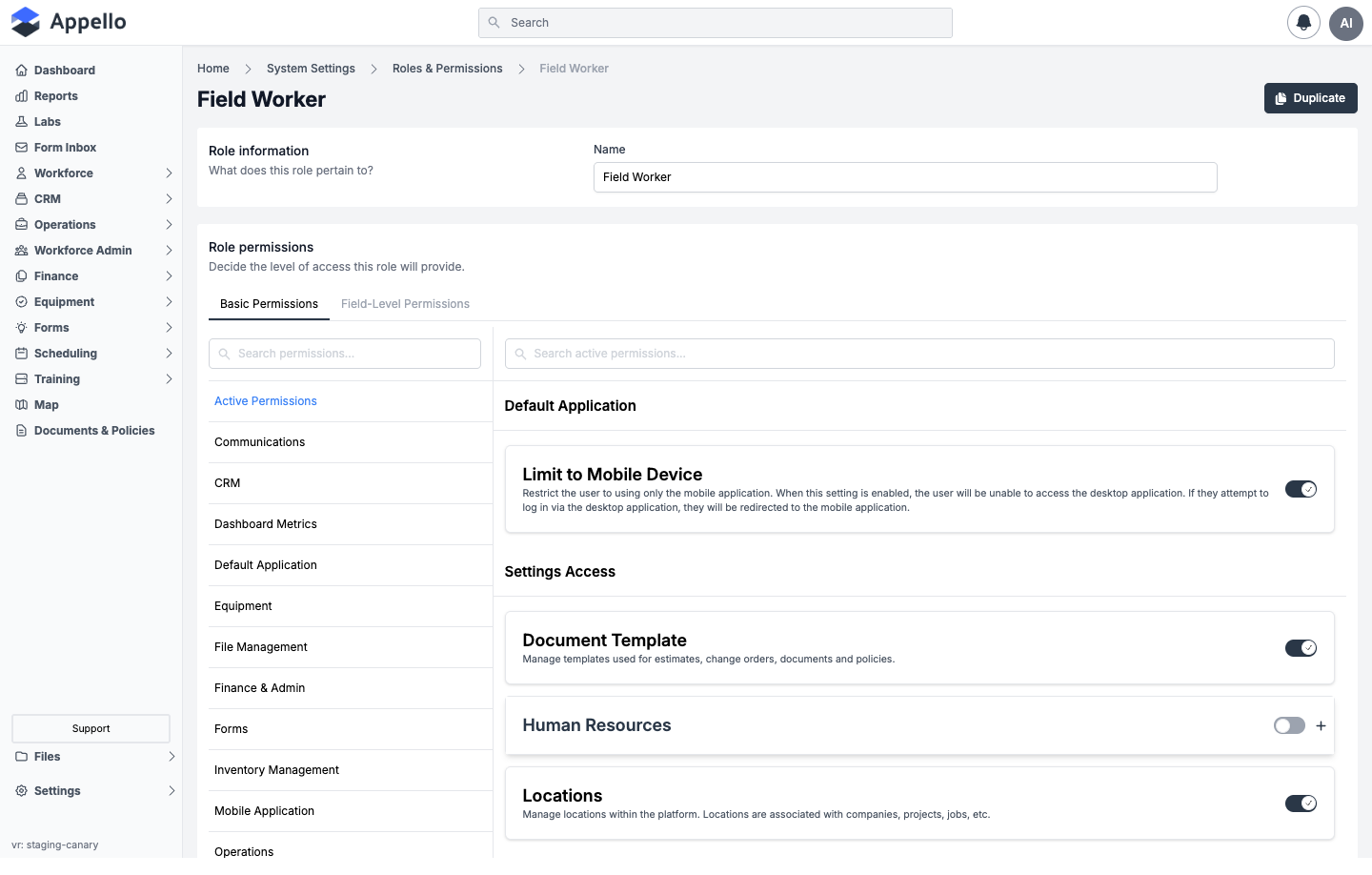
Role Information
| Field | Required | Type | Effect |
|---|---|---|---|
| Name | Yes | Text | The display name for this role. |
The role's Slug (a URL-safe identifier derived from the name) exists on the underlying record but is not an editable field on this form.
Page Controls
| Control | Effect |
|---|---|
| Duplicate (top right) | Opens the Duplicate dialog. |
| Basic Permissions tab | The permission matrix -- see below. |
| Field-Level Permissions tab | Per-field grid -- see Field-Level Permissions. |
| Assign Users to Role section | Checklist of users to add/remove from this role -- see below. |
| Save / Cancel bar | Appears once a change is made; shows a count of pending changes before you commit them. |
Without the Edit permission for Roles, the page shows a banner -- "You don't have the permission to modify" -- above a read-only form.
Permission Tabs
| Tab | Description |
|---|---|
| Basic Permissions | Toggle individual permission items on or off, grouped by category. Many toggles carry a scope (see Permission Matrix Deep Dive) that narrows what data the permission applies to. |
| Field-Level Permissions | Per-field View / Edit / Delete control for a set of supported models (and, for Equipment, per equipment-category attributes). This is a gated feature -- see below. |
Permission Categories
The left sidebar of the Basic Permissions tab organizes permission items into categories. In addition to the categories below, an Active Permissions entry at the top of the sidebar is a quick view of every permission currently enabled for the role -- it is not itself a permission category.
| Category | Contains permission items for |
|---|---|
| Default Application | Restricting a user to the mobile app only. |
| Settings Access | Accounting, Business Settings, Document Template, Download Template, Human Resources, Instance Settings, Integrations, Locations, Mobile Settings, Notification Settings, Property Settings, Roles and Permissions, API Credentials. |
| System Related | Property Model Form Overrides, Audit Trail, Sensitive Form Data, Sensitive User Data, Map (Beta). |
| Mobile Application | Jobs, Schedules, Timesheets, Timesheet Expenses, Form Submission History, Clock In/Out, Certifications, and Work Order Checklist -- all as they appear on the mobile app. |
| Workforce | User, User Groups, and Department records. |
| CRM | Companies and Contacts. |
| Operations | Projects, Jobs, Work Orders, Job Material Specification, and Request For Information. |
| Signatures | Requesting and managing signatures on work orders and other records. |
| Equipment | Equipment, Equipment Rates, Equipment Time Entry, Maintenance Thresholds, and Maintenance Schedule. |
| Inventory Management | Stock locations, per-location levels, and the movement ledger. |
| Scheduling | Job Schedule and User Schedule. |
| Forms | Form Management, Form Inbox, and Form Submission Administration. |
| Training and Certifications | Certification Types, User Certifications, and Training Providers. |
| Finance & Admin | Timesheet Matrix & Timesheet Log, Clock In & Out, Expenses, Vacation/Leave, Financial Summary, Purchase Orders, Invoices, Progress Reports, and Billing Templates (desktop). |
| Sales | Estimates and Change Orders. |
| Communications | Notes and Policy Documents. |
| File Management | Files, Document Folders, and Onboarding Document Packages. |
| Dashboard Metrics | Financial Metrics on the dashboard. |
| Reports | Sales, Operations, Health and Safety, Workforce Administration, and Custom Report. |
Each permission item shows a toggle (enabled/disabled), a description of what it controls, and some show a + button to expand related sub-permissions.
Permission Operations
Every permission item is one or more named operations on a type of record (for example, Companies under CRM bundles View, Create, Edit, Archive, Delete, and Restore behind one toggle, plus its own scope). The operation vocabulary is shared across the whole matrix; not every item exposes every operation -- only the ones that make sense for that record type.
| Operation | What it unlocks |
|---|---|
| View | See the records. |
| Create | Add new records. |
| Edit | Modify existing records. |
| Archive | Remove a record from active lists without permanently deleting it. |
| Delete | Permanently remove a record. |
| Restore | Bring an archived (or, for some models, deleted) record back. |
| Assign | Connect a record to another record -- e.g. assigning this role's own permission matrix, or assigning a trade level or custom property to a user. |
| Lock / Unlock | Item-specific lock controls, such as Lock Timesheet Matrix or Lock & Unlock Expense -- freezes a record against further edits until unlocked. |
| Approve / Reject | Domain-specific approval actions (timesheets, equipment time entries, expenses, leave requests). |
For the full category-by-category breakdown of which items exist and which of these operations each one exposes, see the Permission Matrix Deep Dive.
Field-Level Permissions
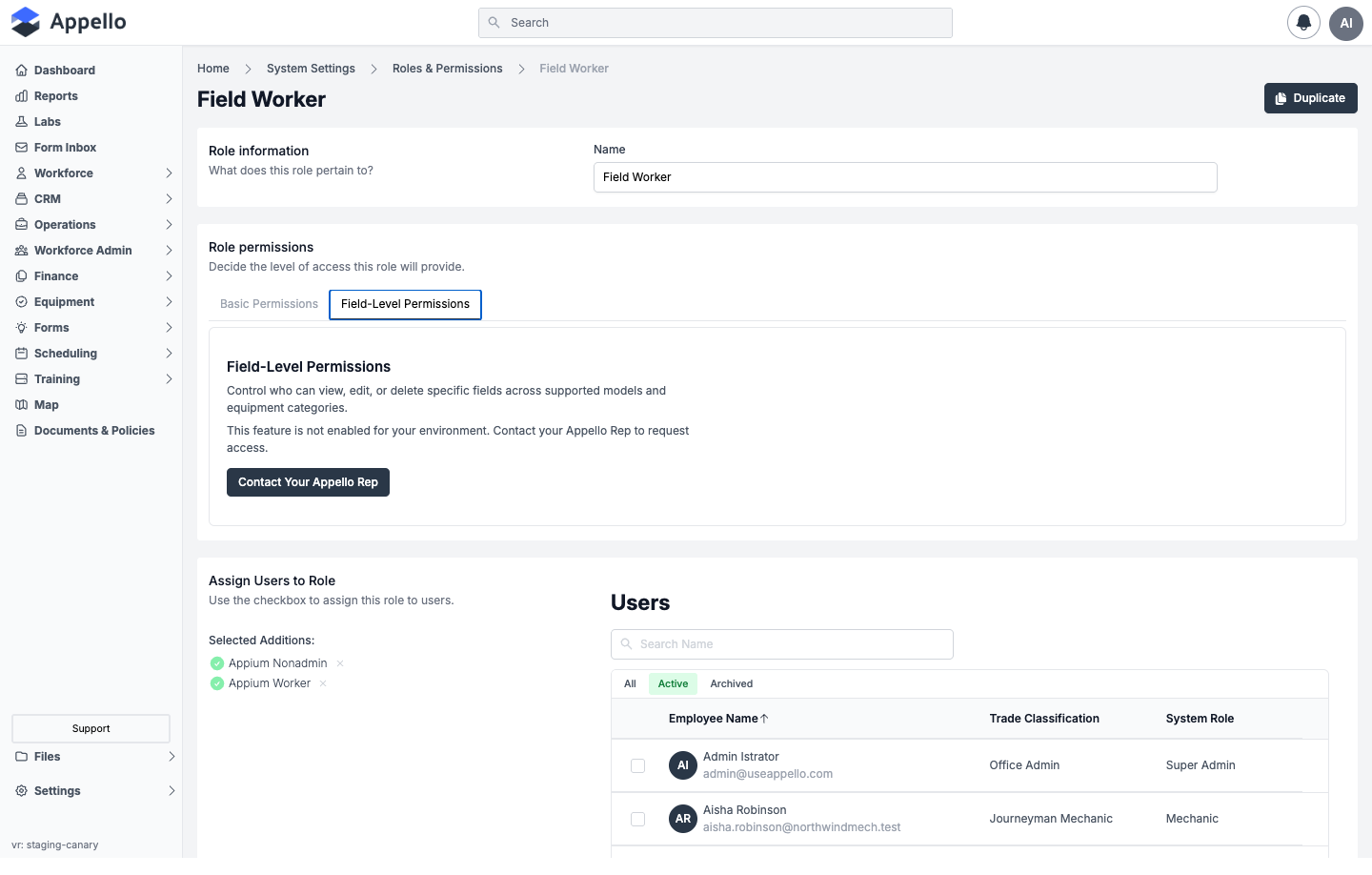
Field-Level Permissions is a gated feature. On an instance where it is not enabled, the tab shows "This feature is not enabled for your environment. Contact your Appello Rep to request access." and does not display the permission grid.
Where it is enabled, you pick a Model from a dropdown -- Projects, Jobs, Companies, Contacts, Departments, Users, Expenses, Equipment, Estimate/Change Order, Invoices, or RFIs -- and configure View / Edit / Delete for that model's fields. Selecting Equipment as the model also shows an Equipment Category dropdown, and the grid then covers that category's attributes.
A role must be saved once (given a name and at least the Role Information step completed) before its Field-Level Permissions tab becomes configurable.
Assign Users to Role
Below the permission tabs, an Assign Users to Role section lists your organization's users (with All / Active / Archived tabs and a name search, and a System Role column showing each user's currently assigned role) so you can check the box next to any user to add them to this role directly from the role's edit page.
Duplicate
Use the Duplicate button (top-right of a role's edit page) to create a copy of an existing role. It prompts for a new role name, pre-filled as "<Role Name> - Copy," checks that the name isn't already in use, then creates the new role and opens it for editing.
Role Detail Page
Route: /roles/[id] (gated by the View permission for Roles & Permissions).
What it's for: A minimal, read-only summary of one role's Name and Slug. Nothing on the current role list, edit page, or Duplicate flow links here directly -- the route exists (other parts of the product, such as generic activity/reference links, can point to it) but the normal click path from the role list goes straight to the edit page instead.
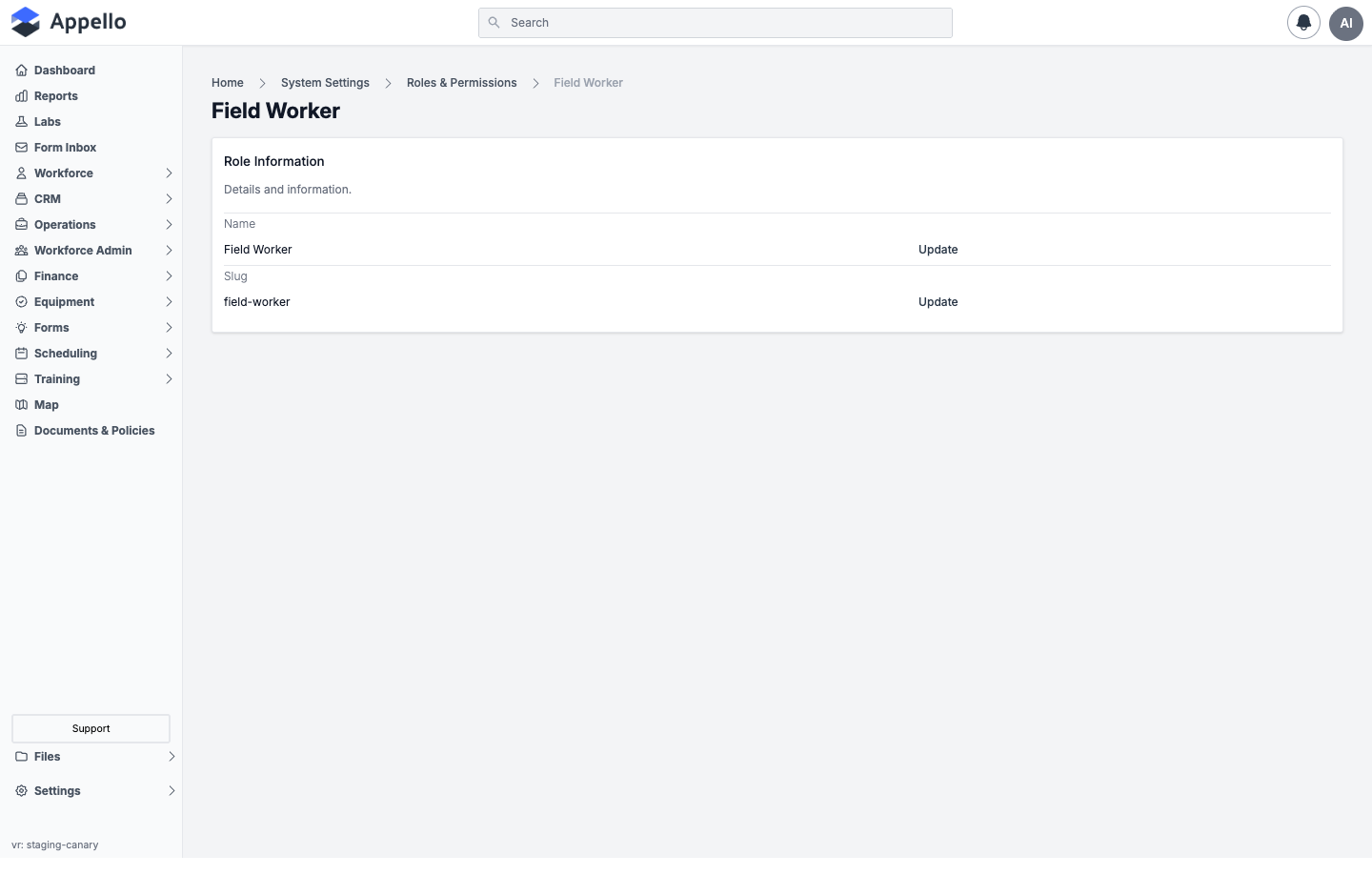
| Field | Description |
|---|---|
| Name | The role's display name, with an Update link back to the edit form. |
| Slug | The role's URL-safe identifier, with its own Update link. |
This page does not show a permissions summary or an assigned-users list -- only Name and Slug.
Both Update links go to the same /roles/[id]/edit page (the Slug link anchors to the Name
field, since Slug itself isn't independently editable there).
Assigning Roles to a User
Roles are assigned to a user from the user's profile, not from the role's own pages.
Where: User profile → Roles tab → Update Roles button.
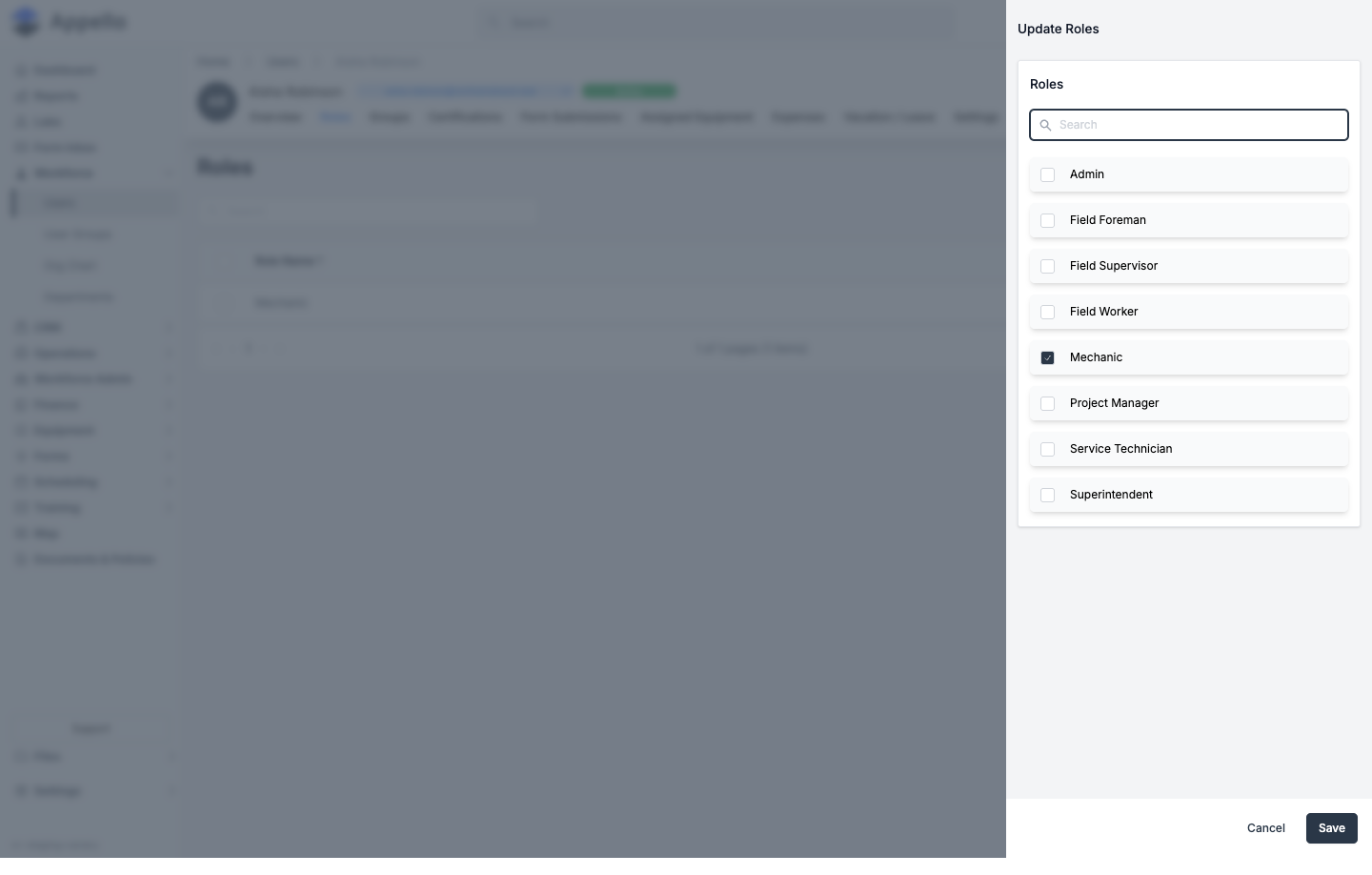
Update Roles opens a flyout (AddRolesToUserFlyout) with a searchable checklist of every
active role; roles already assigned to the user are pre-checked. Check or uncheck roles and click
Save to connect/disconnect them from the user in one step, or Cancel to discard.
For the full walkthrough of that tab -- including its columns, controls, and permissions -- see User Detail → Roles.
How Multiple Roles Combine
A user can be assigned more than one role. Their effective permissions are the union of every role they hold:
- If any assigned role grants a permission, the user has it -- roles never subtract from each other.
- If more than one of the user's roles grants the same permission with different scopes, the widest scope wins, in this priority order (highest to lowest):
| Priority | Scope |
|---|---|
| Highest | All |
| For Scheduled Jobs | |
| Project Based (Assigned Projects Only) | |
| Department | |
| Shared | |
| Direct Reports | |
| Own | |
| Lowest | None |
For example, a user with one role scoped to Own and a second role scoped to All for the same permission item ends up with All access for that item.
System and Default Roles
Appello ships with three built-in roles that appear in the standard role list:
| Role | Intended for |
|---|---|
| Admin | Full access to all modules, settings, and financial data. |
| Field Supervisor | Field team leads -- scheduling, timesheets, and operations. |
| Field Worker | On-site workers -- mobile app, timesheets, forms, notes. |
The product also seeds two additional system roles that are flagged hidden and do not appear in the Roles & Permissions list above:
| Role | Behavior |
|---|---|
| Super Admin | Excluded from the role list entirely unless the signed-in user is themselves a super user. |
| Guest User | Flagged as hidden; not shown in the standard list. |
Nothing marks Admin, Field Supervisor, or Field Worker as uneditable -- they are ordinary roles and, with the Assign permission for Roles & Permissions, can be edited or even renamed like any other role. Editing a built-in role is not blocked by the product; treat it as a risk you're taking on deliberately, not a protected default. Duplicating a built-in role (see Duplicate) and editing the copy is the safer path for customization.
The permission matrix is extensive and covers many individual toggles per category. During initial setup, it is recommended to duplicate an existing role and adjust permissions rather than building from scratch.
Navigation and Settings Tab Gating
Permission checks control more than the /roles routes themselves -- they also decide which
sidebar sections and Settings tabs a user sees at all:
- The Settings → Roles & Permissions tab only appears in the Settings panel when the signed-in user has all of View, Create, Edit, Delete, and Assign on Roles, plus View and Assign on Roles & Permissions. A user missing any one of those simply doesn't see the tab -- there's no partial or read-only view of it in Settings.
- Every other Settings tab (Accounting, Instance Settings, Property Settings, Locations, and so on) is gated the same way -- a per-tab permission check decides whether it appears in the Settings navigation at all.
- The standalone
/roles,/roles/[id], and/roles/[id]/editpages each carry their own permission check (View on Roles & Permissions for the first two, Assign for the editor) independent of whether the Settings tab is visible -- so a user can reach the full-page role list or editor via a direct link even where the Settings tab itself is hidden for some other reason, as long as their own permissions clear that page's check.
Permissions Reference
| Route / surface | Required permission(s) |
|---|---|
/roles (role list) | View on Roles & Permissions |
/roles/add (create form) | No dedicated check; Create Role needs Edit on Roles, saving needs Assign on Roles & Permissions |
/roles/[id] (role detail) | View on Roles & Permissions |
/roles/[id]/edit (permission matrix) | Assign on Roles & Permissions |
| Settings → Roles & Permissions tab | View, Create, Edit, Delete, and Assign on Roles, plus View and Assign on Roles & Permissions (all required) |
| User profile → Roles tab | View on Roles (to see the tab) |
| Update Roles flyout (assign/unassign) | Connects/disconnects roles on the user record -- see User Detail → Roles for the tab's own permission notes |
Related Pages
- Permission Matrix Deep Dive -- Full breakdown of permission scopes and categories.
- User Detail -- The Roles tab and Update Roles flyout, from the user's side.
- Departments -- Department structure referenced by the Department permission scope.
- Property Settings -- Another Settings tab gated the same way as Roles & Permissions.
- Instance Settings -- Instance-wide configuration, also permission-gated in Settings.
- My Profile -- Where a user can see their own account, separate from the roles assigned to them here.