Trade Classifications
Trade classifications (also called trade levels) define the job/skill levels within a trade -- for example Apprentice, Journeyman Mechanic, Foreman, or Superintendent. Each Employee Agreement has its own list of trade classifications, and each classification carries the wage rates paid to a worker at that level. They are what an employee agreement's wage table is actually a table of.
Navigation
Sidebar → Settings → Human Resources → Employee Agreements tab → open an agreement → Trade Classifications tab
Trade classifications are not a standalone settings screen -- they belong to whichever employee agreement you open. See Human Resources Settings for the full tab layout of an employee agreement, and Employment Agreements for how agreements and their wage tables fit together.
Overview
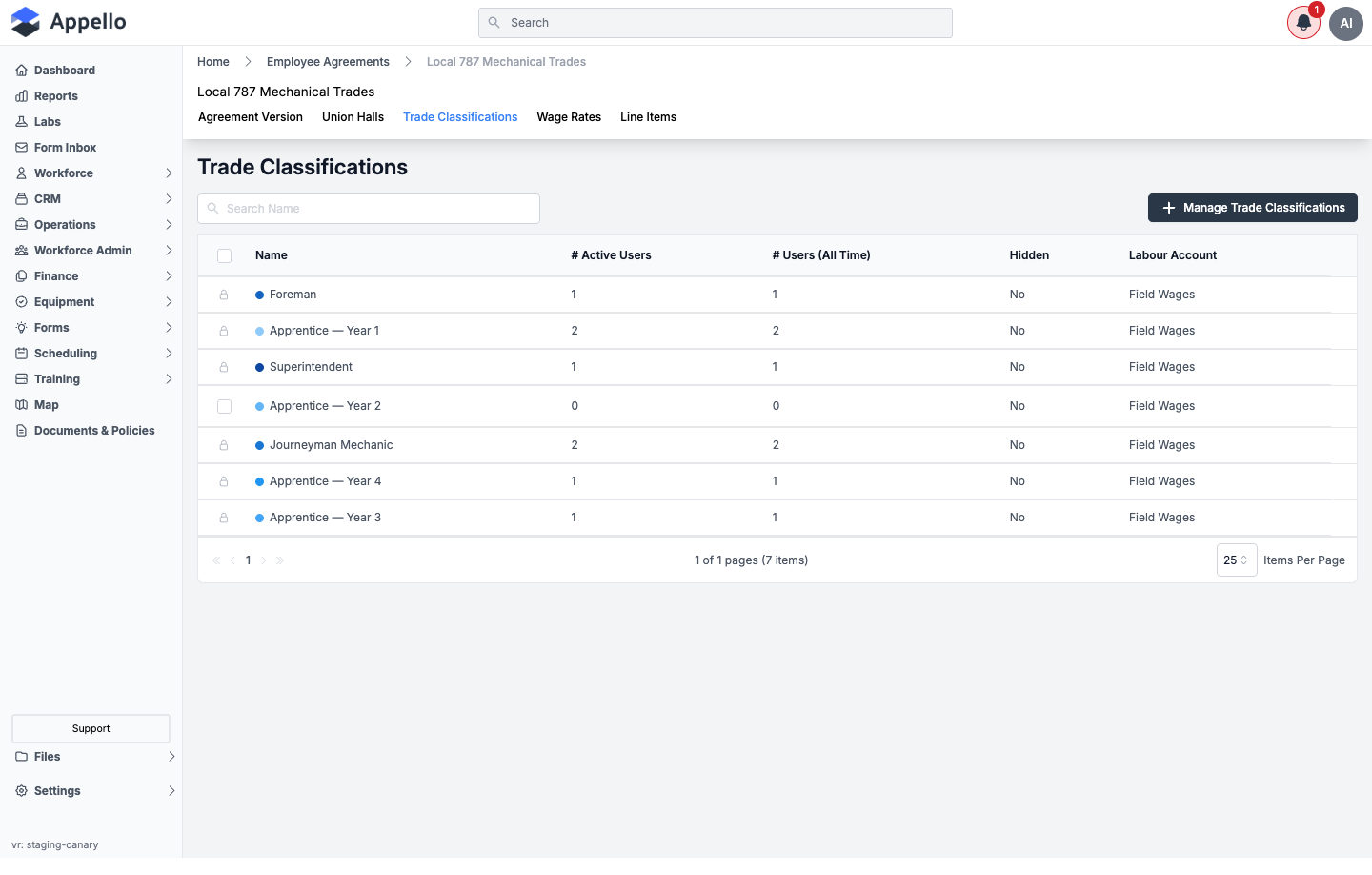
Every trade classification belongs to exactly one employee agreement -- a Journeyman Mechanic under a Local 787 agreement and a Journeyman Mechanic under a different agreement are two separate records, each with its own wage rates. The list shows, per classification:
| Column | Description |
|---|---|
| Name | The classification's label, with its assigned color indicator. |
| # Active Users | Employees currently assigned this classification. |
| # Users (All Time) | Total employees ever assigned this classification. |
| Hidden | Whether the classification is hidden from selection elsewhere. |
| Labour Account | The Chart of Accounts labour account this classification's costs post to. |
Naming a hierarchy like Apprentice → Journeyman → Foreman → Superintendent is common practice for unionized trades and mirrors how Collective Bargaining Agreements define progression, but Appello does not seed these names for you. Every classification shown above (and the "Apprentice -- Year 1" through "Year 4" split) came from setup on this example agreement -- a different agreement, or a non-union one, may use entirely different labels (e.g. "Office Admin", "Service Tech II").
Managing Trade Classifications
Click Manage Trade Classifications to add, rename, reorder, hide, or delete classifications for the open agreement.
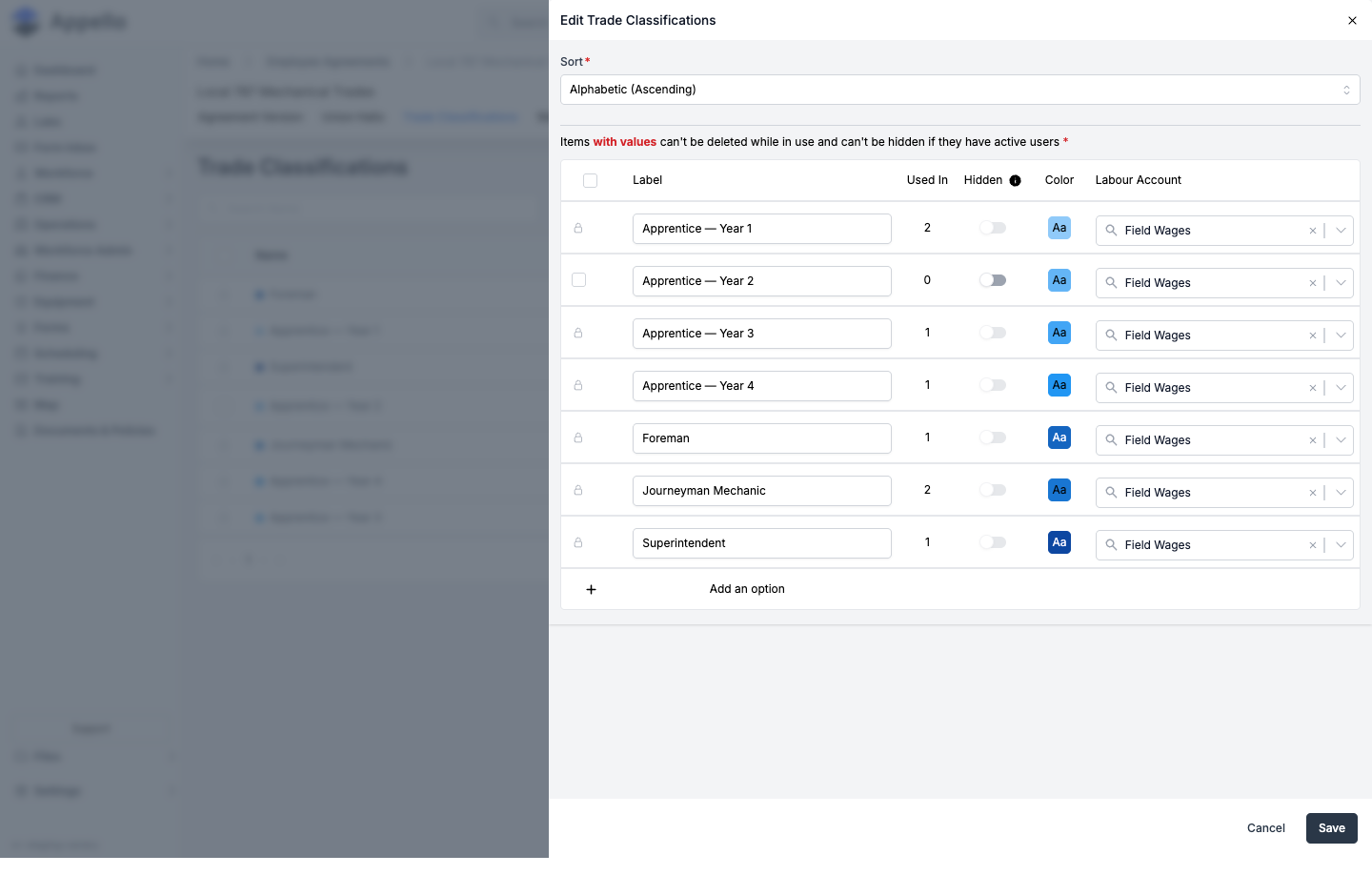
- Sort -- Choose Custom (drag rows into the order you want -- this is what defines the hierarchy's display order) or Alphabetic (Ascending).
- For each row, set:
- Label -- Required. The classification's name.
- Hidden -- Toggle on to remove the classification from selection lists (assigning it to a user, timesheets, etc.) without deleting it. A classification can't be hidden while it has active users.
- Color -- Click the color swatch to pick the indicator color shown in lists and on the schedule.
- Labour Account -- Required. The Chart of Accounts labour account (from the direct-labour category) this classification's costs post to.
- Click Add an option to add a new classification, or the trash icon to delete one. A classification with values (active or historical users) can't be deleted while in use.
- Click Save.
This documentation did not confirm whether renaming a classification, or changing its Labour Account, retroactively affects historical timesheets already posted under the old name/account.
Assigning a Trade Classification to a User
A trade classification is assigned per user with an effective date, not as a single static field -- this is what lets Appello apply the correct wage rate to a timesheet even after a worker's classification later changes.
-
Open the user's profile and click the edit (pencil) icon.
-
Scroll to the Trade Classification field and click Update Trade Classification.
-
In the panel that opens, choose the Employee Agreement, the User Trade Classification, and an Effective Date, then click Save.
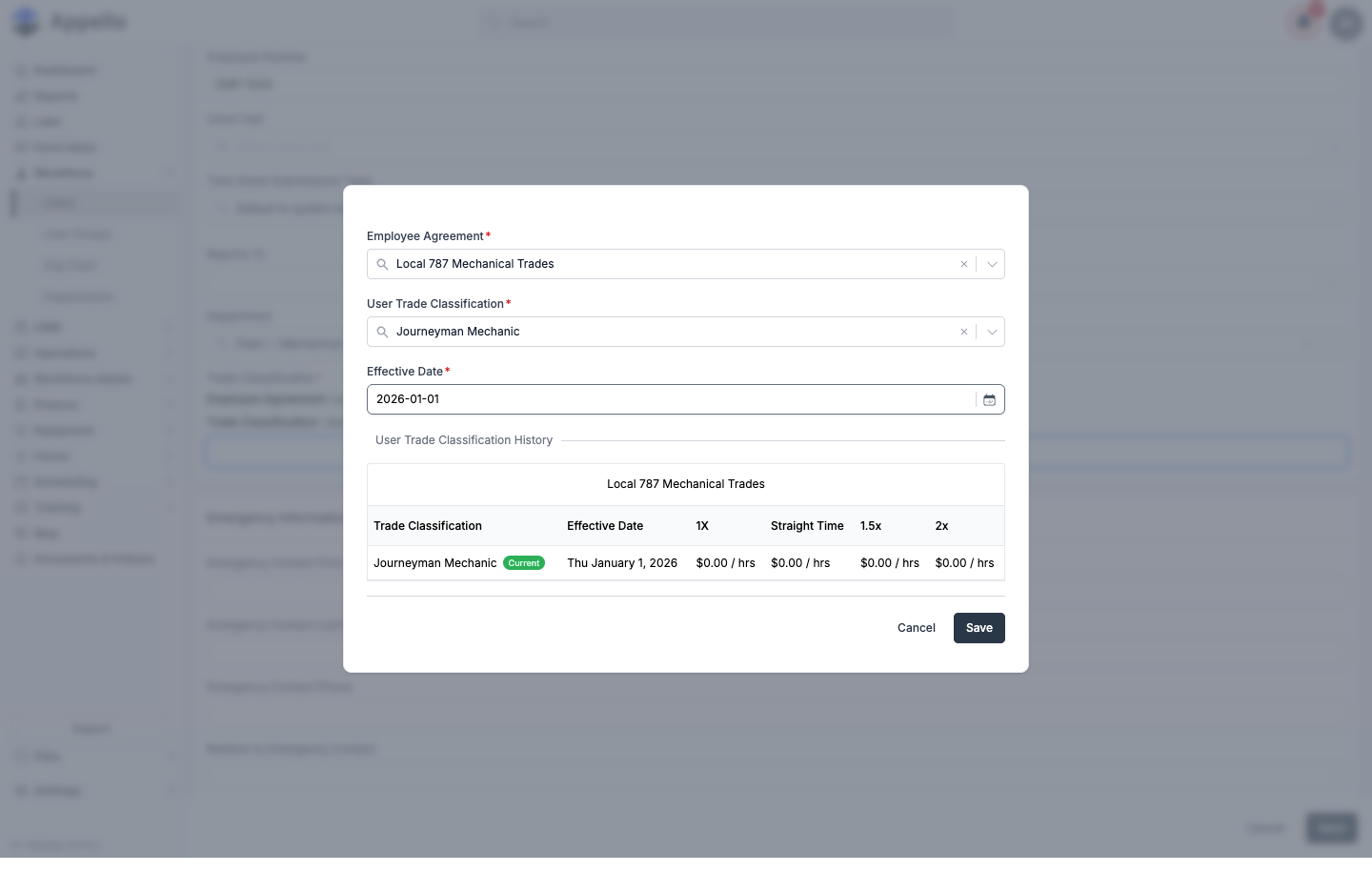
The same panel shows a User Trade Classification History table -- every past and current
classification the user has held under this agreement, each with the effective date it started
and the wage rate categories (for example 1X, Straight Time, 1.5x, 2x) it pays at. This is
how a worker's rate can change mid-year (a promotion to Journeyman, for example) while their
timesheets from before that date continue to cost out at the old rate.
See Users for the full walkthrough of creating and editing a user, including where the Trade Classification field sits relative to Union Hall and Role & Permissions.
How the Wage Lookup Works
When a timesheet is submitted, Appello resolves the pay rate for those hours automatically:
Worker → Trade Classification (as of the timesheet date, via User Trade Classification History)
       → Employee Agreement Contract (the version in effect on that date)
       → Wage Rate category (e.g. 1X / Straight Time, 1.5x, 2x)
       → Rate value (optionally varying by Wage Region)
The foreman or payroll admin doesn't look up rates manually -- the worker's current trade classification and the applicable contract version determine which row of the wage table applies. See Human Resources Settings for how wage rate categories and contract versions are configured on an agreement.
Dashboard Reporting
If a user has added it to their Company Metrics panel (Home dashboard), an Active Employees By Trade Classification section shows a live count of active users per classification, with one small card per classification. Clicking a card opens the Users list filtered to that classification.
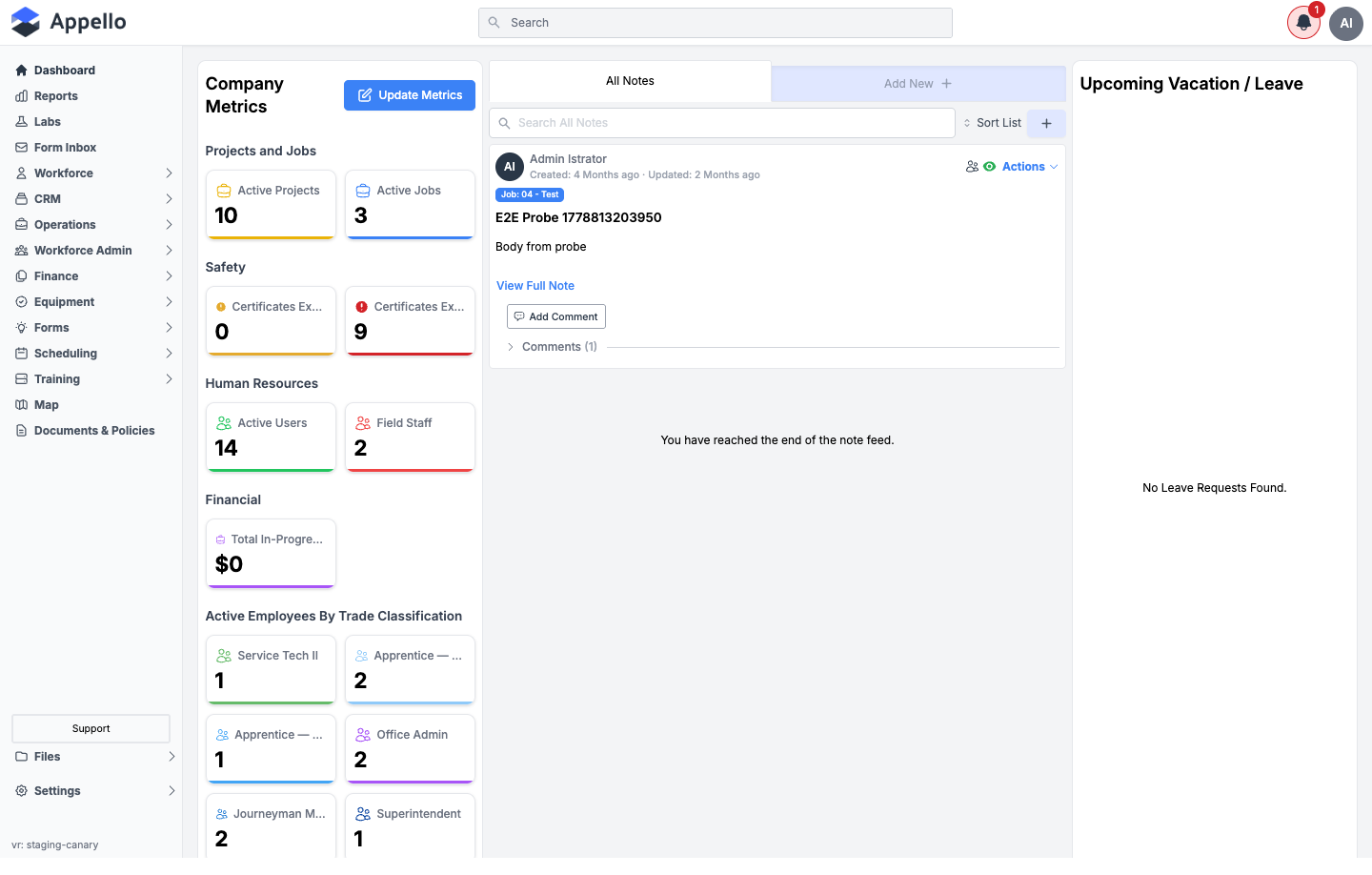
This metric only appears for users with permission to view Users, and only once it has been added via Update Metrics on the Company Metrics panel -- it is not a fixed, always-visible report.
How Trade Classifications Connect to Other Features
| Feature | How Trade Classifications Are Used |
|---|---|
| Employment Agreements | Each classification is scoped to one agreement and carries that agreement's wage rates. |
| Timesheets | The worker's classification as of the timesheet date determines which wage rate applies to their hours. |
| Scheduling | Settings → Instance Settings lets you choose which trade classifications display on the workforce schedule. |
| Job Costing | Labour costs on jobs use the wage rate tied to the worker's trade classification at the time worked. |
| Certifications | Required certifications can be scoped to specific trade classifications. |
| Chart of Accounts | Each classification posts its labour costs to the Labour Account assigned to it. |
Related Pages
- Human Resources Settings -- Full tab layout for employee agreements, including Trade Classifications
- Employment Agreements -- Wage tables and contract versioning
- Users -- Assigning a trade classification when creating or editing a user
- Union Hall Management -- Geographic dispatch locations
- Certifications -- Required certifications by trade classification