Travel Rate Cards & Zones
Travel rate cards define the per-diem, mileage, and board allowances your workers receive when travelling to job sites outside their home area. Each card contains multiple zones based on distance from the worker's union hall, with escalating allowances for longer commutes. This is a critical feature for ICI contractors managing crews across wide geographic regions.
Navigation
Sidebar → Settings → Human Resources → Wages tab (Travel Rate Cards section)
URL: /settings/human-resources → Wages tab
Overview
Travel rate cards are linked to employment agreements. Each agreement can have its own travel card — reflecting the travel provisions negotiated in the CBA. Cards are versioned by effective date so historical travel payments remain accurate.
Understanding Travel Zones
A travel zone system works outward from a reference point — typically the worker's union hall:
| Zone | Distance from Hall | Daily Travel Allowance | Board (if applicable) | Parking |
|---|---|---|---|---|
| Free Zone | 0–40 km | $0.00 | — | — |
| Zone 1 | 41–60 km | $25.00 | — | — |
| Zone 2 | 61–80 km | $40.00 | — | — |
| Zone 3 | 81–100 km | $55.00 | — | — |
| Zone 4 | 101–120 km | $70.00 | — | $23.00 |
| Zone 5 | 121–150 km | $85.00 | $140.00 | $23.00 |
| Zone 6 | 151–180 km | $100.00 | $140.00 | $23.00 |
| Zone 7 | 181–210 km | $110.00 | $140.00 | $23.00 |
| Zone 8 | 211–250 km | $120.00 | $140.00 | $23.00 |
| Zone 9 | 250+ km | $130.00 | $140.00 | $23.00 |
Board allowance kicks in at the distance where a daily commute becomes impractical — the worker stays near the job site instead. This is typically defined in the CBA.
How Zone Calculation Works
When a foreman enters a timesheet for a worker:
- The system looks up the worker's home union hall (e.g., Local 95 — Hamilton).
- It determines the job site location from the job record.
- It calculates the distance between the hall and the job site.
- It maps that distance to the appropriate zone on the worker's travel rate card.
- The travel allowance, board, and parking are automatically added to the timesheet.
This eliminates manual travel calculations — a process that typically takes office staff hours per pay period.
Creating a Travel Rate Card
Card Details
| Field | Description |
|---|---|
| Name | Descriptive name with effective period (e.g., "Local 95 Travel Rate Card (Ontario) Effective May 2025–May 2026") |
| Linked Agreement | The employment agreement this card applies to |
Adding Zones
Within a card, add zones with escalating rates:
| Field | Description |
|---|---|
| Zone Name | Label (e.g., "Free Zone", "Zone 1", "Zone 2") |
| Travel Allowance | Daily dollar amount for travel compensation |
| Board Allowance | Daily amount for accommodation (if applicable for this zone) |
| Parking Allowance | Daily parking reimbursement |
Versioning Travel Rate Cards
When CBA travel rates change (typically annually):
- Create a new travel rate card with the updated effective date.
- Enter the new zone rates.
- Link the new card to the appropriate employment agreement.
- The previous card remains for historical reference — timesheets before the new effective date use the old rates.
Example version history:
| Card | Effective Period | Status |
|---|---|---|
| Local 95 Travel Rate Card (Ontario) Effective May 2025–May 2026 | May 2025 – May 2026 | Active |
| Local 95 Travel Rate Card (Ontario) Effective May 2024–May 2025 | May 2024 – May 2025 | Historical |
Multiple Cards for Different Agreements
A contractor with multiple union locals needs separate travel cards:
| Agreement | Travel Card | Zone Structure |
|---|---|---|
| Local 95 CBA | Local 95 Travel Rate Card | 10 zones (Free + Zones 1–9) |
| Local 473 Sheet Metal | Local 473 Travel Card | May have different zone distances and rates |
| Office Employment | Office Travel Card | Simplified — may only have free zone + mileage |
Distance-Based Travel (Per Kilometer / Mileage)
Zone-based travel (above) pays a fixed daily allowance per zone. The alternative is distance-based travel -- a flat rate paid per kilometer or per mile actually travelled, with an optional unpaid threshold distance. Both calculation types are configured per Employee Agreement, not per worker, so every employment agreement in your company picks one or the other.
Choosing Distance-Based Travel on an Employee Agreement
-
Go to Settings → Human Resources → Employee Agreements.
-
Click Add Employee Agreement, or open an existing agreement's edit panel.
-
Under Travel Calculation Type, choose one of:
Option What it means Per KM/Mile Distance-based -- pays the agreement's flat rate for every unit of distance travelled beyond the free threshold. By Travel Rate Card Zone Zone-based -- pays the fixed daily allowance for whichever zone the job falls in (see above).
The Employee Agreements list shows the choice for every agreement in its Travel Type column, so you can see at a glance which agreements use Distance and which use Zone without opening each one.
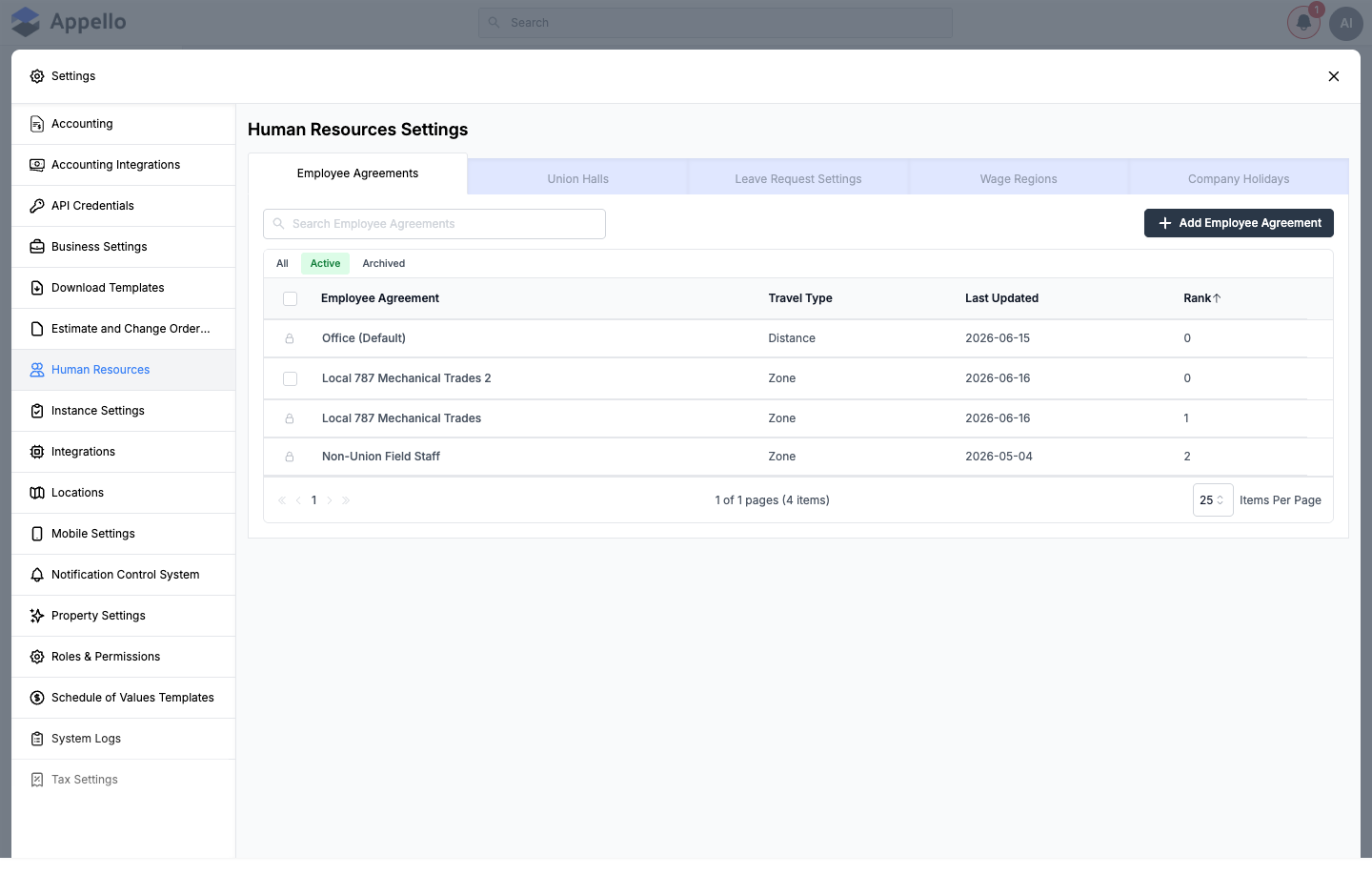
Travel Calculation Type is set once, on the Employee Agreement itself -- it is not a per-worker or per-timesheet choice. Switching an agreement from Zone to Distance (or back) changes how travel is calculated for every worker and every rate card version under that agreement going forward.
The Distance-Based Rate Card (the "Travel" Tab)
Each employee agreement's rate card is configured from its contract's Travel & Board Rates tab (Employee Agreements → [agreement] → [contract] → Travel & Board Rates) -- this is the same tab zone-based agreements use, but for a Distance agreement it shows distance-specific fields instead of a zone table:
| Field | Description |
|---|---|
| Travel Rate | Dollar amount paid per kilometer or per mile travelled (e.g. $0.60/km). Shown alongside a Km/Miles toggle that sets which unit the rate is entered in. |
| Unpaid Travel Distance | A threshold distance (in km or miles) that is never paid -- only the portion of a day's travel beyond this threshold is compensated. Labelled Free Distance on the read-only summary. |
| Board Rate / Per Diem | Flat daily accommodation amount -- same field as on a zone-based card. |
| Parking Rate | Flat daily parking reimbursement -- same field as on a zone-based card. |
| Rate Card Origin | The reference point distance is measured from: Union Hall Address, Employee Address, Company Address, or Specified Address. Same setting used by zone-based cards. |
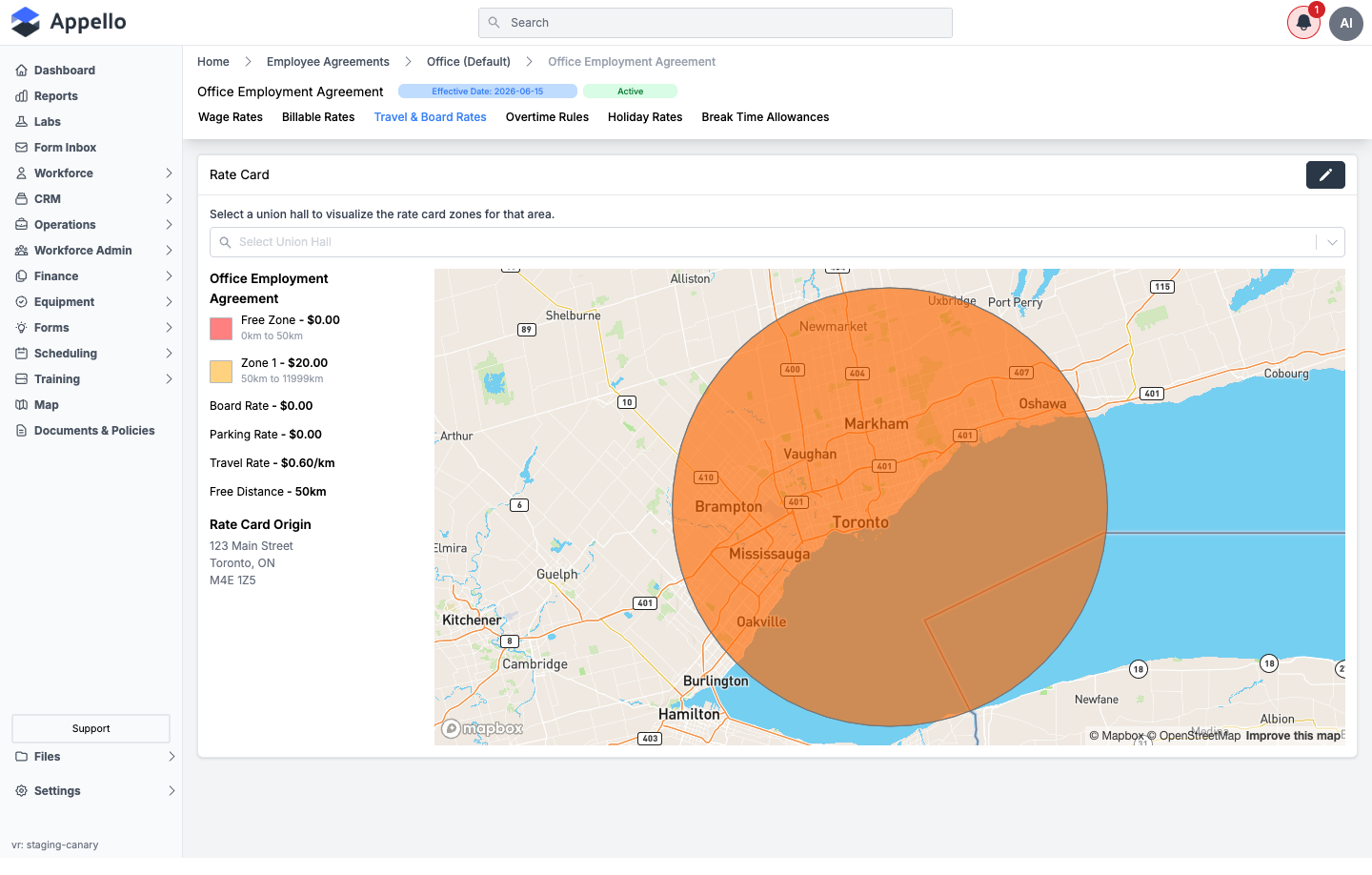
In the screenshot above, the agreement pays $0.60/km, the first 50 km of travel each day is unpaid (Free Distance), and distance is measured from the Rate Card Origin address shown on the card.
How Distance Is Measured
Distance-based travel is measured from the agreement's Rate Card Origin to the job site, the same reference point used by zone-based travel:
- Union Hall Address -- the worker's assigned union hall.
- Employee Address -- the worker's own home address on file.
- Company Address -- your instance's main company address.
- Specified Address -- a single fixed address chosen for the agreement (for example a shop or yard), independent of the worker or hall.
Unlike zone-based travel, where Appello automatically calculates the distance from the origin to the job and maps it to a zone, distance-based travel does not auto-calculate the distance. On the timesheet, a worker or foreman types the distance travelled directly into the Submitted Distance field for each job (see below). A small map-pin icon next to each travel record opens a Google Maps directions link from the agreement's Rate Card Origin to that job's location, as a reference for measuring the trip -- it does not fill in the distance automatically.
The unit a worker enters against (km or miles) follows your instance's Preferred Distance Unit, set at Settings → Instance Settings → Distance Unit. Appello converts the Travel Rate and Unpaid Travel Distance internally so the rate card still applies correctly if a distance is entered in the other unit.
No "round trip" toggle or automatic doubling of distance was found for distance-based travel. A worker (or whoever enters the distance) types whatever total distance your company's policy calls for -- a one-way trip or a round trip -- there is no separate setting that doubles a one-way figure.
How It Shows on a Timesheet and in Travel Records
On a distance-based agreement, a timesheet entry's Travel/Board/Parking section (same panel documented in Instance Settings → Travel, Board & Parking Expense Settings) shows a Travel Records table instead of the single zone badge used by zone-based agreements:
| Column | Description |
|---|---|
| $/km (or $/mile) | The agreement's Travel Rate, or a supervisor's custom rate if Change Rate was used. |
| Job | Which job the travel was for. A worker can add one row per job travelled to that day via Add another travel record. |
| Submitted Distance | Distance the worker (or whoever completes the timesheet) enters for that job. |
| Approved Distance | Distance a user with timesheet-approval permission can adjust before approving. |
| Value | Approved (or submitted) Distance × the rate, calculated automatically. |
| Override Value | A supervisor can type a flat dollar amount here to replace the calculated Value entirely. |
If the rate card has an Unpaid Travel Distance greater than zero, Appello adds an automatic Free Distance row to the table -- shown as a negative distance that offsets the day's total submitted/approved distance, so only travel beyond the free threshold is paid. This row is managed by Appello and carries an Is Applied toggle rather than the usual job/distance fields.
Each travel record becomes a row in Travel Records wherever timesheet travel data is reported -- the Timesheet Log's Travel ($) column and Bulk Timesheet Entry's totals both include distance-based travel the same way they include zone-based travel.
Distance-Based vs. Zone-Based Travel
| Zone-Based | Distance-Based (Per KM/Mile) | |
|---|---|---|
| How pay is calculated | Fixed daily allowance for whichever zone the job falls in | Rate × distance travelled, minus any unpaid threshold |
| Distance calculation | Automatic -- Appello calculates the distance from the origin to the job and maps it to a zone | Manual -- a worker or foreman enters the distance travelled; a Google Maps link helps them measure it |
| Board / Parking | Configured per zone, escalating with distance | Flat daily amounts on the rate card, independent of distance travelled |
| Best fit for | CBAs with a published escalating travel-zone table | Agreements that simply pay a per-km/mile rate, such as many non-union or office agreements |
How Travel Zones Connect to Other Features
| Feature | How Travel Zones Are Used |
|---|---|
| Timesheets | Travel allowances auto-calculate based on worker's hall vs. job site |
| Bulk Crew Entry | Travel for the entire crew calculates in one step |
| Payroll Export | Travel, board, and parking export as separate line items |
| Job Costing | Travel costs allocate to the job they're incurred on |
| Scheduling | Dispatchers can see travel zone impact when assigning remote crews |
Related Pages
- Union Hall Management — Configure the halls that serve as travel zone reference points
- Employment Agreements — Link travel cards to agreements
- Human Resources Settings — Overview of all HR configuration tabs, including the Employee Agreements Travel Type column
- Instance Settings — Set the Preferred Distance Unit (km or miles) and the Travel/Board/Parking expense toggles