Employment Agreements
Employment agreements define the wage structures, benefit rates, and pay rules for different groups of workers. In a unionized environment, these map directly to Collective Bargaining Agreements (CBAs) negotiated between unions and employer associations. Appello supports multiple concurrent agreements -- each with its own wage table, overtime rules, and effective date versioning.
Navigation
Sidebar → Settings → Human Resources → Employee Agreements tab
Overview
The Employee Agreements tab lists every employment agreement configured for your instance.
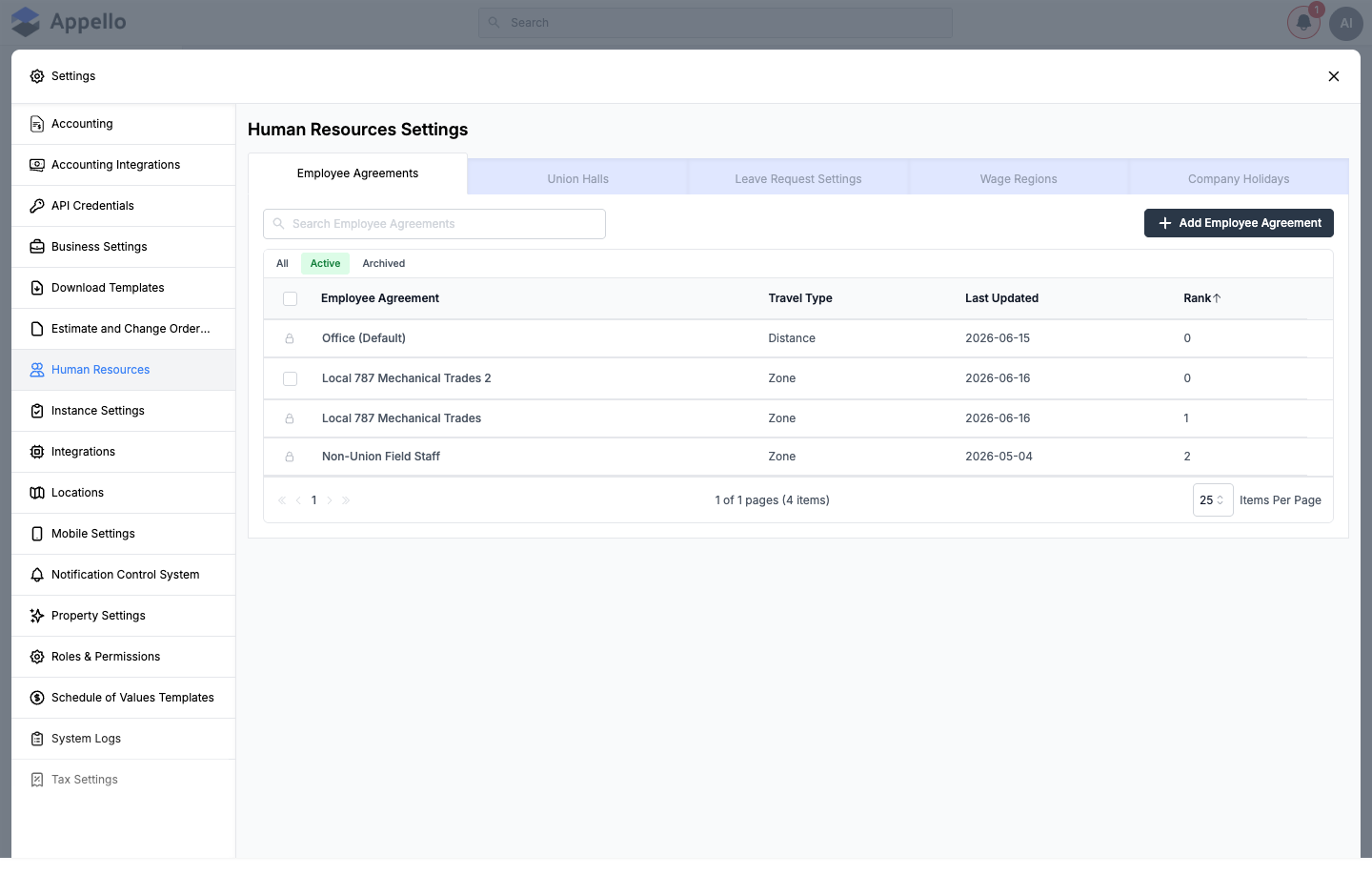
See Human Resources Settings for the list's column definitions (Employee Agreement, Travel Type, Last Updated, Rank) and filters. Clicking an agreement's name opens its detail page -- see Agreement detail tabs below.
Understanding Employment Agreements
Most ICI trade contractors operate under multiple employment agreements simultaneously -- for example:
| Agreement Type | Who It Might Cover |
|---|---|
| Union CBA | Workers dispatched through a specific union local's hiring hall |
| Multi-trade CBA | Workers under a different trade's jurisdiction (e.g. sheet metal) |
| Non-union | Office staff, shop workers, and non-union field personnel |
Each agreement can carry its own wage scales, overtime rules, benefit rates, and travel calculation method, so a contractor working under several CBAs (plus an internal office agreement) tracks all of them natively instead of in spreadsheets.
Creating an Employment Agreement
Click Add Employee Agreement to open the creation flyout.
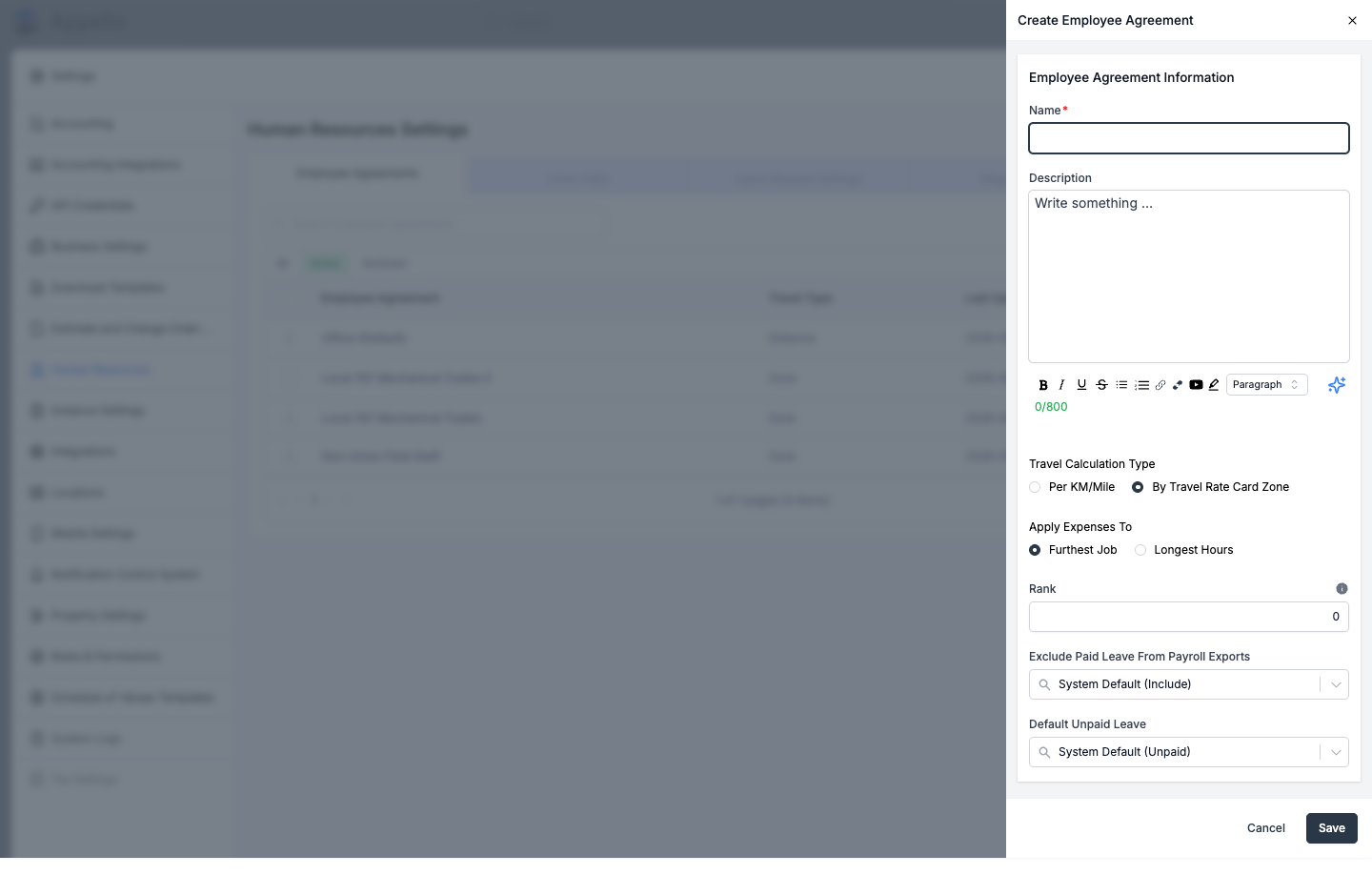
| Field | Description |
|---|---|
| Name | Required. Descriptive name (e.g. "Local 787 Mechanical Trades"). |
| Description | Optional rich-text notes, up to 800 characters. |
| Travel Calculation Type | Per KM/Mile (distance-based) or By Travel Rate Card Zone (zone-based). See Travel Rate Cards & Zones for how each option behaves. |
| Apply Expenses To | Only shown when Travel Calculation Type is By Travel Rate Card Zone. Furthest Job or Longest Hours -- which job on a multi-job day the travel/board expense is attributed to by default. |
| Rank | Numeric sort order. Controls where this agreement's tab appears in places like the Timesheet Log. |
| Exclude Paid Leave From Payroll Exports | Defaults to your instance's setting (shown in parentheses, e.g. "System Default (Include)"). Overrides how this agreement's paid leave is treated on payroll exports. |
| Default Unpaid Leave | Defaults to your instance's setting (e.g. "System Default (Unpaid)"). Overrides how unpaid leave defaults for workers under this agreement. |
Click Save to create the agreement.
Creating an agreement automatically seeds it with a starter Base Rate line item, a 1X wage category, and a first Agreement Version dated today -- so the agreement has a working wage table from the moment it's created, without a separate setup step. See Agreement Versions below.
An existing agreement's row opens the same fields for editing. An agreement's Actions menu also offers Duplicate, which copies the agreement as a starting point for a new one, then navigates straight to the new agreement's Agreement Version tab.
The copy is named <original name> - DUPLICATE (for example, duplicating "Local 787 Mechanical
Trades" produces "Local 787 Mechanical
Trades - DUPLICATE"), and carries over every Wage Rate Category and Line Item, every Trade
Classification, and the active Travel Rate Card -- but only the currently active
Agreement Version (contract) and its rates, not the full historical version list. Union hall
links are not copied; link halls to the new agreement separately from its own Union Halls tab.
Agreement Detail Tabs
Clicking an agreement's name opens its detail page, with its own set of tabs:
| Tab | Purpose |
|---|---|
| Agreement Version | The agreement's contracts (versions) by effective date. See Agreement Versions below. |
| Union Halls | Union halls associated with this agreement. See Union Halls tab below and Union Hall Management for the hall's own detail page. |
| Trade Classifications | The trade/job classifications available under this agreement. See Trade Classifications tab below and Trade Classifications for how they drive the wage lookup. |
| Wage Rates | The named wage categories (e.g. 1X, 1.5X) available under this agreement. See Wage Rate Categories tab below. |
| Line Items | Additional pay/expense line items (e.g. Base Rate) available under this agreement. See Line Items tab below. |
Route: /employee-agreements/[id]. Every tab here is controlled by its own permission item
rather than a single "Employee Agreement" permission: the Agreement Version tab checks the
Job → View permission (a gate shared with other areas of the app), Union Halls checks
Union Hall → View, Trade Classifications checks Trade Level → View, and Wage
Rates / Line Items both check Employee Agreement Rate Label → View. See each tab's own
Permissions line below.
Agreement Versions
Each agreement contains one or more Agreement Versions -- contracts with an effective date and their own wage tables, billable rates, overtime rules, holiday mappings, travel rate card, and (if enabled) break time allowances. When a new CBA is ratified, you replace the active version rather than editing it in place, which preserves historical payroll records.
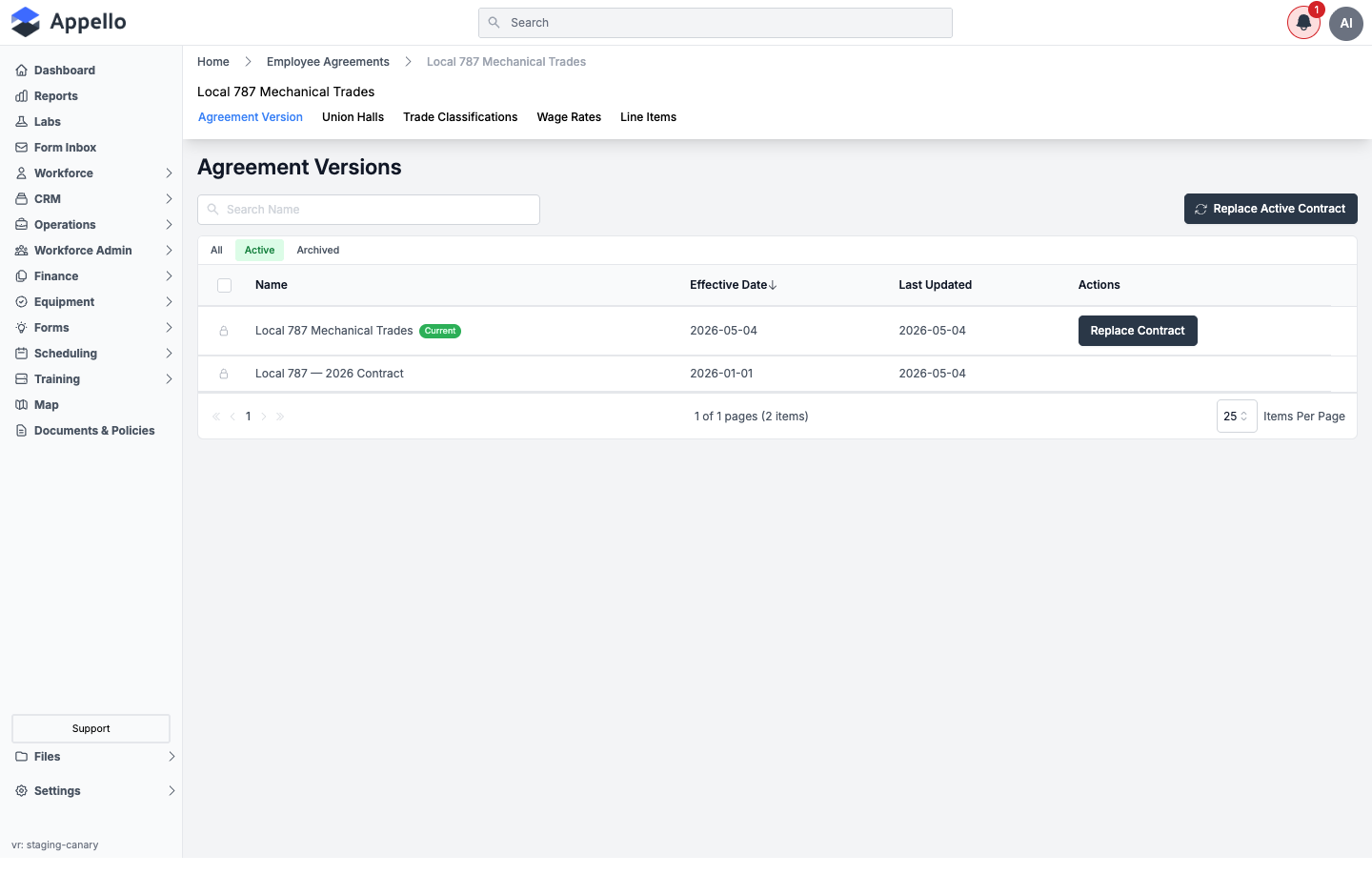
The Current badge marks the version in effect. Click a version's name to open its own tab set -- described in The contract's tabs below.
Which version applies: the Current badge marks the most recent non-archived version whose Effective Date is strictly before today, among this agreement's versions. A version dated today or in the future is not yet "Current" even though it exists -- it takes over the next calendar day. A timesheet always costs out against whichever version was in effect on its own date, not the version that happens to be Current when payroll runs, so re-costing old timesheets after a version change is never necessary. A version is locked (its rates can no longer be freely edited) once any timesheet hours have been recorded against it, or once any worker has been assigned a trade classification under the parent agreement.
Replacing the active version
There is no separate "add a blank version" action. Instead, from the Agreement Version tab, click Replace Active Contract (or Replace Contract on the current row):
- Appello opens a confirmation dialog naming the current version.
- Choose an Effective Date for the new version -- it defaults to the day after the current version's effective date, and cannot be earlier than that.
- Click Replace.
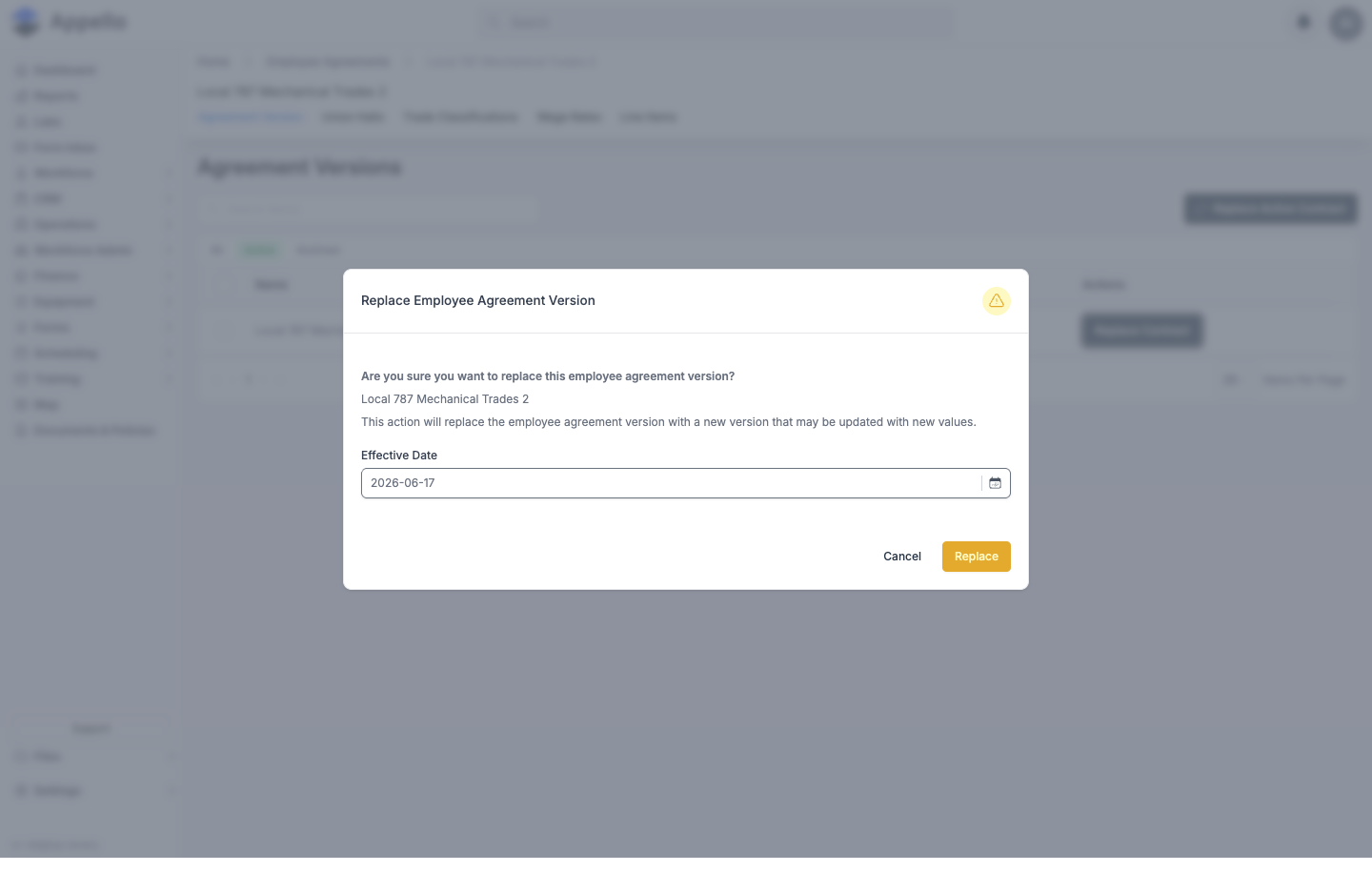
This creates a new Agreement Version as a copy of the current version's rates, then opens it in the same edit flyout used when creating a version, with these fields:
| Field | Description |
|---|---|
| Name | Required. |
| Effective Date | Required. Cannot be earlier than the current version's effective date. |
| Description | Optional rich-text notes, up to 800 characters. |
| Add Travel Expense / Add Board Expense | Toggles controlling which expenses auto-apply to a clock-in/out timesheet submission. Shown or hidden based on your instance's travel/board settings. |
| Zone Boundary Favors Higher Zone | Only shown for zone-based agreements. Controls which zone a job on a distance boundary rounds into. |
| Travel Origin | Union Hall Address, Employee Address, Company Address, or Specified Address -- the reference point travel distance is measured from. See Travel Rate Cards & Zones. |
There is no Expiry Date field -- a version's coverage ends when a later version's effective date supersedes it.
After you edit and save the new version, the previous version remains on the Agreement Version tab (no longer marked Current) for historical reference -- timesheets dated before the new effective date continue to use the old version's rates.
Union Halls Tab
Where: Settings → Human Resources → Employee Agreements → open an agreement → Union Halls
(/employee-agreements/[id]?tab=union-halls).
What it's for: Lists which union halls dispatch workers under this agreement, and is the only place that actually sets a union hall's Employee Agreement link -- the hall's own create/edit panel doesn't have that field.
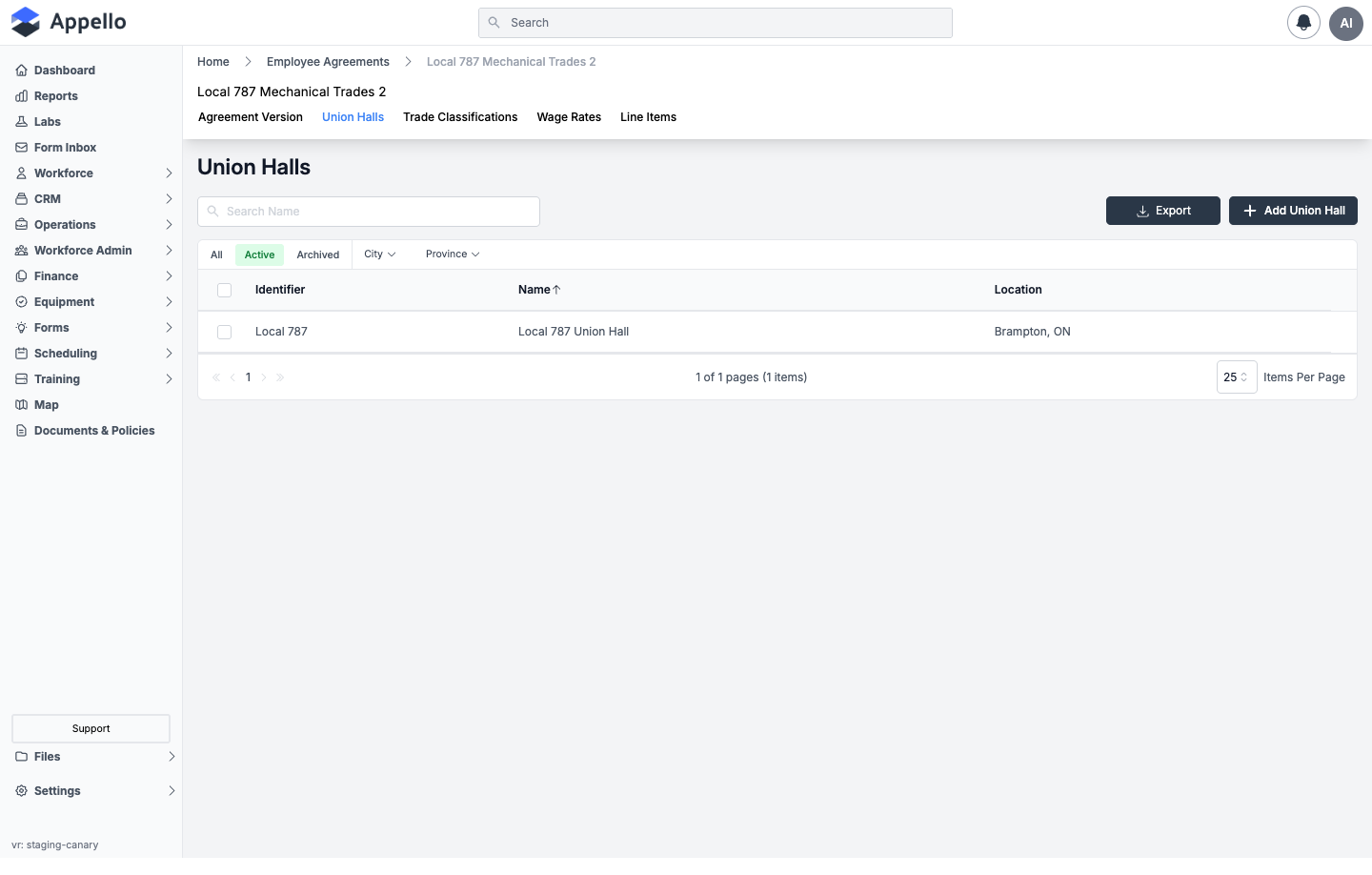
| Column | Description |
|---|---|
| Identifier | The hall's short code, linked to its own detail page. |
| Name | The hall's full name, linked to its own detail page. |
| Location | The city and province/state of the hall's address. |
All / Active / Archived quick tabs and City / Province filters narrow the list; Search Name filters by hall name; Export downloads the filtered list as a CSV. Selecting rows and clicking Archive here detaches the hall from this agreement rather than archiving the hall record itself.
Click Add Union Hall to open the Associate Union Hall flyout, which has two tabs:
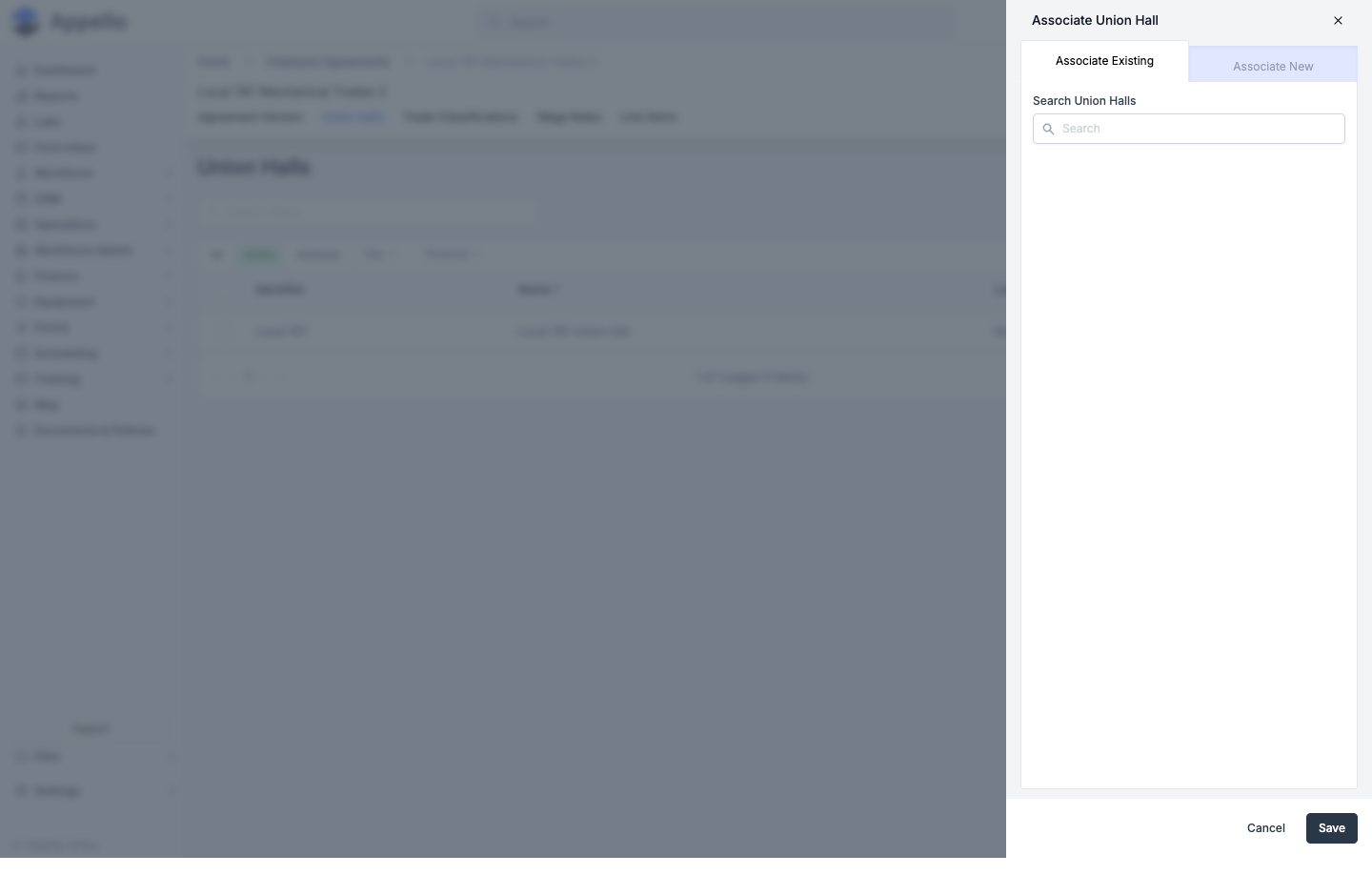
| Tab | Field | Required | Type | Effect |
|---|---|---|---|---|
| Associate Existing | Search Union Halls | Yes | Searchable picker | Finds a hall not yet linked to any agreement (or currently linked elsewhere) and links it to this one. |
| Associate New | (same fields as Creating a Union Hall) | -- | -- | Creates a brand-new union hall record already linked to this agreement, in one step. |
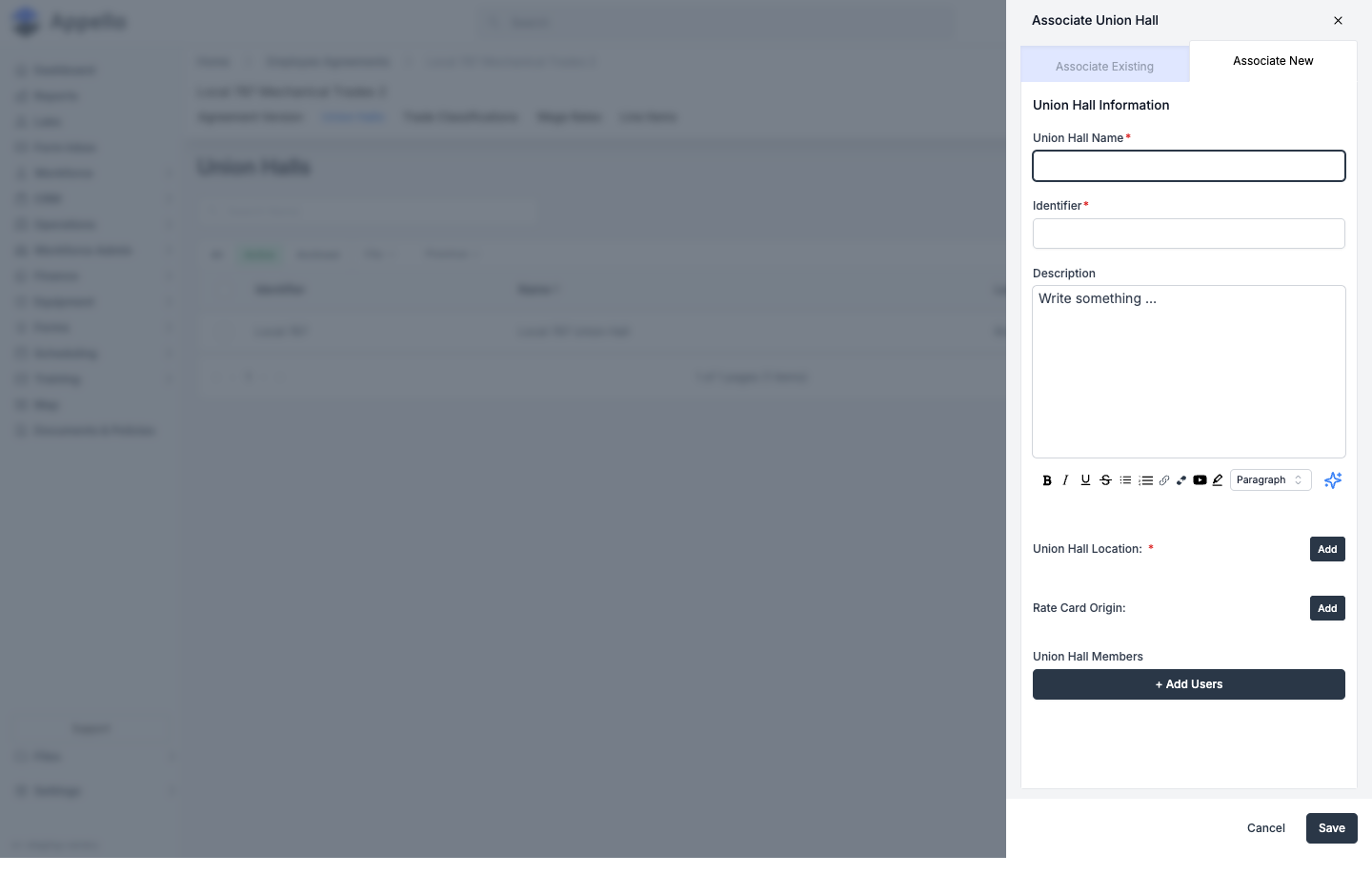
Click Save to link the hall, or Cancel to close without changes.
Workflow:
- Open the agreement, click the Union Halls tab, then Add Union Hall.
- On Associate Existing, search for and select an already-created hall; on Associate New, fill in the hall's own fields (Name, Identifier, Location, etc.) instead.
- Click Save. The hall now shows this agreement on its own Overview tab, and this agreement's active contract's travel rate card zones become the hall's zone map.
Permissions: gated by the Union Hall permission item -- View to see the tab, Edit to link, detach, delete, or restore halls here.
Related pages: Union Hall Management for the hall's own detail page, zone map, and assigning workers to it.
Trade Classifications Tab
Where: Settings → Human Resources → Employee Agreements → open an agreement → Trade
Classifications (/employee-agreements/[id]?tab=trade-levels).
What it's for: Lists the job/skill levels this agreement pays against (Apprentice, Journeyman, Foreman, etc.) -- what the Wage Rates and Billable Rates grids are tables of. Full behavior, the wage-lookup mechanics, and assigning a classification to a user are documented on Trade Classifications; this section covers the tab in place on this route.
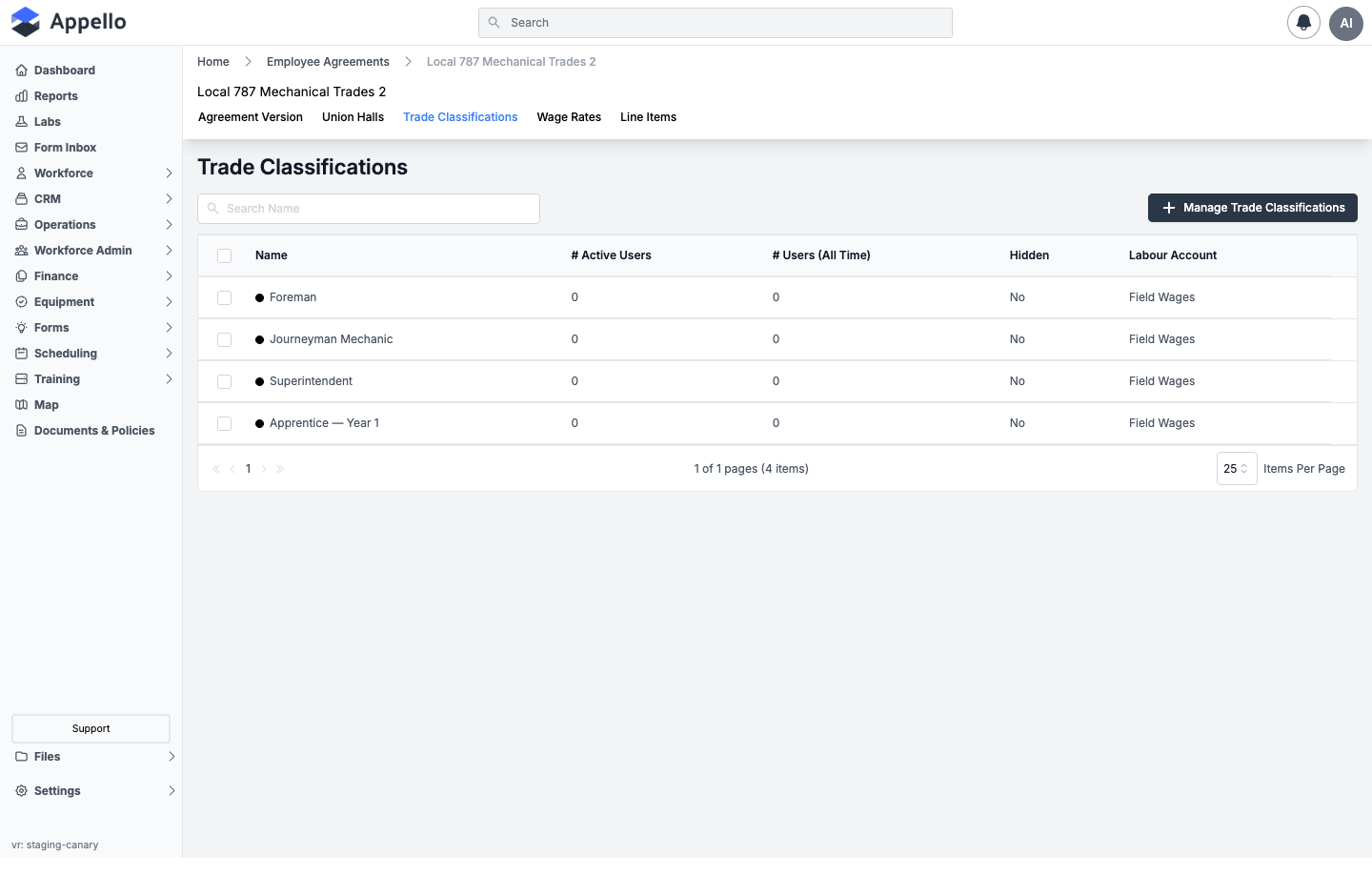
| Column | Description |
|---|---|
| Name | The classification's label, with its assigned color indicator. |
| # Active Users | Employees currently assigned this classification. |
| # Users (All Time) | Total employees ever assigned this classification. |
| Hidden | Whether the classification is hidden from selection elsewhere. |
| Labour Account | The Chart of Accounts labour account this classification's costs post to. |
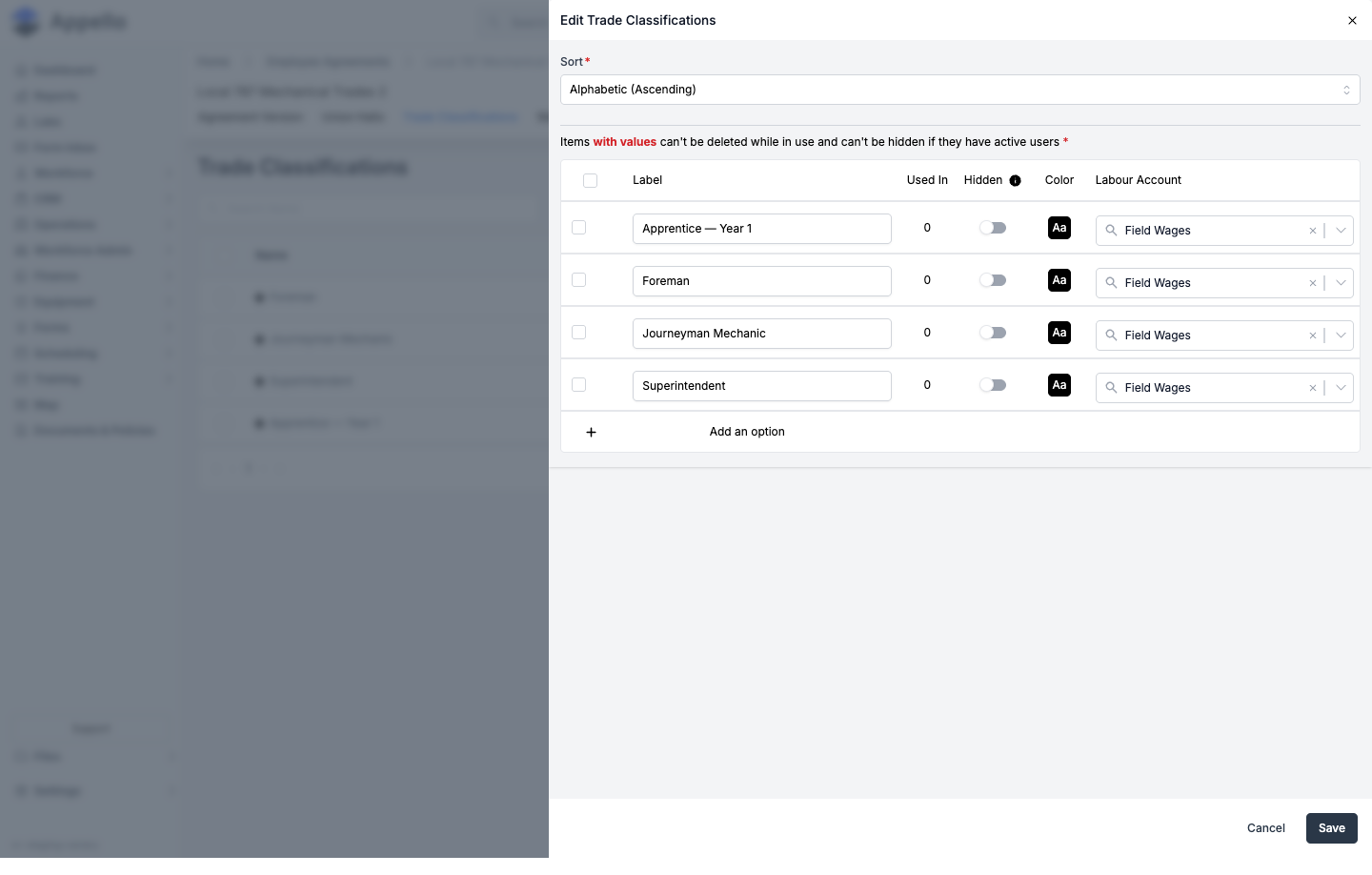
Click Manage Trade Classifications to open the Edit Trade Classifications flyout -- a single inline-editable table, not a per-record modal:
| Field / Control | Required | Type | Effect |
|---|---|---|---|
| Sort | Yes | Combobox: Custom or Alphabetic (Ascending) | Custom enables drag-to-reorder (⠿ handle) and defines the hierarchy's display order; Alphabetic disables dragging and sorts by name. |
| Label | Yes | Text | The classification's name. Blank blocks save with "Trade Level Name and Labour Account are required." |
| Used In | -- | Read-only number | Count of users (active + historical) assigned this classification. Not editable. |
| Hidden | No | Toggle (default off) | Hides the classification from selection lists without deleting it. Disabled (can't be turned on) while the row has active users -- you can always un-hide. |
| Color | No | Color picker (default black) | The indicator swatch shown in lists and on the schedule. |
| Labour Account | Yes | Combobox (Chart of Accounts, direct-labour category only) | Where this classification's costs post. Blank blocks save alongside Label. |
Click Add an option to add a row, the trash icon to delete one (rows with Used In > 0 show a
lock icon instead and can't be deleted or bulk-selected), then Save to commit or Cancel to
discard.
Workflow: click Manage Trade Classifications → Add an option for each level your agreement needs → set Label and Labour Account on each (required) → set Sort, Color, and Hidden as needed → Save.
Permissions: gated by the Trade Level permission item -- View to see the tab, Edit to add, rename, reorder, hide, or delete classifications.
Related pages: Trade Classifications for the wage lookup, assigning a classification to a user with an effective date, and dashboard reporting.
Wage Rate Categories Tab
Where: Settings → Human Resources → Employee Agreements → open an agreement → Wage Rates
(/employee-agreements/[id]?tab=wage-categories).
What it's for: Defines the named rate categories this agreement pays at (1X, 1.5X, 2X,
etc.) -- the column headings that later show up as sub-tabs on a contract's own Wage Rates grid.
This is setup, not dollar values; the dollar amounts live on each contract's Wage Rates tab
below.
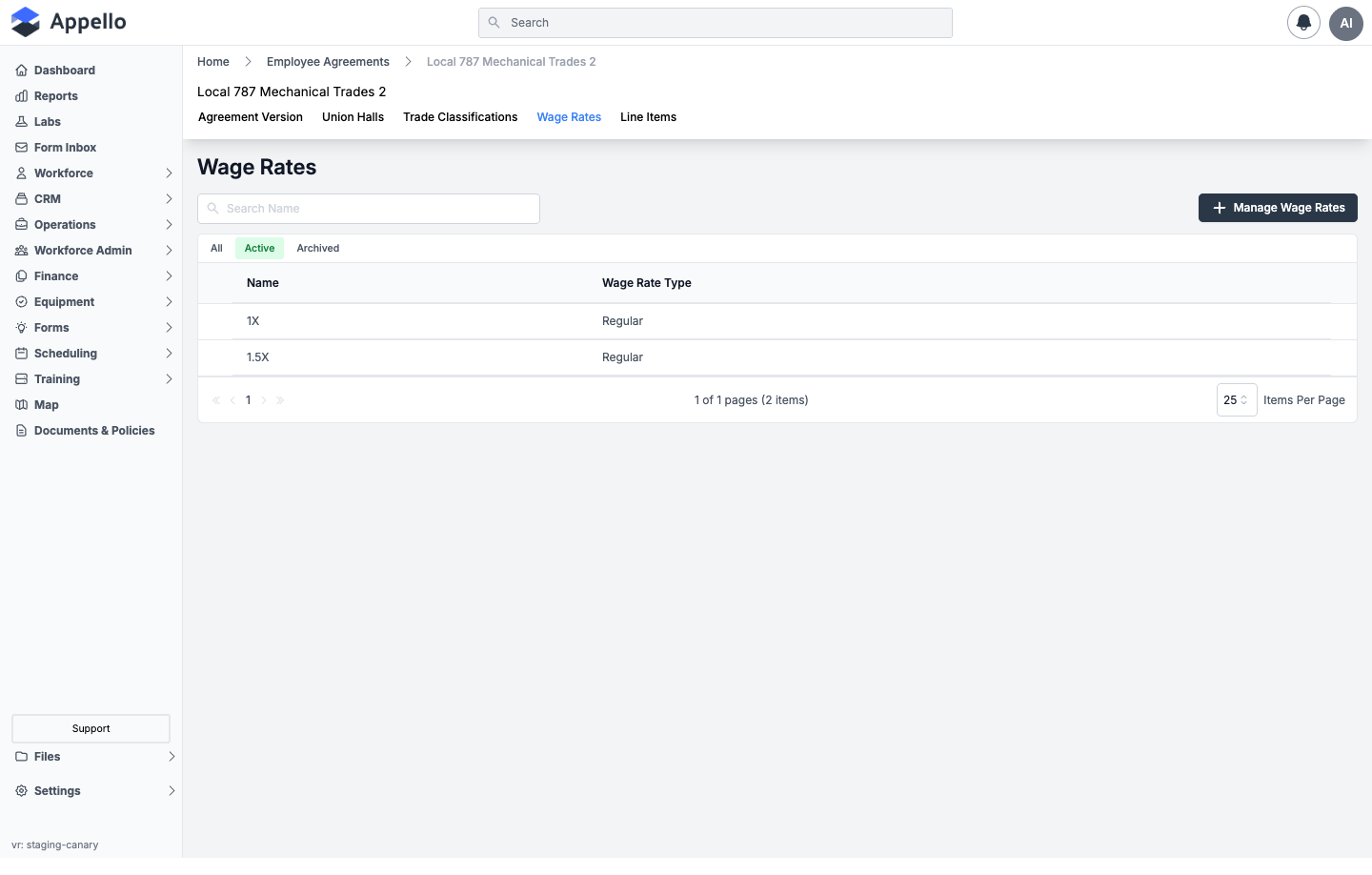
| Column | Description |
|---|---|
| Name | The wage category's name (e.g. 1X, 1.5X). |
| Wage Rate Type | The underlying rate type (e.g. Regular). |
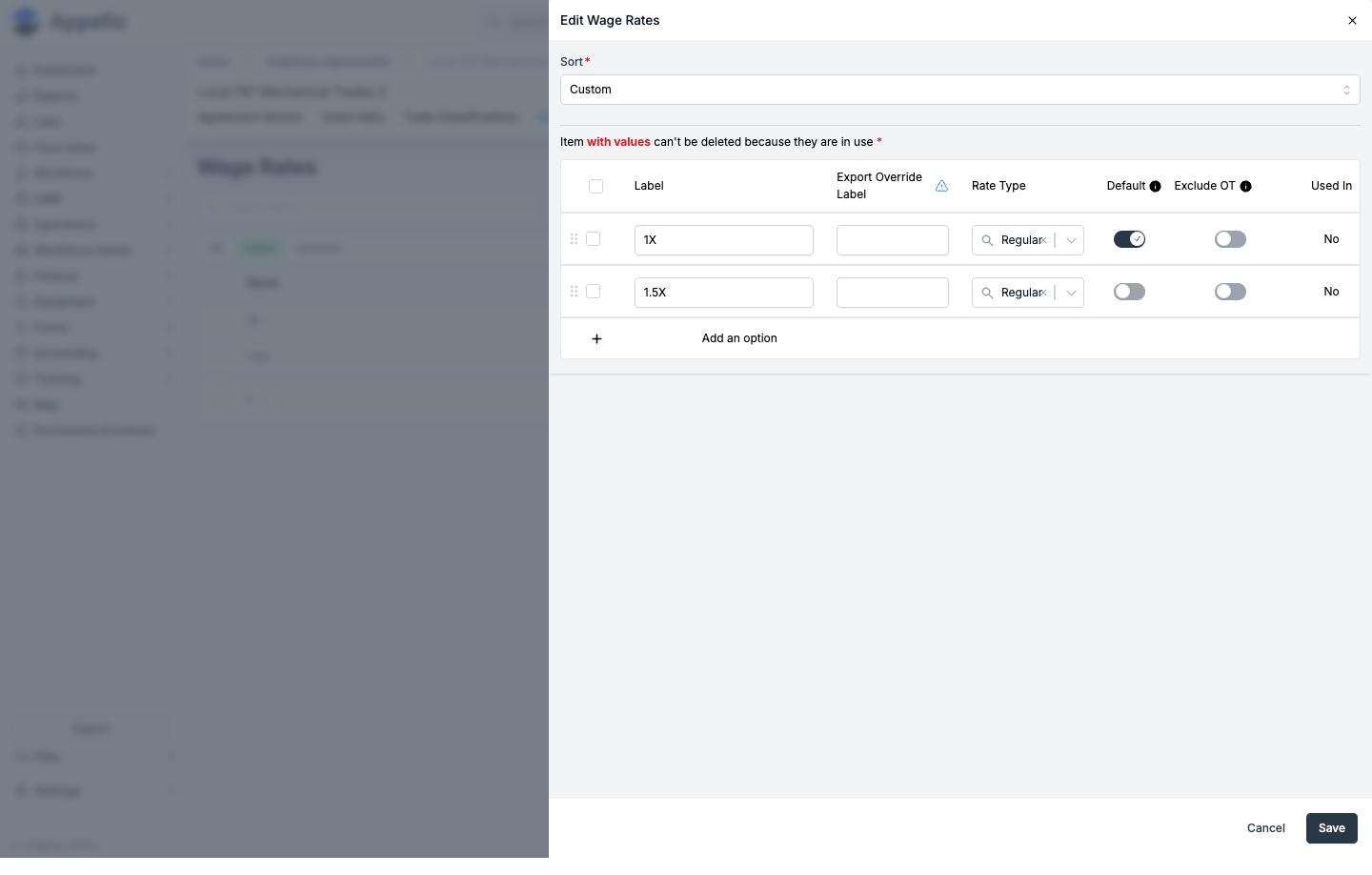
Click Manage Wage Rates to open the Edit Wage Rates flyout -- the same inline-editable-table pattern as Trade Classifications:
| Field / Control | Required | Type | Effect |
|---|---|---|---|
| Sort | Yes | Combobox: Custom / Alphabetic | Same behavior as Trade Classifications' Sort. |
| Label | Yes | Text | The category's name. Blank blocks save with "Label is Required." |
| Export Override Label | No | Text | Customizes this rate's name on payroll exports to match your accounting software's expected format. |
| Rate Type | Yes | Combobox (rate types) | The underlying rate type (e.g. Regular). New rows default to Regular. |
| Default | Exactly one row must be Default | Toggle | Marks the rate that clocking in/out logs time against automatically. Save blocks with "Only one Default Rate is allowed" (more than one) or "At least one Default Rate is required" (none). |
| Exclude OT | No | Toggle (default off) | Removes this rate from the Overtime Rules tier option list -- use for holiday-only rates that shouldn't factor into overtime math. |
| Used In | -- | Read-only text (Yes/No) | Whether values are already recorded against this rate. Rows in use are locked from deletion. |
Click Add an option to add a row, then Save or Cancel.
Workflow: Manage Wage Rates → Add an option for each category the agreement needs
(commonly 1X, 1.5X, 2X) → set Rate Type and confirm exactly one Default row → toggle
Exclude OT on holiday-only rates → Save. The dollar values per trade classification are
then entered on each contract's own Wage Rates tab.
Permissions: gated by the Employee Agreement Rate Label permission item -- View to see the tab, Edit to add, rename, reorder, or delete rate categories.
Line Items Tab
Where: Settings → Human Resources → Employee Agreements → open an agreement → Line Items
(/employee-agreements/[id]?tab=line-items).
What it's for: Defines additional pay or expense entries beyond the base wage categories -- per-diems, tool allowances, or benefit contributions -- that appear as extra rows on every wage category's dollar table. Every agreement is seeded with one Base Rate line item on creation.
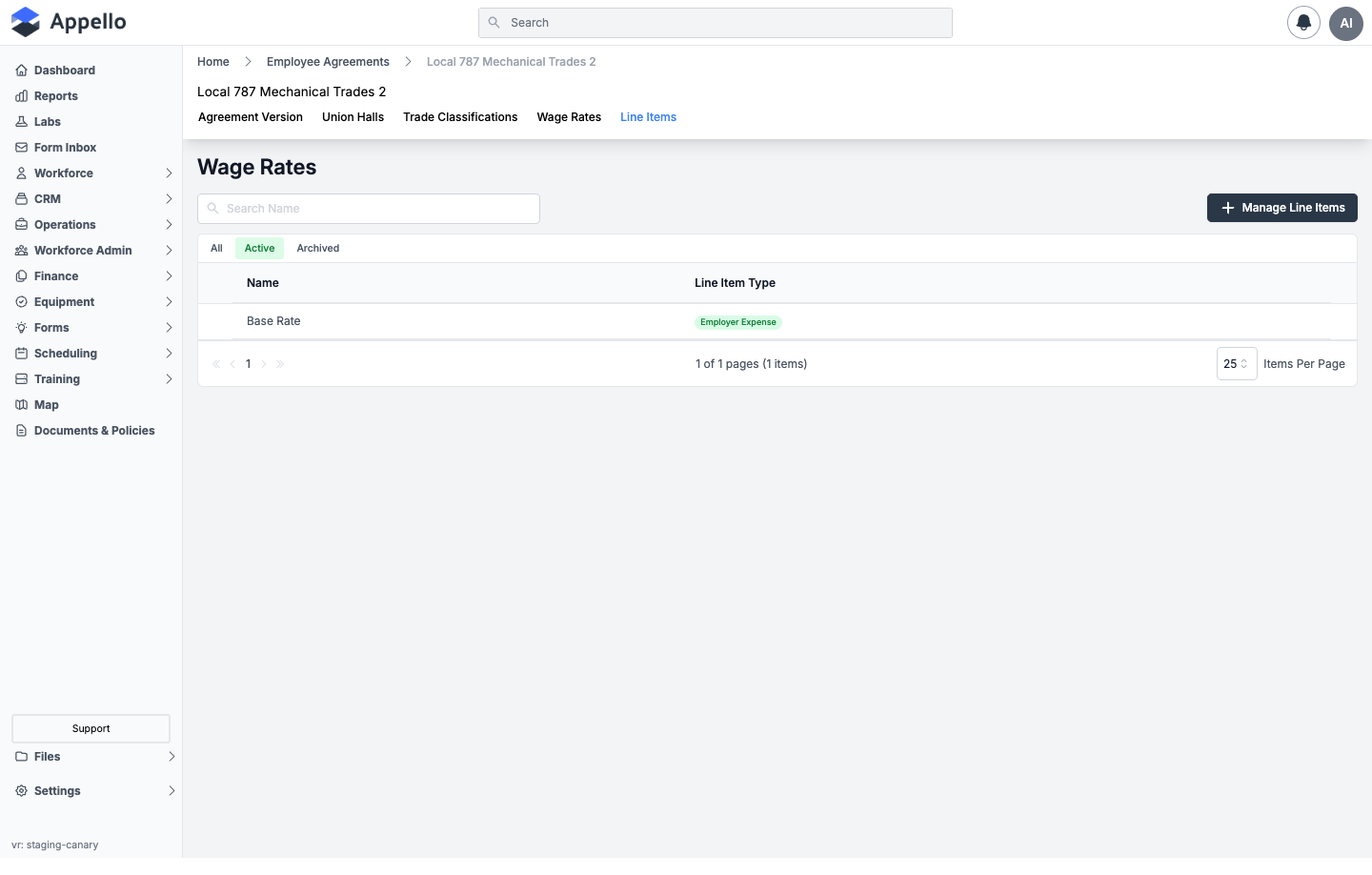
| Column | Description |
|---|---|
| Name | The line item's name. |
| Line Item Type | Employer Expense or Employee Expense. |
Click Manage Line Items to open the same flyout used for Wage Rate Categories, in line-item mode -- note the column set is different:
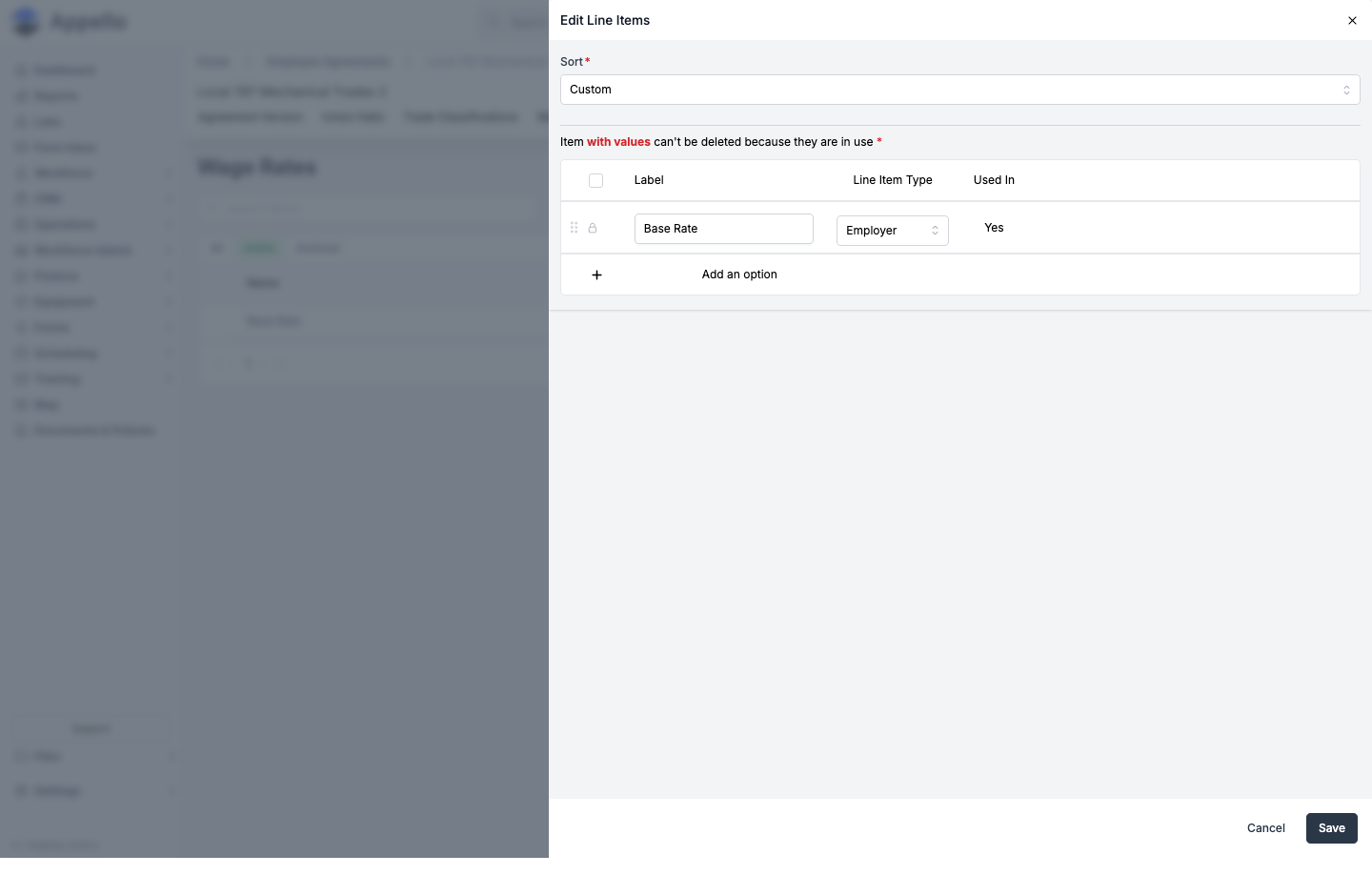
| Field / Control | Required | Type | Effect |
|---|---|---|---|
| Sort | Yes | Combobox: Custom / Alphabetic | Same behavior as the other two management flyouts. |
| Label | Yes | Text | The line item's name. Blank blocks save with "Label is Required." |
| Line Item Type | No (defaults to Employer) | Select: Employer / Employee | Whether this expense is deducted from the employer's or the employee's side of the wage total -- shown as the Employer Expense / Employee Expense badge on the contract's Wage Rates grid. |
| Used In | -- | Read-only text (Yes/No) | Whether values are already recorded against this item. Rows in use are locked from deletion (the seeded Base Rate item always shows a lock icon). |
Unlike Wage Rate Categories, this mode has no Export Override Label, Rate Type, or Default columns -- those only apply to wage-rate rows, not line items.
Workflow: Manage Line Items → Add an option → name it and choose Employer or Employee → Save. The new line item then appears as an extra row on every wage category's dollar table on each contract's Wage Rates tab.
Permissions: gated by the Employee Agreement Rate Label permission item -- the same permission as the Wage Rate Categories tab.
The Contract's Tabs
Where: click a version's name from the Agreement Version tab to open
/employee-contract/[id]. Opening an Agreement Version (contract) shows six tabs:
| Tab | Purpose |
|---|---|
| Wage Rates | The dollar-value wage table for this version. See below. |
| Billable Rates | What work order labour bills out at for this version. See below. |
| Travel & Board Rates | The per-diem/mileage rate card. See below and Travel Rate Cards & Zones for the full zone-based vs. distance-based guide. |
| Overtime Rules | Daily/weekly hour thresholds that escalate pay between wage rate tiers. See below. |
| Holiday Rates | Which wage category applies on each statutory holiday. See below. |
| Break Time Allowances | Automatic paid/unpaid time added after a worked-hours threshold. Only shown when your instance has the feature enabled. See below. |
Wage Rates here is gated by the Job → View permission (the same shared gate as the Agreement Version tab), while Billable Rates, Overtime Rules, Holiday Rates, and Break Time Allowances are all gated by the Employee Agreement Contract permission item, and Travel & Board Rates by the Travel Rate Card permission item. Editing on the Travel & Board Rates tab additionally requires Employee Agreement Contract → Edit, and editing Holiday Rates requires Employee Agreement → Edit -- the only place on either page that checks the parent Employee Agreement permission rather than the contract-level one.
Wage Rates
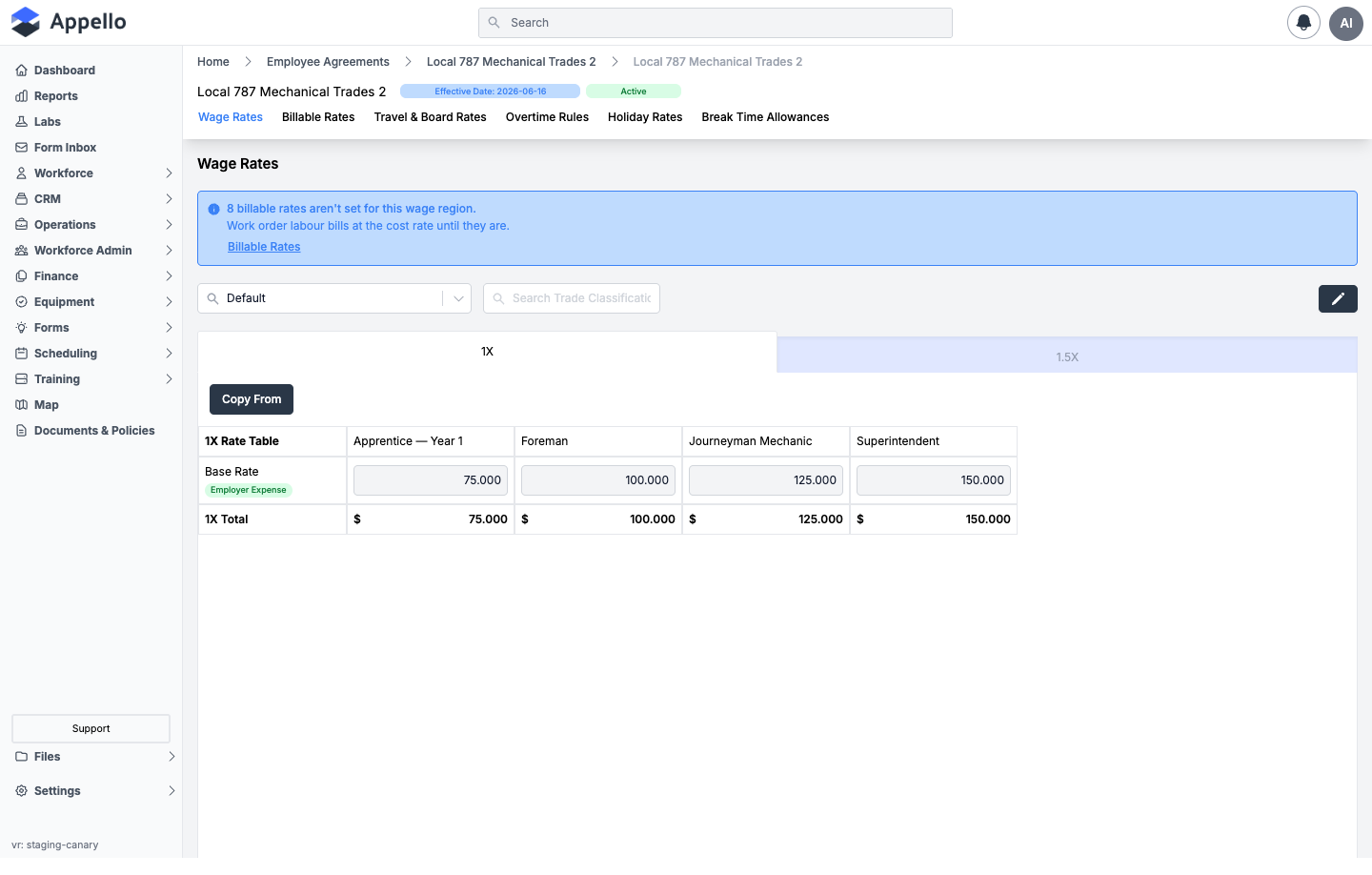
The tab has one sub-tab per wage category defined on the agreement (e.g. 1X, Straight Time,
1.5x, 2x). Within a wage category, the table's rows are the agreement's rate labels and line
items (e.g. Base Pay, Base Rate, Health & Welfare, Pension, Vacation Pay, WSIB, CPP, EI, each
tagged Employer Expense or Employee Expense), and the columns are trade classifications
(e.g. the apprentice years, Foreman, Journeyman Mechanic, Superintendent). A Total row sums
each column. A Wage Region selector above the table scopes rates to a specific region (see
Wage Regions); when a non-default region has no
values yet, an empty state offers Copy From Default instead of the grid.
A banner above the table (pointer style) appears whenever one or more trade classifications in the current wage region are missing a Billable Rate -- see Billable Rates below for exactly when this triggers -- with a link straight to that tab.
Click the pencil icon to edit cell values directly in the grid, or click Copy From to open the Copy Wage Rates flyout instead of typing values by hand:
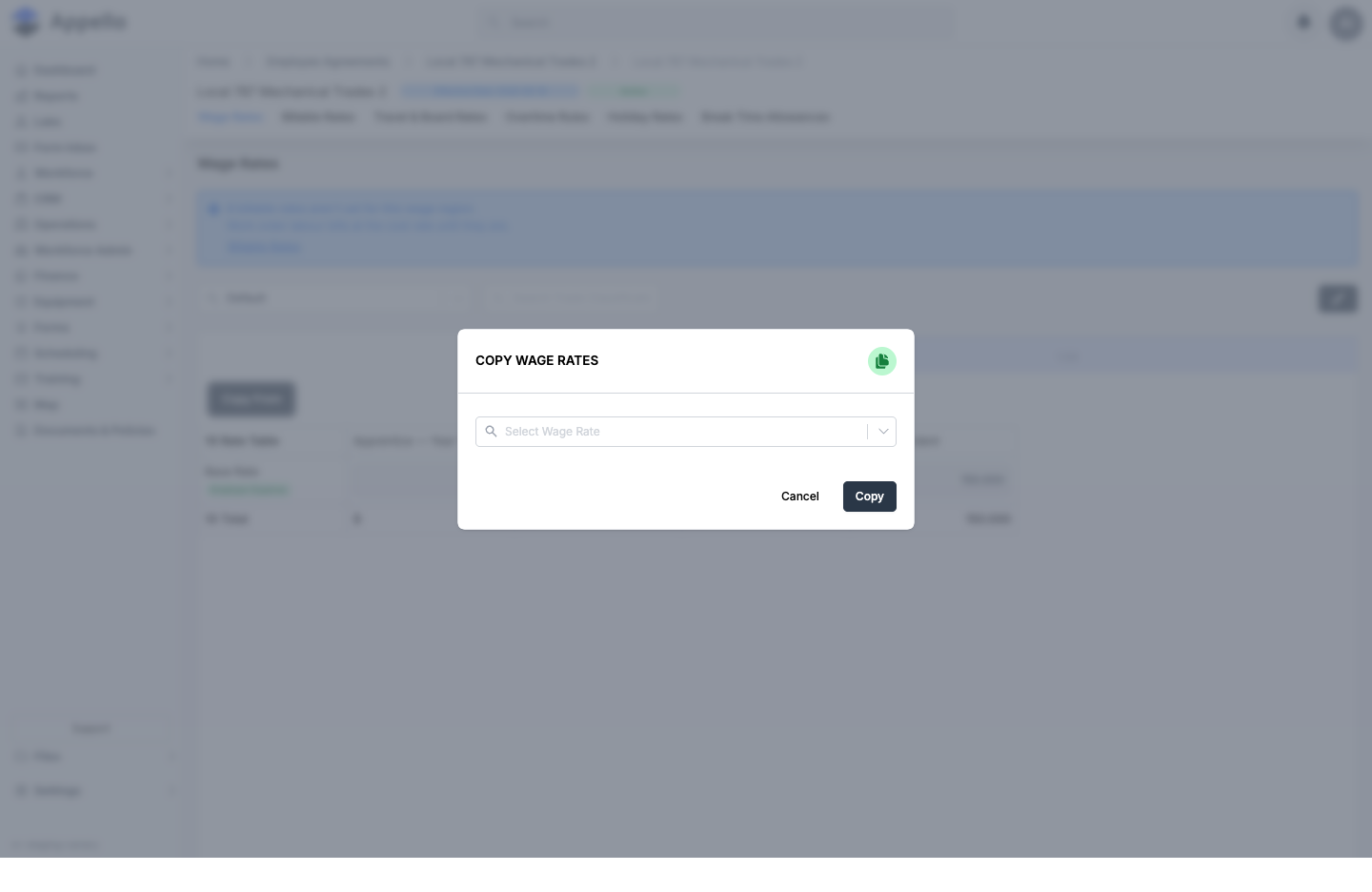
| Field | Required | Type | Effect |
|---|---|---|---|
| Select Wage Rate | Yes | Combobox | Any other wage category on this contract (across wage regions), labeled {name} ({wage region}). The current category is excluded from the list. |
Click Copy to continue -- this opens the Replace Wage Rates? confirmation before anything is actually written:
Replace Wage Rates? This action will overwrite any existing rate values entered into this table. Are you sure you would like to proceed?
Click Continue to overwrite the current category's values with the source category's, or Cancel to back out with nothing changed.
Saving edited (not copied) values shows one more confirmation first -- "You have updated the Wage Rates for this Employee Agreement Contract" -- listing every non-approved timesheet that will be recalculated at the new rate, and a separate read-only list of already-Approved timesheets that will not be recalculated (un-approve them first if they also need the new rate). Timesheets dated before the contract's effective date are never affected either way.
Workflow -- entering a new wage table:
- Open the contract, click Wage Rates, and pick a Wage Region (or leave it on Default).
- Select the wage-category sub-tab you're filling in (e.g.
1X). - Either type each trade classification's dollar value directly into the grid, or click Copy From to pull an entire category's values from another wage category or region.
- Click Save, review the timesheet-impact confirmation, and Confirm.
- Repeat for each wage category sub-tab and, if you use them, each Wage Region.
Billable Rates
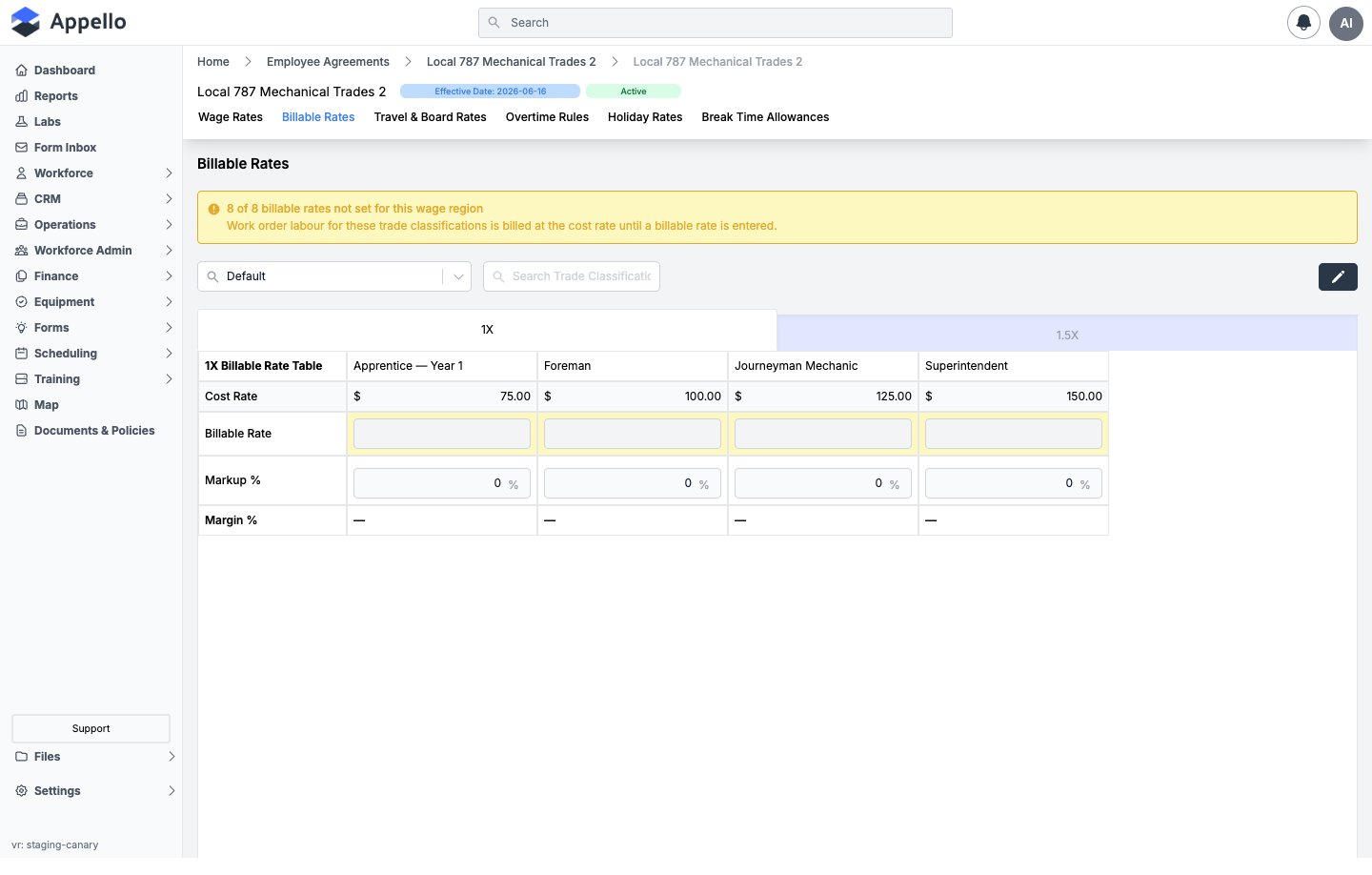
Billable Rates uses the same wage-category-tab-by-trade-classification-column layout as Wage Rates, but with different rows:
| Row | Editable? | How it's calculated |
|---|---|---|
| Cost Rate | No | Pulled straight from that trade classification's Total on the Wage Rates tab. |
| Billable Rate | Yes | What work order labour bills out at. Typing a value here recalculates Markup % for you; typing a Markup % recalculates this field instead -- they stay in sync either way. |
| Markup % | Yes | ((Billable Rate − Cost Rate) / Cost Rate) × 100, rounded to one decimal. Editing this field writes a new Billable Rate: Cost Rate × (1 + Markup% / 100). |
| Margin % | No | ((Billable Rate − Cost Rate) / Billable Rate) × 100, rounded to one decimal. Shows -- until a Billable Rate is entered. Rendered in green at or above 0%, red below 0% -- i.e. billing below cost. |
A banner (warning style, with the affected cells highlighted) appears whenever one or more
trade classifications in the current wage region have no Billable Rate at all -- left blank,
not just set to $0.00, since an intentional $0 billable rate counts as set. The banner text
reads {n} of {total} billable rate(s) not set for this wage region, and work order labour for
those classifications bills at the cost rate until a billable rate is entered. The same check
feeds the pointer-style banner on the Wage Rates tab above.
Workflow: open the contract, click Billable Rates, pick a Wage Region, click the pencil icon, and either type a Billable Rate or a Markup % per trade classification per wage category -- then Save. There's no separate flyout; editing happens directly in the grid.
Travel & Board Rates
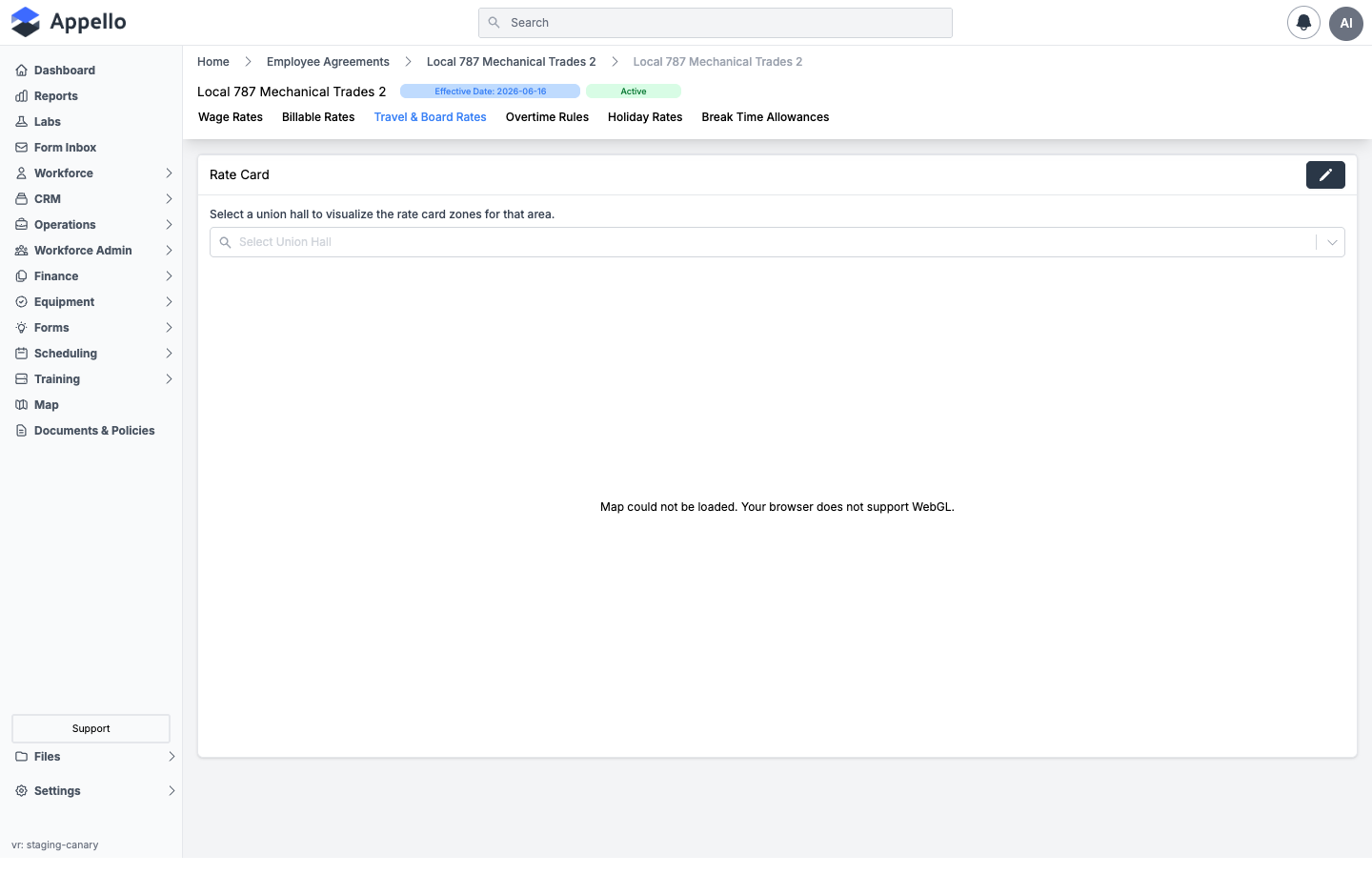
Each contract has exactly one Rate Card, created automatically when the contract itself is created. Select a Union Hall to preview that hall's travel zones plotted on a map against its dispatch address -- this is a read-only preview; the map doesn't itself edit anything.
The zone map didn't render in this doc's headless-browser capture ("Map could not be loaded. Your browser does not support WebGL") -- that's a limitation of the screenshot tool, not a product issue. See the Union Hall detail page for a live rendering of the same zone map.
Click the pencil icon to open the Edit Rate Card flyout:
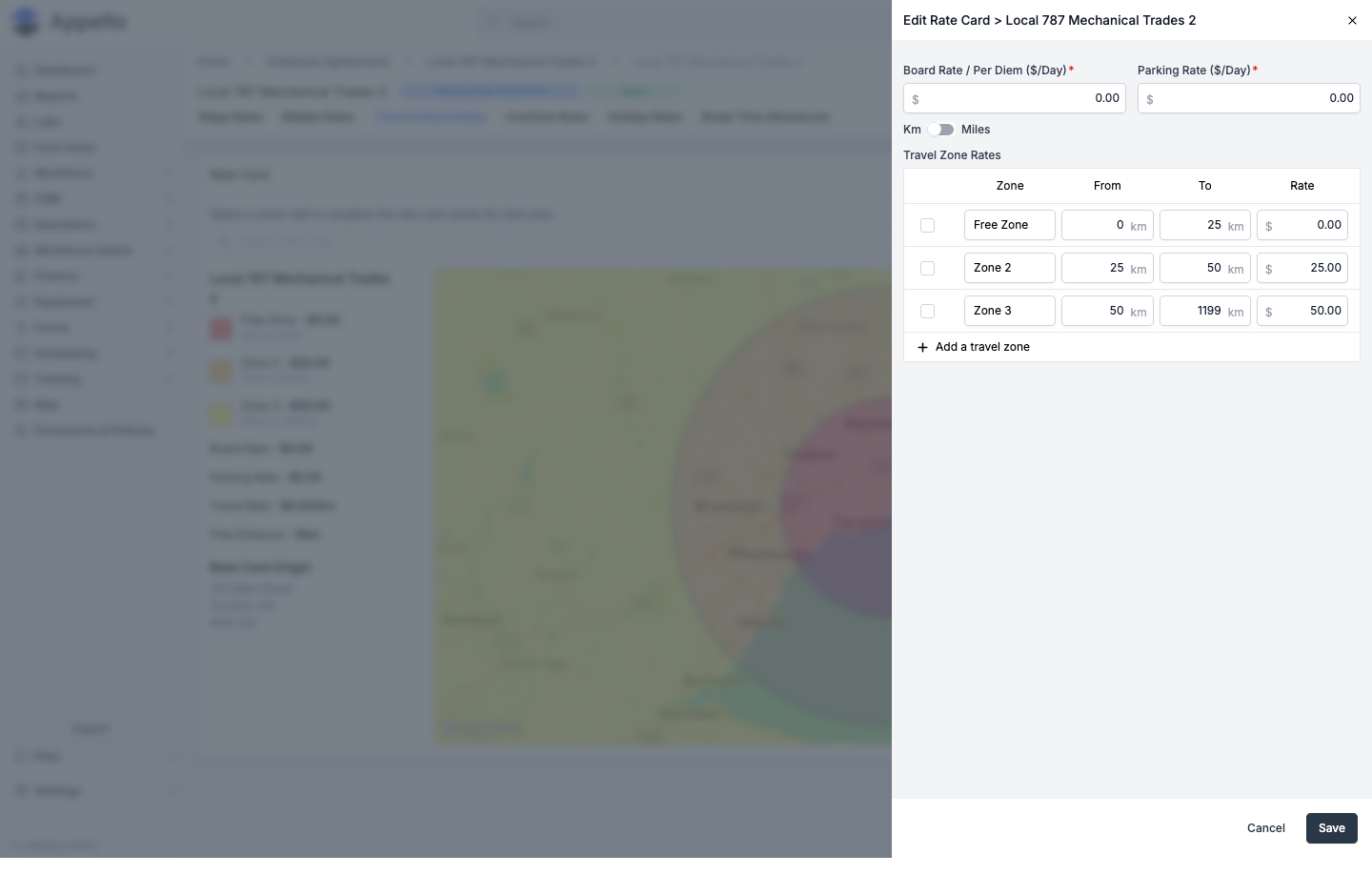
| Field | Required | Type | Shown when | Effect |
|---|---|---|---|---|
| Board Rate / Per Diem ($/Day) | Yes | Currency | Always | Flat daily accommodation/meal allowance. |
| Parking Rate ($/Day) | Yes | Currency | Always | Flat daily parking reimbursement. |
| Km / Miles toggle | -- | Toggle (default from your instance's distance-unit setting) | Always | Switches the unit every distance field on this form is entered in. Switching units only changes how distances are shown and entered -- it doesn't change the rates you saved. |
| Travel Rate ($/Km or $/Mile) | Yes | Currency | Agreement's Travel Calculation Type = Per KM/Mile | The flat per-distance rate paid for travel. |
| Unpaid Travel Distance (Km/Miles) | No | Numeric | Agreement's Travel Calculation Type = Per KM/Mile | A free threshold distance not paid before the Travel Rate kicks in. |
| Travel Zone Rates table | Zone name required per row | Repeatable rows: Zone Name / From / To / Rate | Agreement's Travel Calculation Type = By Travel Rate Card Zone | One row per zone. Zones auto-chain -- each zone's To becomes the next zone's From -- and Add a travel zone appends a new zone starting at the last zone's To. |
Which of the last two rows shows is a property of the parent Employee Agreement's Travel Calculation Type (set when the agreement was created -- see Creating an Employment Agreement above), not of the rate card itself, so every contract under a Zone-based agreement gets the Travel Zone Rates table, and every contract under a Distance-based agreement gets the flat Travel Rate + Unpaid Travel Distance fields instead.
Click Save to persist changes to an existing rate card. On every save except the very first (when the card is created alongside the contract), a Save Rate Card confirmation appears first, listing every timesheet whose travel, board, or parking reimbursement will change, plus these fixed notes:
- Timesheets of any status predating the effective date are never affected.
- Already-approved timesheets on or after the effective date are never affected.
- Timesheets where travel or board were manually adjusted to a custom rate are never affected.
- Changing the Unpaid Travel Distance does not retroactively affect existing timesheets -- verify before approving.
Click Continue to commit, or Cancel to discard the edit.
Workflow: open the contract, click Travel & Board Rates, click the pencil icon, set Board Rate, Parking Rate, and either the flat Travel Rate or the Travel Zone Rates table (whichever your agreement's Travel Calculation Type shows), then Save and confirm the timesheet-impact dialog.
Related pages: Travel Rate Cards & Zones for zone-based vs. distance-based travel in depth, how distance is measured from a union hall vs. employee address, and how a rate card versions alongside the contract that owns it.
Overtime Rules
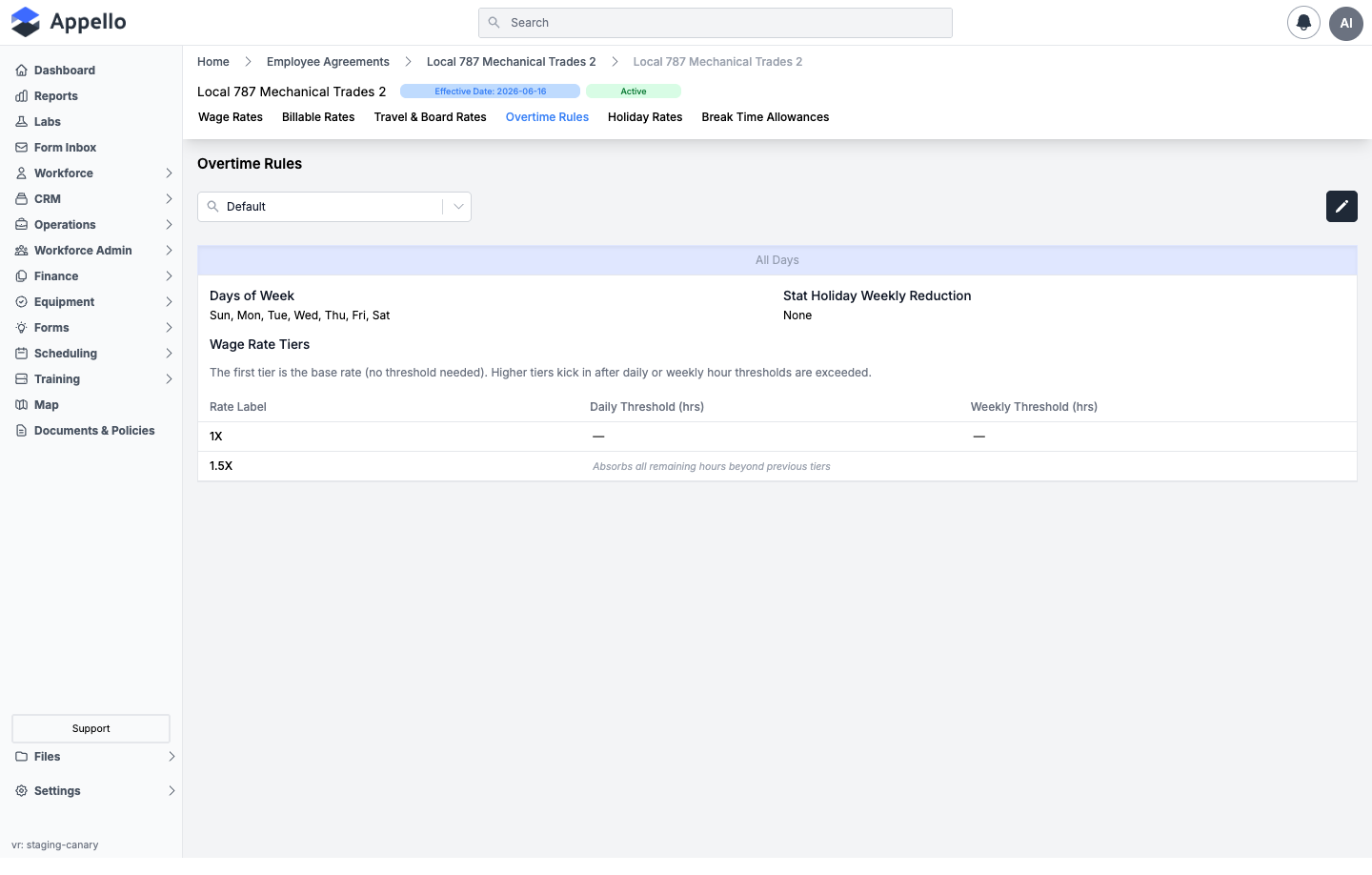
Overtime rules are grouped by day. Every day of the week must belong to exactly one day group -- the screenshot above shows a single All Days group covering all seven days; an instance can split this into, for example, a Weekdays group and a Weekends group with different thresholds. A Wage Region selector above the tabs scopes which rule set you're viewing or editing.
Click the pencil icon to edit. Each day group becomes its own tab, with an Add New tab beside them:
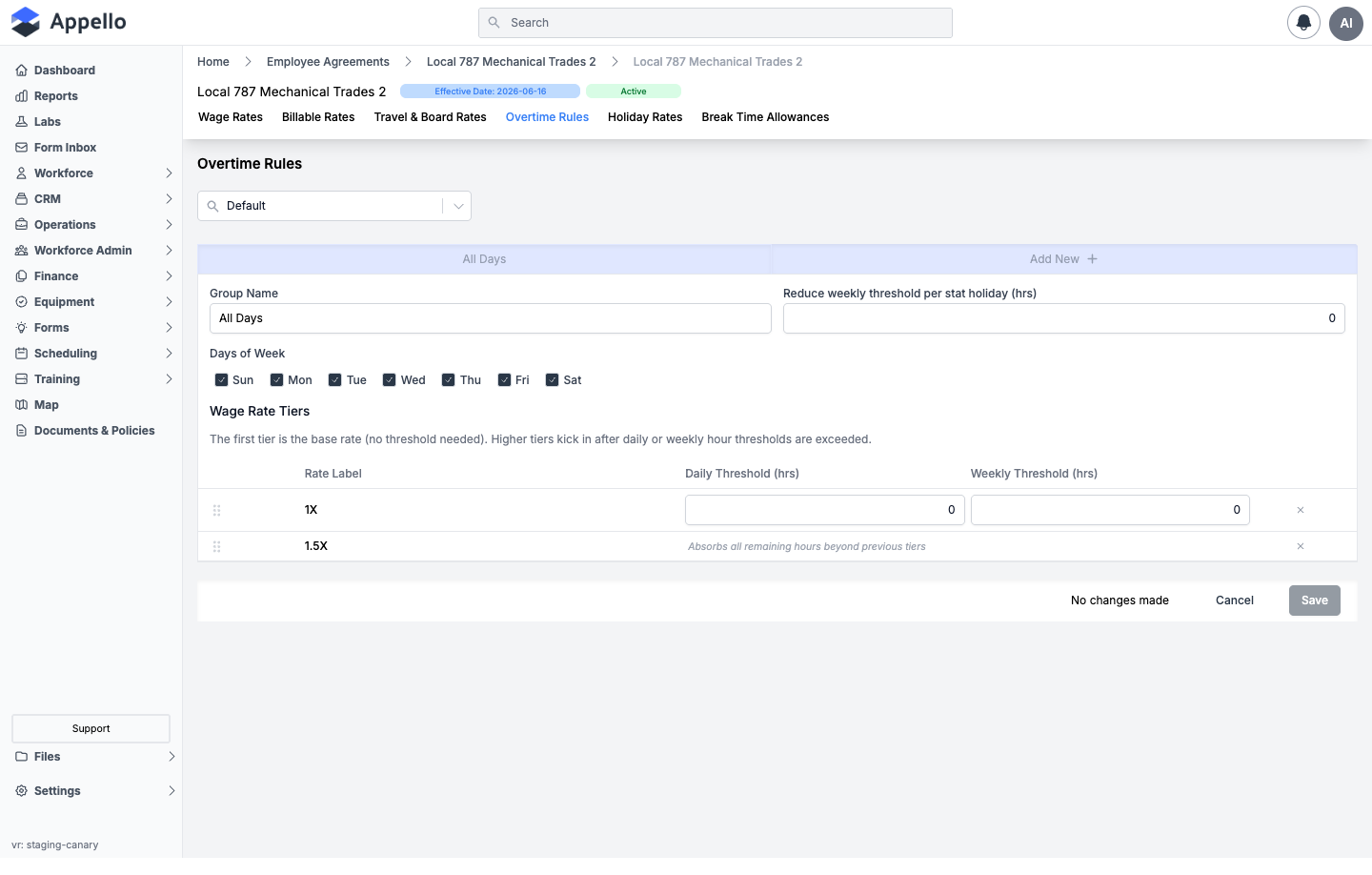
| Field | Required | Type | Effect |
|---|---|---|---|
| Group Name | Yes | Text | Labels the group's tab (e.g. "Weekdays", "Weekends"). Blank blocks save. |
| Reduce weekly/period threshold per stat holiday (hrs) | No | Numeric | Shrinks this group's weekly overtime threshold by this many hours for each statutory holiday that falls in the pay period, so a short holiday week still triggers overtime at the right point. |
| Days of Week | At least one day, no overlaps | Seven checkboxes (Sun--Sat) | Which days this group's tiers apply to. A day already claimed by another group shows disabled with a tooltip naming that group -- one day can't belong to two groups, and every day must belong to some group before you can save. |
| Wage Rate Tiers table -- Rate Label | -- | Read-only, from an "Add a rate label..." picker at the bottom | Which wage category (only categories not flagged Exclude OT are offered) applies once hours reach this tier. Drag rows (⠿ handle) to reorder. |
| Wage Rate Tiers table -- Daily Threshold (hrs) | No | Numeric | Hours per day at which pay rolls into this tier. The first tier is the base rate and shows no threshold field at all ("Base (no threshold)"). |
| Wage Rate Tiers table -- Weekly Threshold (hrs) | No | Numeric | Hours per week at which pay rolls into this tier. |
The last tier in a group never has threshold fields -- it shows "Absorbs all remaining hours beyond previous tiers" instead, since by definition it catches everything the earlier tiers didn't. Remove a tier with its × icon (only while more than one tier remains), or add one from the "Add a rate label..." picker at the bottom of the table.
Click Save to persist the whole rule set, or Cancel to discard changes. Appello validates before saving: at least one day group, every group named, every group covering at least one day, no two groups sharing a day, and every day of the week covered by some group -- any violation blocks the save with a specific error.
Workflow -- setting up overtime for a straightforward Mon–Fri agreement:
- Open the contract, click Overtime Rules, pick the Wage Region, and click the pencil icon.
- On the default All Days group, add tiers with Add a rate label... for each wage
category that kicks in as hours accumulate (e.g.
1Xbase,1.5Xafter 8 daily / 44 weekly,2Xafter 12 daily). - Set the Daily Threshold (hrs) and/or Weekly Threshold (hrs) on each tier except the first (base) and last (catch-all).
- If stat holidays should shrink the weekly threshold, set Reduce weekly threshold per stat holiday (hrs).
- Click Save.
To split weekday and weekend rules instead, click Add New to create a second group, uncheck the weekend days on the first group (or vice versa), and configure each group's own tiers before saving.
Holiday Rates
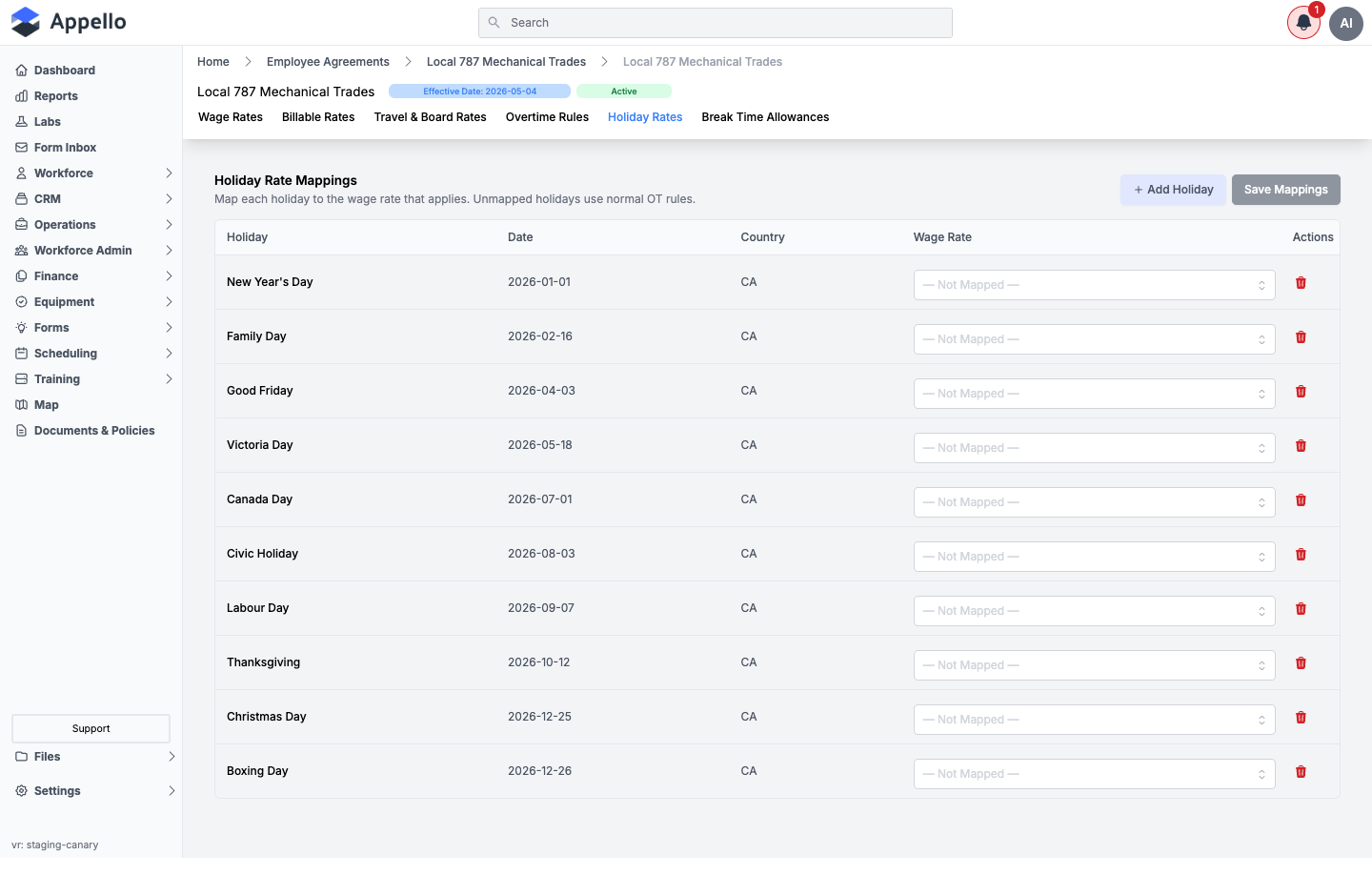
The Holiday Rate Mappings table lists your instance's configured holidays for the current calendar year (see Company Holidays) with their Date and Country, and a Wage Rate dropdown (clearable, default "-- Not Mapped --") to map each holiday to one of this agreement's non-line-item wage categories. An unmapped holiday falls back to the normal Overtime Rules above.
Add Holiday routes straight to Settings → Human Resources → Company Holidays rather than opening an inline form -- holidays are shared across every agreement, so they're managed in one place. The list's own delete icon (trash) removes a holiday globally, with a confirmation warning it will disappear from every agreement's mapping, not just this one.
Click Save Mappings (enabled only once you've changed something) to persist your dropdown choices -- this replaces the contract's entire mapping set, not just the changed rows.
Workflow: open the contract, click Holiday Rates, pick a Wage Rate for each holiday
you want to pay differently than the normal overtime rules (commonly a premium rate like 2X),
leave the rest -- Not Mapped --, then Save Mappings.
Break Time Allowances
Only shown when your instance has the break time allowance feature enabled -- see Human Resources Settings -- break time allowance. A break time allowance automatically adds (or, with a negative value, deducts) paid or unpaid time on a timesheet once a worker crosses a worked-hours threshold -- for example, a 30-minute paid break after 5 hours.
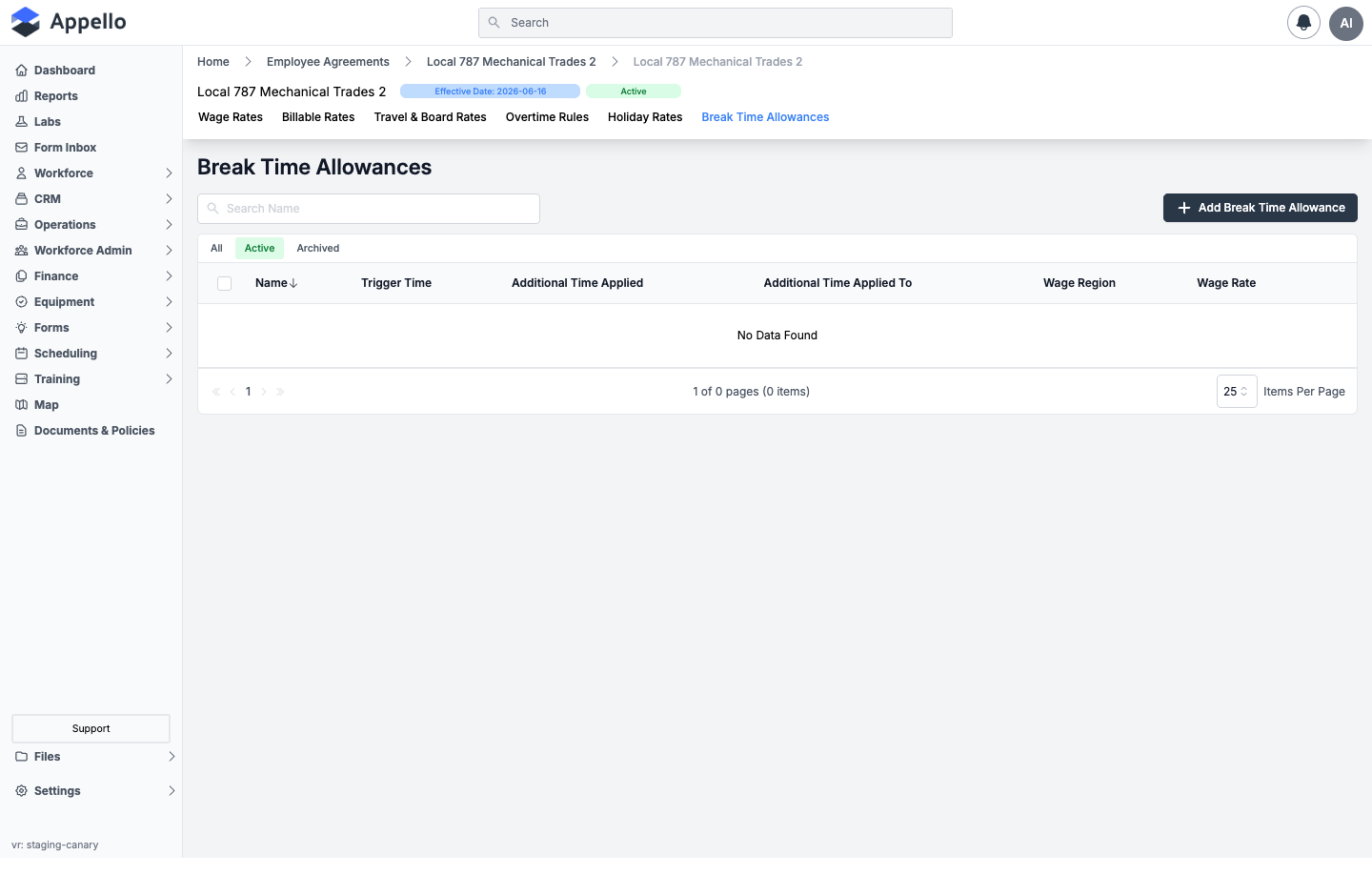
| Column | Description |
|---|---|
| Name | The allowance's name. |
| Trigger Time | Hours worked before the allowance applies. |
| Additional Time Applied | Hours added (or, if negative, deducted) once triggered. |
| Additional Time Applied To | Which timesheet entry receives the time -- see the Assignment field below. |
| Wage Region | The wage region this allowance applies within. |
| Wage Rate | The wage category the added/deducted time is paid at. |
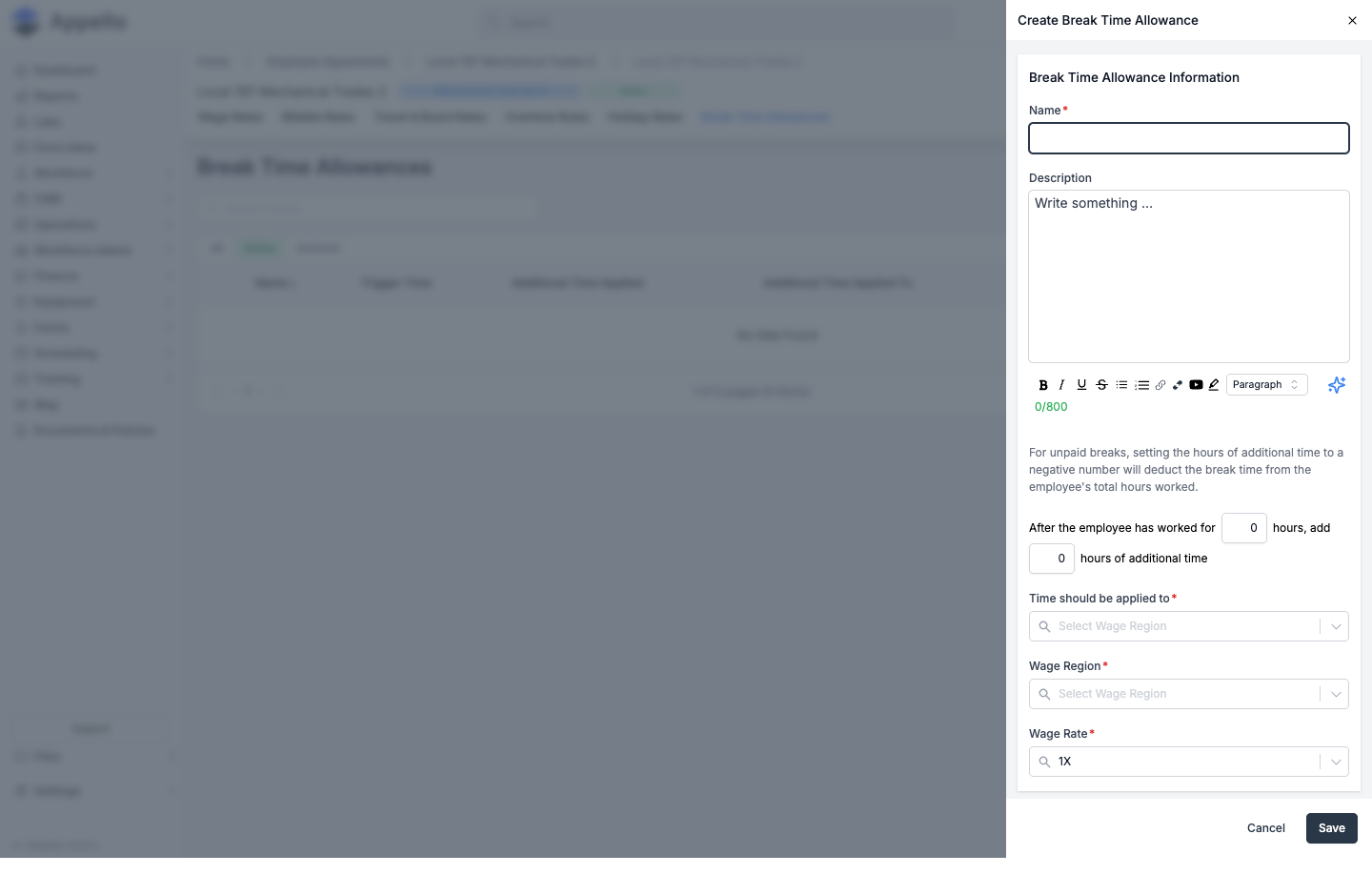
Click Add Break Time Allowance to open the Create Break Time Allowance flyout:
| Field | Required | Type | Effect |
|---|---|---|---|
| Name | Yes | Text | The allowance's display name. |
| Description | No | Rich text (WYSIWYG, up to 800 characters) | Free-text notes. A helper line above the trigger fields reminds you that a negative additional-time value deducts break time rather than adding paid time. |
| Trigger hours / Additional time | Both required | Two numeric inputs in one sentence: "After the employee has worked for _ hours, add _ hours of additional time" | Both values are entered in hours. |
| Time should be applied to | Yes | Combobox: Last Time Sheet Entry / Longest Time Sheet Entry / Specified Job | Which timesheet entry on the triggering day receives the added/deducted time. |
| Default Job | Yes, only when Assignment = Specified Job | Combobox (Jobs) | The job the time is logged against. Includes a built-in "Internal Break Time Job" option seeded for exactly this purpose, which is also the pre-selected default. |
| Wage Region | Yes | Combobox | Defaults to your company's default wage region. |
| Wage Rate | Yes | Combobox (this agreement's non-line-item wage categories, filtered to the selected Wage Region) | Auto-defaults to whichever wage category is flagged Default in that region, and re-defaults every time you change Wage Region. |
Click Save to create the allowance, or Cancel to discard the flyout.
Workflow: open the contract, click Break Time Allowances, click Add Break Time Allowance, name it, fill in the trigger-hours sentence (use a negative additional-time value for an unpaid deduction instead of a paid addition), choose where the time applies, confirm Wage Region and Wage Rate, then Save.
Permissions: the tab itself is gated the same as the other contract-level tabs (Employee Agreement Contract view/edit) -- see the note at the top of The Contract's Tabs.
How Agreements Attach to Users, Timesheets, and Payroll
An Employee Agreement never sits on a worker as a single static field by itself -- it's reached indirectly, through the worker's Trade Classification:
Worker → Trade Classification (as of the timesheet date, via User Trade Classification History)
       → parent Employee Agreement (every Trade Classification belongs to exactly one agreement)
       → Employee Agreement Contract (the version whose Effective Date is in force on that date)
       → Wage Rate category (e.g. 1X / Straight Time, 1.5x, 2x), optionally scoped by Wage Region
       → Rate value (from that contract's Wage Rates tab)
A worker's Employee Agreement is set (indirectly) on Update Trade Classification, on the worker's own profile -- see User Profile Page for where that field sits, and Trade Classifications for the assignment panel itself and its effective-dated history table.
| Feature | How the agreement is used |
|---|---|
| Timesheets | The worker's trade classification (as of the timesheet's own date) resolves to a contract and wage table; that table's rates cost out regular, overtime, holiday, and travel/board time on the timesheet. See Timesheet Matrix for the Employee Agreement filter used to scope the matrix to one agreement's workers. |
| Bulk Crew Entry | Foremen enter crew time in bulk; the same per-worker agreement resolution applies to every entry, and the timesheet matrix's bulk-entry modal defaults its Employee Agreement field from the workers already selected. |
| Overtime & Holiday pay | The contract's own Overtime Rules and Holiday Rates tabs (above) determine when hours roll from base pay into a premium tier, and which tier applies on a statutory holiday. |
| Travel & Board pay | The contract's Rate Card (above) determines per-diem, parking, and mileage/zone reimbursement for the worker's trip to the job. |
| Job Costing | Labour costs on a job are the wage totals from each worker's applicable contract, rolled up by job and cost code. |
| Payroll Export | Timesheet & Payroll Reports are organized one tab per Employee Agreement -- switching agreement tabs re-scopes the whole report, and rate-label columns (1x, 1.5x, 2x, etc.) come directly from that agreement's own Wage Rate Categories. Exports use the agreement's own Exclude Paid Leave From Payroll Exports and Default Unpaid Leave overrides (or the instance default, if unset) to decide how paid leave shows up. |
Setting Up an Agreement From Scratch
- Create the agreement. Settings → Human Resources → Employee Agreements → Add Employee Agreement. Name it, pick Travel Calculation Type (Distance or Zone -- this can't be changed per-contract later, only by editing the agreement), and set any leave-export overrides you need. Saving seeds a starter Base Rate line item, a 1X wage category, and a first contract dated today.
- Add trade classifications. Open the new agreement's Trade Classifications tab → Manage Trade Classifications → add a row per level (Apprentice, Journeyman, Foreman, etc.), each with a Labour Account.
- Add wage rate categories and line items. On Wage Rates, add every premium tier you'll
need (
1.5X,2X, etc.) beyond the seeded1X, and confirm exactly one is Default. On Line Items, add any per-diems, tool allowances, or benefit contributions beyond the seeded Base Rate. - Link union halls, if applicable. On Union Halls, use Add Union Hall to associate an existing hall or create a new one in place.
- Open the first contract from the Agreement Version tab and fill in its dollar values:
- Wage Rates -- enter (or Copy From) each trade classification's dollar value per wage category.
- Billable Rates -- enter a Billable Rate or Markup % per trade classification, if this agreement's labour bills out on work orders.
- Travel & Board Rates -- set Board Rate, Parking Rate, and either a flat Travel Rate or the Travel Zone Rates table, matching the agreement's Travel Calculation Type.
- Overtime Rules -- build day groups and wage-rate tiers with daily/weekly thresholds.
- Holiday Rates -- map any statutory holidays that should pay a premium rate.
- Break Time Allowances, if enabled -- add any automatic paid/unpaid break rules.
- Assign workers. From each worker's profile, use Update Trade Classification to put them on this agreement's trade classification with an effective date -- see Trade Classifications.
- From here on, when rates change (a new CBA, a wage increase), use Replace Active Contract rather than editing the current contract in place -- see Replacing the active version above.
Related Pages
- Human Resources Settings -- Overview of all HR configuration tabs, including wage category setup and break time allowances
- Union Hall Management -- Configure the union halls linked to agreements
- Trade Classifications -- Configure the trade/job classifications used on the Wage Rates and Billable Rates tabs, and how a worker is assigned one
- User Profile Page -- Where a worker's Employee Agreement, Trade Classification, and Union Hall show up on their own profile
- Timesheet Matrix -- Filtering and bulk-entering timesheets by Employee Agreement
- Timesheet & Payroll Reports -- Payroll exports organized one tab per Employee Agreement
- Travel Rate Cards & Zones -- Configure the Travel & Board Rates tab, zone-based and distance-based