Cost Codes & Schedule of Values
Cost codes and the Schedule of Values (SOV) are the foundation of Appello's job costing system. Cost codes define what categories of work are being performed (e.g., pipe insulation, duct wrap, cladding), while the SOV defines the contract value for each line item. Together, they enable real-time tracking of earned value vs. actual cost on every job.
Understanding Cost Codes
What Are Cost Codes?
Cost codes are standardized categories that classify the type of work being performed. When a worker's timesheet is approved, the hours and associated labour cost are allocated to a cost code — enabling per-activity cost tracking.
Typical Cost Code Structure
An insulation contractor's cost codes follow a hierarchical pattern:
| Code | Description | Category |
|---|---|---|
| 01-100 | Pipe Insulation — Hot | Mechanical Insulation |
| 01-200 | Pipe Insulation — Cold | Mechanical Insulation |
| 01-300 | Equipment / Vessel Insulation | Mechanical Insulation |
| 01-400 | Duct Wrap / Duct Board | Mechanical Insulation |
| 02-100 | Metal Jacketing — Pipe | Sheet Metal / Cladding |
| 02-200 | Metal Jacketing — Flat | Sheet Metal / Cladding |
| 02-300 | Architectural Cladding | Sheet Metal / Cladding |
| 03-100 | Firestopping | Fireproofing |
| 03-200 | Passive Fire Protection | Fireproofing |
| 04-100 | Scaffold Erection | Scaffolding |
| 04-200 | Scaffold Dismantle | Scaffolding |
| 05-100 | Removable Covers — Fabrication | Removable Covers |
| 05-200 | Removable Covers — Installation | Removable Covers |
| 90-100 | Supervision | Overhead |
| 90-200 | Safety | Overhead |
| 90-300 | Site Mobilization | Overhead |
Managing Cost Codes
Cost codes are configured at the job level:
- Open a job's detail page.
- Navigate to the Cost Codes tab.
- Add cost codes that apply to this job.
- Set budget amounts per cost code (from the estimate or contract).
Schedule of Values (SOV)
What Is an SOV?
The Schedule of Values breaks down a contract into billing line items — each with a dollar value. It's the basis for progress billing: as work is completed on each line item, you bill the customer for that percentage of the line item's value.
SOV Structure
| Line | Description | Contract Value | Previously Billed | Current % | Current Billing |
|---|---|---|---|---|---|
| 1 | Pipe Insulation — Hot | $125,000.00 | $50,000.00 | 15% | $18,750.00 |
| 2 | Pipe Insulation — Cold | $45,000.00 | $20,000.00 | 10% | $4,500.00 |
| 3 | Equipment Insulation | $80,000.00 | $0.00 | 5% | $4,000.00 |
| 4 | Metal Jacketing | $60,000.00 | $30,000.00 | 20% | $12,000.00 |
| 5 | Firestopping | $35,000.00 | $0.00 | 0% | $0.00 |
| Total | $345,000.00 | $100,000.00 | $39,250.00 |
SOV Templates
Reusable templates speed up SOV creation for similar jobs.
- Navigate to Settings → Schedule of Values Templates.
- Select + Create SOV Templates.
- Enter a Name and optional Description.
- Select + Add Item to add line items one at a time.
- Select Save.
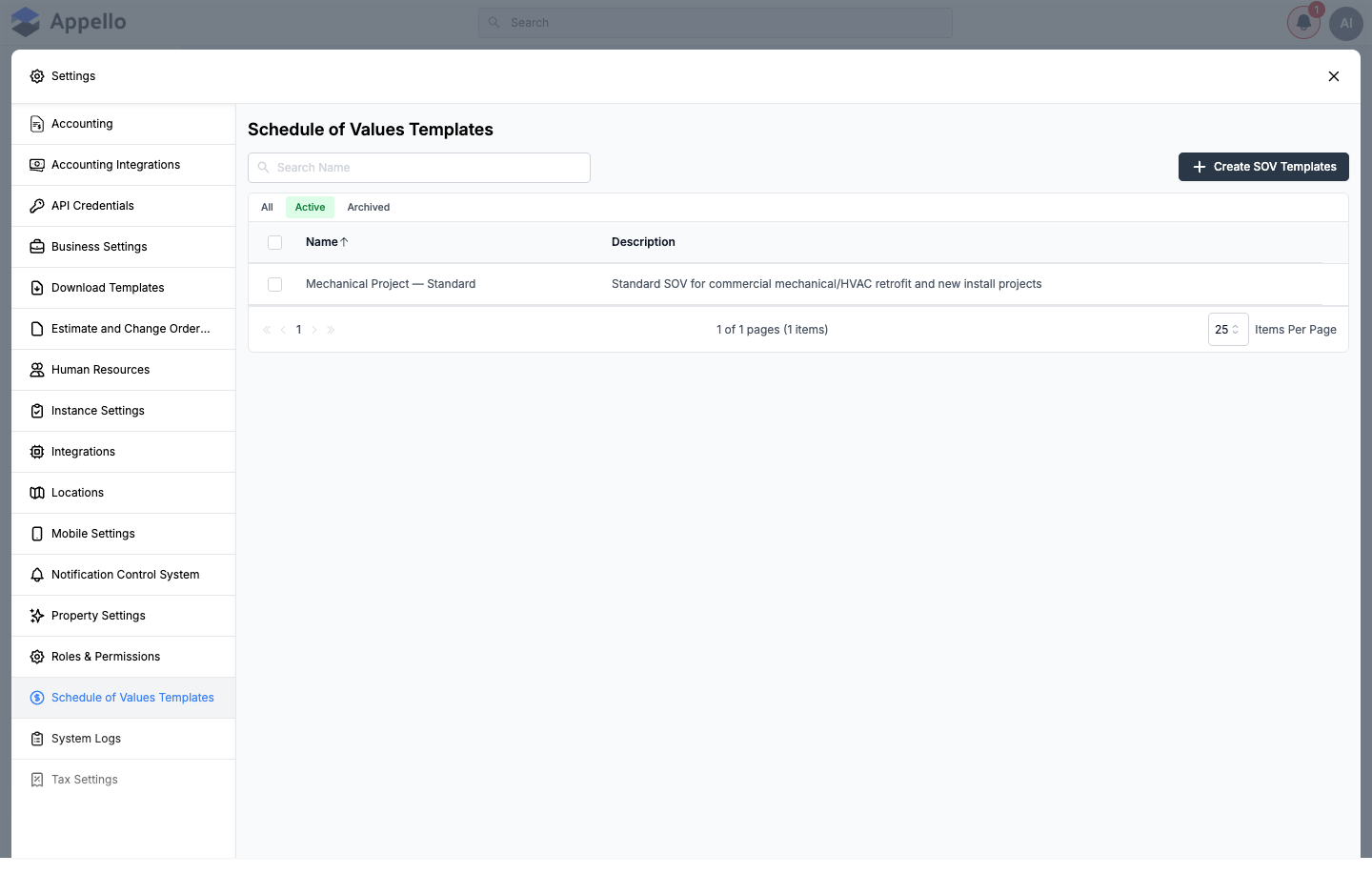
Each template line item carries these fields:
| Field | Description |
|---|---|
| Area | Broad grouping for the line item |
| System | Building or process system the work belongs to |
| Phase | Project phase |
| Module | Sub-grouping under system |
| Component | Specific component being billed |
| Description | Free-text description of the line item |
| Unit | Unit of measure |
| GL Category | General ledger category for accounting sync |
| GL Account | General ledger account |
| Cost Code # | Associated cost code number |
| Code | Short code for the line item |
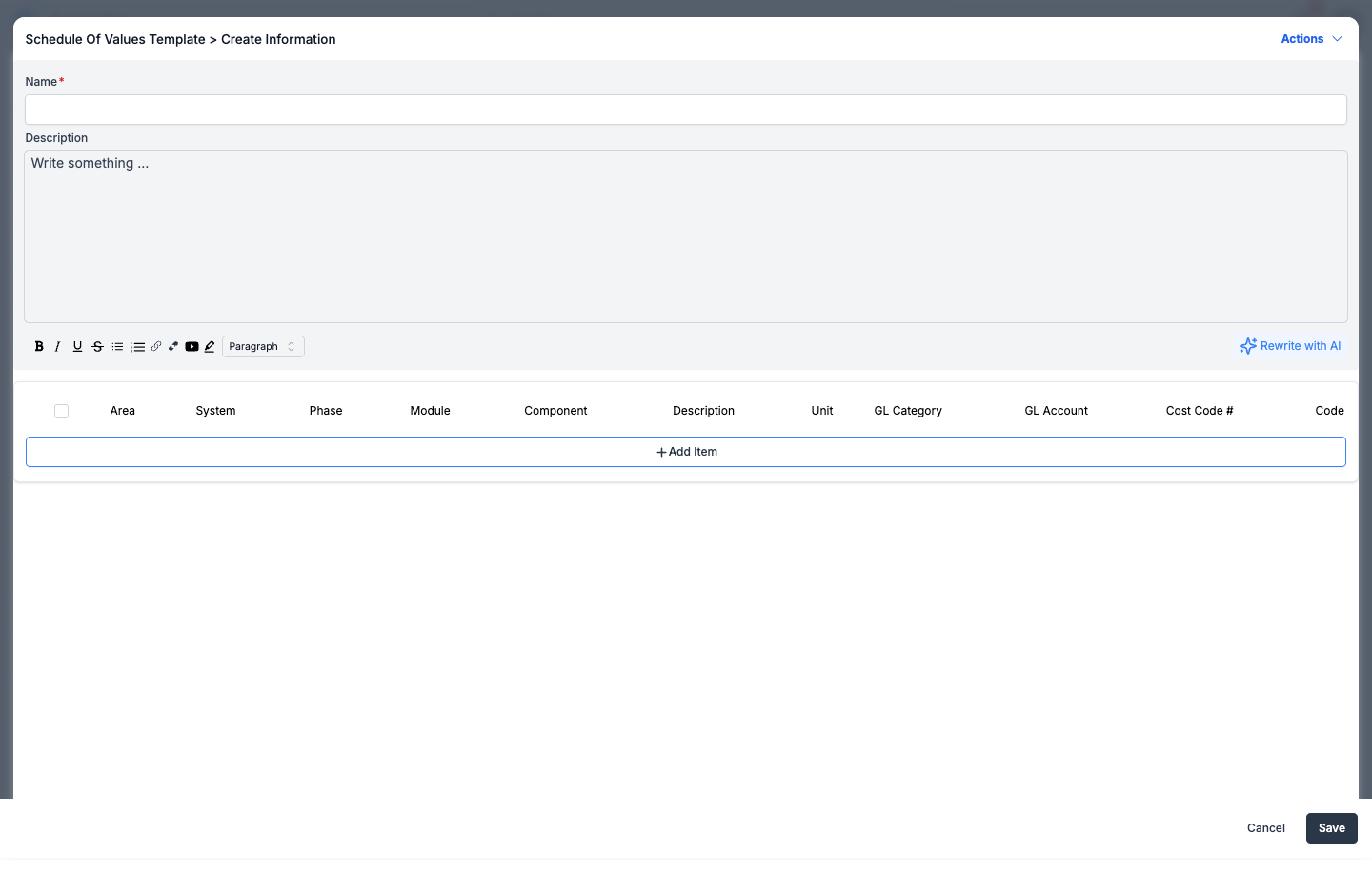
The Description field has a Rewrite with AI control that rewrites the text you've typed in that field — it does not read a file or generate line items. As of Release v1.33.0, Schedule of Values templates and job SOVs are built by adding line items one at a time (+ Add Item), copying an existing global template, or copying the SOV from another job. There is no control in the frontend for uploading an Excel/xlsx file or having AI map spreadsheet columns into SOV rows.
Building a Job's Schedule of Values
A job's SOV lives on the job's Planning & Tracking → Schedule of Values tab. The tab only becomes available once the job has a won estimate — until then it shows a placeholder prompting you to go create/win an estimate first, since the estimate sets the job value that the SOV is built against.
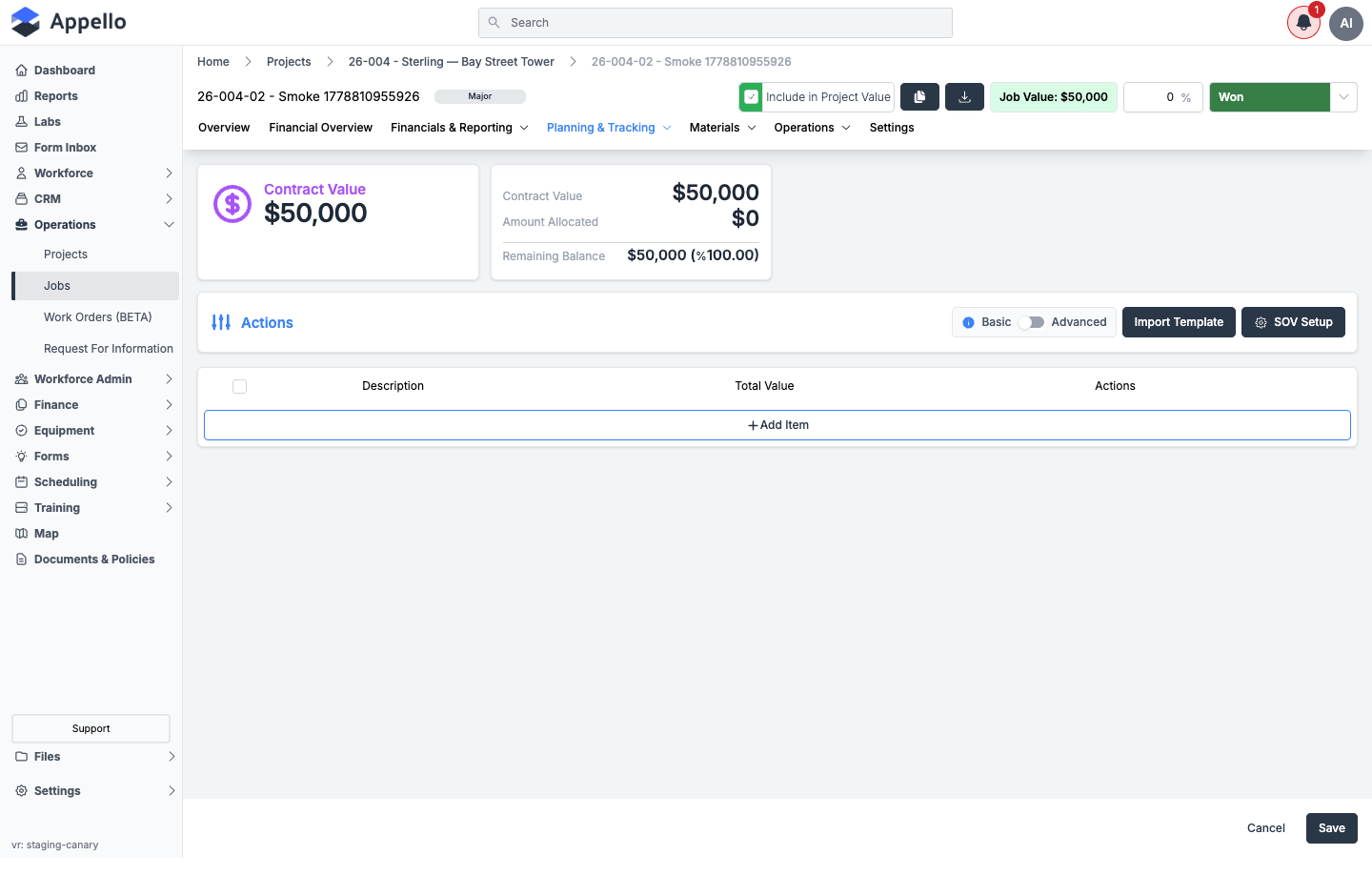
Once a job has a job value, the Schedule of Values screen offers three ways to populate it:
- Add Item — add and edit line items directly in the grid (Description, Total Value).
- Import Template — copy an existing Global Template (from Settings → Schedule of Values Templates) or copy the SOV from another job, then select Copy.
- SOV Setup — configure the columns/fields shown on this job's SOV grid (a Basic/Advanced toggle controls how much detail is shown).
Selecting Import Template opens a modal with two tabs — Global Template and From Another Job — where you pick a template or source job from a dropdown and select Copy. Review the copied line items and adjust values to match the specific contract, then Save.
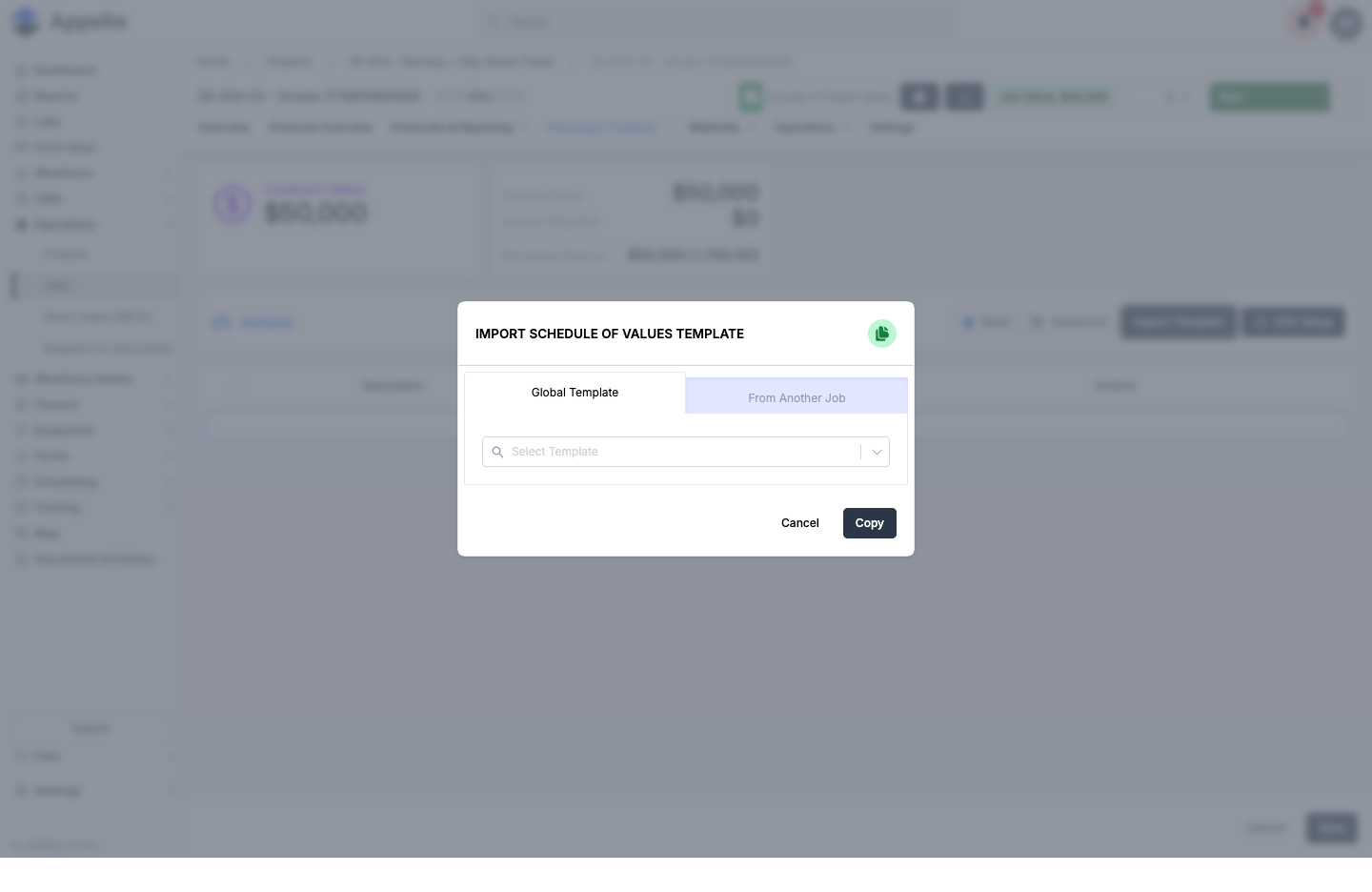
There is no Excel/xlsx upload step and no AI-driven column mapping in this modal — "Copy" duplicates the selected template's or job's existing line items as-is. As of Release v1.33.0, AI-assisted SOV creation from an Excel file is not shipped; SOV rows are entered manually or copied from a template/another job.
Earned vs. Burned
The Core Question
For every job, contractors need to answer: "Am I making money or losing money on this work?"
| Metric | Definition | Source |
|---|---|---|
| Earned Value | What the work is worth per the contract | SOV % complete × line item value |
| Actual Cost | What the work actually cost in labour, materials, etc. | Timesheets + material costs + expenses |
| Variance | Earned minus Actual — positive = profitable | Calculated |
Example
| Cost Code | Earned (from SOV) | Actual (from timesheets) | Variance |
|---|---|---|---|
| Pipe Insulation — Hot | $68,750.00 | $55,000.00 | +$13,750.00 ✅ |
| Metal Jacketing | $42,000.00 | $48,000.00 | -$6,000.00 ❌ |
| Firestopping | $0.00 | $2,500.00 | -$2,500.00 ❌ |
This tells the PM that pipe insulation is ahead of budget, but metal jacketing is over — requiring investigation.
How Cost Codes & SOV Connect to Other Features
| Feature | Integration |
|---|---|
| Timesheets | Workers select a cost code when entering time — labour costs allocate to the right category |
| Bulk Timesheet Entry | Foremen assign cost codes per crew member per shift |
| Progress Reports | SOV drives progress billing calculations |
| Invoicing | Invoices pull from SOV progress for line-item billing |
| Job Financial Summary | Rolled-up earned vs. burned at the job level |
| Employment Agreements | Burdened labour rates used for actual cost calculation |
Related Pages
- Progress Reports — Progress billing from SOV
- Accounts Receivable & Billing — Invoice management
- SOV Templates — Reusable Schedule of Values templates
- Timesheet Matrix — Where cost codes are captured
- Employment Agreements — Burdened rates for cost calculation