In-app notifications
Module: Core | Platform: Web
The header bell opens a notification panel for unread and historical alerts tied to jobs, approvals, and system events.
Navigation
Header → View notifications (bell icon, any main screen)
Overview
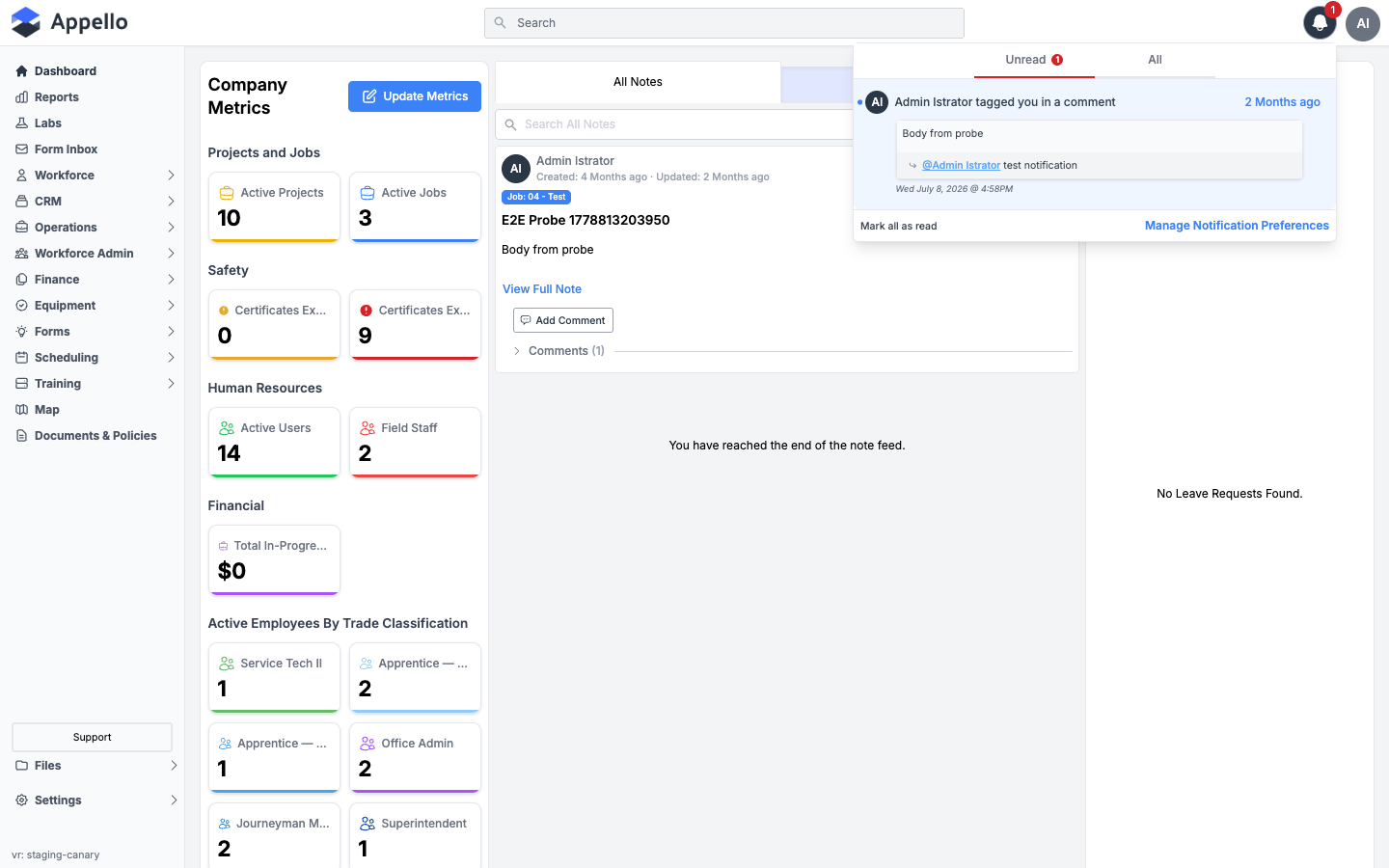
Clicking the bell icon opens a panel anchored below it in the top-right corner of the header -- it is a dropdown, not a full-height side drawer. It lists notifications relevant to your role and permissions, most recent first.
| Control | Description |
|---|---|
| Unread / All | Switch between unread-only and full history. The unread count on the tab matches the bell's badge. |
| Mark all as read | Only shown while you have unread notifications. Marks every unread item as read. |
| Manage Notification Preferences | Switches the same panel to your personal In App / SMS preferences (see below) -- it does not navigate to Settings. |
Bell icon behaviour
| State | Description |
|---|---|
| Badge Count | A red badge on the bell icon shows your unread count. |
| No Badge | All notifications have been read. |
| Click to Open | Click the bell to open the notification panel. |
| Auto-Refresh | The unread count and the open panel's list refetch on a roughly 10-second interval, and again whenever you return to the browser tab. This is polling, not a live push into the open panel. |
Notification types
The types below come from the notification system's source (NotificationTypes), not from what
happens to be assigned to your account, so not every type will be relevant to every role.
| Notification Type | Trigger |
|---|---|
| Acknowledge Feedback | A safety form or feedback item requires your signature or acknowledgment. |
| Timesheet Approved / Rejected | A manager approves or rejects your submitted timesheet. There is no separate "submitted" notification. |
| Leave Approved / Rejected | A manager approves or rejects your leave request. |
| Leave Submitted | A worker submits a leave request. Sent to assigned approvers, not the requester -- see the note below. |
| Expense Approved / Rejected | A manager approves or rejects your employee expense. |
| Expense Submitted | An employee expense is submitted. Sent to assigned approvers. |
| AP Expense Approved / Rejected / Submitted | The same approval lifecycle for Accounts Payable (vendor) expenses. |
| Note Tagged | You are tagged in a note or comment. |
| Note Commented | A note or comment you're on is commented on. |
| Note Created | A new top-level note is created. Sent to assigned approvers, not every user. |
| Document Comment Mention | You're mentioned in a comment on a document (for example, an estimate or change order). |
| Sign Document | A document is routed to you for signature. |
| Signature Request / Completed | A signature is requested from you, or a document you're tracking finishes being signed. |
| Announcement All / Desktop / Mobile | A company-wide announcement is published, scoped to web, mobile, or both. Mobile-only announcements never appear in the desktop panel. |
| User Entered / Left Job Site | A geofence-tracked worker's device enters or exits a job site's geofence radius. Requires Location Tracking to be enabled. |
| User Clocked In Outside Geofence | A worker clocks in from outside the job's configured geofence radius. |
| Job Created | A new job is created. Sent to assigned approvers, not every user. |
| Work Order Submitted | A work order is submitted. |
| RFI Response Submitted | A response is submitted to an RFI (Request for Information). |
| Maintenance Reminder / Overdue | Scheduled equipment maintenance is coming due, or has passed its due date. |
| Stock Running Low | An inventory item drops to or below its reorder threshold. |
| Onboarding Completed | A new user completes onboarding. Sent to assigned approvers, not every user. |
| Intuit Timesheet Export Completed / Failed | A QuickBooks Online timesheet export finishes successfully or fails. |
Six types -- Note Created, Leave Submitted, Expense Submitted, AP Expense Submitted, Onboarding Completed, and Job Created -- are not personal toggles. They only go to whichever users or user groups an administrator assigns in the Application Notification Control System, covered on the Notification Control System page. They also don't appear on your own Notification Preferences screen below.
Reading and clearing notifications
| Action | Description |
|---|---|
| Click a notification | Marks it read and navigates to the related record (job, timesheet, document, etc.) in the same tab. |
| Mark all as read | Marks every unread notification as read without navigating anywhere. |
There is no separate clear, dismiss, or delete action. A notification stays in your history and in the All tab once it's been marked read.
Notification preferences
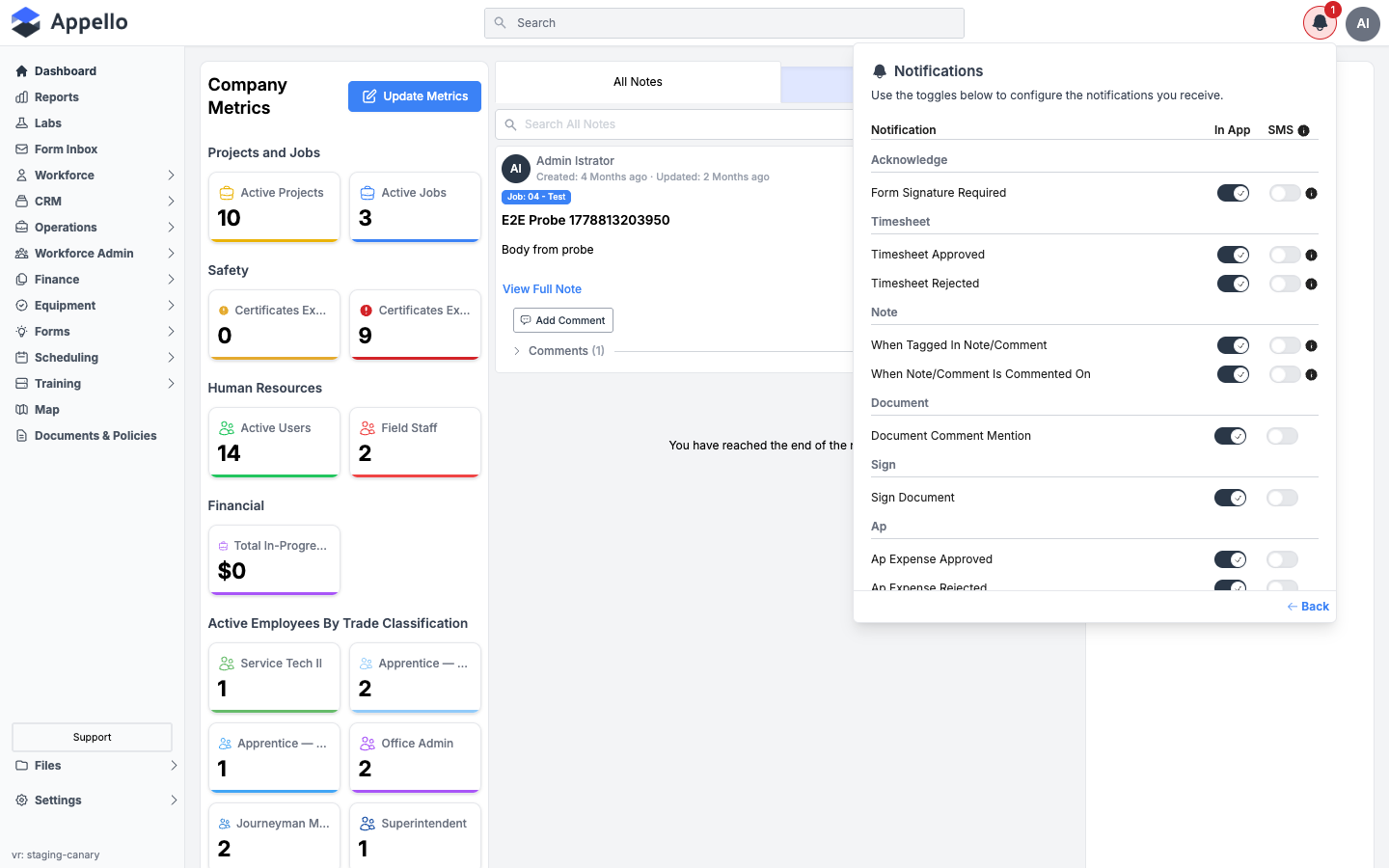
Click Manage Notification Preferences at the bottom of the notification panel to switch it to your own preferences -- this is not a page under Settings, and there is no way for an administrator to edit another user's preferences from the Users list.
| Column | Description |
|---|---|
| In App | Whether this notification type appears in your bell panel. It also controls push delivery to your mobile app -- there is no separate push toggle. |
| SMS | Whether this notification type also sends a text message. Disabled (with a tooltip) until your instance has Twilio configured under Settings → Integrations. |
The list here only covers the types that carry a personal preference -- it does not include the six admin-only types noted above.
There is no email column here, and no email notification channel anywhere in Appello's notification system -- only In App (which also drives mobile push) and SMS.
In-app vs. push vs. email
| Channel | What it is |
|---|---|
| In-app | The bell panel described on this page, on the web app. |
| Push | A banner/lock-screen notification on the Appello mobile app. It is sent to every active device the mobile app has registered for you, gated by the same In App preference above -- not a separate setting. |
| Does not exist as a notification channel. Appello does not send these notification types by email. |
Instance-wide defaults for every type, and who gets the admin-assigned ("mandatory") types, are configured on the Notification Control System page in Settings.
Related
- Notification Control System
- Instance Settings -- Location Tracking governs whether geofence entry/exit notifications fire at all.
- Reports hub