Mobile Web Layout
Appello's web app is fully responsive. On a phone-sized viewport (390×844 or similar), the interface adapts with a condensed header, hamburger navigation, and stacked dashboard cards. Field workers can access all core features — timesheets, scheduling, forms, notes — from their mobile browser without installing a native app.
Evidence
This capture uses a 390×844 browser viewport signed into the same demo instance used for the desktop screenshots.
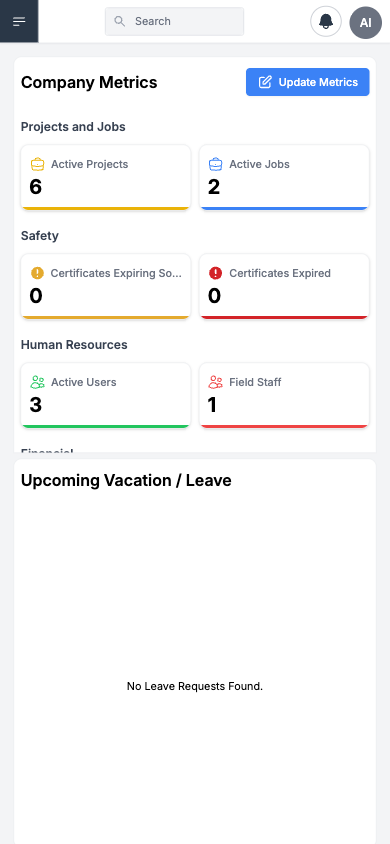
Mobile-Accessible Features
| Feature | Mobile Web Support | Notes |
|---|---|---|
| Dashboard | Full | Stacked cards for metrics, notes, upcoming leave |
| Timesheets | Full | Submit daily time, view status, add notes |
| Scheduling | View Only | See your assigned jobs and dates |
| Forms | Full | Complete safety forms, inspections, checklists |
| Field Notes | Full | Create notes with photos, link to jobs |
| Clock In/Out | Full | GPS-backed punches with location tracking |
| Leave Requests | Full | Submit vacation/sick leave for approval |
| Notifications | Full | View alerts for approvals, schedule changes |
| Profile | Full | Update personal info, view certifications |
Responsive Breakpoints
| Viewport | Layout |
|---|---|
| < 768px | Mobile layout — hamburger nav, stacked cards, single column |
| 768–1024px | Tablet layout — sidebar + condensed main area |
| > 1024px | Desktop layout — full sidebar, multi-column grids |
Key Differences from Desktop
| Area | Desktop | Mobile Web |
|---|---|---|
| Navigation | Persistent sidebar with sections | Hamburger menu with accordion sections |
| Timesheet Matrix | Full grid with all workers | Worker sees only their own entries |
| Scheduling | Multi-week timeline grid | Day-by-day list view |
| Forms | Form builder + management | Form submission only (no builder) |
| Data Entry | Mouse + keyboard optimized | Touch-friendly inputs, larger tap targets |
Native App
Dedicated mobile application guides (Schedule, Timesheets, Notifications, etc.) are listed separately on the documentation tracker and at docs.useappello.app. The native app provides:
- Push notifications for real-time alerts
- Offline mode for areas with poor connectivity
- Camera integration for form photos and receipt capture
- GPS services for clock-in/out location verification
Use Appium against the native app when you need true app chrome, push tokens, or offline behavior.
Related Pages
- Timesheet Matrix — Desktop counterpart for timesheet management
- Clock In / Out Report — View mobile clock events from desktop
- Form Management — Create forms that workers complete on mobile
- Mobile Settings — Configure mobile-specific features