Calendar Schedule
The Calendar Schedule provides a traditional calendar view of all job and work order assignments, making it easy to see daily and weekly workload distribution across your organization. It complements the Job Schedule (project-focused), User Schedule (worker-focused), Daily Schedule (single-day), and Dispatch Board (technician x hour) with a date-centric perspective. See Scheduling Overview for how all five fit together.
Navigation
Sidebar → Scheduling → Calendar Schedule
URL: /scheduling/calendar
Viewing this page requires all three of the Job Schedule → View, User Schedule → View, and Job → View permissions. Creating, moving, or deleting an assignment additionally requires Job Schedule and User Schedule edit permissions -- without them the Schedule + button and drag-to-create/move interactions below aren't available. Editing a past date requires a separate "allow editing past" permission from editing today or a future date.
Overview
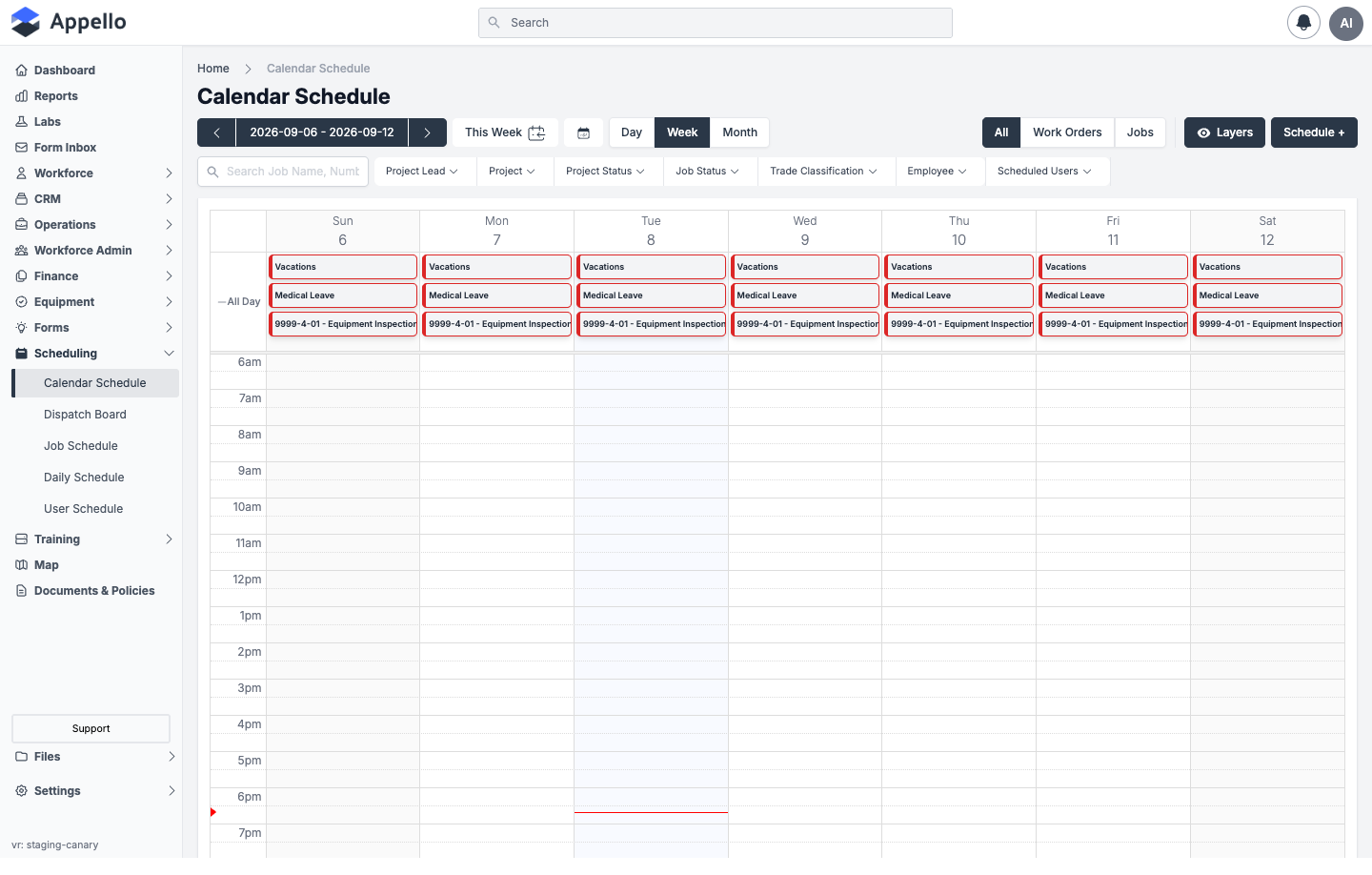
The calendar displays assignment blocks for each day, showing which jobs or work orders have workers scheduled. Click an empty day (or drag across a range) to create a new assignment, or click an existing block to view and edit its details.
The demo instance used for these screenshots has no jobs or work orders scheduled for any nearby date. Every screenshot on this page that shows the grid therefore shows only the built-in Vacations, Medical Leave, and Equipment Inspections rows in the All Day band -- see Leave and Equipment Inspections on the Calendar below -- with no actual job blocks. The create-dialog screenshots below were captured by opening Schedule + and are otherwise unaffected by the empty data set.
Views
| View | Description |
|---|---|
| Month | Full month grid — best for high-level coverage review |
| Week | 7-day view with hourly time slots and an All Day band — best for detailed daily planning |
| Day | A single day stretched across the full width, with the same hourly grid as Week |
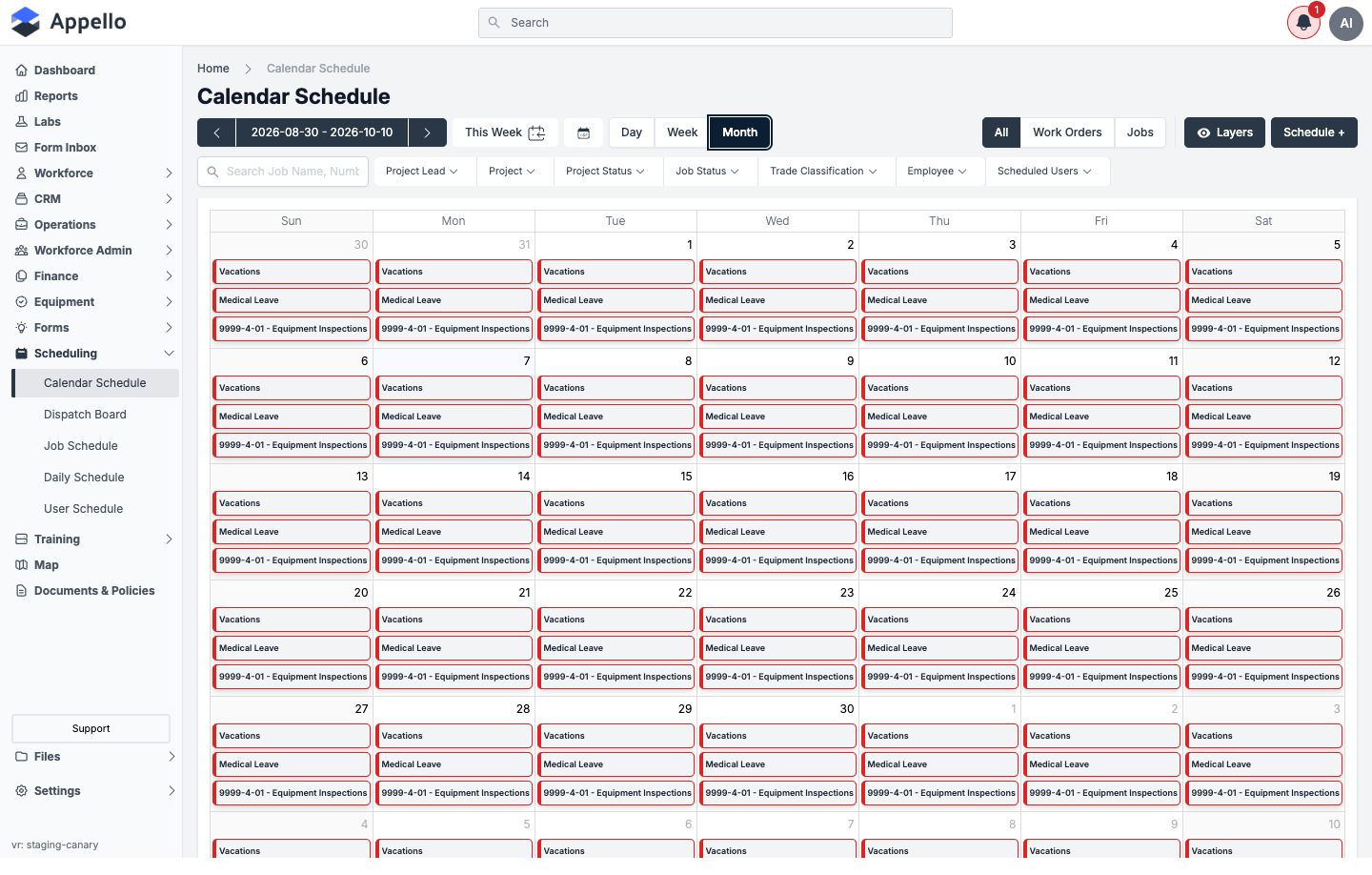
Switch views with the Day / Week / Month buttons in the toolbar. There is no List view on Calendar Schedule. Your chosen scale is remembered (in browser storage) the next time you open Calendar Schedule or the Dispatch Board, which shares the same Day/Week/Month control.
All / Work Orders / Jobs
A three-way toggle at the top-right -- All, Work Orders, Jobs -- restricts the calendar to one classification. This is the same shared control used on the Dispatch Board. Selecting Work Orders also relabels the Job Status filter below to WO Status. See Work Orders Overview for what a work order is.
Date Navigation
- Left/Right arrows — Move forward or backward by one period (day, week, or month)
- This Week / Today — Jump to the current period
- Calendar icon — Opens a date picker to navigate to a specific date
- Clicking a day's column header (Week view) switches to Day view for that day
Filters
The filter bar sits below the view toggles and classification switch:
| Filter | Narrows to... |
|---|---|
| Search Job Name, Number | Jobs or work orders matching the typed text |
| Project Lead | Projects led by a specific person |
| Project | A specific project |
| Project Status | Projects in a given status |
| Job Status (or WO Status) | Jobs or work orders in a given status -- label follows the All/Work Orders/Jobs toggle above |
| Trade Classification | Workers of a given trade level (Journeyman, Apprentice, etc.) |
| Employee | Specific scheduled workers |
| Scheduled Users | Has Scheduled Users / No Scheduled Users -- shows only jobs that do (or don't) have anyone scheduled |
Active filters appear as removable badges below the filter bar.
Calendar Schedule does not have Department or User Group filters. The User Group dropdown that appears on the Job Schedule's worker filters is only available on that view, not on Calendar Schedule. Trade Classification and Employee filtering are shared with the Daily Schedule, and there is no separate Leave filter -- see Leave and Equipment Inspections on the Calendar for how leave shows up here instead.
Schedule Grouping (Instance Setting)
Whether jobs are organized by Customer or by Project across the scheduling interfaces is one shared instance setting, not a per-page control.
Sidebar → Settings → Instance Settings → Mobile Settings → Schedule Grouping -- see Instance Settings § Schedule Grouping for the full control and its options.
This setting is shared with the Job Schedule, where it visibly changes the row hierarchy (Customer > Project > Job, or Project > Job). Calendar Schedule always renders one block per job/work order per date regardless of this setting -- its effect here is on how the underlying project list is organized for the filters above and for the Select Job or Work Order picker in the create-entry dialog, not on the shape of the calendar grid itself.
Colour Legend (Layers)
Click Layers to open the colour-legend panel. Each row is a Calendar View -- a named, coloured category you can assign to a schedule entry -- with a checkbox to show or hide it on the grid:
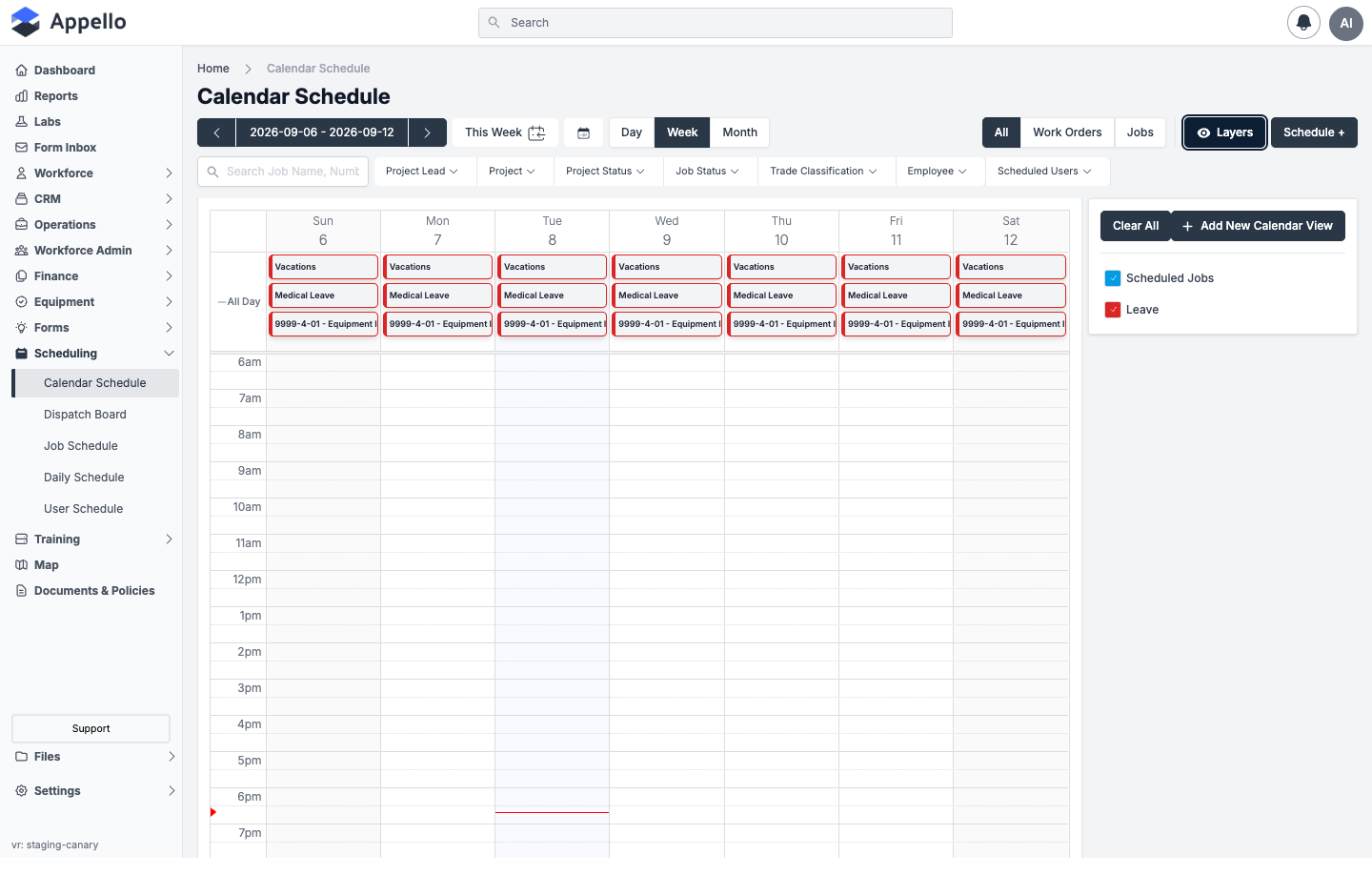
| Control | Effect |
|---|---|
| Checkbox + colour swatch | Shows or hides that Calendar View's entries on the grid |
| Clear All | Unchecks every Calendar View, hiding all entries |
| + Add New Calendar View | Opens a small form (name + colour) to create a new category, so you can colour-code entries however you like |
| Hover a non-default row | Reveals an edit (pencil) icon, and a delete (X) icon if no schedule entries use that view yet |
| Lock icon | The default view can't be renamed or deleted |
Every instance starts with two built-in views: Scheduled Jobs (blue) for ordinary job/work order assignments, and Leave (red). The block colour you see on the grid is set per entry from the Calendar View field in the create/edit dialog (see below) -- except the built-in Vacations, Medical Leave, and Equipment Inspections rows, which always render with a red border regardless of any Calendar View assignment, because they are read-only system entries rather than entries you colour yourself.
Assignment Blocks
Each block on the calendar represents one job or work order scheduled for that date:
| Element | Meaning |
|---|---|
| Time range | Shown on timed (non-all-day) blocks in Week/Day view |
| Job/WO title | Number and name, e.g. "26-004-01 - Bay Street Tower — RTU Replacement" |
| Title | The entry's own optional Title, if one was set (see Notes on a Scheduled Assignment) |
| Description snippet | A truncated preview of the entry's Description, if one was set |
| Left border colour | The assigned Calendar View's colour (see Colour Legend above) |
| Hover | Opens a hover card with the full title, description, worker count, supervisor, and project lead |
| Click | Opens the entry for editing (does nothing on Vacations/Medical Leave/Equipment Inspections rows) |
Creating a Schedule Entry from the Calendar
Click Schedule + in the toolbar, or click/drag an empty slot on the grid, to open the Schedule Job panel:
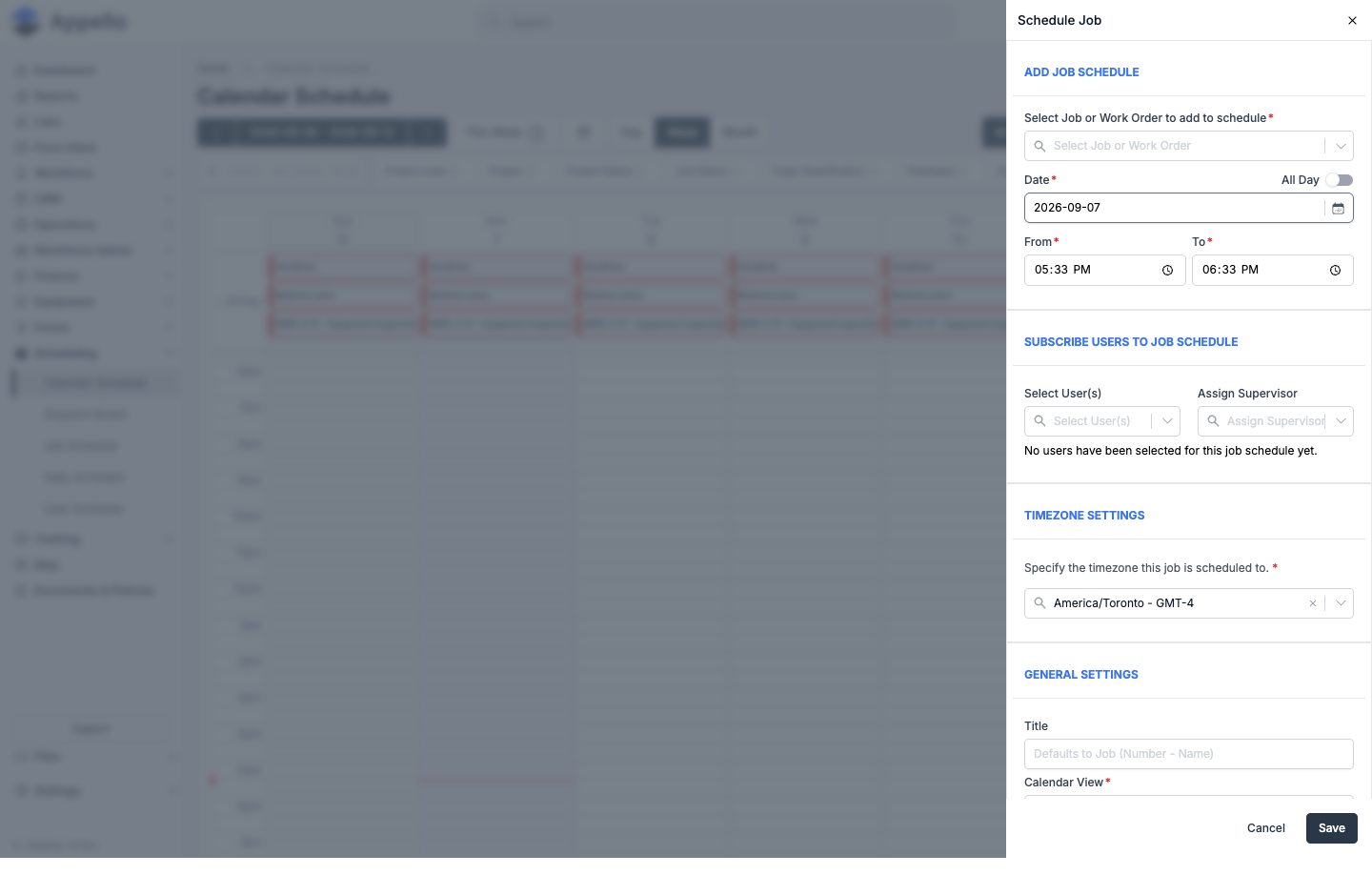
| Field | Required | Notes |
|---|---|---|
| Select Job or Work Order to add to schedule | Yes | Search dropdown; scoped by the All/Work Orders/Jobs toggle |
| Date | Yes | Single day -- see Multi-Day and Long-Term Scheduling for booking a run of days |
| All Day | No | Toggle. On by default when created from a Month-view click; hides From/To when on |
| From / To | Yes, when All Day is off | Start and end time for that one day. A shift can't be longer than 24 hours, and end must be after start |
| Select User(s) | No | Multi-select worker picker -- see Scheduling Multiple Workers at Once |
| Assign Supervisor | No | Marks one selected worker (or another user) as field supervisor for this job on this date |
| Specify the timezone this job is scheduled to | Yes | Defaults to the instance's configured timezone |
| Title | No | Defaults to the job's number and name if left blank |
| Description | No | Rich text, up to 800 characters -- see Notes on a Scheduled Assignment |
| Calendar View | Yes | Which colour/category this entry shows under -- see Colour Legend |
Click Save to create the entry, or Cancel to discard it. Workers see the new assignment on their mobile schedule the next time it refreshes -- see Notifications below for what is (and isn't) pushed to them.
Drag to Move and Resize
Once an entry is on the grid (and it isn't one of the built-in Vacations/Medical Leave/Equipment Inspections rows), you can adjust it without reopening the panel:
- Drag the body of a block to a different day, hour, or time slot to move it.
- Drag the top or bottom edge (Week/Day view) to resize it, changing the start or end time.
- Appello checks whether the target date is free for that job before allowing the change. If the job is already scheduled there, the move is blocked outright with an error -- see Double-Booking Indicators and Conflict Warnings below.
- Otherwise, a Modifying Scheduled Job? confirmation shows the job, the from/to dates and times, and asks you to Cancel or Modify. Confirming saves the change and shows a "Job timeline updated" toast.
Dragging or resizing one of the internal Vacations/Medical Leave/Equipment Inspections rows does nothing but show an "Unable to move/resize internal job schedules" error.
Editing and Deleting an Assignment
Click any non-internal block to reopen the Schedule Job panel pre-filled with its current values. From there:
- Change any field (job, date, times, users, supervisor, timezone, title, description, or Calendar View) and click Save.
- Open the ⋮ menu for two more actions:
- Copy Schedule -- duplicates this entry onto another date (see Multi-Day and Long-Term Scheduling).
- Unschedule Job -- removes the job from this date only. A confirmation titled Unschedule Job? asks you to Cancel or Unschedule. If any worker on the entry has already logged hours against it, Appello blocks the unschedule with an error instead of letting you remove them.
The built-in Vacations, Medical Leave, and Equipment Inspections rows can't be opened, edited, or deleted from this page -- clicking one does nothing.
Multi-Day and Long-Term Scheduling
The Schedule Job panel schedules one job to one date per save -- the Date field takes a single day, with a separate From / To time range for that same day (or an All Day toggle to skip times entirely). Dragging across several days on the calendar grid still opens the panel with only the first day filled in; it does not create one continuous multi-day booking.
To keep a job on the calendar for more than one day:
- Create the assignment on its first date as usual.
- Open that assignment again and click Copy Schedule (the duplicate icon).
- In the Select a date to copy the schedule to panel, pick the next date and click Copy Schedule. Appello copies the job, its time window, title, description, and every currently scheduled worker onto the new date -- it does not touch or remove the original.
- Repeat for each additional date the job needs.
Appello checks the target date before copying and blocks it with an error if that job is already scheduled there.
There is no single control on this screen that books a job across a date range in one step (for example, "Monday through Friday"). Long-running jobs are built up one date at a time with Copy Schedule, or by repeating the Schedule + steps for each date. Switching to Month view (see Views) is the fastest way to see how many days a job already covers.
Scheduling Multiple Workers at Once
The same Schedule Job panel used to create or edit an assignment can add any number of workers in a single visit -- there is no need to open the panel separately for each person.
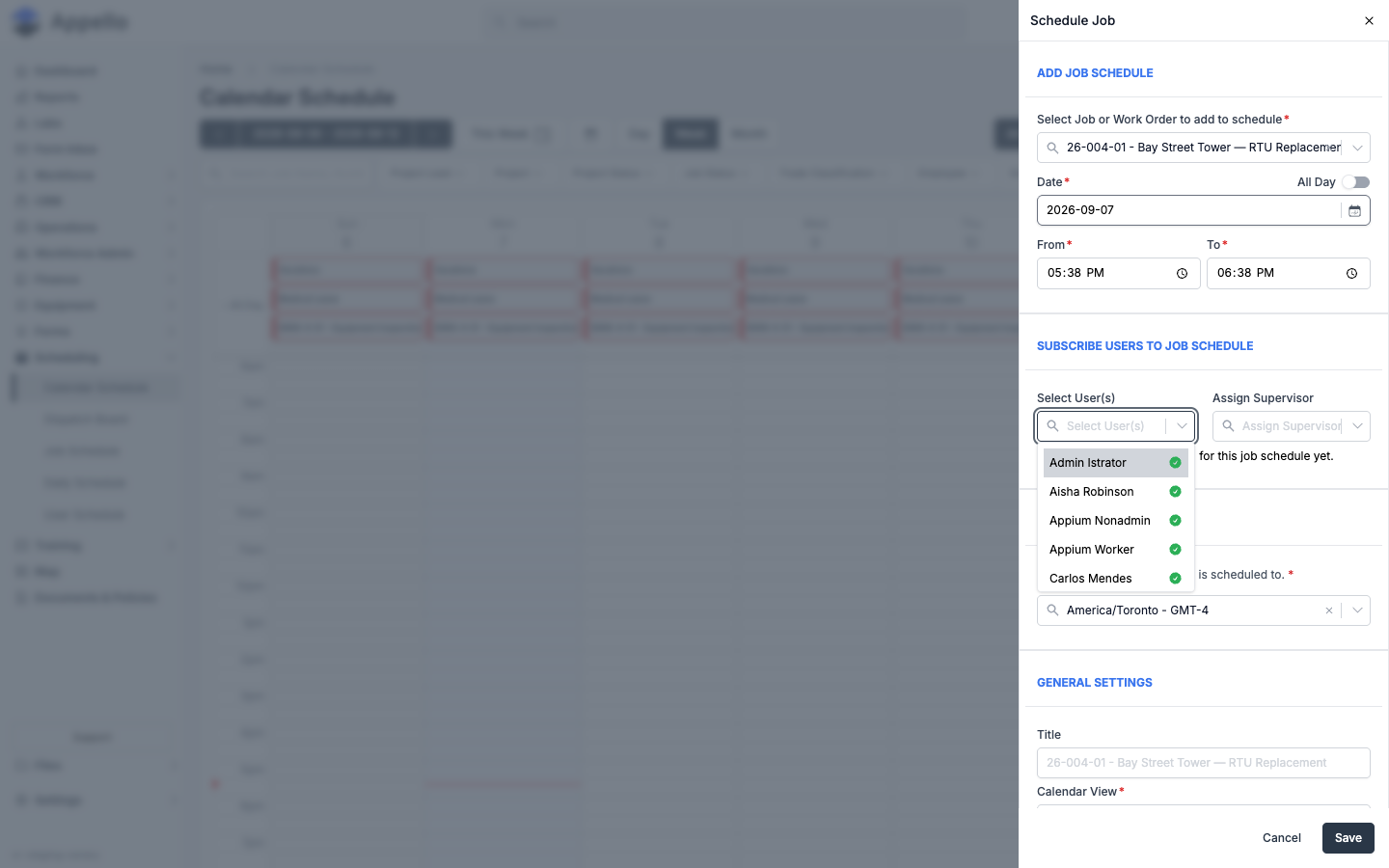
- Open Schedule + (or click an existing assignment) and select the job.
- Click Select User(s) and choose as many workers as the job needs. Each name you pick is added to a Selected Users list beneath the pickers, with an X to remove anyone before saving.
- Use Assign Supervisor to mark one of the scheduled workers (or another user) as the field supervisor for that job on that date -- they get a Supervisor badge in the list.
- Click Save. All selected workers are scheduled to the job in one action.
A worker who has already logged hours against this assignment can't be removed from it -- their row shows a lock icon with a tooltip explaining why, instead of the X.
Notes on a Scheduled Assignment
Every assignment can carry a short Title and a longer Description, entered in the same Schedule Job panel under General Settings.
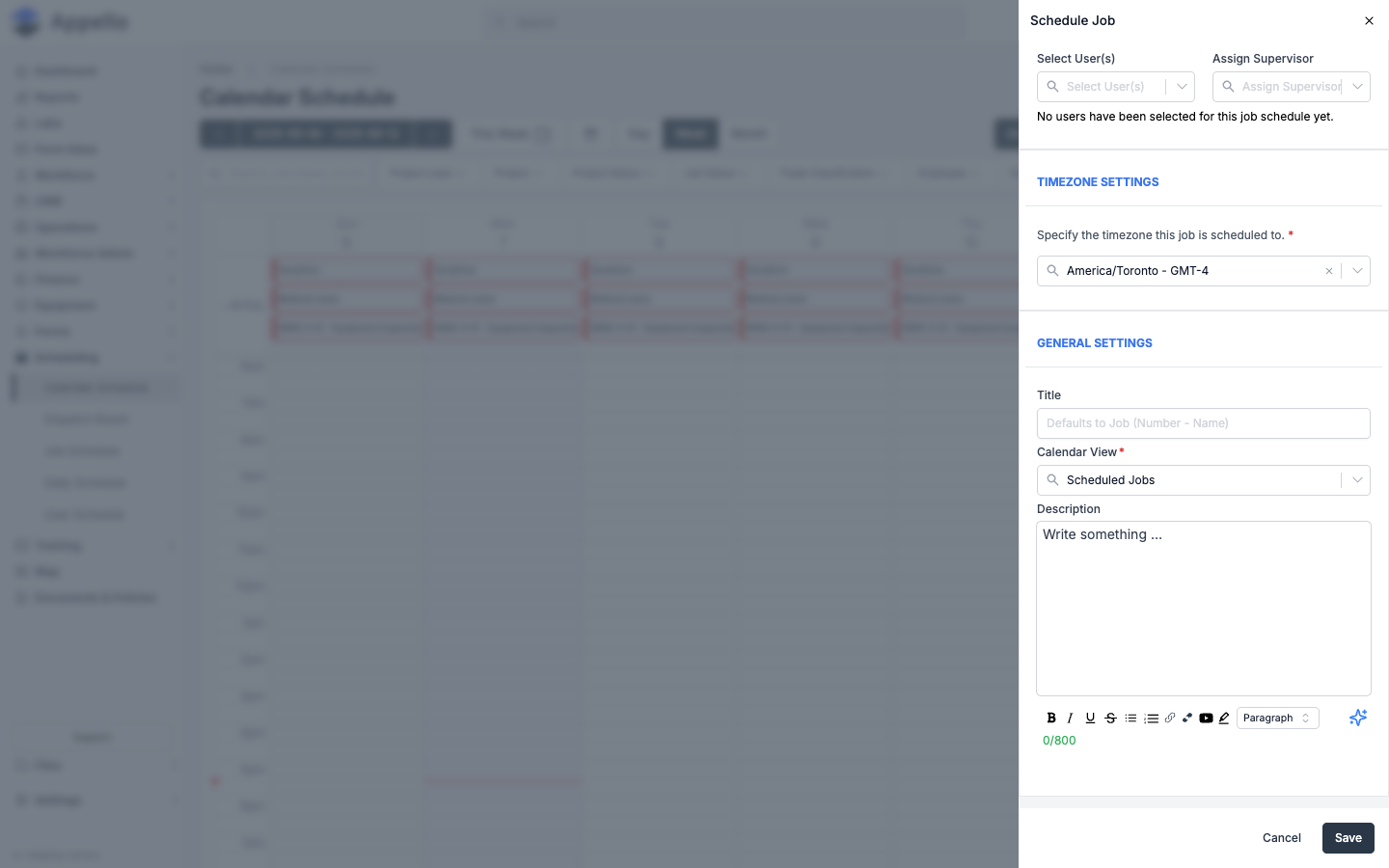
| Field | Notes |
|---|---|
| Title | Optional. Defaults to the job's number and name if left blank. |
| Description | Optional, up to 800 characters. Rich-text editor -- bold, italic, underline, strikethrough, lists, links, embeds, and highlighting. |
Once saved, the title and description show directly on the calendar block (truncated to a couple of lines) and in full under Event Info when you hover over the block.
Double-Booking Indicators and Conflict Warnings
Appello warns about two different kinds of double-booking on this calendar:
| Situation | What happens |
|---|---|
| A worker you're adding already has something else that day | In the Select User(s) list, their row shows a green check (no conflict) or an orange warning icon (they already have an overlapping job or approved time off on that date). |
| You try to save with a conflicting worker still selected | A confirmation dialog lists every conflicting worker, what they're already booked on, and the time -- for example, "User(s) with overlapping schedule." You can Cancel or click Continue to save anyway. |
| You drag or resize an assignment onto a date the job already occupies | Appello blocks the move outright with an error message -- this one cannot be overridden. |
The per-worker warning is informational, not a hard stop -- Appello lets you knowingly double-book a person (for example, a supervisor covering two jobs) as long as you confirm it. The job-level conflict (the same job scheduled twice on one date) cannot be bypassed.
Leave and Equipment Inspections on the Calendar
Every day's All Day band always shows three built-in, read-only rows, the same ones used on Daily Schedule and User Workforce Schedule: Vacations, Medical Leave, and Equipment Inspections (labelled with an internal job number, e.g. "9999-4-01 - Equipment Inspections").
These three rows are fixed system categories, not per-worker indicators -- they appear on every day regardless of whether anyone actually has approved leave or equipment due that day, and the demo instance used for these screenshots (which has no leave requests or scheduled maintenance -- see Leave Submissions) still shows them on every date. Clicking, dragging, or resizing any of the three does nothing -- they are read-only system rows, and Appello blocks edits on them outright.
Individual approved leave for a specific worker does not get its own block on Calendar Schedule. Instead, if you try to schedule a worker who has approved leave on the target date, the Select User(s) list flags them with the same conflict warning described in Double-Booking Indicators and Conflict Warnings above. See Leave Submissions for how leave requests are submitted and approved in the first place.
Equipment Scheduling
The Equipment Inspections row (above) surfaces scheduled equipment maintenance -- due dates projected forward from Equipment's maintenance schedules -- onto the calendar as one more built-in, read-only category alongside Vacations and Medical Leave. See Equipment Maintenance for how those maintenance schedules and due dates are configured; there is no other equipment-specific scheduling control on this page (no way to assign a job's equipment from the Calendar Schedule create/edit dialog).
Public Holidays
Company holidays are configured under Settings → Human Resources → Company Holidays -- search "holiday" from Settings if you don't see the Human Resources tab.
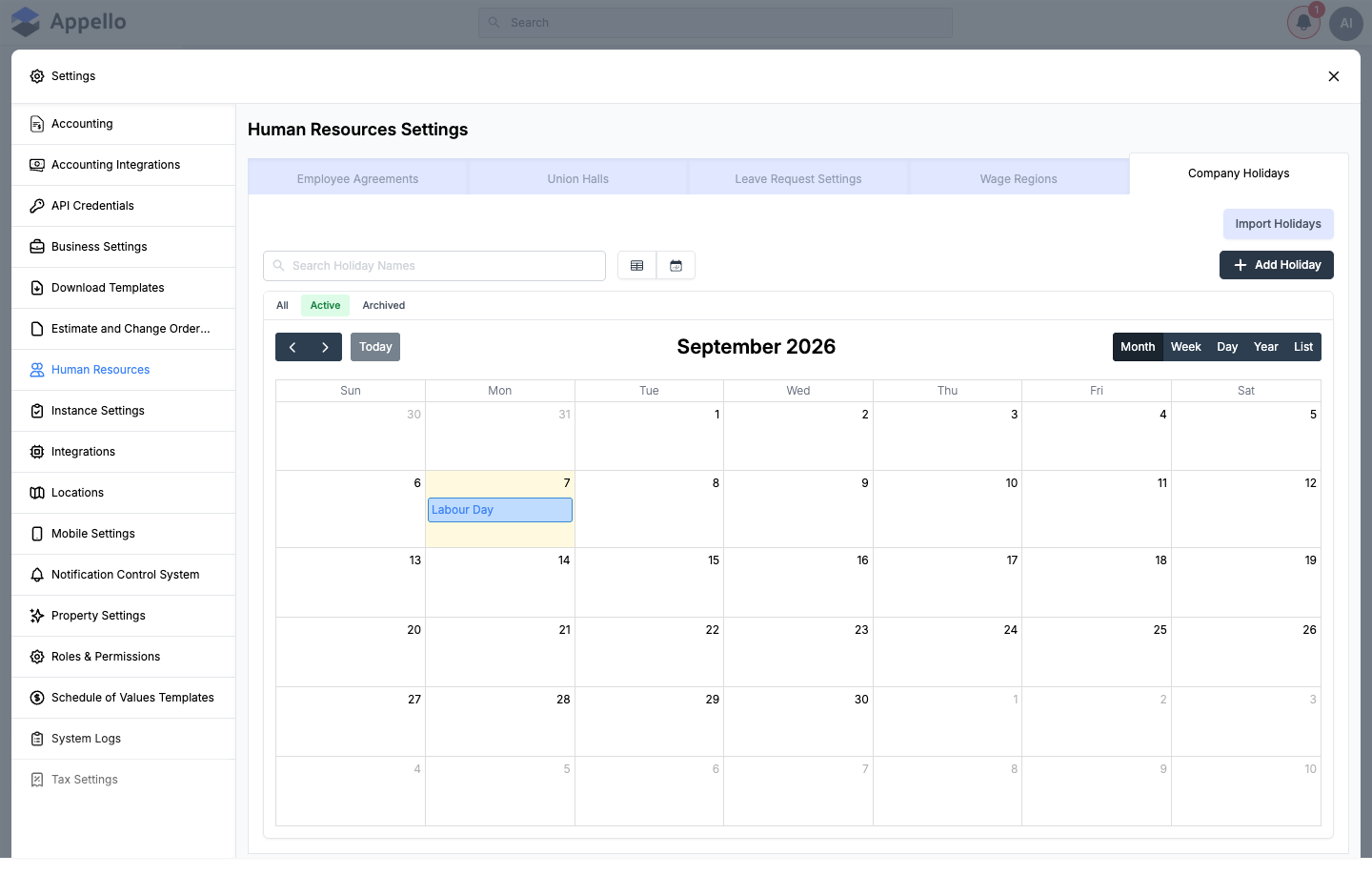
The tab keeps its own Month / Week / Day / Year / List calendar of holidays, plus Add Holiday and Import Holidays buttons. Adding a holiday asks for:
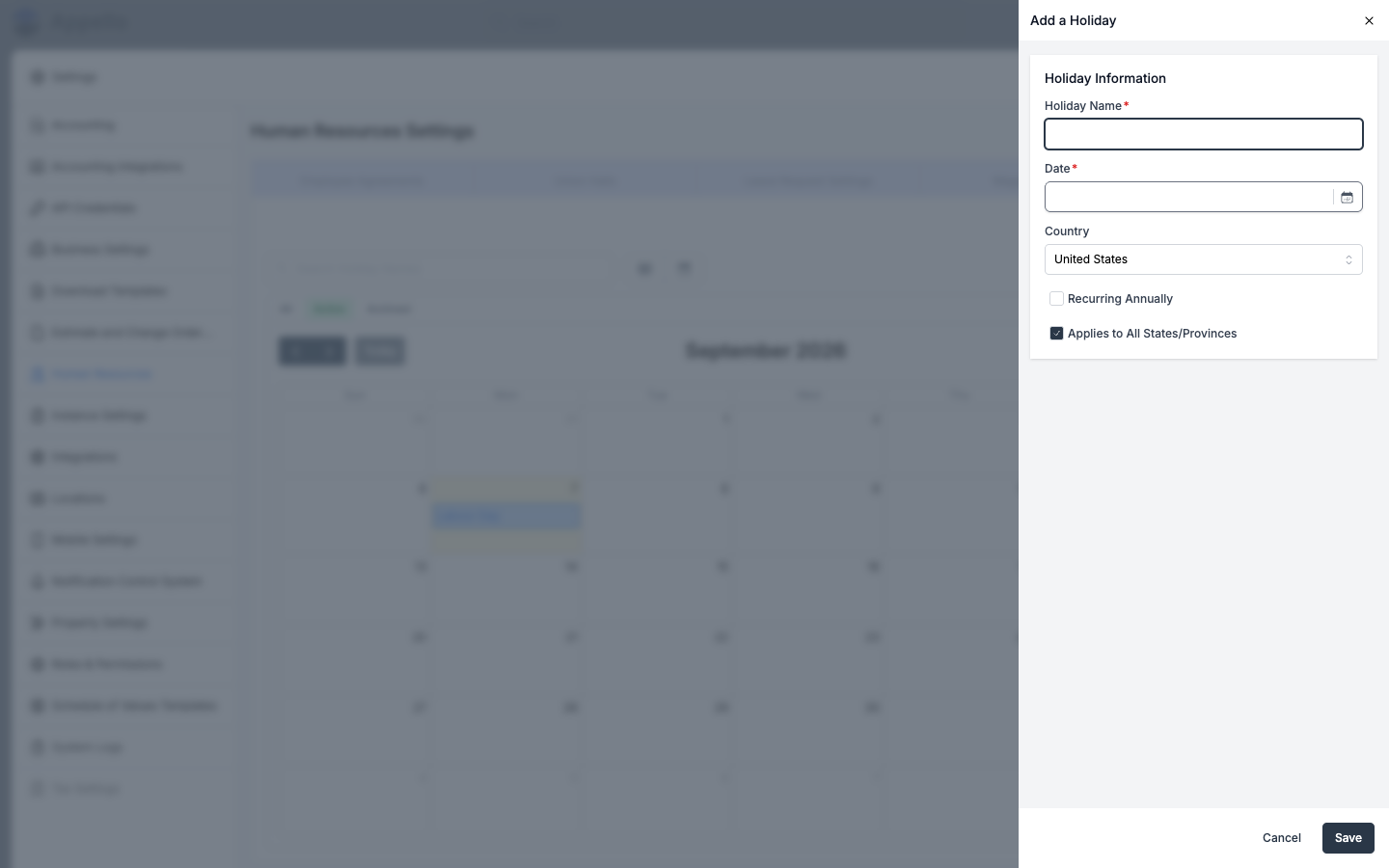
| Field | Required | Notes |
|---|---|---|
| Holiday Name | Yes | |
| Date | Yes | |
| Country | No | Defaults to your instance's country. |
| Recurring Annually | No | Off by default -- check it for holidays that fall on the same date every year. |
| Applies to All States/Provinces | No | On by default. |
Company Holidays configured here are a separate list used for payroll and leave -- they appear on the company's leave/time-off calendar, and in this Settings tab's own calendar. They do not appear as an overlay on the Scheduling → Calendar Schedule grid documented on this page; a public holiday is not shown alongside job assignments in the Week or Month view. Cross-check the Company Holidays list separately when planning work around a holiday.
Export and Print
Calendar Schedule has no export, download, or print button of its own -- the toolbar explicitly disables the shared Export (PDF) and Copy Schedule (bulk duplicate-day) buttons that appear on the Daily Schedule toolbar. If you need a PDF of a day's assignments, use Daily Schedule's Export button instead; there is no equivalent for a week or month view of Calendar Schedule.
Notifications
None of the actions on this page send a push notification, SMS, or in-app alert to the affected worker -- creating, moving, resizing, or unscheduling an assignment from Calendar Schedule notifies nobody. See Scheduling Overview § Schedule Change Notifications and Notification Control § Schedule change notifications for the full picture, including the related notification types (like equipment maintenance reminders) that do exist elsewhere in Appello.
A worker sees their current assignments because the mobile app's My Schedule reads live data when they open it -- not because anything was pushed to their device.
Mobile
Workers see their own Calendar Schedule assignments on the mobile app's My Schedule tab, split into All Day, Hourly, and (if enabled) Weekly sub-tabs, with a Directions button that opens the job's address in the phone's native maps app. See Schedule, Directions and Clock In for the full mobile walkthrough, including clocking in and out from an assignment.
How Calendar Connects to Other Views
| View | Focus | Best For |
|---|---|---|
| Calendar Schedule | Date-centric | "What's happening on Tuesday?" |
| Job Schedule | Project-centric | "Who's on the Harbourview project this week?" |
| User Schedule | Worker-centric | "Where is Dave Mitchell assigned?" |
| Daily Schedule | Single-day | "Who's on today, and who's still unassigned?" |
| Dispatch Board | Technician x hour | "Who's free right now, and can I put this job on them?" |
All five views show the same underlying data — different perspectives for different questions.
Related Pages
- Scheduling Overview — How the five scheduling views fit together
- Job Schedule — Multi-week project and job timeline grid
- User Schedule — Workforce-centric schedule view
- Daily Schedule — Single-day matrix/card view for building today's crew
- Dispatch Board — Drag-to-assign board for short service and T&M work
- User Groups & Crews — Pre-defined crews for quick scheduling
- Leave Submissions — Where approved leave comes from
- Equipment Maintenance — Source of the Equipment Inspections row
- Instance Settings — Schedule Grouping and other scheduling-related settings
- Notification Control — What does (and doesn't) send a notification
- Schedule, Directions and Clock In — The mobile side of this page's assignments
- Work Orders Overview — What a work order is, for the All/Work Orders/Jobs toggle