Job schedule
Module: Scheduling | Platform: Web
The Job Schedule view displays all projects and their jobs on a timeline grid, allowing administrators to see crew assignments and scheduling coverage at a glance.
Navigation
Sidebar → Scheduling → Job Schedule
URL: /scheduling/jobs
Viewing this page requires both the job: view and JobSchedule: view permissions -- the
route checks them together, so missing either one blocks access to /scheduling/jobs.
When your instance's Automatically schedule In Progress jobs setting (see
Auto-Scheduling In Progress Jobs below, and
Instance Settings → Schedule Settings) is
turned on, the Job Schedule item is removed from the Scheduling sidebar entirely -- the
sidebar's navigation list drops any entry pointing at /scheduling/jobs while that setting is
enabled. The page and its permissions are unaffected; there is simply no sidebar link to it once
every In Progress job is scheduled automatically.
On the canary demo instance used for the screenshots on this page, the setting is currently off, which is why Job Schedule appears in the sidebar in every screenshot below.
Overview
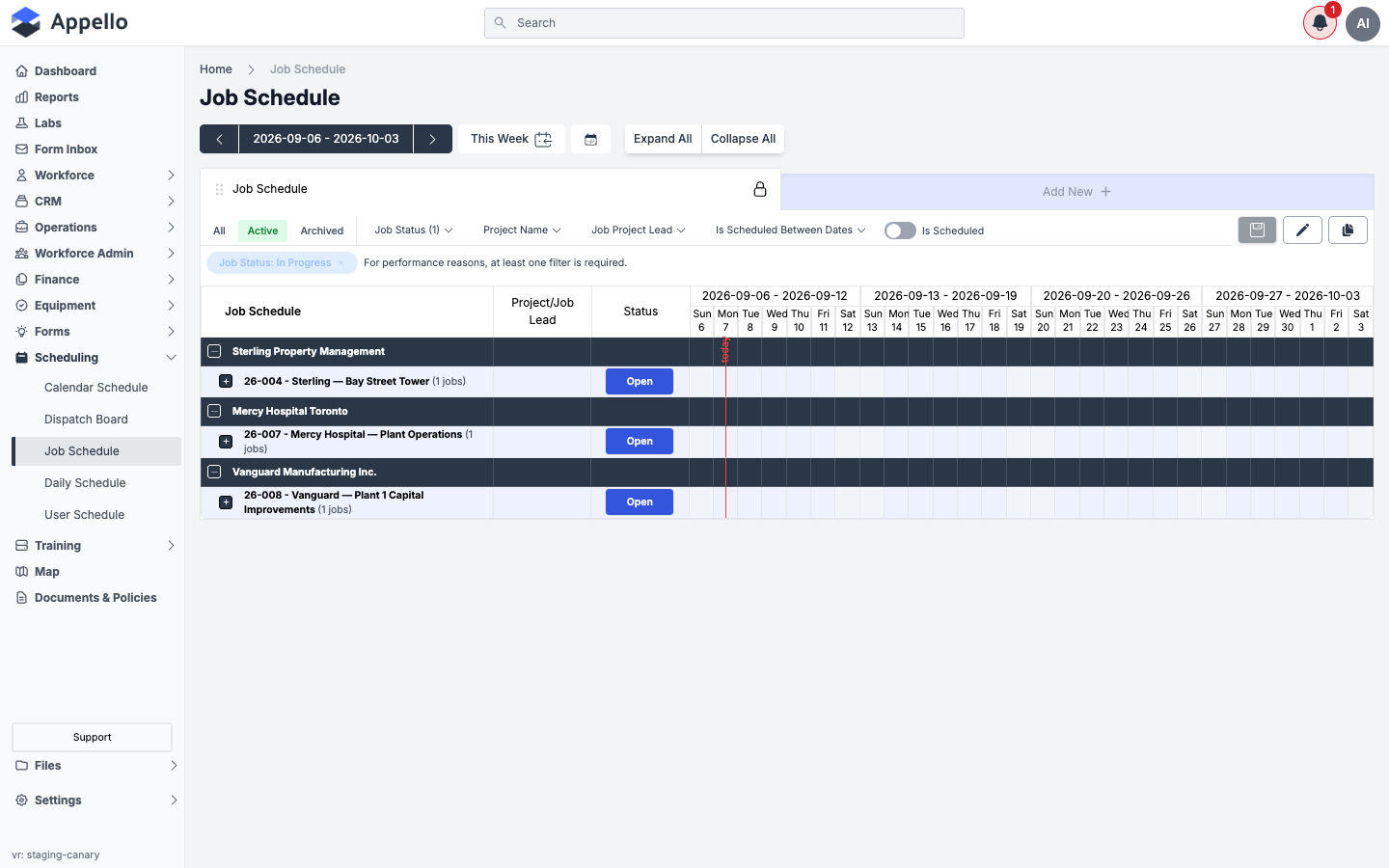
The Job Schedule presents a multi-week grid with projects (and their jobs) listed on the left and individual calendar days across the top. Rows are jobs, nested under their projects and, depending on your instance's grouping setting, under their customers -- columns are single days. This is a day-by-day grid, not a Gantt-style timeline: each cell is one job (or project) on one specific day, not a bar that spans a date range as a single draggable object. A run of consecutive scheduled days is drawn with rounded ends so it reads like a short bar, but the underlying data and interaction are still one schedule record per day.
Date Range
The date range selector at the top controls which weeks are visible in the grid:
- Use the left and right arrows to shift the date window forward or backward.
- Click This Week to jump back to the current week.
- Click the calendar icon to pick a specific date.
The current date range is displayed between the arrows (e.g., 2026-03-30 - 2026-04-26).
Job Schedule as a Breakdown by Jobs
The Job Schedule is also the company-wide report for seeing every open job's crew coverage at a glance. Rows are grouped in three levels:
- Customer -- e.g., Sterling Property Management. This top level only appears when your instance's schedule is configured to group by customer; some instances group directly by project instead.
- Project -- e.g., 26-004 - Sterling — Bay Street Tower, with a job count badge (e.g., "1 jobs") and an Open button that opens the project.
- Job -- e.g., 26-004-01 - Bay Street Tower — RTU Replacement, with its own Status badge (e.g., "In Progress").
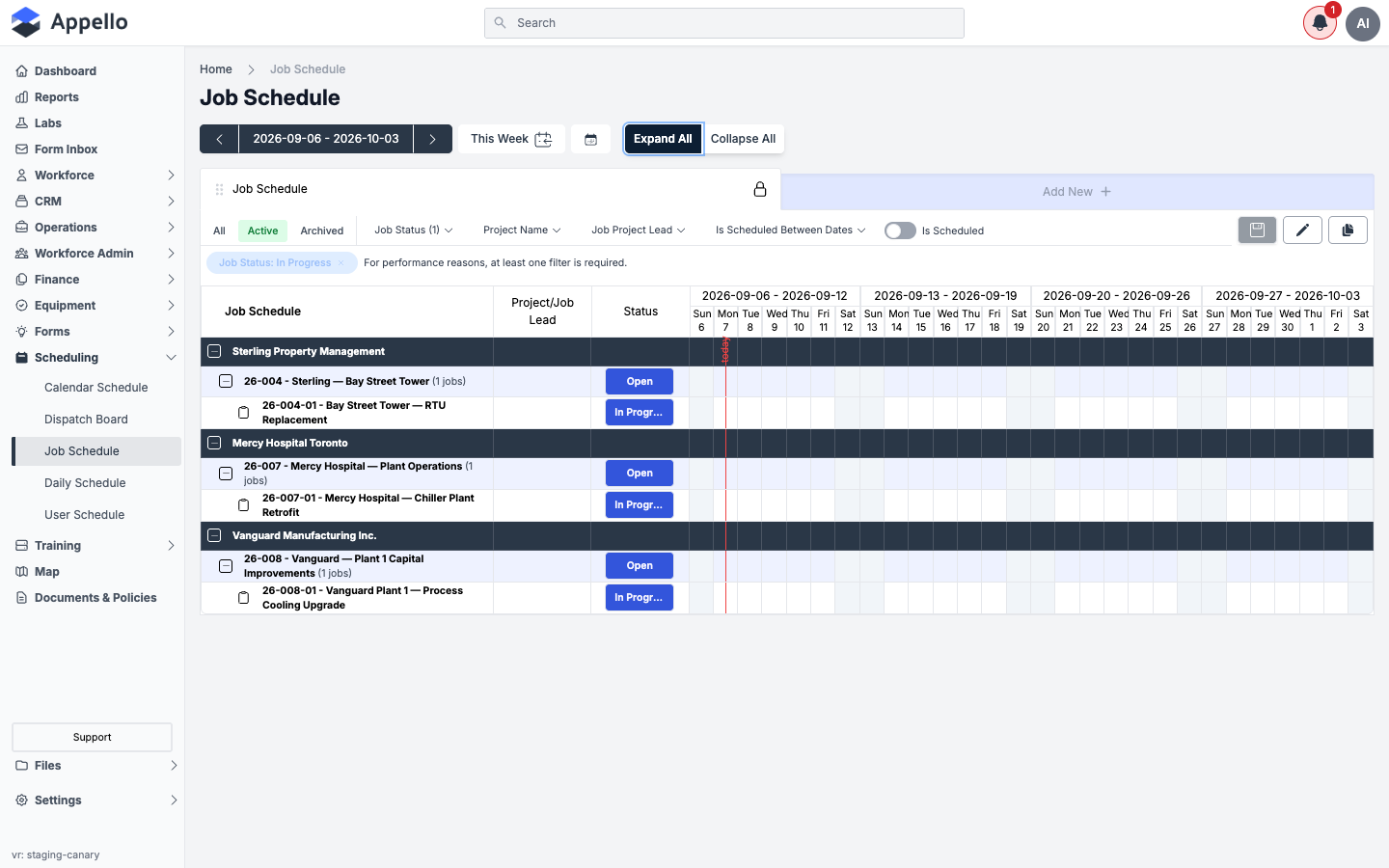
The view itself (the "Job Schedule" card at the top of the grid) behaves like the saved views on other list pages in Appello:
- Lock icon -- The default "Job Schedule" view is a system view and cannot be renamed or deleted; the lock icon next to its name indicates this.
- Save icon -- Enabled only when you have unsaved filter changes. Saves your current filters back to the view.
- Edit icon (pencil) -- Rename the view or change which columns it displays.
- Duplicate icon -- Create a copy of the current view (with its own name and filters) as a starting point for a new saved view.
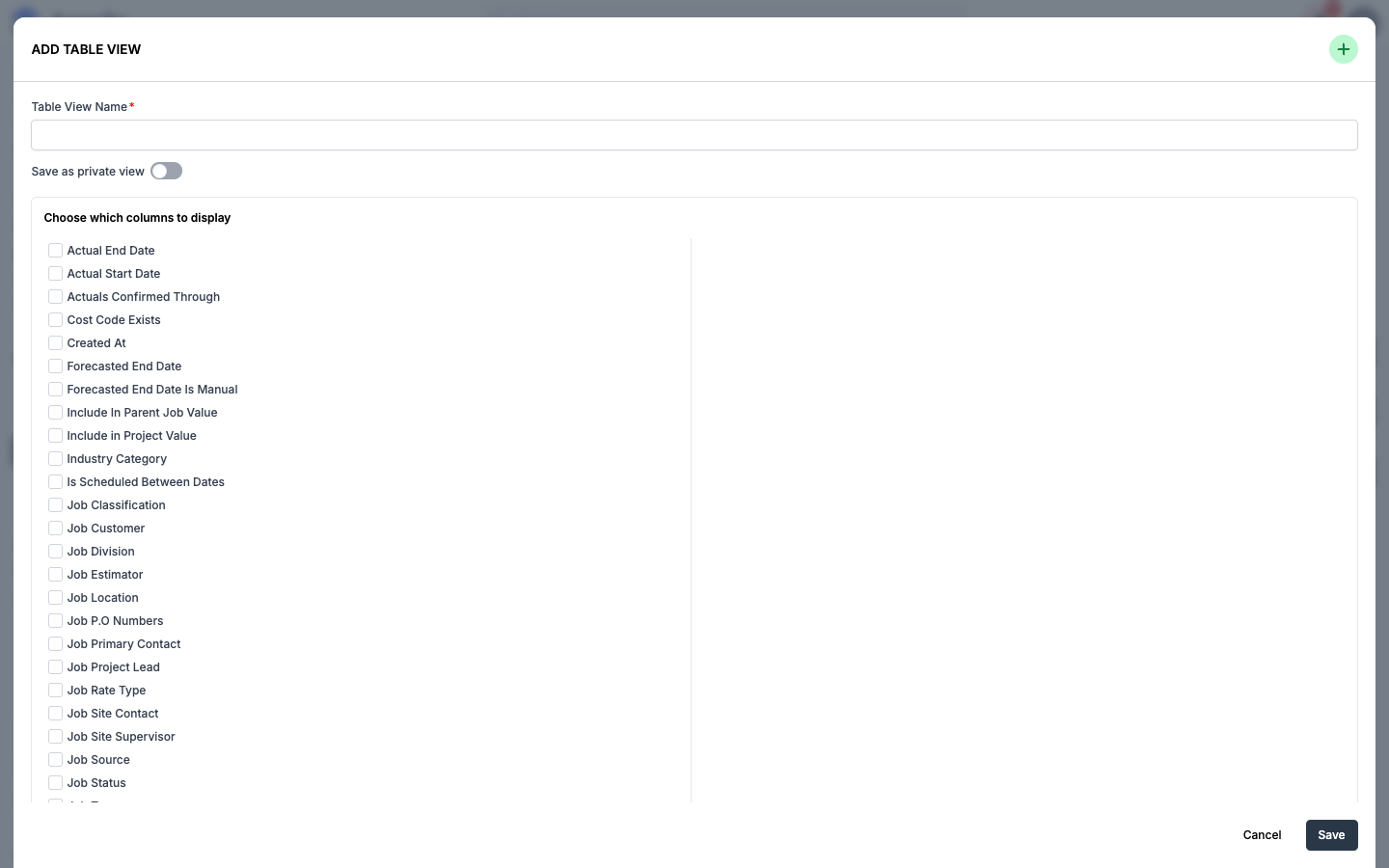
The Job Schedule page does not currently have an Export/download button. The Add New action described below creates an additional saved table view (with its own column selection) rather than exporting data -- there is no CSV or PDF export on this page.
Project List
The left column lists all projects with:
- Project code and name -- e.g., AM-2026-01 - Riverside Central Plant Upgrade
- Job count -- Number of jobs under the project (e.g., "3 jobs")
- Expand/collapse -- Click the + icon to expand a project and see individual jobs
Schedule Grid
Each cell in the grid represents one day for one project or job:
- Number in cell -- Count of workers scheduled for that day
- Colored block -- Indicates a schedule entry exists for that day
- Empty cell -- No schedule entry for that day
- Today highlight -- The current day column is visually highlighted
Status Column
The Status column shows a colored badge for every row:
- On a project row, the badge is the project's own status (e.g., Open) -- this isn't a fixed Open/Archived binary; whatever status property values your instance has configured for projects can appear here.
- On a job row, the badge is the job's status -- the same statuses you can filter by with the Job Status filter (e.g., In Progress, Quoting, Won).
Each badge is colored per that status's own configured color (its status property's color), not a fixed palette. On the demo canary instance every visible status happens to be configured blue, so Open and In Progress render the same color -- an instance with distinct status colors would show each badge in its own color.
The colored blocks inside the day-by-day grid (see Schedule Grid above) are a separate, uniform indicator -- they mean "this day has a schedule entry," not "this job has this status," and are not colored by job status. A project row's block renders as a translucent blue and a job row's block as a solid blue, regardless of the row's status badge.
Job Dependencies
Checked against the Job and Job Schedule data models: there is no concept of one job depending on, blocking, or being a predecessor of another job. The grid has no dependency lines, no "blocked" state, and no field for sequencing one job's schedule against another's. If work needs to happen in a particular order, that order has to be planned and communicated outside the grid -- Appello does not enforce or visualize job dependencies here.
Filters
Use the filter bar above the grid to narrow the view. Every filter here (other than the All / Active / Archived toggle and the Is Scheduled switch) opens as a dropdown with its own internal search box over the matching values -- none of them are plain text fields sitting directly on the page.
| Filter | Description |
|---|---|
| All / Active / Archived | Toggle between all projects, only active, or only archived |
| Job Status | Filter by job status (see Status Column above) |
| Project Name | Dropdown with a search box -- narrows the grid to projects matching what you type |
| Job Project Lead | Dropdown with a search box -- filter by assigned project lead |
| Is Scheduled Between Dates | Show only jobs with schedule entries in the visible weeks |
| Is Scheduled | Toggle version of the filter above -- switch it on to show only jobs that already have schedule entries in the visible date range |
Search
There is no dedicated full-text search box on the Job Schedule page itself. The Project Name filter above opens a dropdown with its own search input for narrowing that one field's values; the Search box at the very top of every page (next to the sidebar) is Appello's global search and isn't scoped to this schedule.
Default filter and the "at least one filter" rule
The page always loads with Job Status: In Progress applied as a default filter -- only jobs whose status maps to the In Progress workflow stage are shown until you change it.
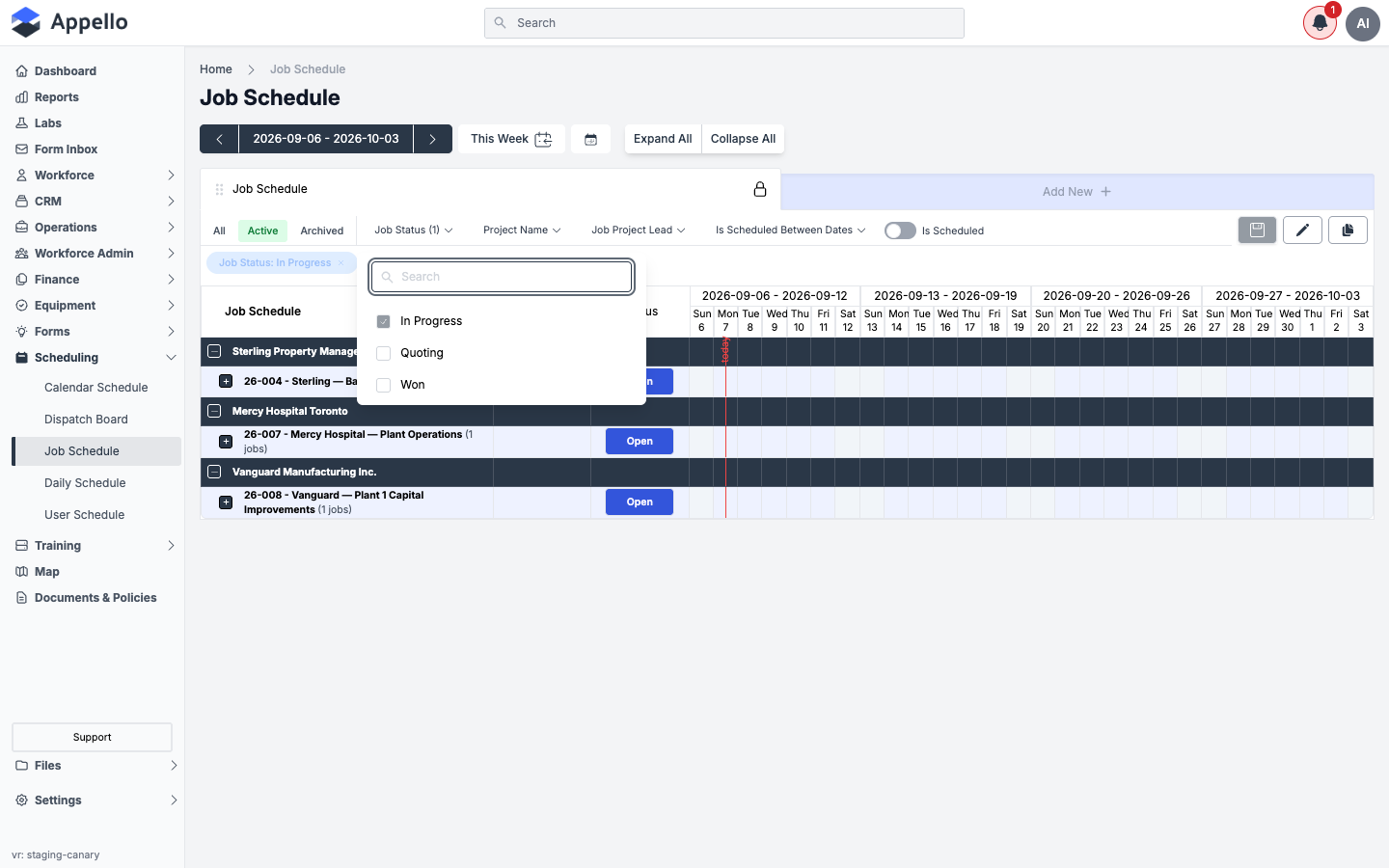
For performance reasons, the Job Schedule always requires at least one filter to be active. If you try to remove the last remaining filter badge, Appello disables the removal and shows:
For performance reasons, at least one filter is required.
To see jobs in a different status, add or check another status in the Job Status dropdown before removing "In Progress" -- you cannot clear the filter bar down to zero filters.
Actions
- Add New -- Opens Add Table View, which creates a new saved table view of this list (its own name, its own set of visible columns, and optionally marked private to you). It does not create a schedule assignment -- to schedule a job, click a day cell in the grid.
- Expand All / Collapse All -- Expand or collapse all project rows to show or hide individual jobs
Scheduling a job from the grid
Job Schedule has no form-based "new schedule" button -- every schedule entry on this page is created or removed by interacting with the grid cells directly.
Toggling a single day
Click a day cell on a job row to toggle a schedule entry for that single day on or off. This does not schedule any crew -- it creates (or removes) an empty schedule record for that job and date, with a worker count of zero. If the day you're unscheduling already has workers on it, a confirmation dialog warns you first, since removing the day also unschedules those workers.
Clicking a day cell on a project row instead toggles that same day for every job under the project at once.
Scheduling a date range: the Schedule Job Dates dialog
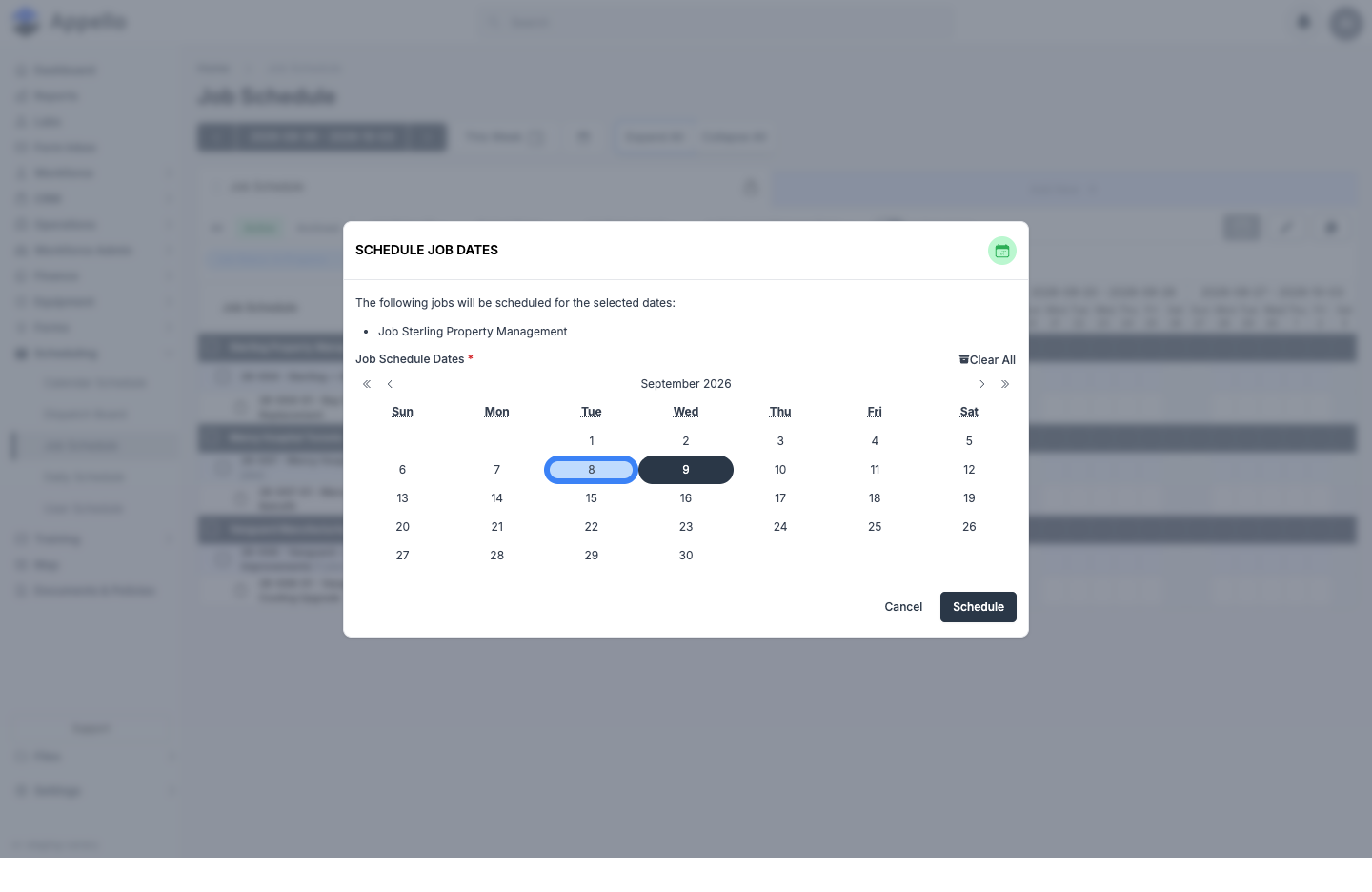
Shift-click a day cell on a job row (or on a project row, to cover every job under it) to open the Schedule Job Dates dialog:
| Field | Required | Notes |
|---|---|---|
| Affected jobs (list) | -- | Read-only. Lists the job(s) that will receive the new schedule entries -- one job for a job-row shift-click, or every job under the project for a project-row shift-click. |
| Job Schedule Dates | Yes | A month calendar, not a typed date range. The day you shift-clicked is pre-selected; click any other day to add it, or click a selected day again to remove it. Clear All empties the whole selection. |
Click Schedule to create a schedule entry for every date you picked, or Cancel to close the dialog without changing anything (the screenshot above was captured mid-selection and then canceled -- nothing was saved). Like the single-day toggle, this dialog does not assign any crew -- see Assigning crews from here vs. the Workforce view below.
Assigning crews from here vs. the Workforce view
Job Schedule only ever writes the schedule flag for a job on a date -- whether you toggle one day at a time or pick several with the Schedule Job Dates dialog, neither action accepts a crew, a single worker, or a supervisor. Hovering a scheduled block shows a read-only popover of who happens to already be assigned, and the small number in the corner of a cell is just a worker count -- there is nothing to click on this page to add someone to a job.
To put specific people on a job, assign them from one of the worker-facing scheduling views instead. All of them write to the same underlying schedule, so the assignment shows up back here (as a scheduled block with a non-zero worker count) as soon as it's saved:
- Calendar Schedule -- pick a job, then add any number of workers with the Schedule Job panel's Select User(s) picker.
- Daily Schedule -- click a cell in Matrix View, or drag a worker's card onto a job in Card View, for a single day.
- User Workforce Schedule -- pick one worker from the picker, then click a day cell to assign them (shift-click for a date range) -- see Assigning a worker to a job.
- Dispatch Board -- drag a Job or Work Order onto a technician's row, or paint a time range on their row.
See Scheduling Overview for the full comparison of how all five scheduling views fit together.
Auto-Scheduling In Progress Jobs
Your instance has a setting that automatically keeps every In Progress job "scheduled" on this grid, even before anyone assigns crew to it.
Where to find it
Sidebar → Settings → Instance Settings → Schedule Settings
The toggle is labeled:
Would you like to automatically schedule In Progress jobs?
It's documented in full, with its default and the rest of the Schedule Settings card, on Instance Settings → Schedule Settings -- this section only covers what the setting does specifically on the Job Schedule page.
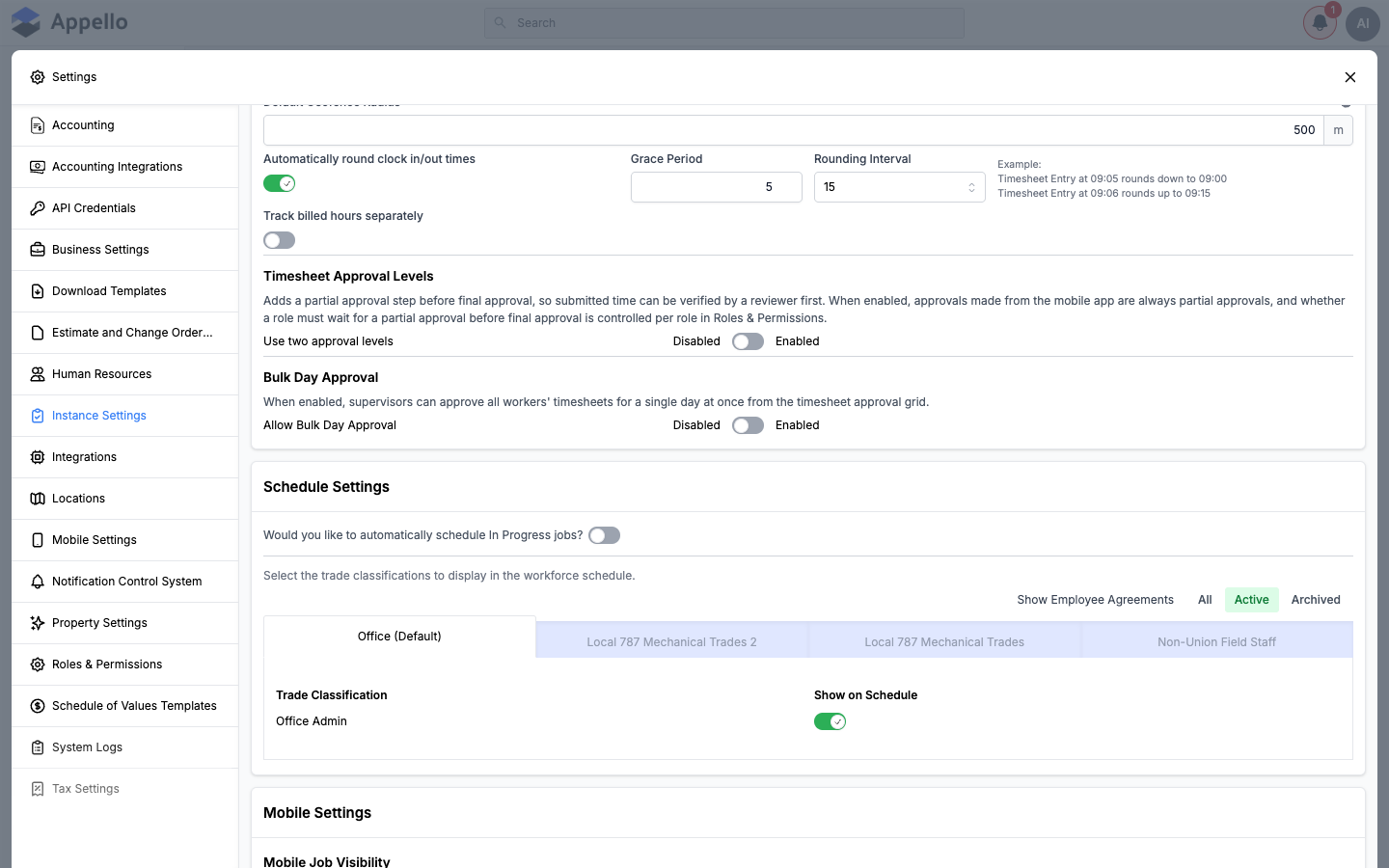
On the canary demo instance used for this page's screenshots, the toggle is off, as shown above -- see the note under Navigation for why that also means the Job Schedule sidebar item is still visible in every other screenshot on this page.
This setting lives under the Instance Settings tab, not Business Settings -- both are reached from the same Settings menu, but the Schedule Settings card is only on the Instance Settings tab.
What it does
When this setting is enabled, Appello automatically creates a schedule entry for every day in the range you are viewing, for every job whose status maps to the In Progress workflow stage -- whether or not a supervisor has manually assigned anyone to that job. In effect, any job that is In Progress will always show as scheduled on the Job Schedule grid and will always satisfy the Is Scheduled / Is Scheduled Between Dates filter, because a real schedule record now exists for it. It also removes Job Schedule from the Scheduling sidebar entirely (see the note under Navigation) -- once every In Progress job is scheduled automatically, the page has nothing left for a dispatcher to manage by hand.
This also changes the User Workforce Schedule view: cells for auto-scheduled days are shown in a distinct greyed style and cannot be toggled by clicking, since there is nothing to manually add or remove for that day.
When this setting is disabled (the default), a job only appears as scheduled on this grid once someone has explicitly clicked a day cell (or used bulk scheduling) to assign it, as described in Scheduling a job from the grid above.
Moving a job's status to a closed/complete workflow state while this setting is enabled can trigger a confirmation prompt about unscheduling that job's future dates and any linked timesheets or equipment assignments. That prompt appears on the job/project status-change screen, not on this page.
Job Detail's Schedule Tab
Opening a specific job (via a project row's Open button here, or from Operations → Jobs) goes to that job's own record, which has its own Schedule tab scoped to just that job's calendar entries -- shifts, leave, and equipment inspections filtered down to the one job, using the same calendar component as the rest of Scheduling. See Job Detail → Schedule for its controls.
Mobile
This documentation is for the desktop web application. Job Schedule (/scheduling/jobs) is a
dispatcher/admin tool for seeing coverage across every project at once and has no direct mobile
equivalent. Workers see their own assignments -- however they were created, including from this
page -- on their phone instead; see
Schedule & Clock In.
Breadcrumb
The breadcrumb trail at the top shows: Home > Job Schedule, allowing quick navigation back to the dashboard.
Related Pages
- Scheduling Overview -- How the five scheduling views fit together
- Calendar Schedule -- Date-centric calendar view, and where to add crew with the Select User(s) picker
- Daily Schedule -- Single-day matrix/card view for building today's crew
- User Workforce Schedule -- Worker-centric schedule view
- Dispatch Board -- Drag-to-assign board for short service and T&M work
- Instance Settings -- Schedule Settings, including auto-scheduling In Progress jobs
- Job Detail -- A single job's own Schedule tab
- Schedule & Clock In (Mobile) -- How workers see their assignments on their phone