Progress Reports
Progress Reports track the financial completion of jobs by comparing billed amounts against the contract value. They are the bridge between your Schedule of Values (what you contracted to do) and your billing (what you've invoiced so far) — essential for progress billing workflows common in ICI construction.
Where it is
- Sidebar → Finance → Progress Reports -- the company-wide overview lists every progress
report across every job. URL:
/overview/progress-reports. - Job → Planning & Tracking → Progress Reports -- the same kind of record, scoped to one job; see Create a Progress Report below.
The Progress Reports → View permission gates the page -- without it, Progress Reports does not appear under Finance in the sidebar.
Overview
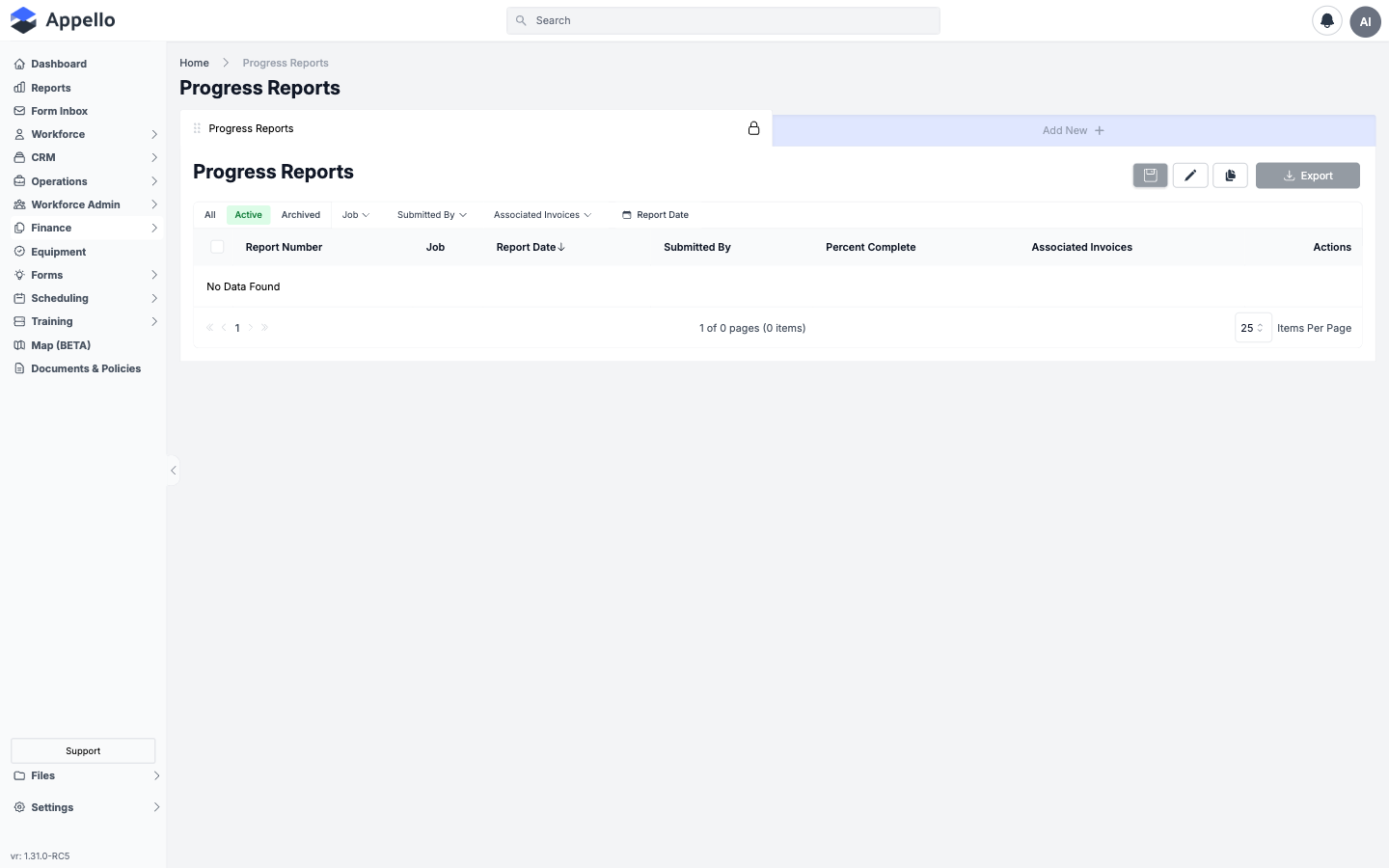
The Progress Reports overview lists every progress report across every job -- one row per report, not one row per job.
Columns
| Column | Description |
|---|---|
| Report Number | The job's full job number plus the report's sequence number, e.g. 26-004-01-PR-02. |
| Job | The job the report belongs to. |
| Report Date | The report's "as of" date. Sortable -- the list opens sorted by this column, descending. |
| Submitted By | The user who saved the report from the desktop panel (see Create a Progress Report) -- not necessarily the field crew member whose mobile percentage the report is built from. |
| Percent Complete | The report's overall percent complete, from its approved line-item values. |
| Associated Invoices | Any progress invoices generated from this report -- see Generate a Progress Invoice. |
| Actions | A View Details link that opens the report in the same panel used to create it. |
This session's demo instance had no progress reports carried over, so the overview shows No Data Found -- every screenshot on this page reflects that empty state.
Filters, quick tabs, search, and sort
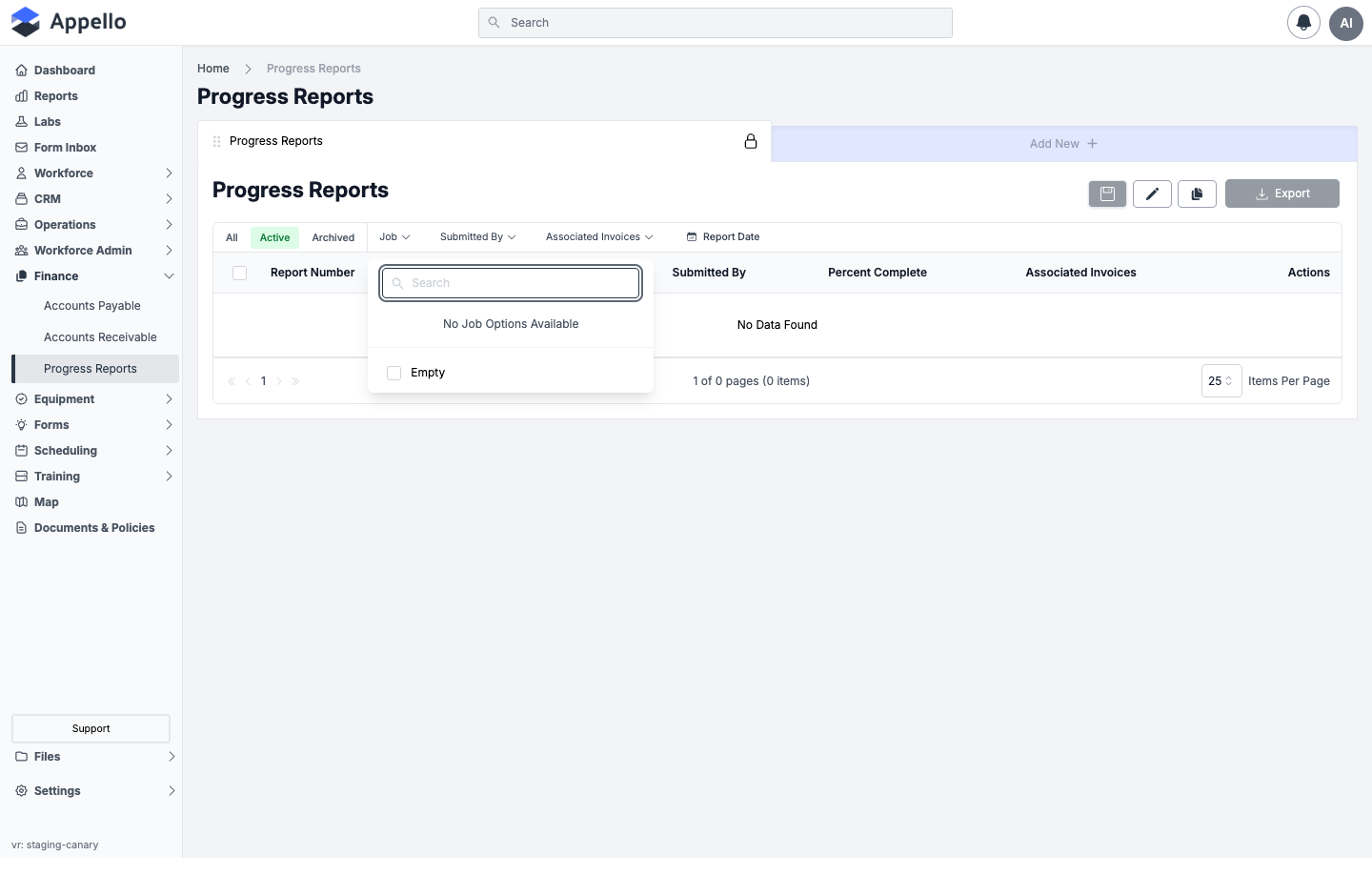
| Control | Behavior |
|---|---|
| Job | Searchable multi-select checklist of jobs that have a progress report, plus an Empty option. |
| Submitted By | Searchable multi-select checklist of users who have saved a progress report. |
| Associated Invoices | Two options: All Progress Reports, or Without Invoices (reports with no invoice created from them yet). |
| Report Date | A calendar date-range picker. |
| Sort | Click the Report Date column header to reverse sort direction -- it is the only sortable header shown. |
| Search | There is no free-text search box on this list -- unlike most other overview lists, search is turned off here. |
Whether the Report Date filter actually narrows results could not be confirmed -- the demo instance has no rows to filter.
Quick tabs -- Active (default, not archived), Archived, and All (both together).
Saved views -- above the quick tabs, Progress Reports is itself a saved view tab, locked because it is the system default. + Add New next to it creates an additional custom view of this list with its own saved filters and columns -- it does not create a progress report. The three icons above the table (disk, pencil, duplicate) save, rename/reconfigure, and clone the currently open view.
Export downloads the current view; the button is disabled while the list has no rows, as on the empty demo instance above.
There is no Create / Add New Progress Report action on this overview page -- a progress report can only be created from inside a job, on its Planning & Tracking → Progress Reports tab. See Create a Progress Report below.
Progress Billing Workflow
The standard ICI progress billing cycle:
- Set up the Schedule of Values (SOV) on the job — line items matching the contract breakdown.
- Track progress — As work is completed, update the percentage complete for each SOV line item.
- Generate a Progress Report — Appello calculates the billing amount based on progress.
- Apply holdback/retention — Typically 10% holdback on each billing per construction lien legislation.
- Create Invoice — Generate an invoice from the progress report.
- Send to customer — Export as branded PDF.
- Track payment — Record when payment is received.
- Repeat — Monthly progress billing until project completion.
Holdback / Retention
Canadian construction law requires a statutory holdback (typically 10%) on each progress billing:
| Billing Amount | Holdback (10%) | Net Billing |
|---|---|---|
| $50,000.00 | $5,000.00 | $45,000.00 |
| $75,000.00 | $7,500.00 | $67,500.00 |
| Total | $12,500.00 | $112,500.00 |
The holdback is released after a defined lien period (typically 60 days after substantial completion).
Create a Progress Report
A progress report is created on a specific job, under Planning & Tracking → Progress Reports. It records how much of each Schedule of Values line has been completed as of a given date, and it is the source of the numbers that later flow onto a progress invoice.
Steps
-
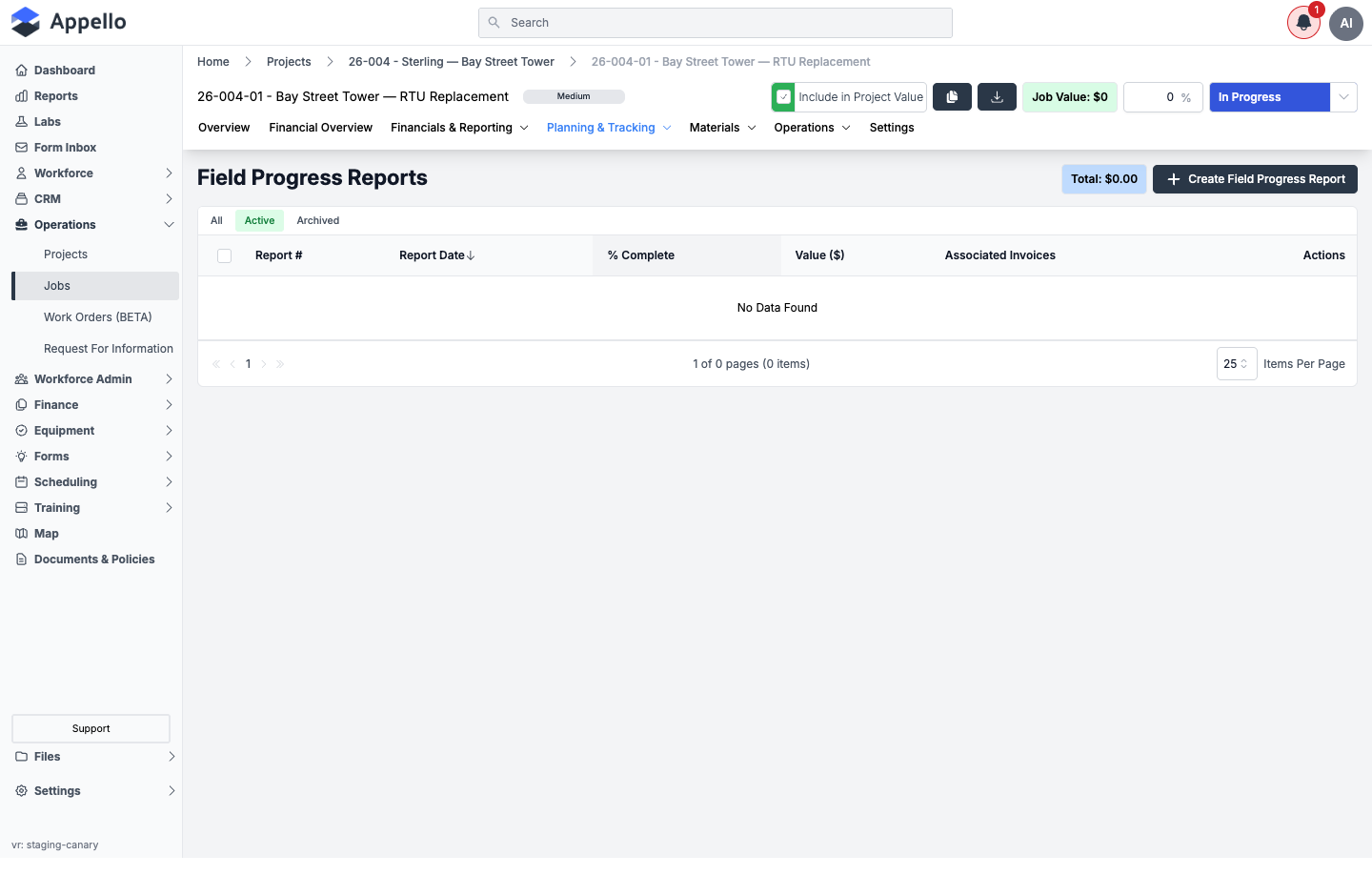
Open the job and go to Planning & Tracking → Progress Reports. The list shows every progress report already created for the job -- Report #, Report Date, % Complete, Value ($), and Associated Invoices -- plus the total value of progress reports not yet invoiced in the Total chip at the top right.
-
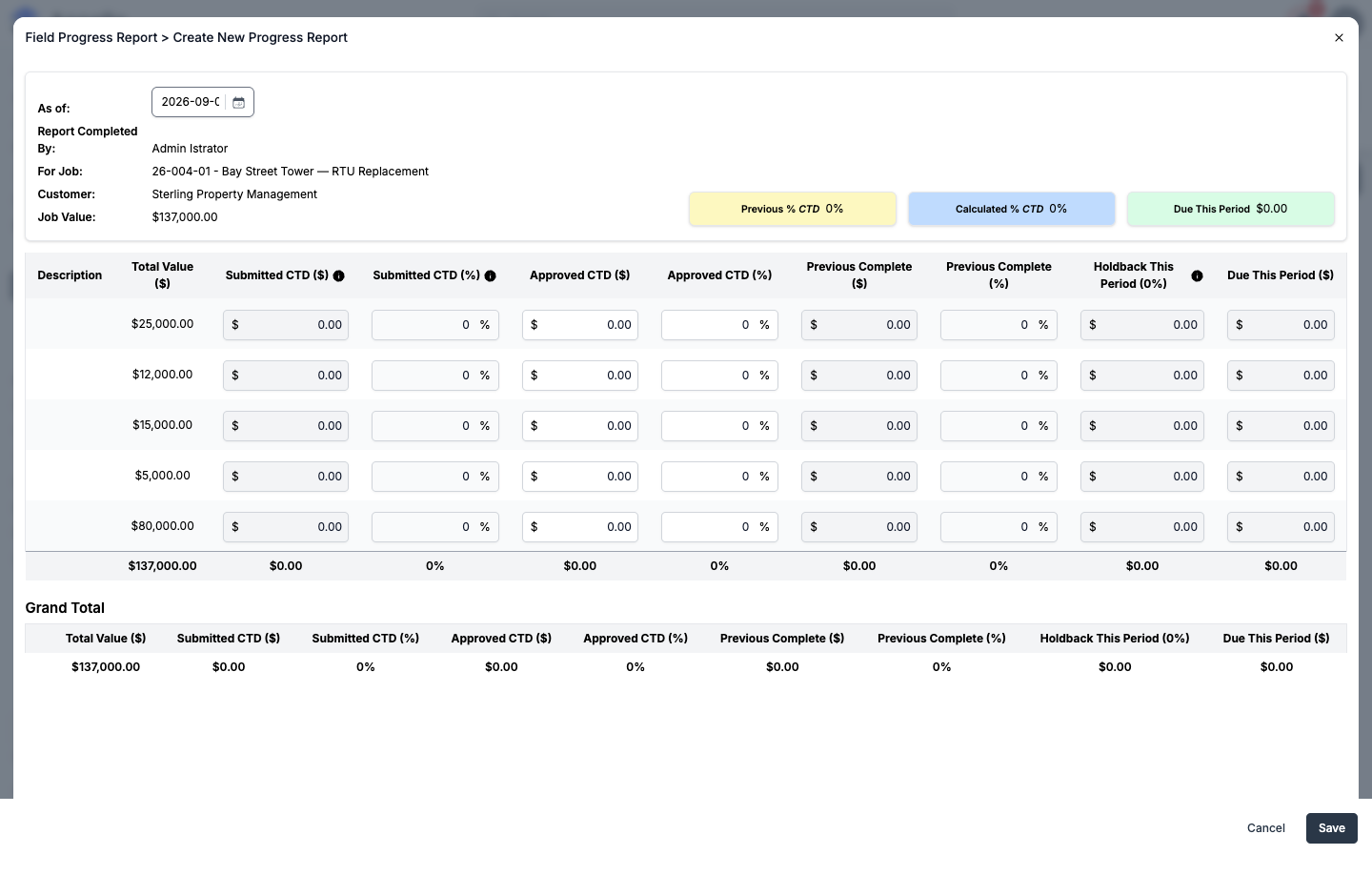
Click Create Field Progress Report. The Create New Progress Report panel opens with the job's Schedule of Values loaded as one row per SOV line item, plus As of, Report Completed By, For Job, Customer, and Job Value at the top.
-
For each SOV line item, enter the Approved CTD (%) or Approved CTD ($) -- the two are linked, so entering one calculates the other against the line's Total Value ($). The row also shows, read-only:
- Submitted CTD ($ / %) -- the percent complete submitted through the mobile On Site Application, where field crews can report progress before the office confirms it.
- Previous Complete ($ / %) -- the approved amount carried over from the last progress report.
- Holdback This Period -- an estimated holdback amount for the line, at the job's holdback percentage. A note on this column states this is an estimate only -- the holdback percentage can still be adjusted when the invoice itself is created.
- Due This Period ($) -- the approved amount for this report minus the previous complete amount.
A Grand Total row sums every column, and three chips above the table track Previous % CTD, Calculated % CTD, and Due This Period for the whole report as you edit.
-
If the job has approved change orders, they appear as additional rows in their own Approved Change Orders section, identified by change order number instead of the SOV spec-label columns -- see Change orders in progress billing below.
-
Click Save. The report is added to the Progress Reports list with its % Complete and Value ($), and becomes available for use on a progress invoice.
The "approval" step for a progress report is this office-side entry itself: field/mobile progress comes in as Submitted CTD, and the value entered here on the report becomes the Approved CTD that everything downstream (progress invoices, the job's cost-to-date, cost code actuals) uses. There is no separate approve/reject action or status field on the progress report record.
The Bay Street Tower demo job used for these screenshots has a $0 job value and no Schedule of Values populated with real quantities, so the Create New Progress Report panel above shows the line items at their default $0 / 0% state rather than mid-project numbers. The field layout, columns, and calculation behavior are otherwise exactly as shown.
See Cost Codes & Schedule of Values for how SOV line items and cost codes are set up before a progress report can be created against them.
Statuses and the Status-Change Workflow
A progress report has no status field and no draft/submitted/approved workflow of its own. The two-stage language you see on the form reflects where each number came from, not a record status:
- Submitted -- the read-only Submitted CTD ($ / %) values on each line, populated from whatever was last entered through the mobile app (the On Site Application) for that cost code or change order. Anyone with mobile access to the job can submit progress this way; it does not change anything on an existing progress report by itself.
- Approved -- the editable Approved CTD ($ / %) values that an office user enters (or confirms, pre-filled from the submitted amount) when they open the panel and click Save. This is the only "approval" step that exists: saving the report is the approval, and the approved values immediately become what the job's cost-to-date, cost code actuals, and any associated invoice use -- there is no separate pending/approved state to transition through afterward, and no reject action.
Who can do this: editing a progress report (creating one, changing its line items, or saving over an existing one) requires the Progress Reports → Edit permission; opening the list or a report at all requires Progress Reports → View -- see Permissions below. A report cannot be edited at all once an associated invoice has been marked paid and locked (the panel shows a warning banner and disables every field in that case).
Notifications: creating or saving a progress report does not send a notification to anyone. The only downstream effect is silent: the job's overall % Complete and any unlocked invoice already drawn from that report are recalculated immediately.
No Status column or control appears anywhere on the Progress Reports overview (see the Overview screenshots above) -- there is no hidden approval workflow behind this list.
Generate a Progress Invoice
Once at least one progress report exists on the job, it can be turned into a progress bill from the job's Billing tab (labeled Invoicing in the job header, under Financials & Reporting → Invoicing).
Steps
-
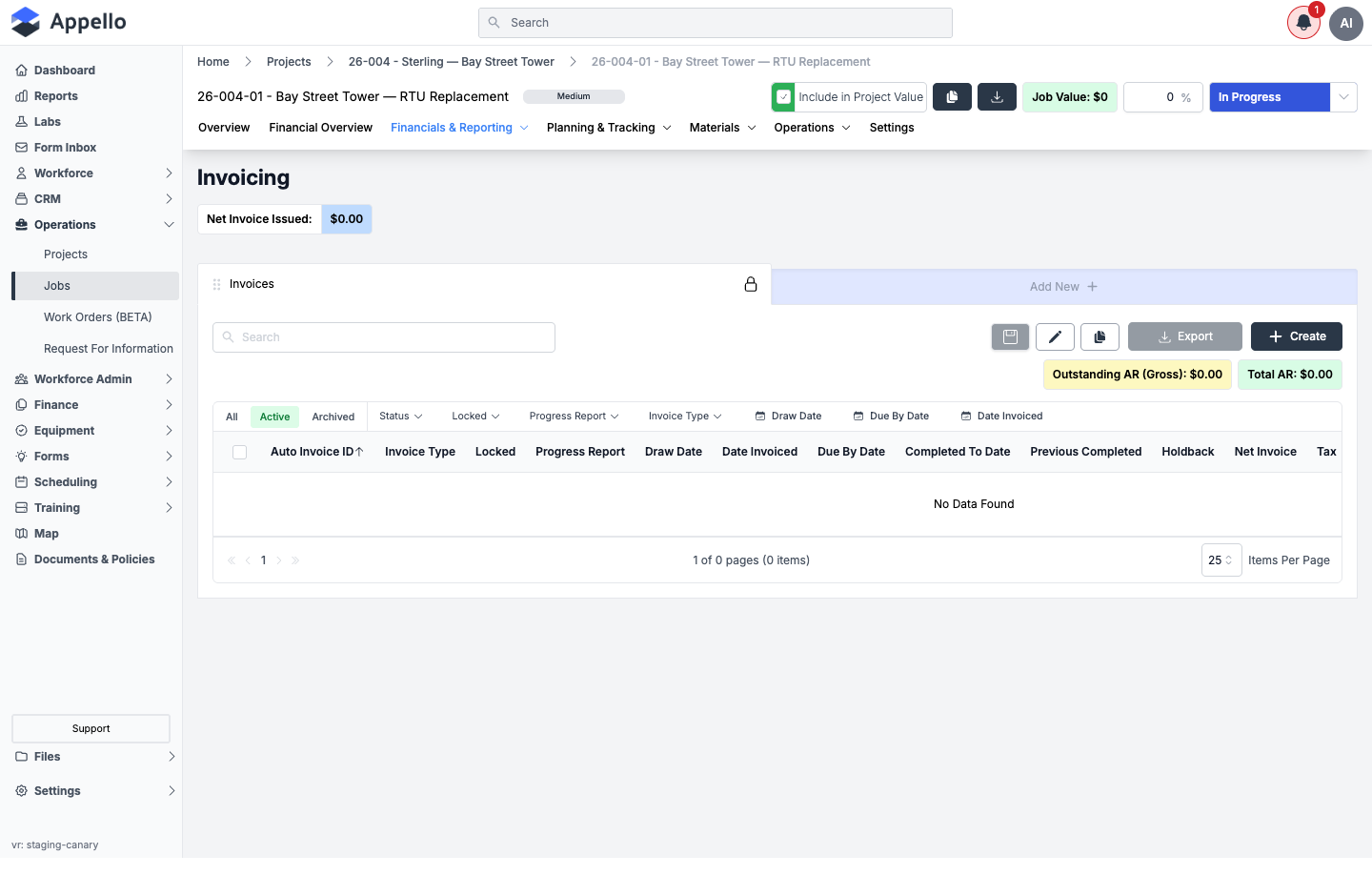
Open the job and go to Financials & Reporting → Invoicing. The Invoices table lists every bill on the job, with columns including Invoice Type, Locked, Progress Report, Draw Date, Date Invoiced, Due By Date, Completed To Date, Previous Completed, Holdback, Net Invoice, and Tax -- plus Outstanding AR (Gross) and Total AR chips above the table.
-
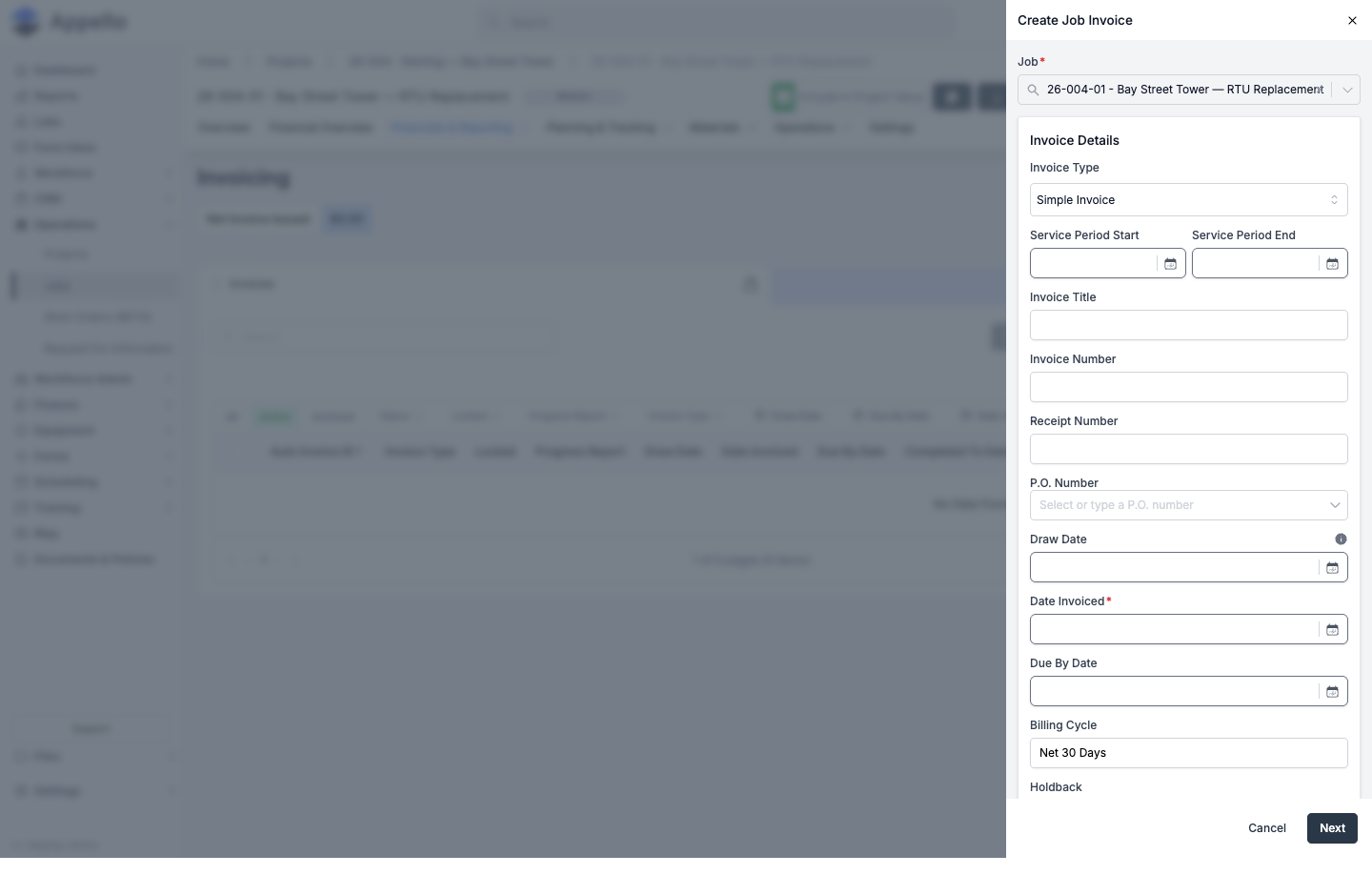
Click Create. The Create Job Invoice panel opens with an Invoice Type dropdown.
-
Set Invoice Type to the progress template. The options offered here depend on the job's current state:
- Simple Invoice -- always available.
- Progress Based Invoice -- only offered once the job has at least one progress report.
- Subsidy Invoice -- only offered if the job has a subsidy amount configured; see Subsidy template below.
- <Holdback label> Invoice (e.g. Holdback Invoice) -- only offered if the job has holdback recorded to release; see Release of holdback below.
-
Choosing Progress Based Invoice lets you pick which progress report the bill is drawn from, and pulls that report's Completed To Date and Previous Completed amounts onto the bill. The bill's Gross Billing is the report's due-this-period value; a Holdback % field (see Holdback and retention below) then reduces it to the Subtotal that gets invoiced.
-
Fill in the remaining invoice details -- Service Period, Invoice Title, P.O. Number, Date Invoiced, Due By Date, Billing Cycle, and any Additional Notes -- then click Next to continue to the line items and totals step, and Save to create the bill.
The Bay Street Tower demo job has no progress report yet, so only Simple Invoice was offered in the Invoice Type dropdown during this pass, and the panel could not be carried past the first step (this session did not create or save a bill). The template list and per-template behavior above are described rather than captured as a screenshot of every template.
Holdback and Retention
Holdback (also called retention, depending on how your instance labels it) is the portion of each progress billing withheld until later in the project, per standard ICI/construction-lien practice. Appello configures it at three levels: an instance-wide label and defaults, a per-job percentage, and a per-bill percentage that can still be adjusted at invoice time.
Instance-wide configuration
Under Settings → Business Settings:
-
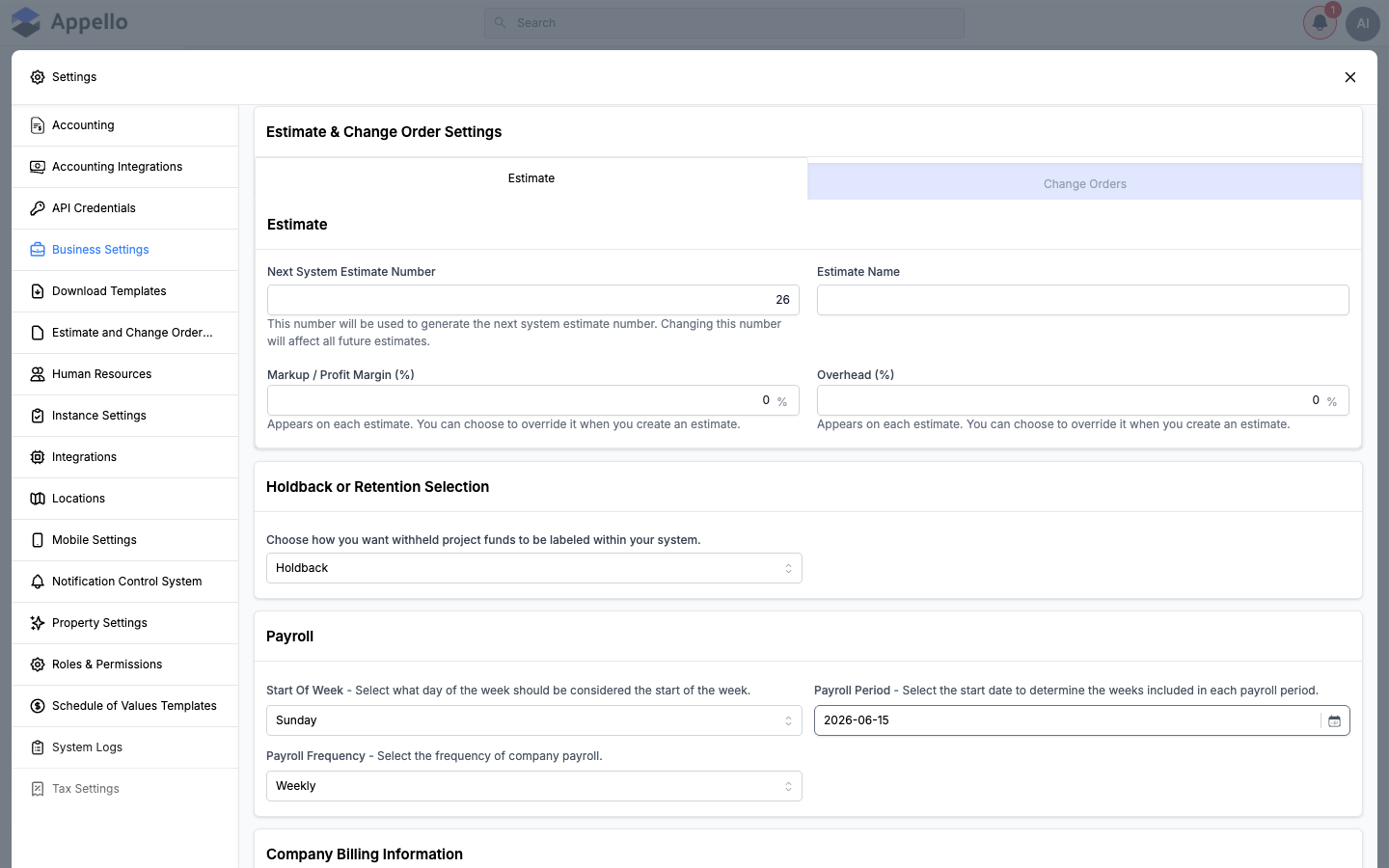
Holdback or Retention Selection -- chooses the word used everywhere else in the product for this concept: Holdback or Retention. Every other holdback-related label (fields, columns, invoice template name) follows from it.
-
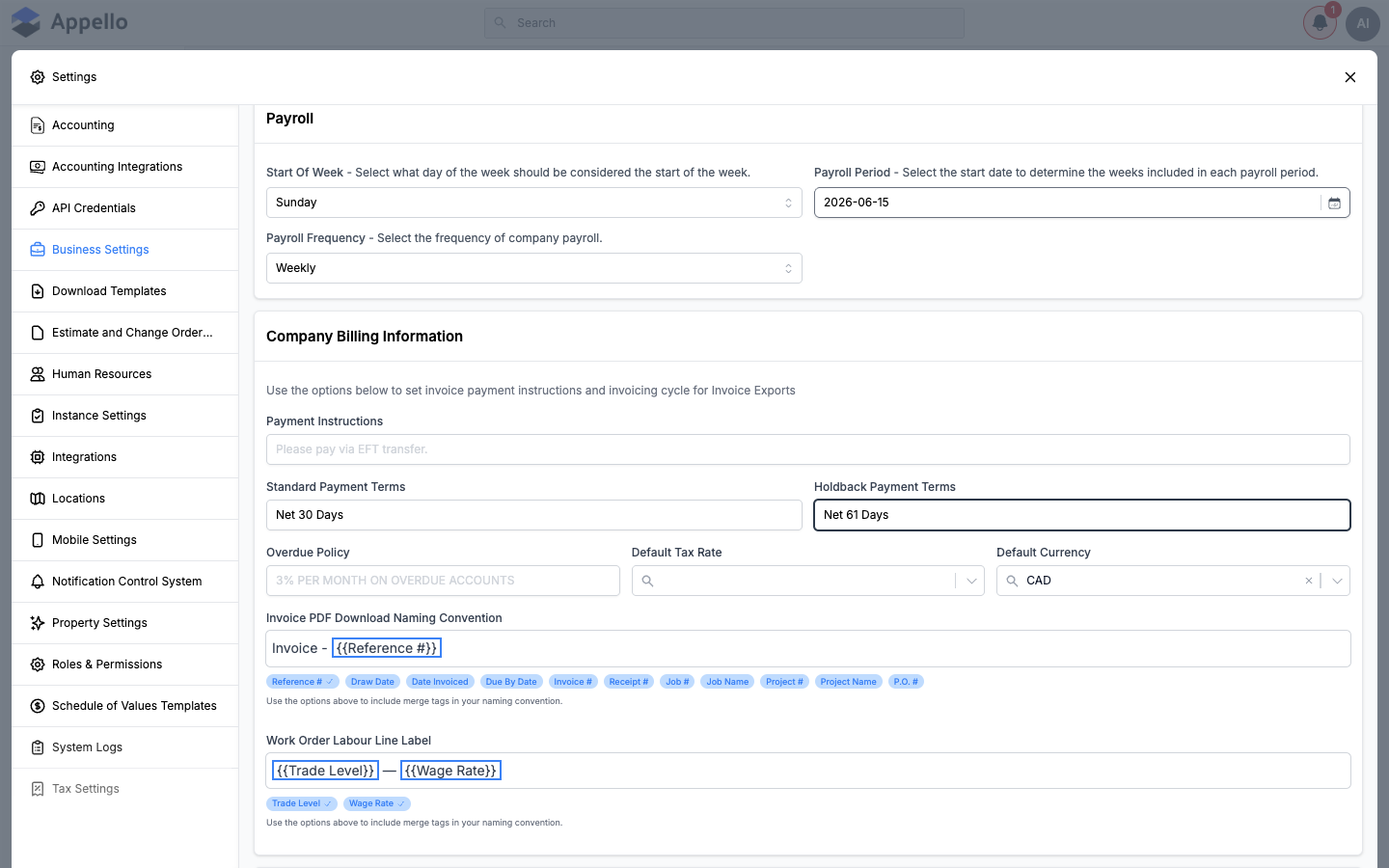
Holdback Payment Terms (under Company Billing Information, next to Standard Payment Terms) -- the default payment terms text (e.g. "Net 61 Days") applied to a bill's payment terms when its invoice type is the holdback-release template.
-
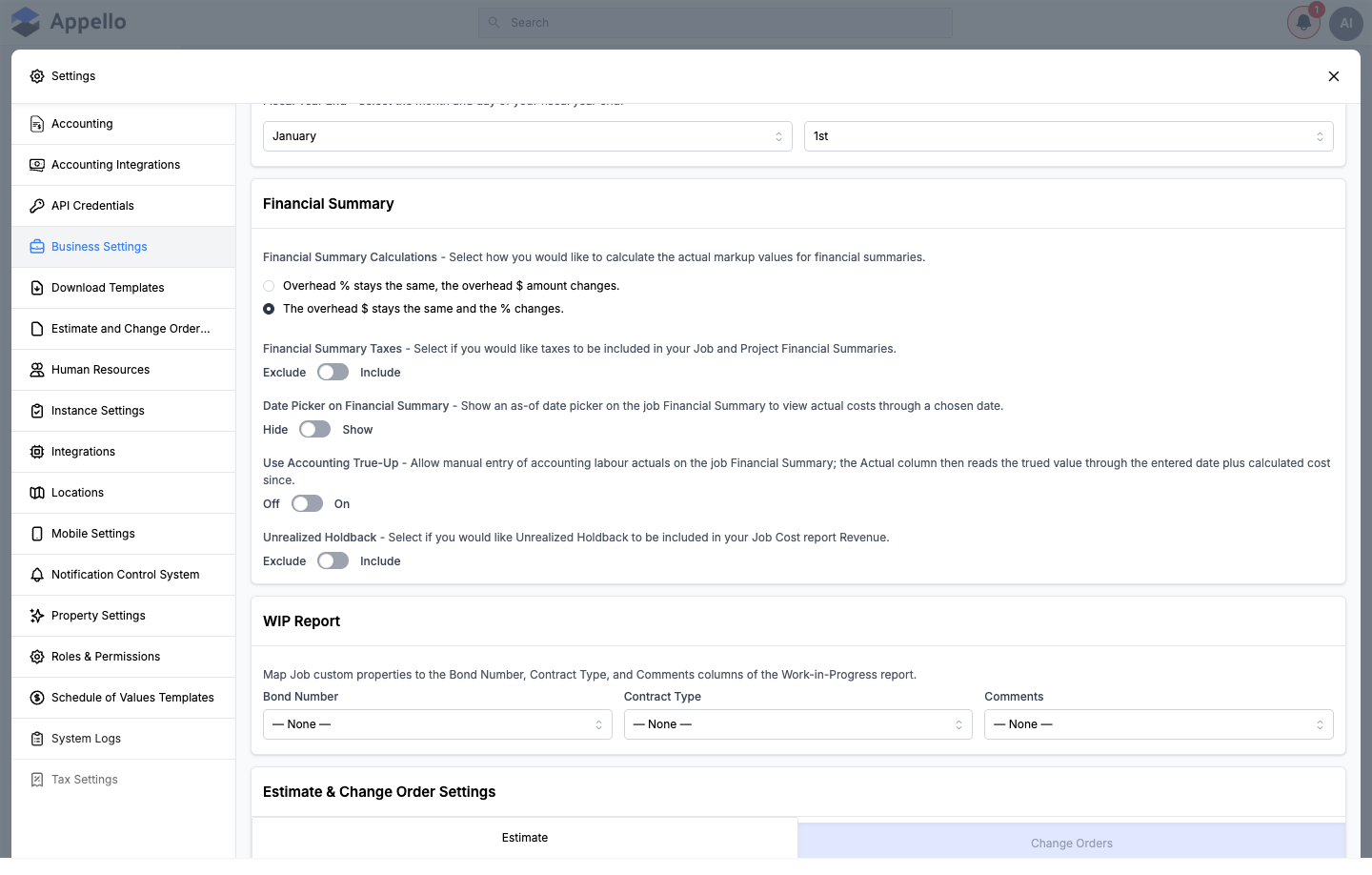
Unrealized Holdback (under Financial Summary) -- whether holdback that has been withheld but not yet released is included as revenue on the Job Cost report (Exclude / Include).
Per-job holdback
Every job has its own Holdback percentage, set in Job Financial Details when the job is created (default 0%) -- see Create a Job. This job-level percentage is what pre-fills the holdback estimate shown on each progress report row and on new progress bills for that job.
How holdback is calculated on a bill
On a Simple or Progress Based invoice, a Holdback % field lets you confirm or override the percentage for that specific bill. The bill's summary then shows:
| Line | Calculation |
|---|---|
| Gross Billing | The billing amount for the period |
| Less <Holdback label> X% | Gross Billing × (Holdback % ÷ 100), shown as a deduction |
| Subtotal | Gross Billing minus the holdback deduction |
Only bills with a Holdback % greater than 0 show the deduction line. Holdback withheld this way accumulates against the job until it is released.
Release of holdback
To bill out accumulated holdback, create an invoice and set Invoice Type to the <Holdback label> Invoice template (only offered once the job has holdback to release). This template computes the amount due as the job's full accumulated holdback amount minus whatever has already been billed on prior holdback invoices for the job -- so partial releases are supported, not just a single final release.
The Bay Street Tower demo job has no holdback percentage or SOV values configured, so the holdback deduction line, the per-line Holdback This Period estimate, and the holdback-release template could not be captured live with non-zero numbers. The calculations above are read from the billing form's source, not inferred.
Subsidy Template
A Subsidy Invoice template exists alongside Simple, Progress Based, and the holdback-release template in the job's Create Job Invoice panel. It is a real, selectable template -- confirmed in the invoice type list and the bill-detail rendering logic -- not a placeholder.
It only appears as an option once the job has a subsidy amount configured (a Job Subsidy Amount greater than 0). When selected, the bill shows a Subsidy Amount line item instead of pulling from the progress report or SOV, and its own subsidy-specific bill layout.
The Bay Street Tower demo job does not have a subsidy amount configured, so the Subsidy Invoice option did not appear in this session's Invoice Type dropdown and the subsidy bill layout could not be screenshotted. Its existence and gating condition are described rather than shown live.
Change Orders in Progress Billing
Approved change orders on a job feed into progress reports and progress bills the same way approved SOV values do:
- On the Create New Progress Report panel, approved change orders appear in their own Approved Change Orders table below the base SOV line items, identified by Change Order Number instead of the spec-label columns used for SOV rows. Each change order row has the same Submitted CTD, Approved CTD, Previous Complete, Holdback This Period, and Due This Period columns as an SOV row.
- Those change order rows are included in the report's Grand Total and therefore in the progress report's overall % Complete and Value ($) once approved.
- Because the change order's approved value is included in the progress report, it is also included in any progress invoice generated from that report.
The Bay Street Tower demo job has no change orders (its Change Orders tab under Planning & Tracking shows "No Estimate Data Available"), so the Approved Change Orders section could not be captured with real rows. Its columns and totals behavior are documented from the progress report form's source rather than a live screenshot.
How Progress Feeds Earned vs Burned, WIP, and the Financial Summary
A progress report's Approved CTD % on each cost code line is the "SOV % complete" that other finance views read from -- nothing downstream recalculates percent complete on its own; it all traces back to whatever was last approved here.
| Where it shows up | What it uses from the progress report |
|---|---|
| Earned vs Burned -- see Cost Codes & Schedule of Values | Earned Value per cost code = Approved CTD % × the line's contract value. Actual Cost still comes from timesheets/materials/expenses, independently of the progress report. |
| Job % Complete (Jobs list, Job Cost Report's Progress & Performance) | Recalculated immediately after every progress report save, from that job's single most recent (by date) approved report. |
| Job Cost Report -- see Job Cost Report | Reads the same job-level % Complete and Earned Value figures the progress report drives; it does not re-derive them from SOV/cost codes independently. |
| WIP Report -- see WIP Report | Does not read the progress report directly. Its Billed To Date comes from the job's invoices -- which, for progress billing, were themselves generated from a progress report (see Generate a Progress Invoice). A report that hasn't been invoiced yet has no effect on WIP numbers. |
Progress Billing From an Approved Report
Once a report has been saved (approved), it can be drawn on by one or more progress invoices -- see Generate a Progress Invoice above for the full flow, and Accounts Receivable & Billing for how those invoices are tracked and collected afterward. A report stays open to further invoices until it is fully billed; editing a report that already has an associated invoice updates that invoice's values too (the panel warns you before saving in that case), unless the invoice has been marked paid and locked.
Permissions
All progress report actions are gated by one permission item, Progress Reports, with the standard set of actions (Settings → Roles & Permissions → Finance → Progress Reports):
| Action | Controls |
|---|---|
| Progress Reports → View | Seeing the Progress Reports overview and sidebar link, and the job's Planning & Tracking → Progress Reports tab. |
| Progress Reports → Create | The Create Field Progress Report button on a job. |
| Progress Reports → Edit | Opening View Details on an existing report and saving changes to it (this is also what "approves" a report -- see Statuses above). |
| Progress Reports → Archive / Restore | The bulk Archive / Restore actions on the Active / Archived tabs of the overview list. |
| Progress Reports → Delete | The bulk Delete action on the Archived tab of the overview list. |
Related Pages
- Cost Codes & SOV -- Schedule of Values configuration, and the Earned vs. Burned model that a progress report's Approved CTD feeds
- Job Cost Report -- per-job financial drill-down that reads the same % Complete and Earned Value a progress report sets
- WIP Report -- portfolio-level Billed To Date / Cost To Date, fed indirectly through progress invoices
- Change Orders -- Creating and approving change orders that flow into progress billing
- Accounts Receivable & Billing -- Invoice tracking and AR management for progress invoices after they're created
- SOV Templates -- Reusable SOV templates