Onboarding Overview
Module: Various | Platform: Web
Onboarding in Appello spans multiple modules rather than a single dedicated screen. Setting up a new employee involves configuring their profile, assigning certifications, adding them to departments and user groups, and publishing policy documents for acknowledgement.
Onboarding Workflow
| Step | Module | Action |
|---|---|---|
| 1. Create User | Settings → Users | Add name, email, role, trade classification, union affiliation |
| 2. Set Permissions | Settings → Users | Assign role (Worker, Foreman, Project Manager, Admin) and feature permissions |
| 3. Assign Department | Settings → Human Resources | Place user in their department (e.g., Plumbing, Sheet Metal, HVAC) |
| 4. Add to User Groups | Workforce → User Groups | Add to relevant groups for scheduling and reporting |
| 5. Record Certifications | Training → Certifications | Enter expiry dates for Working at Heights, WHMIS, trade tickets, etc. |
| 6. Publish Policies | Documents & Policies | Share company handbook, safety manual, code of conduct |
| 7. Configure Pay | Settings → Business Settings | Set pay rates, overtime rules, benefit eligibility |
| 8. Set Travel Zone | Workforce → Travel Zones | Assign travel zone for per-diem and mileage calculations |
| 9. Employment Agreement | Workforce → Employment Agreements | Record contract type, start date, probation period |
| 10. Send HR Documents | Workforce Admin → Onboarding Documents | Send an offer letter, direct-deposit form, or other paperwork for e-signature |
| 11. First Schedule | Scheduling | Assign to initial project or job site |
Key Configuration Areas
User Profile
Every new hire starts with a user profile under Settings → Users. Required fields:
| Field | Description |
|---|---|
| First / Last Name | Legal name for payroll and forms |
| Login credentials and notification delivery | |
| Role | Determines system access level (Worker, Foreman, PM, Admin, Super Admin) |
| Trade Classification | Maps to union rates and job matching |
| Start Date | Used for seniority calculations and reporting |
| Union Hall | Links to dispatch and collective agreement rules |
Certifications & Compliance
Before a worker is dispatched to a job site, Appello can flag missing or expired certifications. See Certifications for managing:
- Mandatory certs — Working at Heights, WHMIS, First Aid
- Trade tickets — Journeyperson, apprenticeship records
- Custom certs — Client-specific safety requirements (e.g., CSTS, Ground Disturbance)
Policy Documents
Publish documents that new hires must acknowledge. See Documents & Policies for:
- Employee handbook
- Health & safety manual
- Code of conduct
- PPE requirements
How HR documents fit together
"HR documents" during onboarding actually span four separate parts of Appello. Each has its own detailed guide -- this section is a map between them, not a replacement for those guides.
| Area | What it covers | Where |
|---|---|---|
| Employment agreements | Wage tables, overtime rules, and benefit rates for a group of workers (a union CBA or a non-union pay scale) -- not a signable document | Settings → Human Resources → Employee Agreements |
| Onboarding documents | Offer letters, direct-deposit forms, and similar paperwork, bundled into packages and sent for e-signature | Workforce Admin → Onboarding Documents |
| Onboarding users | Per-employee tracking of who has signed which document package | Workforce Admin → Onboarding Users |
| Policy documents | Handbooks, safety manuals, and other read-and-acknowledge material -- no signature | Documents & Policies |
Employment agreements are wage tables, not signable paperwork
The employee contract page (/employee-contract/[id]) is the wage-rate table for one
version of an Employment Agreement -- for example a
union CBA or an office pay scale. Its tabs are Wage Rates, Billable Rates, Travel &
Board Rates, Overtime Rules, Holiday Rates, and (when enabled) Break Time
Allowances.
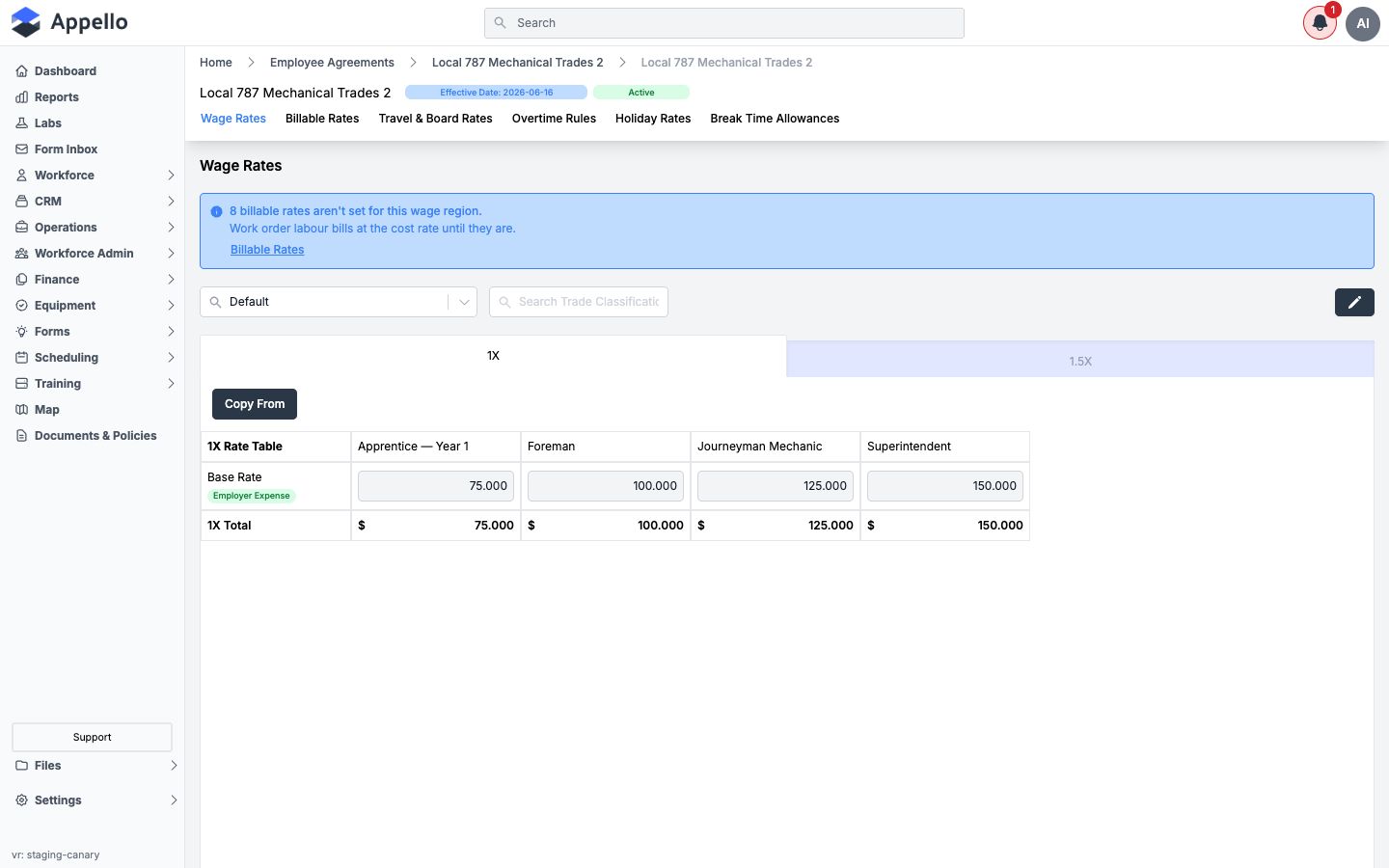
Confirmed by crawling the canary demo instance (v1.33, 2026-09-07): the employee contract page has no Documents or Files tab. It only holds pay-rule data. If you're looking for the actual offer letter, contract, or other paperwork a new hire signs, that lives in Onboarding Documents, described next -- not on this page.
Sending paperwork for signature
Actual onboarding paperwork -- offer letters, direct-deposit forms, code-of-conduct sign-offs, and so on -- is handled by a separate feature built on Dropbox Sign:
- An admin builds a document package out of Dropbox Sign templates in Onboarding Documents.
- The package is sent to a new hire for signature and tracked, person by person, in Onboarding Users.
- The connection to Dropbox Sign itself -- who can connect it, what the connection status means, and the webhook event log -- is covered in Dropbox Sign E-Signature.
This feature only appears in the Workforce Admin sidebar menu when your instance's Dropbox Sign integration is active; see the note in each linked guide above.
Policy acknowledgements are a separate track
Handbooks, safety manuals, and other material that a worker reads and acknowledges -- with no signature involved -- are published and tracked separately, under Policy documents. A policy acknowledgement is a simple in-app or mobile Acknowledge tap with a timestamp; it does not go through Dropbox Sign.
Where signed files end up
Signed documents live in Dropbox Sign itself, not in an Appello file store. Each user who has been sent a document package gets an Onboarding Documents tab on their own profile, alongside their other tabs (Certifications, Expenses, and so on), listing every package sent to them and linking out to the finished, signed file in Dropbox Sign's own viewer. See Onboarding Documents → Where signed documents end up for the full details.
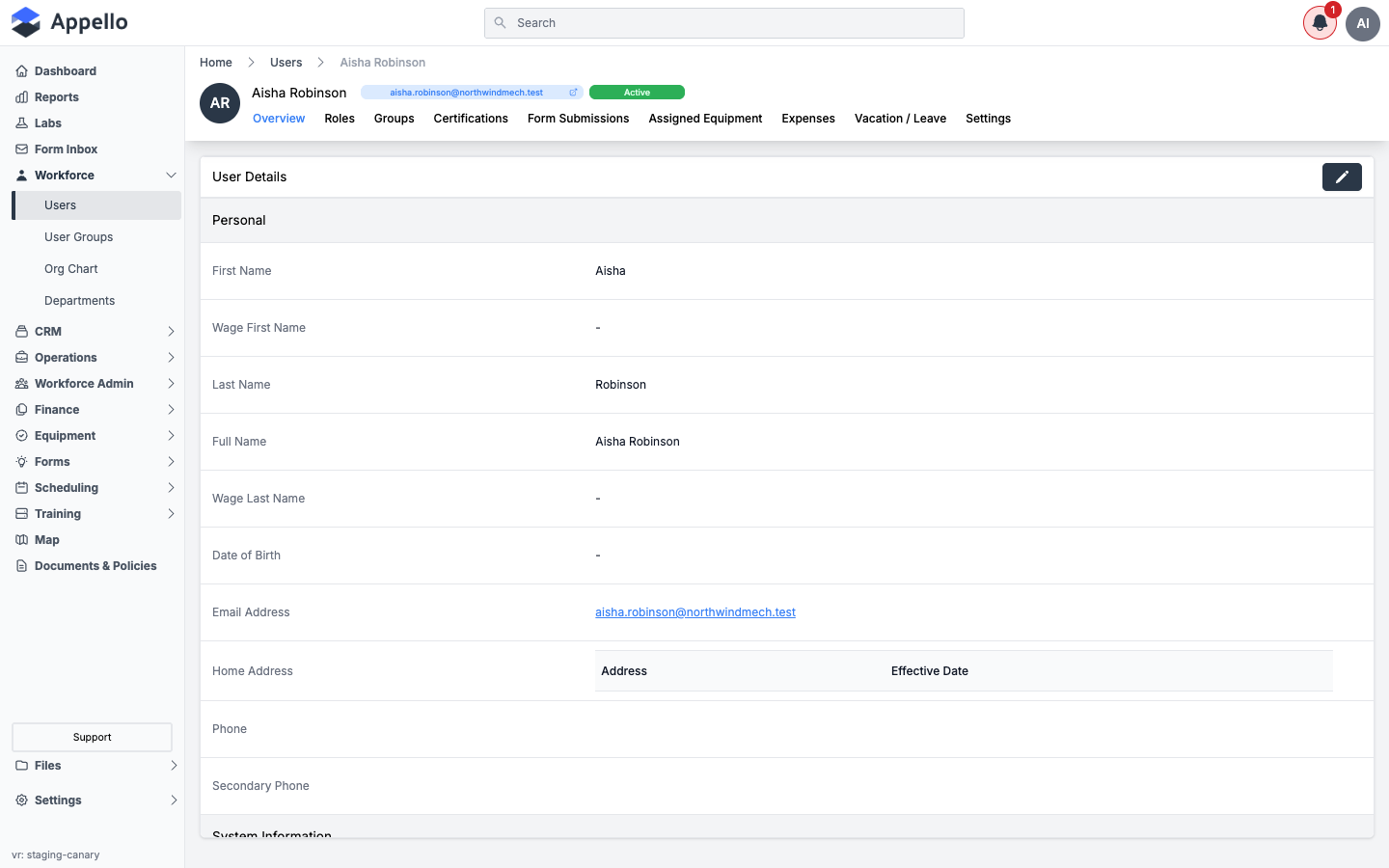
The tab is called Onboarding Documents, not "Files" or "Documents" -- and it only appears when Dropbox Sign is active and the viewer has permission to see document packages. The screenshot above is from the canary demo instance, where Dropbox Sign is inactive, so the tab isn't present; the row shown here is otherwise unchanged. The Files entry in the main sidebar is a separate, company-wide file manager and is not where onboarding paperwork or signed documents appear.
Related Pages
- Instance Settings — Company profile and defaults
- Business Settings — Pay rules, overtime, and financial configuration
- Human Resources — Departments, org structure, HR fields
- Certifications — Manage worker certifications and expiry tracking
- Documents & Policies — Publish and track policy acknowledgements
- User Groups — Organize workers for scheduling and permissions
- Employment Agreements — Contract types and wage tables
- Onboarding Documents — Build document packages and send them for e-signature
- Onboarding Users — Track per-employee signature status
- Dropbox Sign E-Signature — Connect and manage the e-signature integration