Sales Reports
Module: CRM | Platform: Web
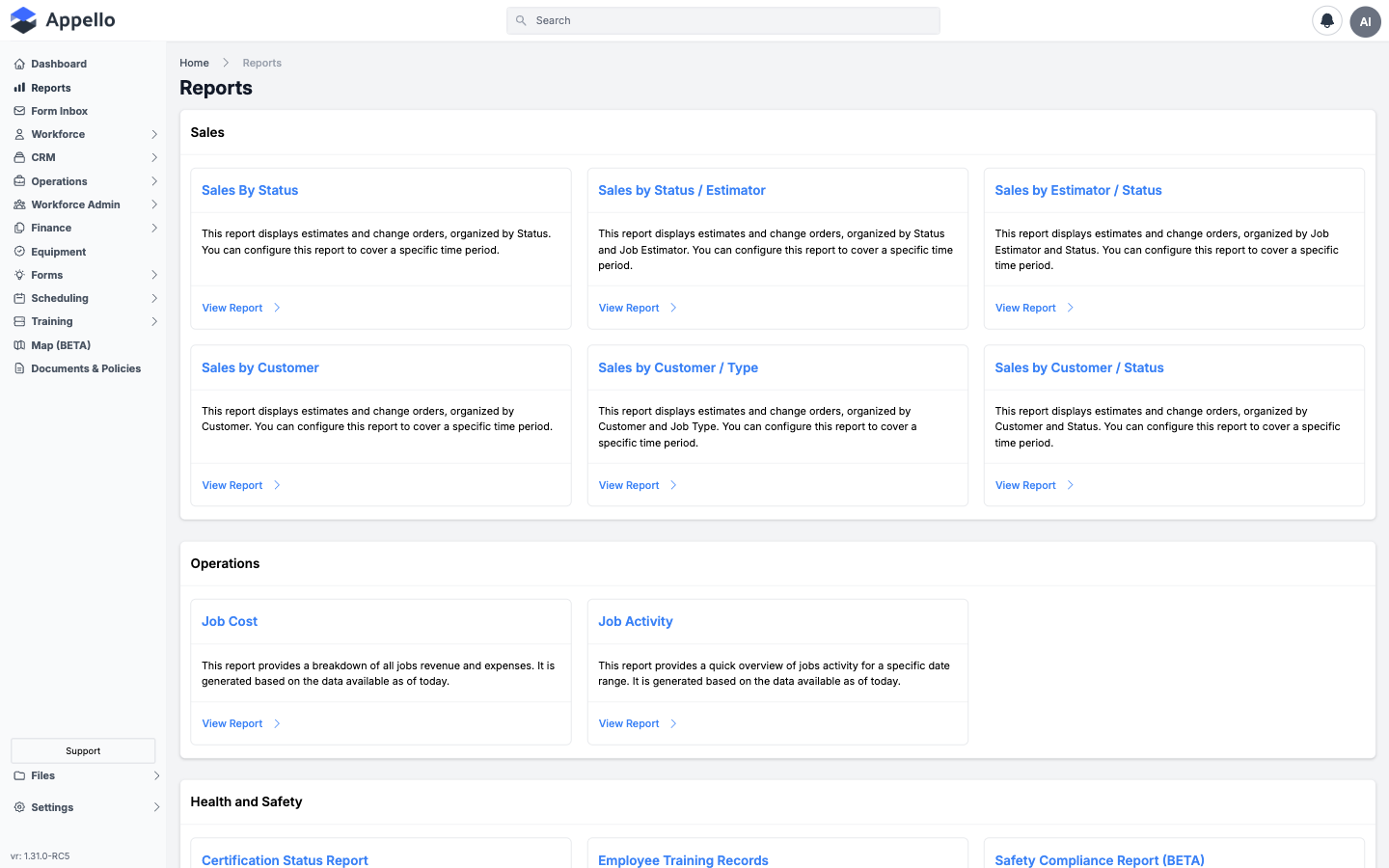
Six report cards launched from the Reports hub, under the Sales category. All six read from the same underlying dataset — every Estimate and Change Order record (the two are stored together and distinguished by record type) — and only differ in how that data is grouped, filtered, and totaled. All six are read-only, pivot-table style reports with no drill-down and no edit capability from the report screen itself.
Where they are
Sidebar → Reports, then click the tile or list entry under Sales:
| Report | Card label on the hub | URL |
|---|---|---|
| Sales By Status | Sales By Status | /reports/sales-by-status |
| Sales by Status / Estimator | Sales by Status / Estimator | /reports/sales-by-status-estimator |
| Sales by Estimator / Status | Sales by Estimator / Status | /reports/sales-by-estimator-status |
| Sales by Customer | Sales by Customer | /reports/sales-by-customer |
| Sales by Customer / Type | Sales by Customer / Type | /reports/sales-by-customer-type |
| Sales by Customer / Status | Sales by Customer / Status | /reports/sales-by-customer-status |
What "sales" means on these reports
Every row on every one of these six reports is a single Estimate or Change Order record — regardless of its status. "Sales" here does not mean "closed/Won deals only"; it means the whole estimate/change-order pipeline, which is exactly why each report groups by Status (or lets you filter by it): to let you see how much is Draft, Sent, Won, Lost, and so on, not just the winners.
SUM of Total Amount on every report is the sum of each record's Bid amount plus its Subsidy amount. Change orders are added side-by-side with estimates in that same sum — there is no separate change-order column.
The two families of report count different records. The three Status-first reports (Sales By Status, Sales by Status/Estimator, Sales by Estimator/Status) only include the estimate and change-order records marked as counting toward the job's value — normally one "live" version per job, once superseded drafts are excluded. The three Customer-first reports (Sales by Customer, Sales by Customer/Type, Sales by Customer/Status) include every non-deleted record regardless of that setting. Expect noticeably different row counts between the two families for the same date range.
Shared controls
All six reports share the same pivot-table toolbar:
| Control | Description |
|---|---|
| All / Active / Archived | Tabs. Active (the default) shows non-archived records; Archived shows archived records; All shows both. |
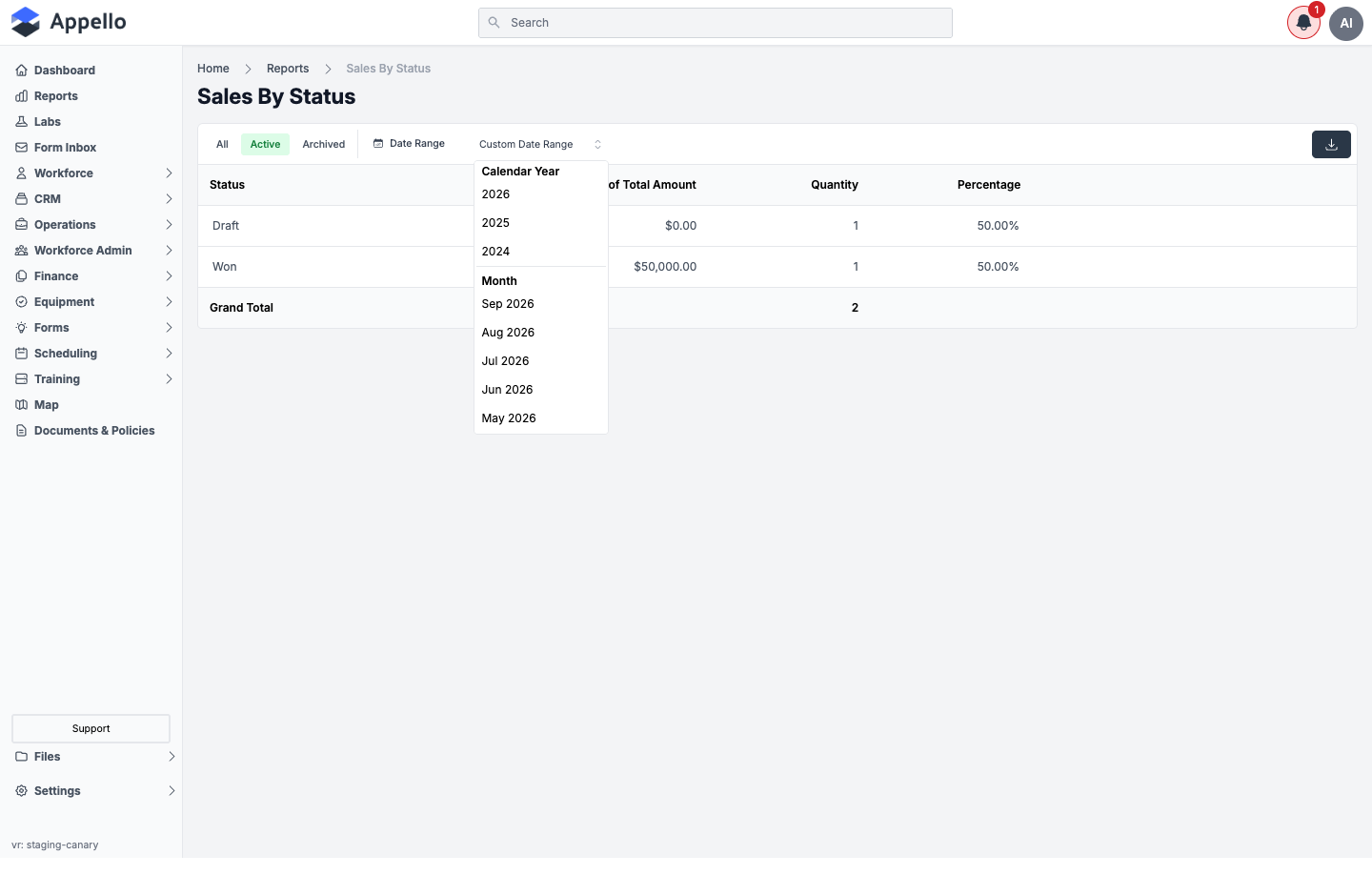
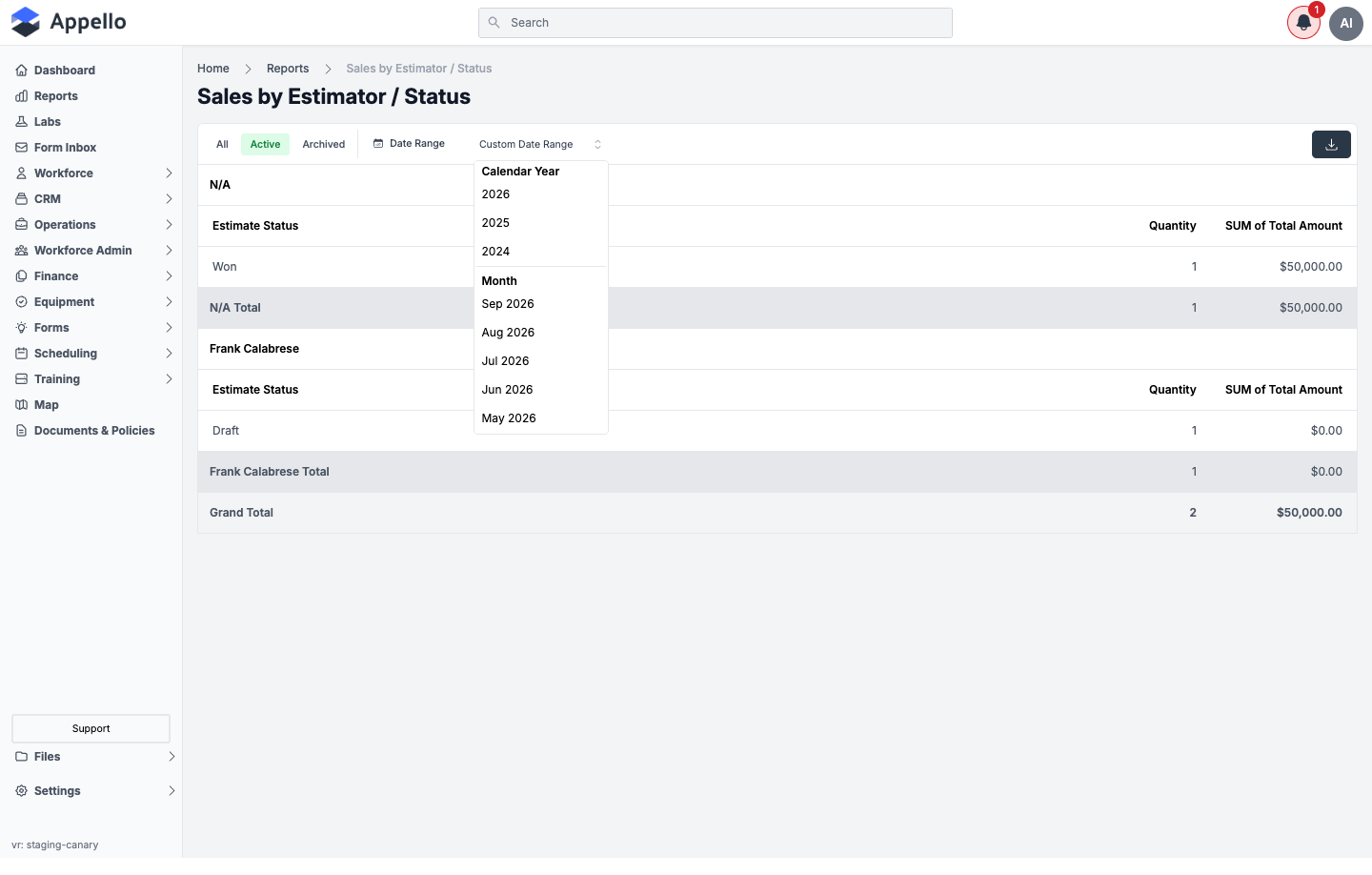
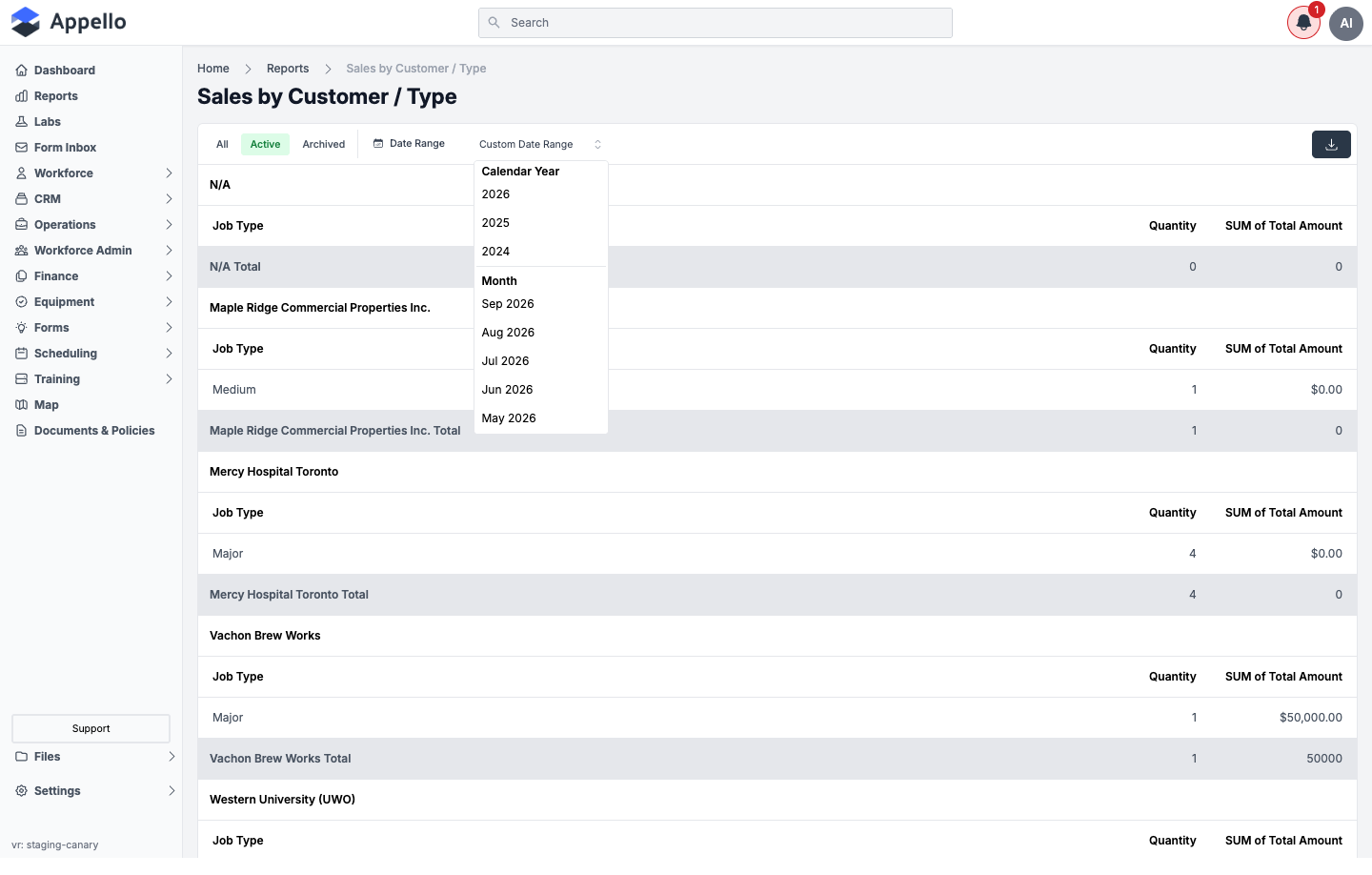
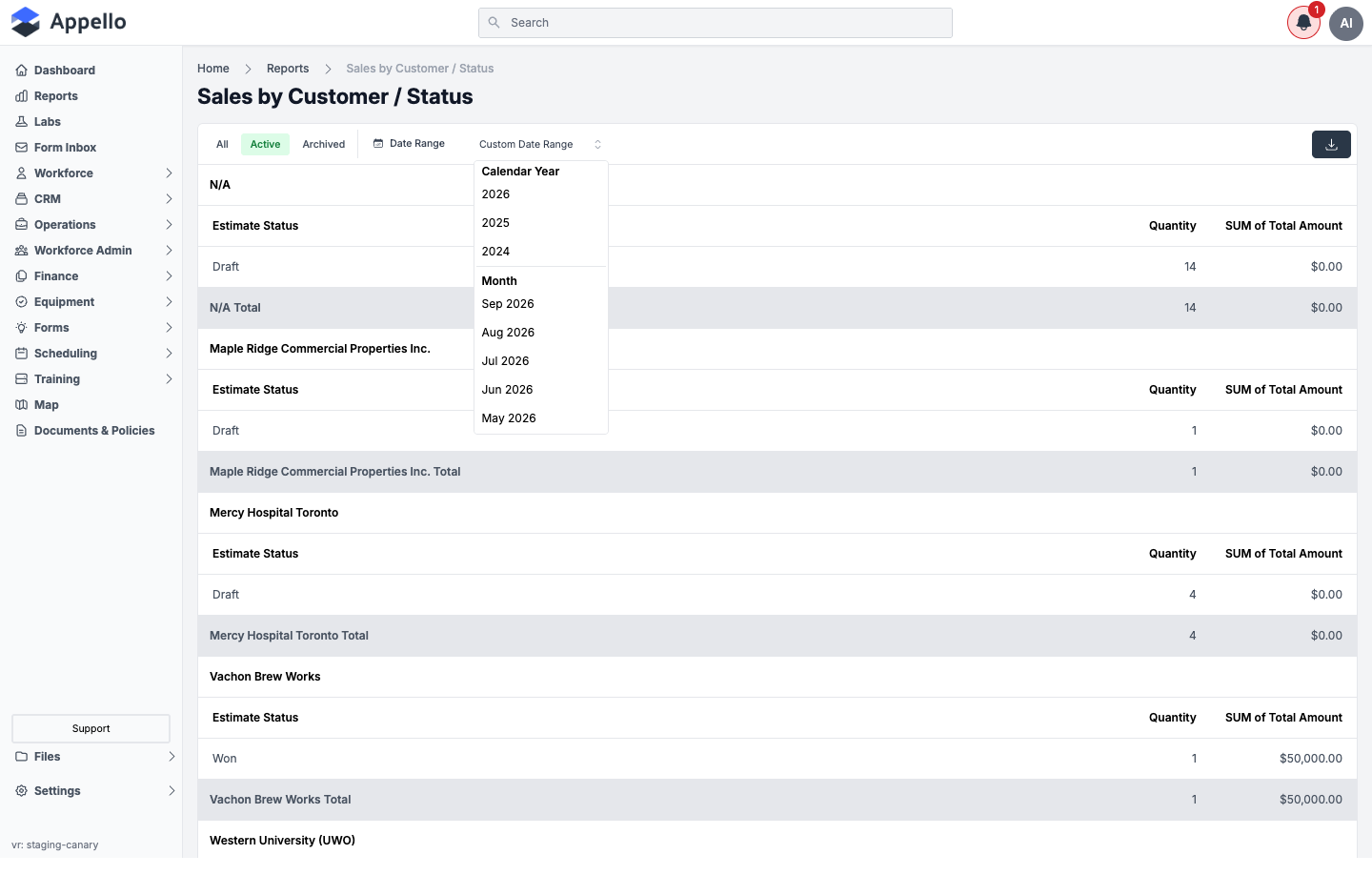
| Date Range | Filters on Date Won — falling back to the estimate date for records that haven't been won yet. Click Custom Date Range to open the quick-value dropdown (Calendar Year, or one of the last several calendar Months) or pick a custom start/end date. With no range selected, the report shows all-time data. |
| Export CSV | The dark button with a download icon, top-right. Downloads the currently-filtered rows as CSV. There is no PDF or Excel export on these reports. |
Each report is designed to offer extra dropdown filters — Status, Estimator, Customer, or Job Type, depending on the report (see the per-report tables below). Those dropdowns do not currently appear on the page: only the Date Range and the Active / Archived / All tabs are present and functional. The intended filters are listed below for completeness, with this gap called out per report.
Sales By Status
What it's for
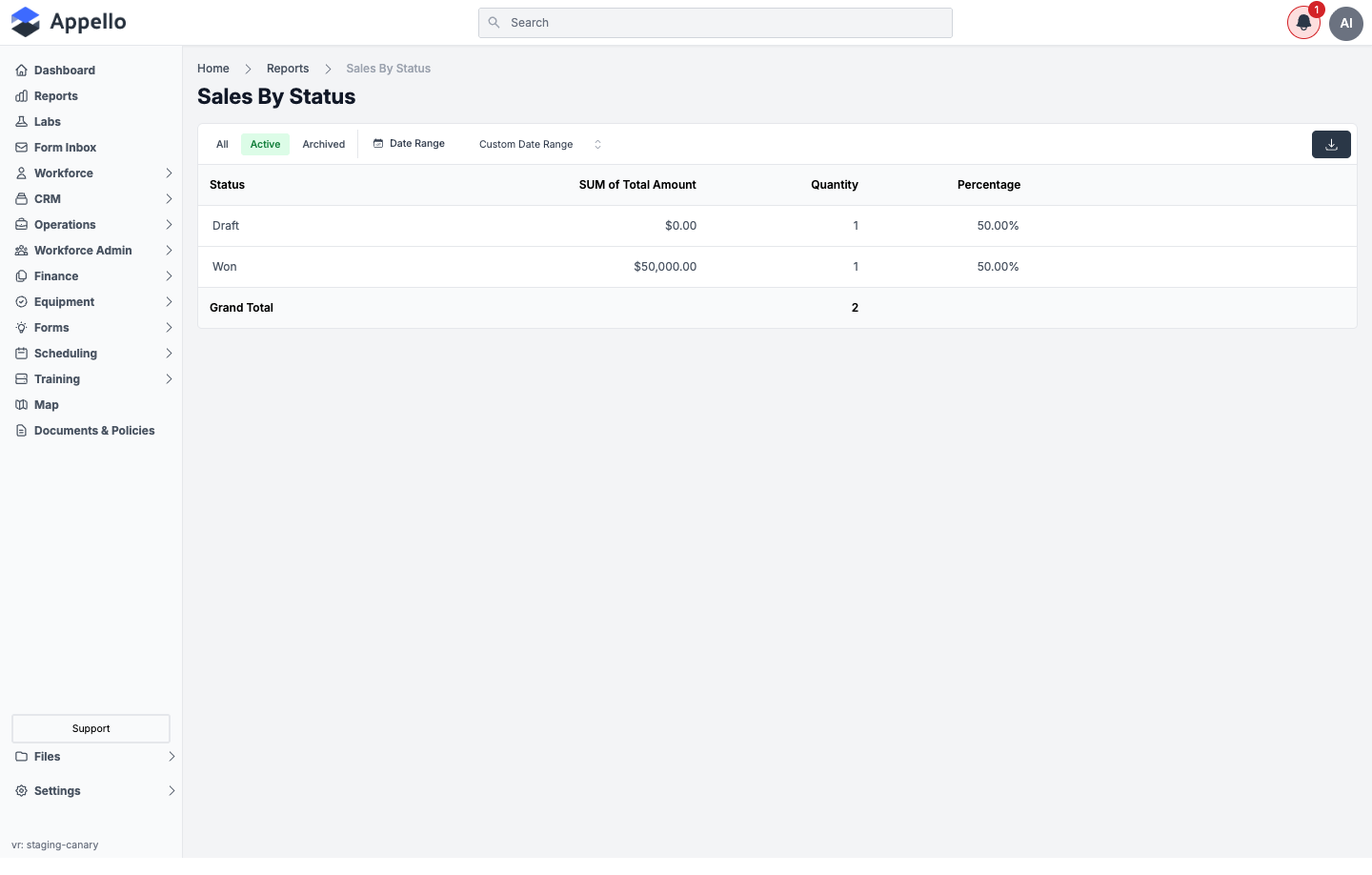
The estimate/change-order pipeline broken out by status — how much is Draft, Sent, Won, Lost, and so on, and what share of the total record count each status represents.
Screenshot
Screenshot — filter open
Filters
| Filter | Description |
|---|---|
| Date Range (Date Won) | See Shared controls above. |
| Status (allowed, not rendered) | Intended to narrow to specific statuses. Not present on the live page — see the note above. |
Columns and row grouping
One row per Status, ordered by the status property's configured order number.
| Column | Calculation |
|---|---|
| Status | The estimate/change-order status name — configurable per instance in Property Settings; Draft and Won are shown on the demo instance. |
| SUM of Total Amount | Sum of Bid + Subsidy for every estimate/change-order in that status, within the Won-date range, counting only records marked as contributing to job value. |
| Quantity | Count of estimate/change-order records in that status. |
| Percentage | That status's Quantity divided by the Quantity across every status shown, as a percentage. |
Grand Total row at the bottom totals Quantity across all statuses (Percentage is blank on the total row; SUM of Total Amount is not totaled by this particular report — see the screenshot).
How to run it
- Sidebar → Reports, then click Sales By Status under Sales.
- Choose All, Active, or Archived (defaults to Active).
- Optionally set a Date Range — it filters on Date Won (or estimate date, if not yet won).
- Review the Status rows and the Grand Total.
- Click Export CSV to download the current rows.
Permissions
- Sales → Estimates → View
- Sales → Change Orders → View
- Finance & Admin → Financial Summary → View
- The Reports → Sales permission for Sales By Status
Related pages
Sales by Status / Estimator
What it's for
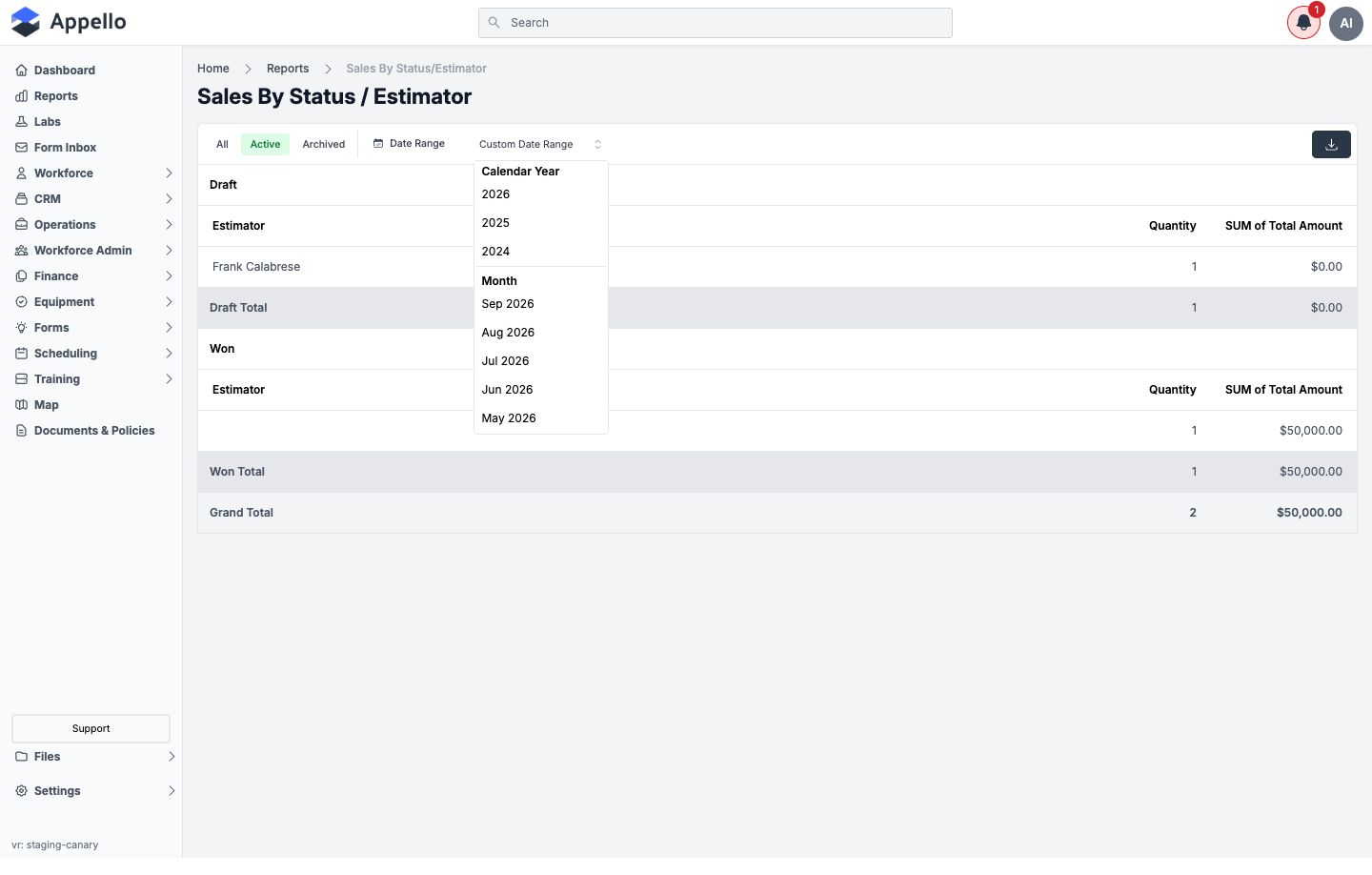
The same pipeline as Sales By Status, with a second level: within each status, which estimator (or job lead, if no estimator is set) the records belong to.
Screenshot
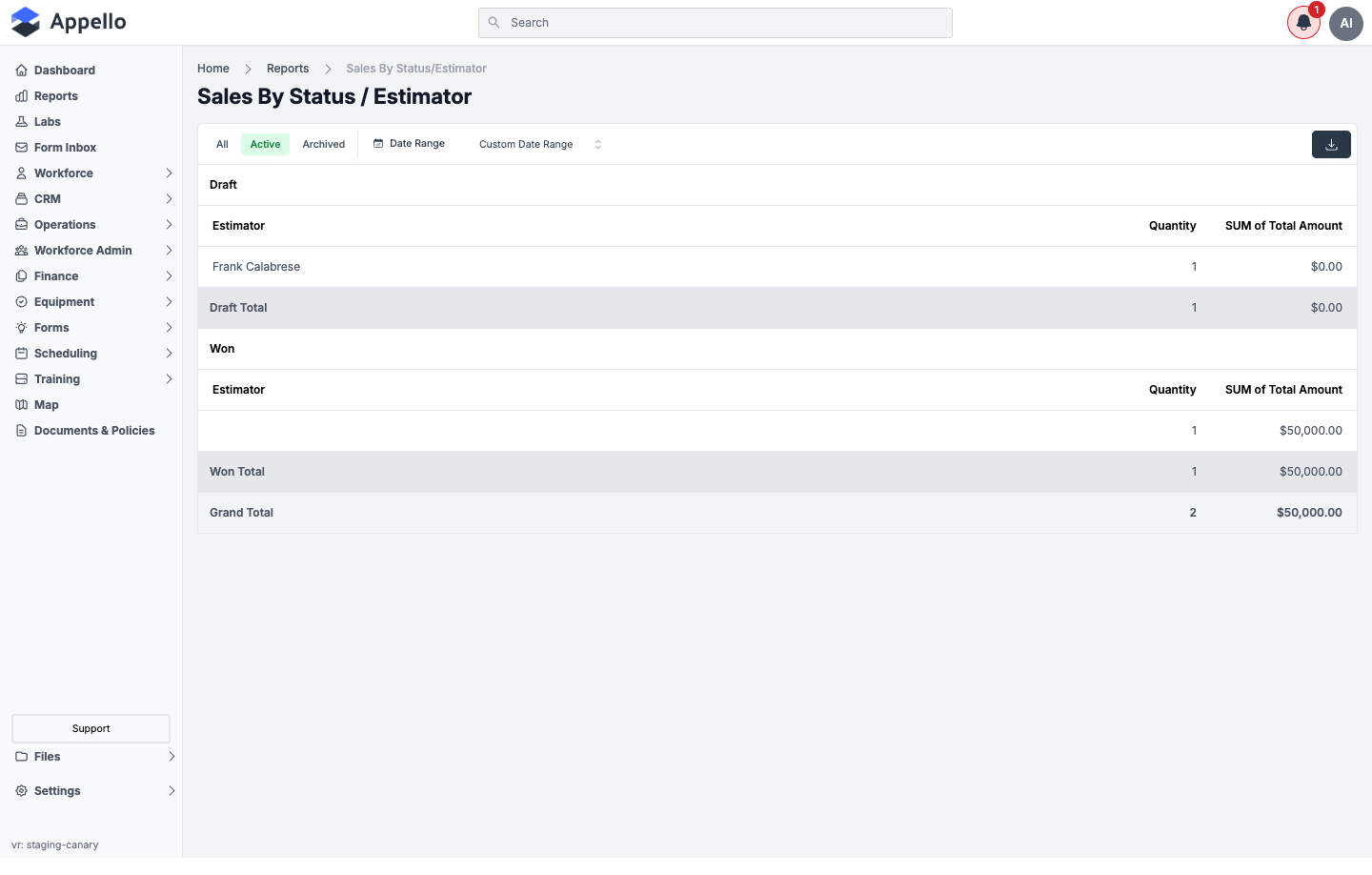
On the demo instance, the Won group's single record has no estimator assigned, so its Estimator cell renders blank rather than a name.
Screenshot — filter open
Filters
| Filter | Description |
|---|---|
| Date Range (Date Won) | See Shared controls above. |
| Estimator, Status (allowed, not rendered) | Intended to narrow to specific estimators or statuses. Not present on the live page — see the note above. |
Columns and row grouping
Outer group: Status (ordered by the status property's order number). Inner group, within each status: Estimator — falls back to the record's job lead when no estimator is set on the estimate/change-order itself.
| Column | Calculation |
|---|---|
| Estimator | The estimator's name (or job lead, as a fallback) for that status/estimator group. |
| Quantity | Count of estimate/change-order records for that estimator within that status. |
| SUM of Total Amount | Sum of Bid + Subsidy for that estimator within that status, within the Won-date range, counting only records marked as contributing to job value. |
Each status group ends in a [Status] Total row (sums Quantity and SUM of Total Amount across its estimators), and the table ends in a Grand Total row across every status.
How to run it
- Sidebar → Reports, then click Sales by Status / Estimator under Sales.
- Choose All, Active, or Archived.
- Optionally set a Date Range.
- Review each status group's estimator breakdown and its subtotal, then the Grand Total.
- Click Export CSV to download the current rows.
Permissions
- Sales → Estimates → View
- Sales → Change Orders → View
- Finance & Admin → Financial Summary → View
- The Reports → Sales permission for Sales by Status / Estimator
Related pages
Sales by Estimator / Status
What it's for
The mirror of Sales by Status / Estimator: estimator first, status second. Useful for reviewing one estimator's pipeline across every status they have records in.
Screenshot
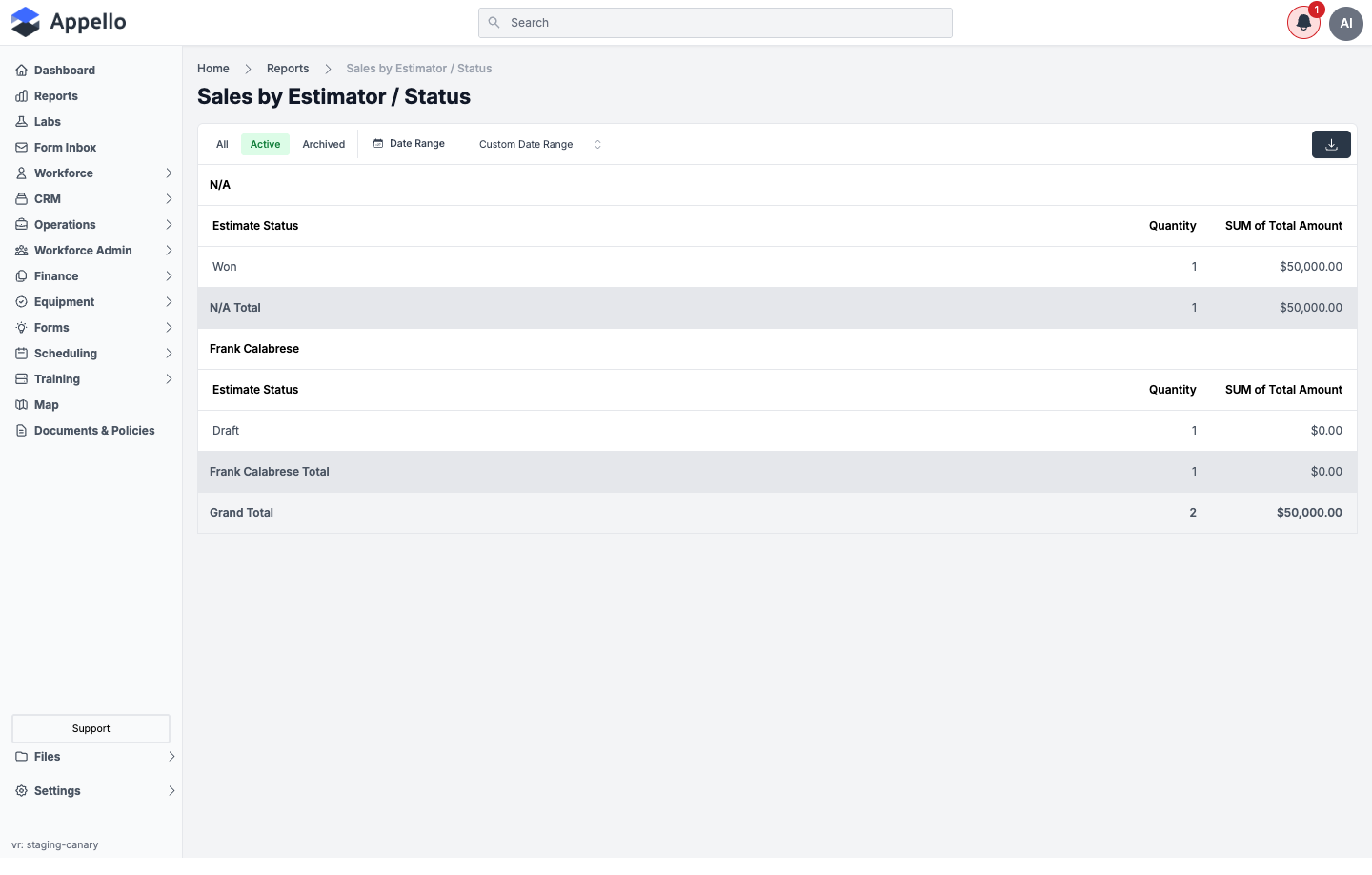
The outer group label reads N/A on the demo instance for the record that has no estimator (and no job lead) set — that's the report's fallback label when the group-by value is null, not a data error.
Screenshot — filter open
Filters
| Filter | Description |
|---|---|
| Date Range (Date Won) | See Shared controls above. |
| Estimator, Status (allowed, not rendered) | Intended to narrow to specific estimators or statuses. Not present on the live page — see the note above. |
Columns and row grouping
Outer group: Estimator (falls back to job lead; renders N/A when neither is set), ordered by estimator first name. Inner group, within each estimator: Estimate Status.
| Column | Calculation |
|---|---|
| Estimate Status | The status name for that estimator/status group. |
| Quantity | Count of estimate/change-order records at that status for that estimator. |
| SUM of Total Amount | Sum of Bid + Subsidy at that status for that estimator, within the Won-date range, counting only records marked as contributing to job value. |
Each estimator group ends in a [Estimator] Total row, and the table ends in a Grand Total row across every estimator.
How to run it
- Sidebar → Reports, then click Sales by Estimator / Status under Sales.
- Choose All, Active, or Archived.
- Optionally set a Date Range.
- Review each estimator's status breakdown and its subtotal, then the Grand Total.
- Click Export CSV to download the current rows.
Permissions
- Sales → Estimates → View
- Sales → Change Orders → View
- Finance & Admin → Financial Summary → View
- The Reports → Sales permission for Sales by Estimator / Status
Related pages
Sales by Customer
What it's for
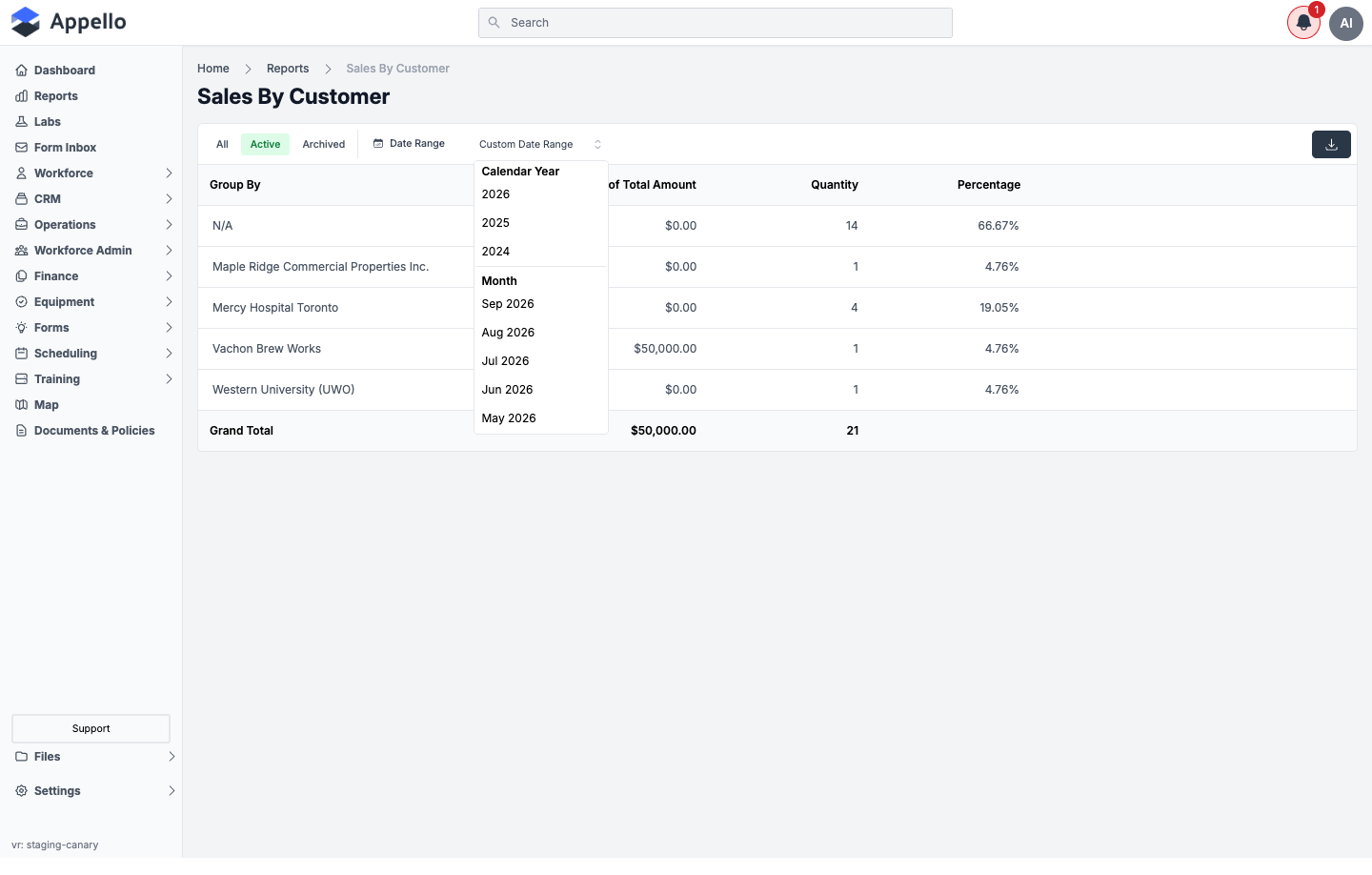
The estimate/change-order pipeline broken out by customer (company) — total value, record count, and share of total records per customer, including records with no customer linked.
Screenshot
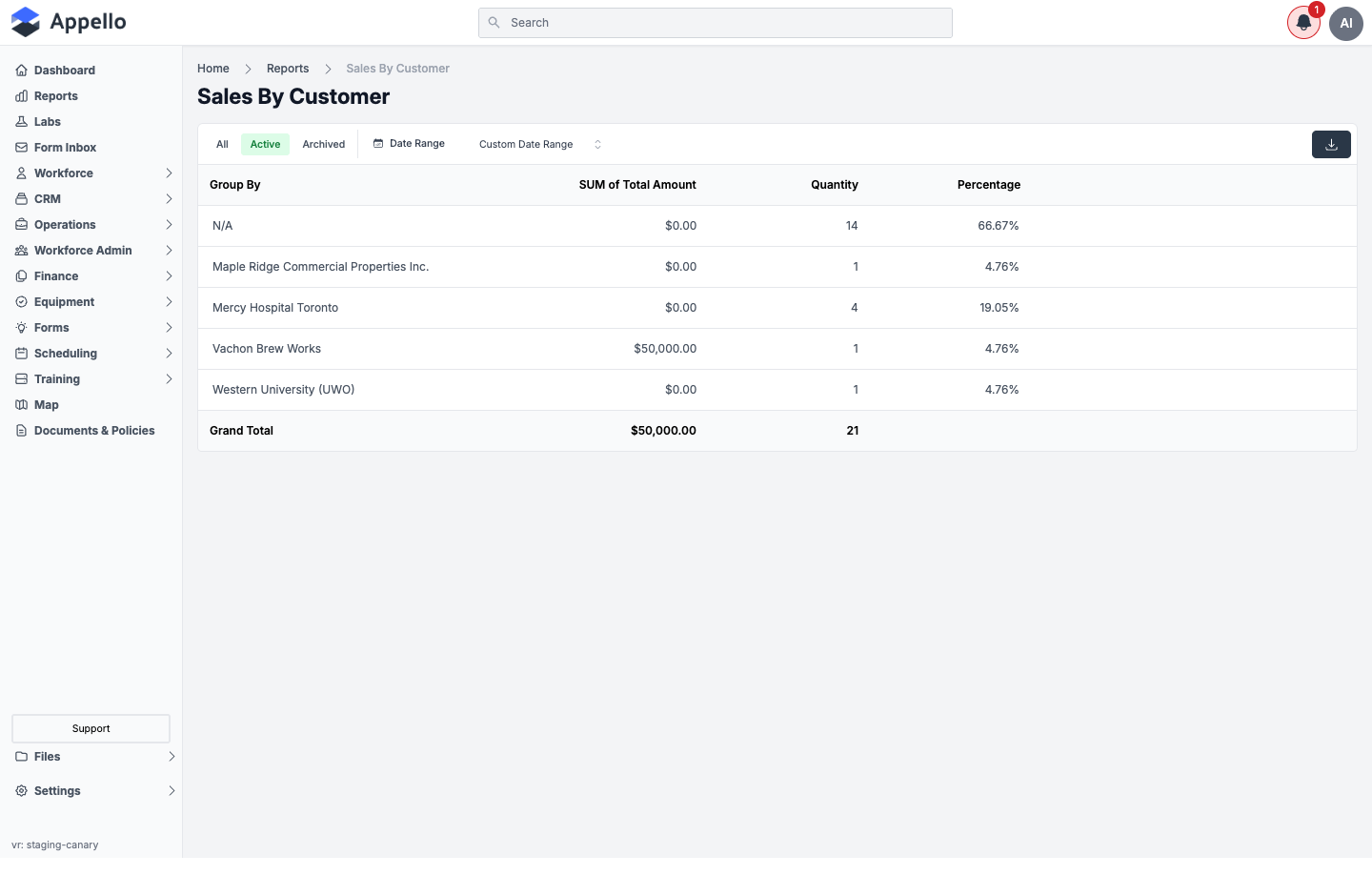
Unlike the three Status-first reports, this report does not limit itself to records marked as contributing to job value, so it includes every non-deleted estimate/change-order record — 21 records on the demo instance for the same date range where Sales By Status shows only 2. The N/A row is every record with no customer linked (directly or via its job) — 14 of the 21 records on the demo instance.
Screenshot — filter open
Filters
| Filter | Description |
|---|---|
| Date Range (Date Won) | See Shared controls above. |
| Customer (allowed, not rendered) | Intended to narrow to specific customers. Not present on the live page — see the note above. |
Columns and row grouping
One row per customer (company), plus an N/A row for records with no company linked.
| Column | Calculation |
|---|---|
| Group By | The customer's company name, or N/A if the record has no company (directly, or via its job). |
| SUM of Total Amount | Sum of Bid + Subsidy for every estimate/change-order linked to that customer, within the Won-date range. |
| Quantity | Count of estimate/change-order records for that customer. |
| Percentage | That customer's Quantity divided by the Quantity across every customer shown, as a percentage. |
Grand Total row totals SUM of Total Amount and Quantity across every customer.
How to run it
- Sidebar → Reports, then click Sales by Customer under Sales.
- Choose All, Active, or Archived.
- Optionally set a Date Range.
- Review each customer's totals and the Grand Total.
- Click Export CSV to download the current rows.
Permissions
- Sales → Estimates → View
- Sales → Change Orders → View
- Finance & Admin → Financial Summary → View
- CRM → Companies → View
- The Reports → Sales permission for Sales by Customer
Related pages
Sales by Customer / Type
What it's for
Sales by Customer, with a second level: within each customer, which job type their estimates and change orders fall under (e.g. Major, Medium).
Screenshot
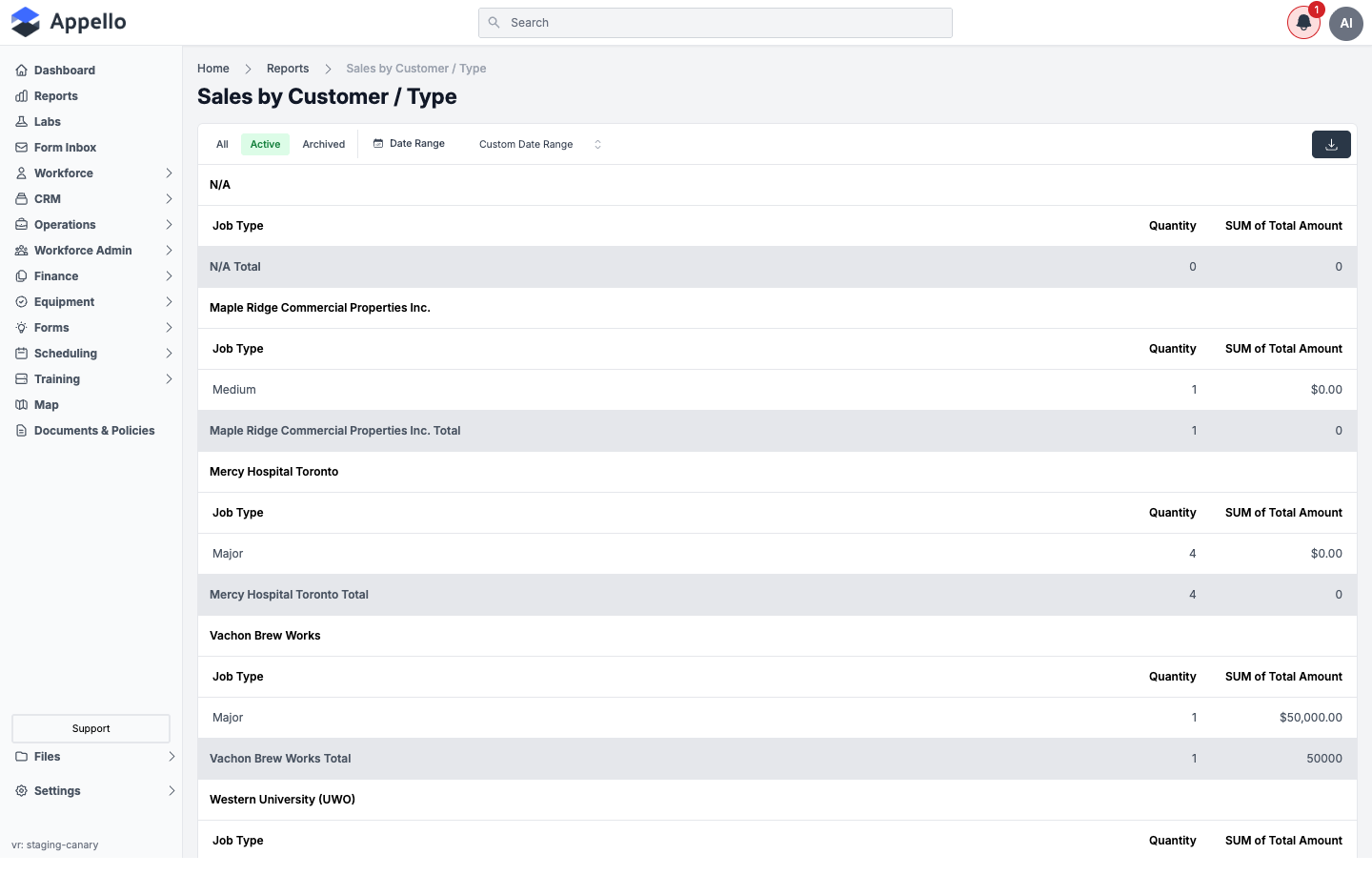
On the demo instance, the N/A customer group's job-type subtotal row reads 0 / 0 with no job-type line above it, even though that same group has 14 records on Sales by Customer and Sales by Customer/Status. Those 14 records also have no job type set — a null-value pivot group that the report drops from the inner breakdown but still shows a (zeroed) subtotal row for, rather than matching the 14 shown elsewhere. This is how the report behaves -- not a data problem to fix on your end.
Screenshot — filter open
Filters
| Filter | Description |
|---|---|
| Date Range (Date Won) | See Shared controls above. |
| Customer, Job Type (allowed, not rendered) | Intended to narrow to specific customers or job types. Not present on the live page — see the note above. |
Columns and row grouping
Outer group: Customer (or N/A). Inner group, within each customer: Job Type.
| Column | Calculation |
|---|---|
| Job Type | The job type name for that customer/job-type group (e.g. Major, Medium — configured per instance). |
| Quantity | Count of estimate/change-order records for that customer at that job type. |
| SUM of Total Amount | Sum of Bid + Subsidy for that customer at that job type, within the Won-date range. |
Each customer group ends in a [Customer] Total row, and the table ends in a Grand Total row across every customer.
How to run it
- Sidebar → Reports, then click Sales by Customer / Type under Sales.
- Choose All, Active, or Archived.
- Optionally set a Date Range.
- Review each customer's job-type breakdown and its subtotal, then the Grand Total.
- Click Export CSV to download the current rows.
Permissions
- Sales → Estimates → View
- Sales → Change Orders → View
- Finance & Admin → Financial Summary → View
- CRM → Companies → View
- The Reports → Sales permission for Sales by Customer / Type
Related pages
Sales by Customer / Status
What it's for
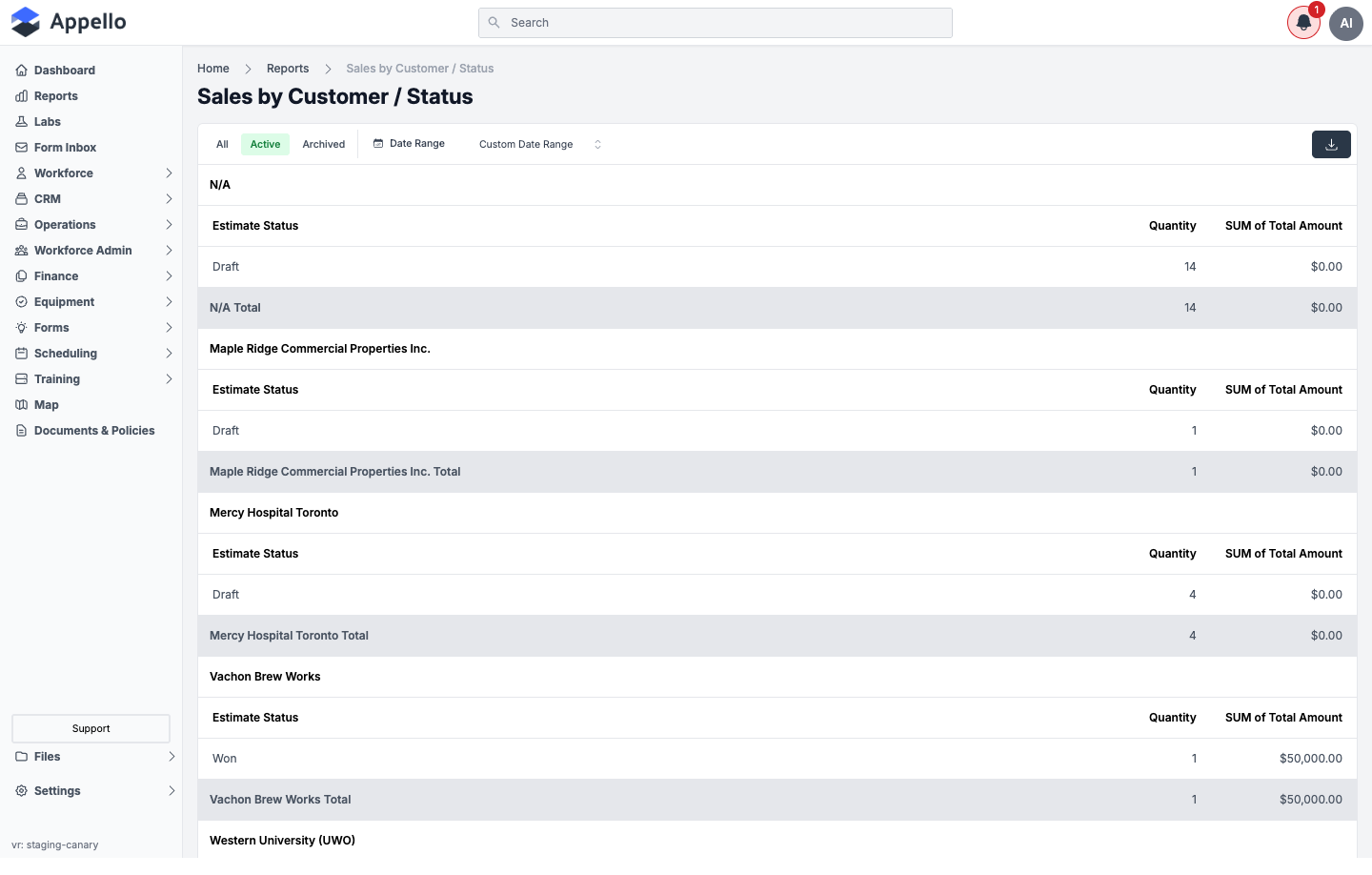
Sales by Customer, with a second level: within each customer, which status their estimates and change orders are in (Draft, Won, and so on).
Screenshot
Screenshot — filter open
Filters
| Filter | Description |
|---|---|
| Date Range (Date Won) | See Shared controls above. |
| Customer, Status (allowed, not rendered) | Intended to narrow to specific customers or statuses. Not present on the live page — see the note above. |
Columns and row grouping
Outer group: Customer (or N/A). Inner group, within each customer: Estimate Status.
| Column | Calculation |
|---|---|
| Estimate Status | The status name for that customer/status group. |
| Quantity | Count of estimate/change-order records for that customer at that status. |
| SUM of Total Amount | Sum of Bid + Subsidy for that customer at that status, within the Won-date range. |
Each customer group ends in a [Customer] Total row, and the table ends in a Grand Total row across every customer.
How to run it
- Sidebar → Reports, then click Sales by Customer / Status under Sales.
- Choose All, Active, or Archived.
- Optionally set a Date Range.
- Review each customer's status breakdown and its subtotal, then the Grand Total.
- Click Export CSV to download the current rows.
Permissions
- Sales → Estimates → View
- Sales → Change Orders → View
- Finance & Admin → Financial Summary → View
- CRM → Companies → View
- The Reports → Sales permission for Sales by Customer / Status