Mobile Form Submission
Field workers fill out safety inspections, toolbox talks, and other forms directly from the Appello mobile app. Each submission is GPS-stamped and timestamped, with support for photo capture, digital signatures, and offline completion.
Navigation
Bottom Tab Bar → My Forms (clipboard icon)
Workflow
Filling Out a Form
- Open the My Forms tab on the mobile app.
- Forms assigned to the worker's current job appear at the top.
- Tap a form to open it.
- Complete each field — the form scrolls through sections in order.
- Capture photos using the device camera when prompted.
- Sign with your PIN when the signature field appears.
- Tap Submit.
The completed form is uploaded to the server and appears in the Form Inbox on the desktop for office review.
Mandatory Forms
If a form is assigned as mandatory for a job:
- The form appears with a red indicator until completed.
- The worker may be unable to submit their timesheet until mandatory forms are completed (depending on instance configuration).
What Gets Captured Automatically
Every form submission includes metadata that the worker doesn't have to enter:
| Data | Source |
|---|---|
| GPS coordinates | The device's location at the moment the form data reaches the server |
| Started at | The moment the submission record is first created -- when a worker opens the form, or when office staff use + Start Form |
| Submitted / last updated at | The moment the form is submitted, or last edited or signed after that |
| Worker identity | The logged-in user filling out the form |
| Job | The job the form is associated with |
| Signature location | Each required signer's own GPS coordinates and time, captured separately at the moment they sign |
This metadata is critical for compliance -- it proves the form was completed at the right place, at the right time, by the right person. The gap between Started at and Submitted / last updated at is also what the office sees as the "time to complete" on a submission.
This does not currently include the device's app version or device model. That information is only tracked on a separate device/push-notification record, not on the individual form submission -- there is no confirmed field on a form submission itself for app version or device type.
Geolocation and Timestamp Tracking
Where the Office Sees It
Office staff review a submission's location and timing from the Form Inbox. Opening a submission shows who submitted it, which job it's tied to, and when it was last updated right in the header:
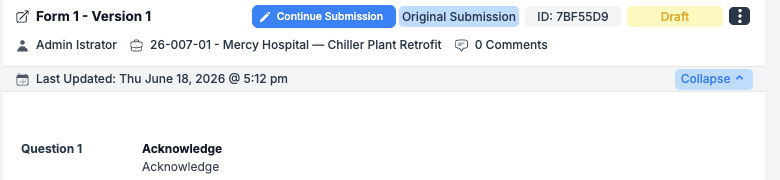
If the submission has GPS coordinates attached, a View on map option appears in the ⋮ menu next to the submission -- clicking it opens those coordinates in Google Maps. Each required signer's own sign-off location and time are shown separately next to their signature, with their own Click to View Map link, independent of the submission's own coordinates.
The canary demo instance used for this page has no completed, mobile-submitted forms with recorded coordinates, so the View on map link and per-signer "Signed at" location couldn't be captured live. The screenshot above shows the one seeded Draft submission on canary, which was started from the office using + Start Form rather than from the mobile app -- it carries no GPS coordinates, so no map link appears on it. The header layout shown is the same layout a mobile-submitted form uses; only the map link and coordinates would differ.
What Controls It
GPS capture for form submissions is controlled by a single instance-wide setting, not a per-form option -- there's no toggle on an individual form or form template to require or skip location capture.
Settings → Instance Settings → Location Tracking:
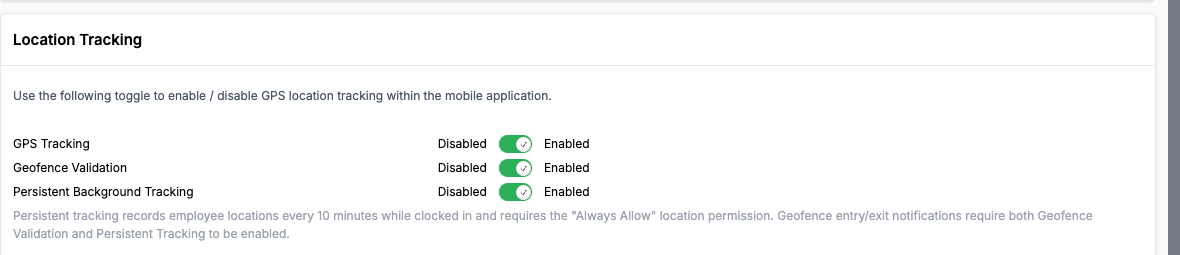
| Toggle | What it does |
|---|---|
| GPS Tracking | The master switch. When off, no GPS coordinates are recorded on form submissions, signatures, or check-ins anywhere on the instance. |
| Geofence Validation | Requires GPS Tracking to be on. Not used for form submissions -- it applies to job-site check-ins. |
| Persistent Background Tracking | Requires GPS Tracking to be on. Records employee locations every 10 minutes while clocked in; needs the "Always Allow" location permission on the device. Not used for form submissions. |
Turning GPS Tracking off also turns off Geofence Validation and Persistent Background Tracking. Turning it back on does not automatically restore the other two -- they must be re-enabled separately.
This switch is instance-wide: it also governs the GPS coordinates recorded on check-ins and signatures, not only form submissions. There's no separate, form-specific GPS setting to turn off tracking for one form while keeping it on for others.
Photo Capture
Forms that include photo fields:
- Open the device camera directly from the form.
- Captured photos are embedded in the submission.
- Photos also auto-upload to the job's file folder (if configured).
- GPS coordinates are embedded in the photo metadata.
Digital Signatures
PIN-based signature capture:
- When a signature field appears, enter your 4 or 5 digit PIN.
- Your signature (name + PIN verification) is recorded.
- For "one per worker" forms, each worker on site signs individually.
- For "one per job" forms, the foreman signs on behalf of the crew.
Offline Support
If the worker is in an area with no cellular signal:
- Forms can be filled out offline.
- Submissions are queued locally.
- When connectivity returns, forms automatically upload.
- GPS coordinates reflect the location at time of completion (not upload).
Related Pages
- Form Inbox — Where office staff review submissions, including location and timing
- Form Builder & Management — Create form templates on the desktop
- Form Report — View submission analytics
- Instance Settings — Where GPS Tracking is turned on or off for the instance